In function calling and agent use cases, token usage can be variable. You should understand your expected Tokens Per Minute (TPM) usage in detail before migrating workloads to PTU.
Provisioned throughput units
Provisioned throughput units (PTUs) are generic units of model processing capacity that you can use to size provisioned deployments to achieve the required throughput for processing prompts and generating completions. Provisioned throughput units are granted to a subscription as quota. Each quota is specific to a region and defines the maximum number of PTUs that can be assigned to deployments in that subscription and region.Provisioned throughput billing
Microsoft Foundry Regional Provisioned Throughput, Data Zone Provisioned Throughput, and Global Provisioned Throughput are billed hourly based on the number of deployed PTUs, with substantial term discount available via the purchase of Azure reservations. The hourly billing model is useful for short-term deployment needs, such as validating new models or acquiring capacity for a hackathon. However, the discounts provided by the Azure reservation for Foundry Regional Provisioned, Data Zone Provisioned, and Global Provisioned are considerable and most customers with consistent long-term usage will find a reserved model to be a better value proposition. Azure reservations are a financial discount construct applied to billing meters, not to service interactions (like deployment). Reservations and deployments are loosely coupled to provide flexibility. You create or delete deployments and reservations independently. This approach lets you change resources, subscriptions, or deployments without changing the billing construct. Recommended order of operations to avoid unwanted charges:- Use Foundry to deploy your model in a region with available quota. This step confirms capacity exists, since quota does not equal capacity.
- After deployment, share deployment details, including deployment type (Global Provisioned, Data Zone Provisioned, or Regional Provisioned), region, and subscription, with your admin.
- The admin uses these details to either purchase a new reservation matching the deployment details, or verify that an existing reservation matches, to receive the discounted rate.
Foundry provisioned customers onboarded prior to the August self-service update use a purchase model called the Commitment model. These customers can continue to use this older purchase model alongside the Hourly/reservation purchase model. The Commitment model is not available for new customers or certain new models introduced after August 2024. For details on the Commitment purchase model and options for coexistence and migration, see the Foundry Provisioned August Update.
Model independent quota
Unlike the Tokens Per Minute (TPM) quota used by other Foundry offerings, PTUs are model-independent. The PTUs might be used to deploy any supported models hosted and sold directly by Microsoft in the region.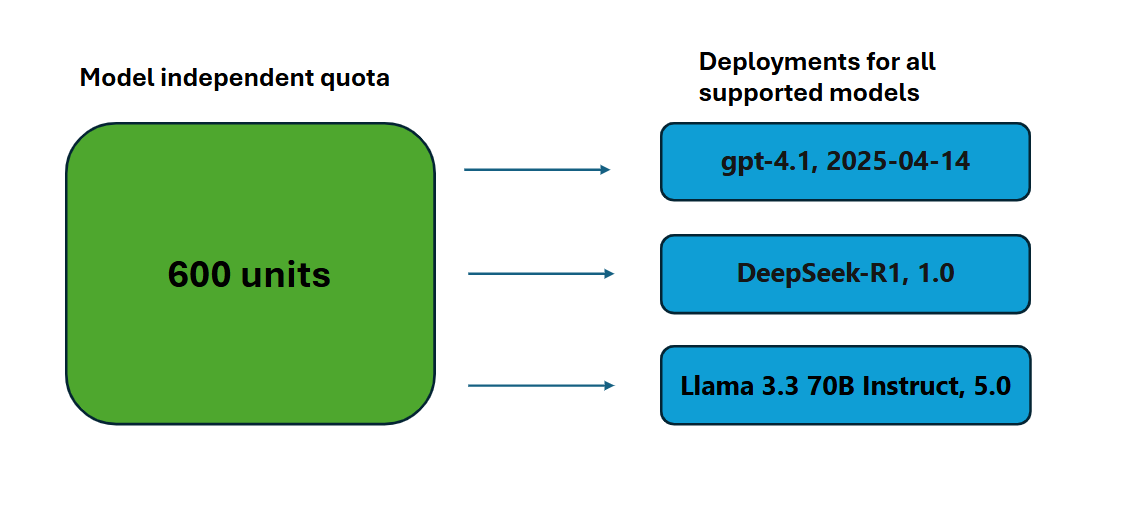
Quota doesn’t guarantee capacity. Deploy your model in Foundry before purchasing a matching reservation in the Azure portal.
| deployment type | Quota name |
|---|---|
| Regional Provisioned | Regional Provisioned Throughput Unit |
| Global Provisioned | Global Provisioned Throughput Unit |
| Data zone Provisioned | Data Zone Provisioned Throughput Unit |
Hourly usage
Regional Provisioned, Data Zone Provisioned, and Global Provisioned deployments are charged an hourly rate ($/PTU/hr) on the number of PTUs that have been deployed. For example, a 300 PTU deployment will be charged the hourly rate times 300. All Foundry model pricing is available in the Azure Pricing Calculator. If a deployment exists for a partial hour, it will receive a prorated charge based on the number of minutes it was deployed during the hour. For example, a deployment that exists for 15 minutes during an hour will receive 1/4th the hourly charge. If the deployment size is changed, the costs of the deployment will adjust to match the new number of PTUs.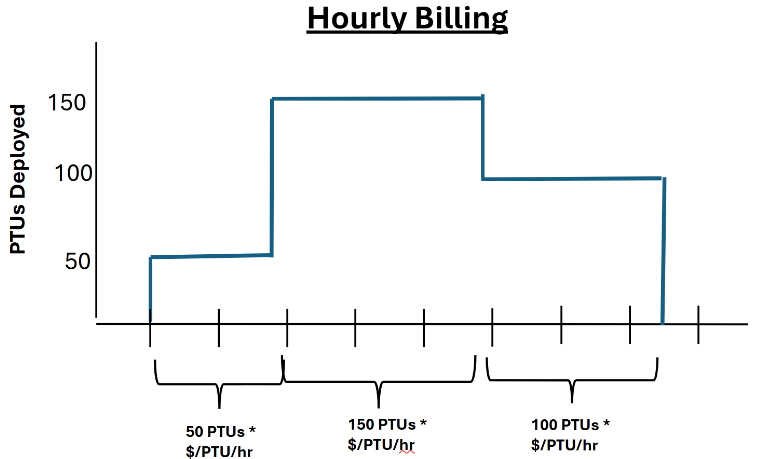
It’s not recommended to scale production deployments according to incoming traffic and pay for them purely on an hourly basis. There are two reasons for this:
- The cost savings achieved by purchasing Azure Reservations for Foundry Provisioned Throughput, Data Zone Provisioned, and Global Provisioned are significant, and it will be less expensive in many cases to maintain a deployment sized for full production volume paid for via a reservation than it would be to scale the deployment with incoming traffic.
- Having unused provisioned quota (PTUs) doesn’t guarantee that capacity will be available to support an increase in the size of the deployment when required. Quota limits the maximum number of PTUs that can be deployed, but it isn’t a capacity guarantee. Provisioned capacity for each region and model dynamically changes throughout the day and might not be available when required. As a result, it’s recommended to maintain a permanent deployment to cover your traffic needs (paid for via a reservation).
Delete PTU deployments
Charges for deployments on a deleted resource will continue until the resource is purged. To prevent unwanted charges, delete a resource’s deployment before deleting the resource. However, if you already deleted the resource first, you can recover or purge it. For more information, see recover or purge deleted Azure OpenAI resources.
- Delete the deployment in the Microsoft Foundry portal.
- If you plan to remove the Azure AI resource, delete deployments first, then delete the resource. Purge the resource to stop charges.
- Go to the Reservations page in the Azure portal to manage reservations. In the Azure portal, you can purchase, cancel, or exchange reservations to align with current deployments.
How much throughput per PTU you get for each model
The amount of throughput (measured in tokens per minute or TPM) a deployment gets per PTU is a function of the input and output tokens in a given minute. Generating output tokens requires more processing than input tokens. Starting with GPT 4.1 models and later, the system generally matches the global standard price ratio between input and output tokens, with exceptions for some models. For all deployments, cached tokens are deducted 100% from the utilization. For example, for gpt-5, one output token counts as eight input tokens towards your utilization limit, which matches the pricing. For other models, such as gpt-4.1, one output token counts as four input tokens. Older models use a different ratio.Exceptions to input and output throughput ratio
The system allows exceptions to the standard input-to-output token ratio for certain models. For example, with Llama-3.3-70B-Instruct, one output token counts as four input tokens toward your utilization limit. This ratio differs from the global standard price ratio between input and output tokens. To see the input and output pricing for the model, see pricing for Llama models.Latest Azure OpenAI models
gpt-4.1, gpt-4.1-mini and gpt-4.1-nano don’t support long context (requests estimated at larger than 128k prompt tokens).
| Topic | gpt-5.3-codex | gpt-5.2 | gpt-5.2-codex | gpt-5.1 | gpt-5.1-codex | gpt-5 | gpt-5-mini | gpt-4.1 | gpt-4.1-mini | gpt-4.1-nano | o3 | o4-mini |
|---|---|---|---|---|---|---|---|---|---|---|---|---|
| Global & data zone provisioned minimum deployment | 15 | 15 | 15 | 15 | 15 | 15 | 15 | 15 | 15 | 15 | 15 | 15 |
| Global & data zone provisioned scale increment | 5 | 5 | 5 | 5 | 5 | 5 | 5 | 5 | 5 | 5 | 5 | 5 |
| Regional provisioned minimum deployment | 50 | 50 | 50 | 50 | 50 | 50 | 25 | 50 | 25 | 25 | 50 | 25 |
| Regional provisioned scale increment | 50 | 50 | 50 | 50 | 50 | 50 | 25 | 50 | 25 | 25 | 50 | 25 |
| Input TPM per PTU | 3,400 | 3,400 | 3,400 | 4,750 | 4,750 | 4,750 | 23,750 | 3,000 | 14,900 | 59,400 | 3,000 | 5,400 |
| Latency Target Value | 99% > 50 Tokens Per Second* | 99% > 50 Tokens Per Second* | 99% > 50 Tokens Per Second* | 99% > 50 Tokens Per Second* | 99% > 50 Tokens Per Second* | 99% > 50 Tokens Per Second* | 99% > 80 Tokens Per Second* | 99% > 80 Tokens Per Second* | 99% > 90 Tokens Per Second* | 99% > 100 Tokens Per Second* | 99% > 80 Tokens Per Second* | 99% > 90 Tokens Per Second* |
Previous Azure OpenAI models
| Topic | gpt-4o | gpt-4o-mini | o3-mini | o1 |
|---|---|---|---|---|
| Global & data zone provisioned minimum deployment | 15 | 15 | 15 | 15 |
| Global & data zone provisioned scale increment | 5 | 5 | 5 | 5 |
| Regional provisioned minimum deployment | 50 | 25 | 25 | 25 |
| Regional provisioned scale increment | 50 | 25 | 25 | 50 |
| Input TPM per PTU | 2,500 | 37,000 | 2,500 | 230 |
| Latency Target Value | 99% > 25 Tokens Per Second* | 99% > 33 Tokens Per Second* | 99% > 66 Tokens Per Second* | 99% > 25 Tokens Per Second* |
Direct from Azure models
| Topic | Llama-3.3-70B-Instruct | DeepSeek-R1 | DeepSeek-V3-0324 | DeepSeek-R1-0528 |
|---|---|---|---|---|
| Global & data zone provisioned minimum deployment | 100 | 100 | 100 | 100 |
| Global & data zone provisioned scale increment | 100 | 100 | 100 | 100 |
| Regional provisioned minimum deployment | NA | NA | NA | NA |
| Regional provisioned scale increment | NA | NA | NA | NA |
| Input TPM per PTU | 8,4501 | 4,000 | 4,000 | 4,000 |
| Latency Target Value | 99% > 50 Tokens Per Second* | 99% > 50 Tokens Per Second* | 99% > 50 Tokens Per Second* | 99% > 50 Tokens Per Second* |
Determine PTU requirements for a workload
Determining the right number of provisioned throughput units (PTUs) for your workload is an essential step in optimizing performance and cost. PTUs represent an amount of model processing capacity. Similar to your computer or databases, different workloads or requests to the model will consume different amounts of underlying processing capacity. The conversion from throughput needs to PTUs can be approximated using historical token usage data or call shape estimations (input tokens, output tokens, and requests per minute) as outlined in the performance and latency documentation. A few high-level considerations:- Generations require more capacity than prompts
- For GPT-4o and later models, the TPM per PTU is set for input and output tokens separately. For older models, larger calls are progressively more expensive to compute. For example, 100 calls of with a 1000 token prompt size requires less capacity than one call with 100,000 tokens in the prompt. This tiering means that the distribution of these call shapes is important in overall throughput. Traffic patterns with a wide distribution that includes some large calls might experience lower throughput per PTU than a narrower distribution with the same average prompt & completion token sizes.
Obtain PTU quota
Customers need to request quota via the Request Quota Link. If more quotas are required, you also need to request quota via the link in the Microsoft Foundry Operate section > Quota pane. The form allows the customer to request an increase in the specified PTU quota for a given region. The customer receives an email at the included address once the request is approved, typically within two business days.Per-Model PTU minimums
The minimum PTU deployment, increments, and processing capacity associated with each unit varies by model type & version. See the above table for more information.Azure Reservations for Foundry Provisioned Throughput
Discounts on top of the hourly usage price can be obtained by purchasing an Azure Reservation for Foundry Regional Provisioned, Data Zone Provisioned, and Global Provisioned. An Azure Reservation is a term-discounting mechanism shared by many Azure products. For example, Compute and Cosmos DB. For Foundry Regional Provisioned, Data Zone Provisioned, and Global Provisioned, the reservation provides a discount in exchange for committing to payment for fixed number of PTUs for a one-month or one-year period.- Azure Reservations are purchased via the Reservations page in the Azure portal.
-
Reservations are purchased regionally and can be flexibly scoped to cover usage from a group of deployments. Reservation scopes include:
- Individual resource groups or subscriptions
- A group of subscriptions in a Management Group
- All subscriptions in a billing account
- Discount applies when Deployment type (Regional/Data Zone/Global), Region, and Reservation scope (subscription or resource group) match the running deployment. Matching is not by model or deployment ID. Multiple deployments within scope can consume the same reservation up to its PTU quantity.
- New reservations can be purchased to cover the same scope as existing reservations, to allow for discounting of new provisioned deployments. The scope of existing reservations can also be updated at any time without penalty, for example to cover a new subscription.
- Reservations for Global, Data Zone, and Regional deployments aren’t interchangeable. You need to purchase a separate reservation for each deployment type.
- Reservations can be canceled after purchase, but credits are limited.
- If the size of provisioned deployments within the scope of a reservation exceeds the amount of the reservation, the excess is charged at the hourly rate. For example, if deployments amounting to 250 PTUs exist within the scope of a 200 PTU reservation, 50 PTUs will be charged on an hourly basis until the deployment sizes are reduced to 200 PTUs, or a new reservation is created to cover the remaining 50.
- Reservations guarantee a discounted price for the selected term. They don’t reserve capacity on the service or guarantee that it will be available when a deployment is created. It’s highly recommended that customers create deployments prior to purchasing a reservation to protect against over-purchasing a reservation.
- Capacity availability for model deployments is dynamic and changes frequently across regions and models. To protect against purchasing a reservation for more PTUs than you can use, create deployments first, and then purchase the Azure Reservation to cover the PTUs you have deployed. This best practice will ensure that you can take full advantage of the reservation discount, and protects you from committing to a reservation that you cannot use.
- The Azure role and tenant policy requirements to purchase a reservation are different than those required to create a deployment or Foundry resource. Verify authorization to purchase reservations in advance of needing to do so. See Foundry Provisioned Throughput Reservation for more details.
Size your Foundry provisioned throughput reservation
The PTU amounts in reservation purchases are independent of PTUs allocated in quota or used in deployments. It’s possible to purchase a reservation for more PTUs than you have in quota, or can deploy for the desired region, model, or version. Credits for over-purchasing a reservation are limited, and customers must take steps to ensure they maintain their reservation sizes in line with their deployed PTUs. The best practice is to always purchase a reservation after deployments have been created. This protects against purchasing a reservation and then finding out that the required capacity isn’t available for the desired region or model. Reservations for Global, Data Zone, and Regional deployments aren’t interchangeable. You need to purchase a separate reservation for each deployment type.Manage Azure reservations
After a reservation is created, monitor it via the Azure Reservation portal or Azure Monitor to ensure that the reservation is receiving the usage you expect. To learn more about managing and monitoring Azure reservations, see these articles:- View Azure reservation utilization
- View Azure Reservation purchase and refund transactions
- View amortized benefit costs
- Charge back Azure Reservation costs
- Automatically renew Azure reservations