The Microsoft Foundry provisioned throughput offering is a model deployment type that allows you to specify the amount of throughput you require in a model deployment. Foundry then allocates the necessary model processing capacity and ensures it’s ready for you. Use the provisioned throughput you requested across a diverse portfolio of models that are sold directly by Azure. These models include Azure OpenAI models and newly introduced flagship model families like Azure DeepSeek within Foundry Models, with more model families onboarding over time.
Provisioned throughput provides:
| Benefit | Description |
|---|
| Broader model choice | Access to the latest flagship models |
| Flexibility | Switch models and deployments with given provisioned throughput quota |
| Significant discounts | Boost your reservation utilization with a more flexible reservation choice |
| Predictable performance | Stable max latency and throughput for uniform workloads |
| Allocated processing capacity | Throughput is available whether used or not once deployed |
| Cost savings | High throughput workloads might provide cost savings versus token-based consumption |
Prerequisites
- An Azure subscription. Create one for free.
- A Microsoft Foundry project with a model deployed using a provisioned throughput deployment type.
- Provisioned throughput quota allocated to your subscription in your target region.
- Azure CLI (if you plan to create deployments via the command line).
When to use provisioned throughput
Consider provisioned throughput deployments when you have well-defined, predictable throughput and latency requirements—typically for production applications with known traffic patterns. Provisioned throughput is also useful for real-time or latency-sensitive applications.
Understand PTU allocation
Provisioned throughput units (PTU) and deployment types are the building blocks of provisioned throughput. The following sections explain how they work.
Provisioned throughput units (PTU)
Provisioned throughput units (PTU) are generic units of model processing capacity that you use to size provisioned deployments to achieve the required throughput for processing prompts and generating completions. Provisioned throughput units are granted to a subscription as quota and used to define costs. Each quota is specific to a region and defines the maximum number of PTU that can be assigned to deployments in that subscription and region.
Cost management under shared PTU reservation
Use the PTU capability to seamlessly manage costs for Foundry Models under a shared PTU reservation. But, the required PTU units for deployment and throughput performance are dynamically tailored to the chosen models. To learn more about PTU costs and model latency points, see Understanding costs associated with PTU.
Existing PTU reservations are automatically upgraded to empower customers with enhanced efficiency and cost savings as they deploy Foundry Models. For example, suppose you have an existing PTU reservation with 500 PTU purchased. You use 300 units for Azure OpenAI models, and you choose to also use PTU to deploy Azure DeepSeek, Azure Llama, or other models with PTU capability on Foundry Models.
-
If you use the remaining 200 PTU for DeepSeek-R1, the 200 PTU share the reservation discount automatically, and your total usage for the reservation is 500 PTU.
-
If you use 300 PTU for DeepSeek-R1, then 200 PTU share the reservation discount automatically while 100 PTU exceed the reservation and are charged with DeepSeek-R1’s hourly rate.
To learn about saving costs with PTU reservations, see Save costs with Microsoft Foundry Provisioned Throughput Reservations.
Deployment types
When you create a provisioned deployment in Foundry, the deployment type on the Create Deployment dialog can be set to the Global Provisioned Throughput, Data Zone Provisioned Throughput, or Regional Provisioned Throughput deployment type depending on the data processing needs for the given workload.
When you’re creating a provisioned deployment in Foundry via CLI or API, the sku-name can be set to GlobalProvisionedManaged, DataZoneProvisionedManaged, or ProvisionedManaged depending on the data processing need for the given workload.
| Deployment Type | sku-name in CLI |
|---|
| Global Provisioned Throughput | GlobalProvisionedManaged |
| Data Zone Provisioned Throughput | DataZoneProvisionedManaged |
| Regional Provisioned Throughput | ProvisionedManaged |
sku-name parameter to match the deployment type you wish to deploy.
az cognitiveservices account deployment create \
--name <myResourceName> \
--resource-group  <myResourceGroupName> \
--deployment-name MyDeployment \
--model-name gpt-4o \
--model-version 2024-08-06  \
--model-format OpenAI \
--sku-capacity 15 \
--sku-name GlobalProvisionedManaged
Manage capacity and availability
Capacity for provisioned throughput is subject to regional availability and real-time demand. The following sections describe how capacity works and how to find it.
Capacity transparency
The models sold directly by Azure are highly sought-after services where customer demand might exceed service GPU capacity. Microsoft strives to provide capacity for all in-demand regions and models, but selling out a region is always a possibility. This constraint can limit some customers’ ability to create a deployment of their desired model, version, or number of PTU in a desired region—even if they have quota available in that region.
Quota limits the maximum number of PTUs that can be deployed in a subscription and region, but it doesn’t guarantee capacity availability. Capacity is allocated at deployment time.
- Quota doesn’t guarantee capacity. Quota places a limit on the maximum number of PTUs that can be deployed in a subscription and region.
- Capacity is allocated at deployment time and is held for as long as the deployment exists. If service capacity isn’t available, the deployment fails.
- Use real-time information on quota and capacity availability to choose an appropriate region for your scenario.
- Scaling down or deleting a deployment releases capacity back to the region. There’s no guarantee that the capacity is available if the deployment is scaled up or re-created later.
Regional capacity guidance
To find the capacity needed for their deployments, use the capacity API or the Foundry deployment experience to provide real-time information on capacity availability.
In Foundry, the deployment experience identifies when a region lacks the capacity needed to deploy the model. This looks at the desired model, version, and number of PTU. If capacity is unavailable, the experience directs users to select an alternative region.
Details on the deployment experience can be found in the Foundry Provisioned get started guide.
Use the model capacities API to programmatically identify the maximum sized deployment of a specified model. The API considers both your quota and service capacity in the region.
If an acceptable region isn’t available to support the desired model, version, and/or PTU, customers can also try the following steps:
- Attempt the deployment with a smaller number of PTUs.
- Attempt the deployment at a different time. Capacity availability changes dynamically based on customer demand, and more capacity might become available later.
- Ensure that quota is available in all acceptable regions. The model capacities API and Foundry experience consider quota availability in returning alternative regions for creating a deployment.
The following sections explain how to monitor utilization and handle capacity limits.
Monitor capacity
The Provisioned-Managed Utilization V2 metric in Azure Monitor measures a given deployments utilization on 1-minute increments. All provisioned deployment types are optimized to ensure that accepted calls are processed with a consistent model processing time (actual end-to-end latency is dependent on a call’s characteristics).
Provisioned deployments provide you with an allocated amount of model processing capacity to run a given model.
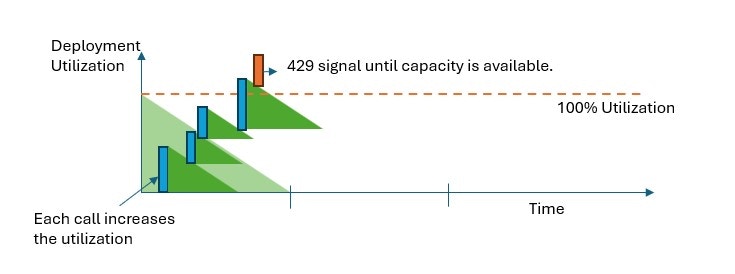
In all provisioned deployment types, when capacity is exceeded, the API returns a 429 HTTP Status Error. The fast response enables the user to make decisions on how to manage their traffic. Users can redirect requests to a separate deployment, to a standard deployment instance, or use a retry strategy to manage a given request. The service continues to return the 429 HTTP status code until the utilization drops below 100%.
Handle HTTP 429 responses
The 429 response isn’t an error, but instead it’s part of the design for telling users that a given deployment is fully utilized at a point in time. By providing a fast-fail response, you have control over how to handle these situations in a way that best fits your application requirements.
The retry-after-ms and retry-after headers in the response tell you the time to wait before the next call will be accepted. How you choose to handle this response depends on your application requirements. Here are some considerations:
- Consider redirecting the traffic to other models, deployments, or experiences. This option is the lowest-latency solution because the action can be taken as soon as you receive the 429 signal. For ideas on how to effectively implement this pattern see this community post.
- If you’re okay with longer per-call latencies, implement client-side retry logic. This option gives you the highest amount of throughput per PTU. The Foundry client libraries include built-in capabilities for handling retries.
Utilization-based request evaluation
In all provisioned deployment types, each request is evaluated individually according to its prompt size, expected generation size, and model to determine its expected utilization. This behavior is in contrast to standard deployments, which have a custom rate limiting behavior based on the estimated traffic load. For standard deployments, this custom rate limiting behavior can lead to HTTP 429 errors before defined quota values are exceeded if traffic isn’t evenly distributed.
For provisioned deployments, we use a variation of the leaky bucket algorithm to maintain utilization below 100% while allowing some burstiness in the traffic. The high-level logic is as follows:
-
Each customer has a set amount of capacity they can use on a deployment.
-
When a request is made:
a. When the current utilization is above 100%, the service returns a 429 code with the
retry-after-ms header set to the time until utilization is below 100%.
b. Otherwise, the service estimates the incremental change to utilization required to serve the request by combining the prompt tokens, less any cached tokens, and the specified max_tokens in the call. A customer can receive up to a 100% discount on their prompt tokens depending on the size of their cached tokens. If the max_tokens parameter isn’t specified, the service estimates a value. This estimation can lead to lower concurrency than expected when the number of actual generated tokens is small. For highest concurrency, ensure that the max_tokens value is as close as possible to the true generation size.
-
When a request finishes, we now know the actual compute cost for the call. To ensure an accurate accounting, we correct the utilization using the following logic:
a. If the actual > estimated, then the difference is added to the deployment’s utilization.
b. If the actual < estimated, then the difference is subtracted.
-
The overall utilization is decremented at a continuous rate based on the number of PTU deployed.
Calls are accepted until utilization reaches 100%. Bursts just over 100% might be permitted in short periods, but over time, your traffic is capped at 100% utilization.
Concurrent call limits
The number of concurrent calls you can achieve on a deployment depends on each call’s shape (prompt size, max_tokens parameter, and similar factors). The service continues to accept calls until the utilization reaches 100%. To determine the approximate number of concurrent calls, you can model out the maximum requests per minute for a particular call shape in the capacity calculator. If the system generates less than the number of output tokens set for the max_tokens parameter, then the provisioned deployment will accept more requests.
Provisioned throughput capability for models sold directly by Azure
This section lists Foundry Models that support the provisioned throughput capability. Use your PTU quota and PTU reservation across the models shown in the table.
-
The model version isn’t included in this table. Check the supported version for each model when you choose the deployment option in the Foundry portal.
-
Regional provisioned throughput deployment options vary by region.
-
New models sold directly by Azure are onboarded with the Global provisioned throughput deployment option first. The Data zone provisioned option comes later.
-
PTUs are managed regionally and by offer type. PTU quota and any reservations must be in the region and shape (Global, Data zone, Regional) you wish to use.
-
Spillover is an optional capability that manages traffic fluctuations on provisioned deployments. For more information on spillover, see Manage traffic with spillover for provisioned deployments.
| Model Family | Model name | Global provisioned | Data zone provisioned | Regional provisioned | Spillover feature |
|---|
| Azure OpenAI | Gpt 5.2 | ✅ | | | ✅ |
| Gpt 5.1 | ✅ | ✅ | | ✅ |
| Gpt 5.1 codex | ✅ | ✅ | | ✅ |
| Gpt 5 | ✅ | ✅ | ✅ | ✅ |
| Gpt 5 mini | ✅ | ✅ | ✅ | ✅ |
| Gpt 4.1 | ✅ | ✅ | ✅ | ✅ |
| Gpt 4.1 mini | ✅ | ✅ | ✅ | ✅ |
| Gpt 4.1 nano | ✅ | ✅ | ✅ | ✅ |
| Gpt 4o | ✅ | ✅ | ✅ | ✅ |
| Gpt 4o mini | ✅ | ✅ | ✅ | ✅ |
| Gpt 3.5 Turbo | ✅ | ✅ | ✅ | ✅ |
| o1 | ✅ | ✅ | ✅ | ✅ |
| o3 | ✅ | ✅ | ✅ | ✅ |
| o3 mini | ✅ | ✅ | ✅ | ✅ |
| o4 mini | ✅ | ✅ | ✅ | ✅ |
| Azure DeepSeek | DeepSeek-R1 | ✅ | | | |
| DeepSeek-V3-0324 | ✅ | | | |
| DeepSeek-R1-0528 | ✅ | | | |
| Meta Llama | Llama-3.3-70B-Instruct | ✅ | | | |
Region availability for provisioned throughput capability
Global Provisioned Throughput
Data Zone Provisioned Throughput
Regional Provisioned Throughput
Global provisioned throughput model availability
| Region | gpt-5.3-codex, 2026-02-24 | gpt-5.2-codex, 2026-01-14 | gpt-5.2, 2025-12-11 | gpt-5.1, 2025-11-13 | gpt-5.1-codex, 2025-11-13 | gpt-5, 2025-08-07 | gpt-5-mini, 2025-08-07 | o3, 2025-04-16 | o4-mini, 2025-04-16 | gpt-4.1, 2025-04-14 | gpt-4.1-nano, 2025-04-14 | gpt-4.1-mini, 2025-04-14 | o3-mini, 2025-01-31 | o1, 2024-12-17 | gpt-4o, 2024-05-13 | gpt-4o, 2024-08-06 | gpt-4o, 2024-11-20 | gpt-4o-mini, 2024-07-18 |
|---|
| australiaeast | ✅ | ✅ | ✅ | ✅ | ✅ | ✅ | ✅ | ✅ | ✅ | ✅ | ✅ | ✅ | ✅ | ✅ | ✅ | ✅ | ✅ | ✅ |
| brazilsouth | ✅ | ✅ | ✅ | ✅ | ✅ | ✅ | ✅ | ✅ | ✅ | ✅ | ✅ | ✅ | ✅ | ✅ | ✅ | ✅ | ✅ | ✅ |
| canadacentral | ✅ | ✅ | ✅ | ✅ | ✅ | ✅ | ✅ | ✅ | ✅ | ✅ | ✅ | ✅ | ✅ | ✅ | ✅ | ✅ | ✅ | ✅ |
| canadaeast | ✅ | ✅ | ✅ | ✅ | ✅ | ✅ | ✅ | ✅ | ✅ | ✅ | ✅ | ✅ | ✅ | ✅ | ✅ | ✅ | ✅ | ✅ |
| centralus | ✅ | ✅ | ✅ | ✅ | ✅ | ✅ | ✅ | ✅ | ✅ | ✅ | ✅ | ✅ | ✅ | ✅ | ✅ | ✅ | ✅ | ✅ |
| eastus | ✅ | ✅ | ✅ | ✅ | ✅ | ✅ | ✅ | ✅ | ✅ | ✅ | ✅ | ✅ | ✅ | ✅ | ✅ | ✅ | ✅ | ✅ |
| eastus2 | ✅ | ✅ | ✅ | ✅ | ✅ | ✅ | ✅ | ✅ | ✅ | ✅ | ✅ | ✅ | ✅ | ✅ | ✅ | ✅ | ✅ | ✅ |
| francecentral | ✅ | ✅ | ✅ | ✅ | ✅ | ✅ | ✅ | ✅ | ✅ | ✅ | ✅ | ✅ | ✅ | ✅ | ✅ | ✅ | ✅ | ✅ |
| germanywestcentral | ✅ | ✅ | ✅ | ✅ | ✅ | ✅ | ✅ | ✅ | ✅ | ✅ | ✅ | ✅ | ✅ | ✅ | ✅ | ✅ | ✅ | ✅ |
| italynorth | ✅ | ✅ | ✅ | ✅ | ✅ | ✅ | ✅ | ✅ | ✅ | ✅ | ✅ | ✅ | ✅ | ✅ | ✅ | ✅ | ✅ | ✅ |
| japaneast | ✅ | ✅ | ✅ | ✅ | ✅ | ✅ | ✅ | ✅ | ✅ | ✅ | ✅ | ✅ | ✅ | ✅ | ✅ | ✅ | ✅ | ✅ |
| koreacentral | ✅ | ✅ | ✅ | ✅ | ✅ | ✅ | ✅ | ✅ | ✅ | ✅ | ✅ | ✅ | ✅ | ✅ | ✅ | ✅ | ✅ | ✅ |
| northcentralus | ✅ | ✅ | ✅ | ✅ | ✅ | ✅ | ✅ | ✅ | ✅ | ✅ | ✅ | ✅ | ✅ | ✅ | ✅ | ✅ | ✅ | ✅ |
| norwayeast | ✅ | ✅ | ✅ | ✅ | ✅ | ✅ | ✅ | ✅ | ✅ | ✅ | ✅ | ✅ | ✅ | ✅ | ✅ | ✅ | ✅ | ✅ |
| polandcentral | ✅ | ✅ | ✅ | ✅ | ✅ | ✅ | ✅ | ✅ | ✅ | ✅ | ✅ | ✅ | ✅ | ✅ | ✅ | ✅ | ✅ | ✅ |
| qatarcentral | ✅ | ✅ | ✅ | ✅ | ✅ | ✅ | ✅ | ✅ | ✅ | ✅ | ✅ | ✅ | ✅ | ✅ | ✅ | ✅ | ✅ | ✅ |
| southafricanorth | ✅ | ✅ | ✅ | ✅ | ✅ | ✅ | ✅ | ✅ | ✅ | ✅ | ✅ | ✅ | ✅ | ✅ | ✅ | ✅ | ✅ | ✅ |
| southcentralus | ✅ | ✅ | ✅ | ✅ | ✅ | ✅ | ✅ | ✅ | ✅ | ✅ | ✅ | ✅ | ✅ | ✅ | ✅ | ✅ | ✅ | ✅ |
| southeastasia | ✅ | ✅ | ✅ | ✅ | ✅ | ✅ | ✅ | ✅ | ✅ | ✅ | ✅ | ✅ | ✅ | ✅ | ✅ | ✅ | ✅ | ✅ |
| southindia | ✅ | ✅ | ✅ | ✅ | ✅ | ✅ | ✅ | ✅ | ✅ | ✅ | ✅ | ✅ | ✅ | ✅ | ✅ | ✅ | ✅ | ✅ |
| spaincentral | ✅ | ✅ | ✅ | ✅ | ✅ | ✅ | ✅ | ✅ | ✅ | ✅ | ✅ | ✅ | ✅ | ✅ | ✅ | ✅ | ✅ | ✅ |
| swedencentral | ✅ | ✅ | ✅ | ✅ | ✅ | ✅ | ✅ | ✅ | ✅ | ✅ | ✅ | ✅ | ✅ | ✅ | ✅ | ✅ | ✅ | ✅ |
| switzerlandnorth | ✅ | ✅ | ✅ | ✅ | ✅ | ✅ | ✅ | ✅ | ✅ | ✅ | ✅ | ✅ | ✅ | ✅ | ✅ | ✅ | ✅ | ✅ |
| switzerlandwest | ✅ | ✅ | ✅ | ✅ | ✅ | ✅ | ✅ | ✅ | ✅ | ✅ | ✅ | ✅ | ✅ | ✅ | ✅ | ✅ | ✅ | ✅ |
| uaenorth | ✅ | ✅ | ✅ | ✅ | ✅ | ✅ | ✅ | ✅ | ✅ | ✅ | ✅ | ✅ | ✅ | ✅ | ✅ | ✅ | ✅ | ✅ |
| uksouth | ✅ | ✅ | ✅ | ✅ | ✅ | ✅ | ✅ | ✅ | ✅ | ✅ | ✅ | ✅ | ✅ | ✅ | ✅ | ✅ | ✅ | ✅ |
| westeurope | ✅ | ✅ | ✅ | ✅ | ✅ | ✅ | ✅ | ✅ | ✅ | ✅ | ✅ | ✅ | ✅ | ✅ | ✅ | ✅ | ✅ | ✅ |
| westus | ✅ | ✅ | ✅ | ✅ | ✅ | ✅ | ✅ | ✅ | ✅ | ✅ | ✅ | ✅ | ✅ | ✅ | ✅ | ✅ | ✅ | ✅ |
| westus3 | ✅ | ✅ | ✅ | ✅ | ✅ | ✅ | ✅ | ✅ | ✅ | ✅ | ✅ | ✅ | ✅ | ✅ | ✅ | ✅ | ✅ | ✅ |
Data zone provisioned throughput model availability
| Region | gpt-5.2, 2025-12-11 | gpt-5.1, 2025-11-13 | gpt-5.1-codex, 2025-11-13 | gpt-5, 2025-08-07 | gpt-5-mini, 2025-08-07 | o3, 2025-04-16 | o4-mini, 2025-04-16 | gpt-4.1, 2025-04-14 | gpt-4.1-nano, 2025-04-14 | gpt-4.1-mini, 2025-04-14 | o3-mini, 2025-01-31 | o1, 2024-12-17 | gpt-4o, 2024-05-13 | gpt-4o, 2024-08-06 | gpt-4o, 2024-11-20 | gpt-4o-mini, 2024-07-18 |
|---|
| eastus | ✅ | ✅ | ✅ | ✅ | ✅ | ✅ | ✅ | ✅ | ✅ | ✅ | ✅ | ✅ | ✅ | ✅ | ✅ | ✅ |
| eastus2 | ✅ | ✅ | ✅ | ✅ | ✅ | ✅ | ✅ | ✅ | ✅ | ✅ | ✅ | ✅ | ✅ | ✅ | ✅ | ✅ |
| francecentral | ✅ | ✅ | ✅ | ✅ | ✅ | ✅ | ✅ | ✅ | ✅ | ✅ | ✅ | ✅ | ✅ | ✅ | ✅ | ✅ |
| germanywestcentral | ✅ | ✅ | ✅ | ✅ | ✅ | ✅ | ✅ | ✅ | ✅ | ✅ | ✅ | ✅ | ✅ | ✅ | ✅ | ✅ |
| italynorth | ✅ | ✅ | ✅ | ✅ | ✅ | ✅ | ✅ | ✅ | ✅ | - | - | - | - | - | - | - |
| northcentralus | ✅ | ✅ | ✅ | ✅ | ✅ | ✅ | ✅ | ✅ | ✅ | ✅ | ✅ | ✅ | ✅ | ✅ | ✅ | ✅ |
| polandcentral | ✅ | ✅ | ✅ | ✅ | ✅ | ✅ | ✅ | ✅ | ✅ | ✅ | ✅ | ✅ | ✅ | ✅ | ✅ | ✅ |
| southcentralus | ✅ | ✅ | ✅ | ✅ | ✅ | ✅ | ✅ | ✅ | ✅ | ✅ | ✅ | ✅ | ✅ | ✅ | ✅ | ✅ |
| spaincentral | ✅ | ✅ | ✅ | ✅ | ✅ | ✅ | ✅ | ✅ | ✅ | ✅ | ✅ | ✅ | ✅ | ✅ | ✅ | ✅ |
| swedencentral | ✅ | ✅ | ✅ | ✅ | ✅ | ✅ | ✅ | ✅ | ✅ | ✅ | ✅ | ✅ | ✅ | ✅ | ✅ | ✅ |
| westeurope | ✅ | ✅ | ✅ | ✅ | ✅ | ✅ | ✅ | ✅ | ✅ | ✅ | ✅ | ✅ | ✅ | ✅ | ✅ | ✅ |
| westus | ✅ | ✅ | ✅ | ✅ | ✅ | ✅ | ✅ | ✅ | ✅ | ✅ | ✅ | ✅ | ✅ | ✅ | ✅ | ✅ |
| westus3 | ✅ | ✅ | ✅ | ✅ | ✅ | ✅ | ✅ | ✅ | ✅ | ✅ | ✅ | ✅ | ✅ | ✅ | ✅ | ✅ |
Regional provisioned throughput deployment model availability
| Region | gpt-5.2, 2025-12-11 | gpt-5.1, 2025-11-13 | gpt-5, 2025-08-07 | gpt-5-mini, 2025-08-07 | o3, 2025-04-16 | o4-mini, 2025-04-16 | gpt-4.1, 2025-04-14 | gpt-4.1-nano, 2025-04-14 | gpt-4.1-mini, 2025-04-14 | o3-mini, 2025-01-31 | o1, 2024-12-17 | gpt-4o, 2024-05-13 | gpt-4o, 2024-11-20 | gpt-4o, 2024-08-06 | gpt-4o-mini, 2024-07-18 |
|---|
| australiaeast | ✅ | ✅ | ✅ | ✅ | ✅ | - | ✅ | - | ✅ | ✅ | - | ✅ | ✅ | ✅ | ✅ |
| brazilsouth | - | - | - | - | - | - | ✅ | - | ✅ | - | - | ✅ | ✅ | ✅ | ✅ |
| canadacentral | - | - | - | - | - | - | - | - | - | - | - | ✅ | - | - | ✅ |
| canadaeast | ✅ | ✅ | ✅ | ✅ | - | - | - | - | - | ✅ | - | ✅ | ✅ | ✅ | ✅ |
| centralus | - | - | ✅ | - | - | ✅ | ✅ | - | - | - | - | ✅ | ✅ | ✅ | - |
| eastus | - | - | ✅ | - | ✅ | ✅ | ✅ | ✅ | ✅ | - | - | ✅ | ✅ | ✅ | ✅ |
| eastus2 | - | - | ✅ | ✅ | ✅ | ✅ | ✅ | ✅ | ✅ | ✅ | - | ✅ | ✅ | ✅ | ✅ |
| francecentral | - | - | - | - | - | - | - | - | - | - | - | ✅ | - | ✅ | ✅ |
| germanywestcentral | - | - | - | - | - | - | - | - | - | - | - | ✅ | ✅ | ✅ | - |
| japaneast | ✅ | - | ✅ | - | - | ✅ | ✅ | - | ✅ | ✅ | ✅ | ✅ | ✅ | ✅ | ✅ |
| koreacentral | ✅ | - | ✅ | ✅ | - | - | ✅ | - | ✅ | ✅ | - | ✅ | ✅ | ✅ | ✅ |
| northcentralus | - | - | ✅ | - | ✅ | ✅ | ✅ | ✅ | ✅ | - | - | ✅ | ✅ | ✅ | ✅ |
| norwayeast | - | - | - | - | - | - | - | - | - | - | - | ✅ | - | ✅ | ✅ |
| polandcentral | - | - | - | - | - | - | - | - | - | - | - | ✅ | ✅ | - | - |
| southafricanorth | - | - | - | - | - | - | - | - | - | - | - | ✅ | - | - | - |
| southcentralus | - | - | ✅ | - | ✅ | ✅ | ✅ | ✅ | ✅ | ✅ | - | ✅ | - | ✅ | ✅ |
| southeastasia | - | - | - | - | - | - | ✅ | - | - | - | - | - | ✅ | ✅ | ✅ |
| southindia | - | ✅ | ✅ | ✅ | - | - | ✅ | - | ✅ | ✅ | - | ✅ | ✅ | ✅ | ✅ |
| spaincentral | - | - | - | - | - | - | - | - | - | - | - | ✅ | - | ✅ | ✅ |
| swedencentral | - | - | - | - | - | - | ✅ | ✅ | ✅ | ✅ | - | ✅ | ✅ | ✅ | ✅ |
| switzerlandnorth | - | ✅ | - | - | - | - | ✅ | - | ✅ | ✅ | - | ✅ | ✅ | ✅ | ✅ |
| switzerlandwest | - | - | - | - | - | - | - | - | - | - | - | - | - | ✅ | ✅ |
| uaenorth | - | ✅ | - | - | - | - | ✅ | - | - | ✅ | ✅ | ✅ | ✅ | ✅ | - |
| uksouth | ✅ | ✅ | ✅ | - | - | - | ✅ | - | ✅ | - | ✅ | ✅ | ✅ | ✅ | ✅ |
| westeurope | - | - | - | - | ✅ | ✅ | - | - | - | - | - | - | ✅ | - | - |
| westus | - | - | ✅ | - | ✅ | ✅ | ✅ | ✅ | ✅ | - | - | ✅ | ✅ | ✅ | ✅ |
| westus3 | - | ✅ | ✅ | ✅ | ✅ | ✅ | ✅ | ✅ | ✅ | - | - | ✅ | ✅ | ✅ | ✅ |
The provisioned version of gpt-4 Version: turbo-2024-04-09 is currently limited to text only.
Related content