- Where your data is processed (global, data zone, or single region)
- How you pay (pay-per-token or reserved capacity)
- Performance characteristics (latency variance, throughput limits)
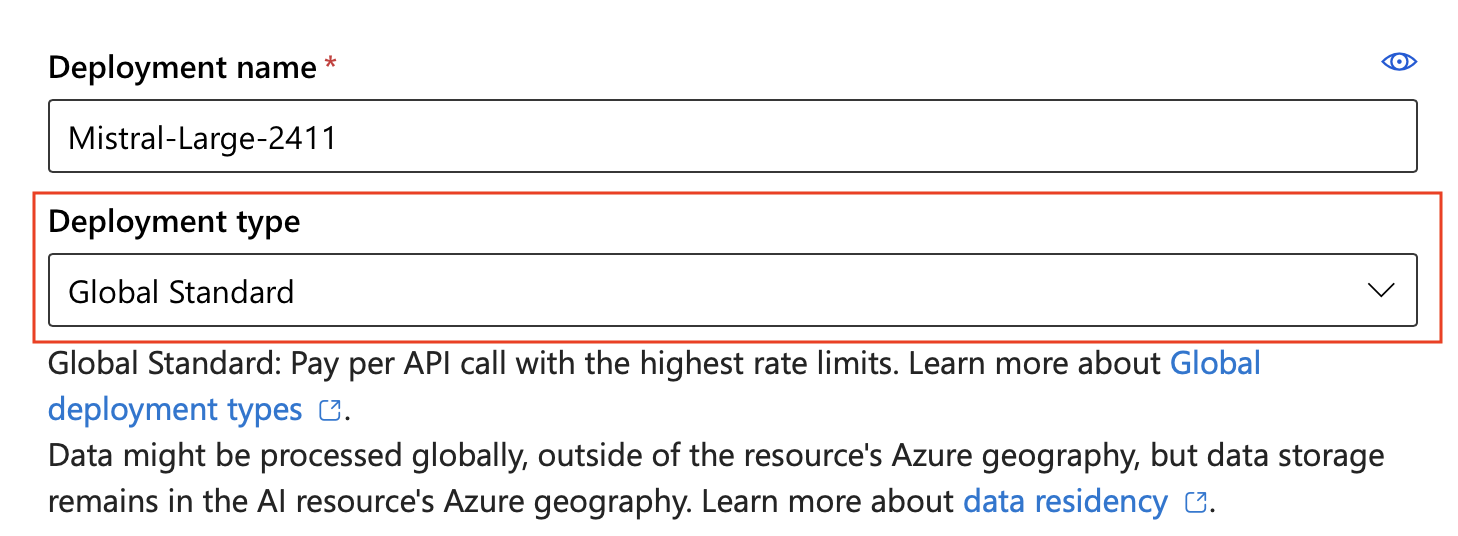
Data residency for all deployment types: Data stored at rest remains in the designated Azure geography. However, inferencing data is processed as follows:
- Global types: May be processed in any Azure region
- DataZone types: Processed only within the Microsoft-specified data zone (US or EU)
- Standard/Regional types: Processed in the deployment region
Deployment type comparison
| Deployment type | SKU code | Data processing | Billing | Best for |
|---|---|---|---|---|
| Global Standard | GlobalStandard | Any Azure region | Pay-per-token | General workloads, highest quota |
| Global Provisioned | GlobalProvisionedManaged | Any Azure region | Reserved PTU | Predictable high-throughput |
| Global Batch | GlobalBatch | Any Azure region | 50% discount, 24-hr | Large async jobs |
| Data Zone Standard | DataZoneStandard | Within data zone | Pay-per-token | EU/US data zone compliance |
| Data Zone Provisioned | DataZoneProvisionedManaged | Within data zone | Reserved PTU | Data zone + predictable throughput |
| Data Zone Batch | DataZoneBatch | Within data zone | 50% discount | Large async jobs with data zone |
| Standard | Standard | Single region | Pay-per-token | Regional compliance, low volume |
| Regional Provisioned | ProvisionedManaged | Single region | Reserved PTU | Regional compliance + throughput |
| Developer | DeveloperTier | Any Azure region | Pay-per-token | Fine-tuned model evaluation only |
Not all models support all deployment types. Check Foundry Models sold directly by Azure for model availability by deployment type and region.
SLA guarantees vary by deployment type. Provisioned types provide guaranteed throughput and lower latency variance. Standard types offer best-effort service. Developer deployments don’t include an SLA. For details, see the Azure SLA for Azure OpenAI Service.
Choose the right deployment type
Use the following criteria to select a deployment type:By data residency requirement
- No restrictions: Use Global Standard or Global Provisioned
- EU data zone: Use DataZone Standard or DataZone Provisioned in an EU region
- US data zone: Use DataZone Standard or DataZone Provisioned in a US region
- Single region only: Use Standard or Regional Provisioned
By workload pattern
- Variable, bursty traffic: Use Standard or Global Standard (pay-per-token)
- Consistent high volume: Use Provisioned types (reserved capacity)
- Large batch jobs (not time-sensitive): Use Global Batch or DataZone Batch (50% cost savings)
- Fine-tuned model evaluation: Use Developer (no SLA, lowest cost)
By latency requirement
- Low latency variance required: Use Provisioned types
- Latency variance acceptable: Use Standard types
Data processing locations
For standard deployments, there are three options: global, data zone, and Azure geography. For provisioned deployments, there are two options: global and Azure geography. Global Standard is a common starting point for most workloads.Global deployments
Global deployments use Azure’s global infrastructure to dynamically route traffic to available datacenters. Global deployments offer the highest initial throughput limits and broadest model availability. For high-volume workloads, you might experience increased latency variation. If you require lower latency variance at scale, use provisioned deployment types. Global deployments receive new models and features first.Data Zone deployments
For Global deployment types, prompts and responses might be processed in any geography where the model is deployed. For DataZone deployment types, prompts and responses are processed only within the specified data zone:- United States: Data processed anywhere within the US
- European Union: Data processed within any EU member nation
With Global Standard and Data Zone Standard deployment types, if the primary region experiences an interruption in service, all traffic initially routed to this region is affected. To learn more, see the business continuity and disaster recovery guide.
Global Standard
- SKU name in code:
GlobalStandard
Global Provisioned
- SKU name in code:
GlobalProvisionedManaged
Global Batch
- SKU name in code:
GlobalBatch
- Large-scale data processing: Analyze datasets in parallel.
- Content generation: Create large volumes of text, such as product descriptions or articles.
- Document review and summarization: Process and summarize lengthy documents.
- Customer support automation: Handle numerous queries simultaneously.
- Data extraction and analysis: Extract and analyze information from large amounts of unstructured data.
- Natural language processing (NLP) tasks: Perform sentiment analysis or translation on large datasets.
Batch deployments trade real-time responsiveness for cost savings. Batch requests don’t have a real-time SLA — they target completion within 24 hours but might take longer.
Data Zone Standard
- SKU name in code:
DataZoneStandard
Data Zone Provisioned
- SKU name in code:
DataZoneProvisionedManaged
Data Zone Batch
- SKU name in code:
DataZoneBatch
Standard
- SKU name in code:
Standard
Regional Provisioned
- SKU name in code:
ProvisionedManaged
Developer (for fine-tuned models)
- SKU name in code:
DeveloperTier
Troubleshooting deployment issues
Common issues when creating or using deployments:| Issue | Cause | Resolution |
|---|---|---|
| Deployment type unavailable | Model doesn’t support the selected type | Check model availability by deployment type |
| Quota exceeded | Subscription limit reached for tokens per minute | Request quota increase in Azure portal or use a different region |
| Region unavailable | Model not deployed in selected region | Select a region from the model’s availability list |
| Provisioned capacity unavailable | No PTU capacity in region | Try a different region or use Global Provisioned for broader availability |
Restrict deployment types with Azure Policy
Azure Policy helps enforce organizational standards and assess compliance at scale. Through its compliance dashboard, you can evaluate the overall state of the environment and drill down to per-resource, per-policy granularity. Azure Policy also supports bulk remediation for existing resources and automatic remediation for new resources. Learn more about Azure Policy and specific built-in controls for Foundry Tools. Use the following policy to disable access to a specific Foundry deployment type. ReplaceGlobalStandard with the SKU name for the deployment type you want to restrict.
Related content
- Deploy Microsoft Foundry Models in the Foundry portal
- Create and deploy an Azure OpenAI in Microsoft Foundry Models resource
- Foundry Models sold directly by Azure
- Model region availability by deployment type
- Microsoft Foundry Models quotas and limits
- Provisioned throughput concepts
- Global Batch processing
- Azure OpenAI Service pricing
- Data privacy and security for Foundry Models
- Business continuity and disaster recovery