Azure AI Inference beta SDK is deprecated and will be retired on May 30, 2026. Switch to the generally available OpenAI/v1 API with a stable OpenAI SDK. Follow the migration guide to switch to OpenAI/v1, using the SDK for your preferred programming language.
Deployments
Foundry uses deployments to make models available. Deployments give a model a name and set specific configurations. You can access a model by using its deployment name in your requests. A deployment includes:- A model name
- A model version
- A provisioning or capacity type1
- A content filtering configuration1
- A rate limiting configuration1
Azure OpenAI inference endpoint
The Azure OpenAI API exposes the full capabilities of OpenAI models and supports more features like assistants, threads, files, and batch inference. You might also access non-OpenAI models through this route. Azure OpenAI endpoints, usually of the formhttps://<resource-name>.openai.azure.com, work at the deployment level and each deployment has its own associated URL. However, you can use the same authentication mechanism to consume the deployments. For more information, see the reference page for Azure OpenAI API.
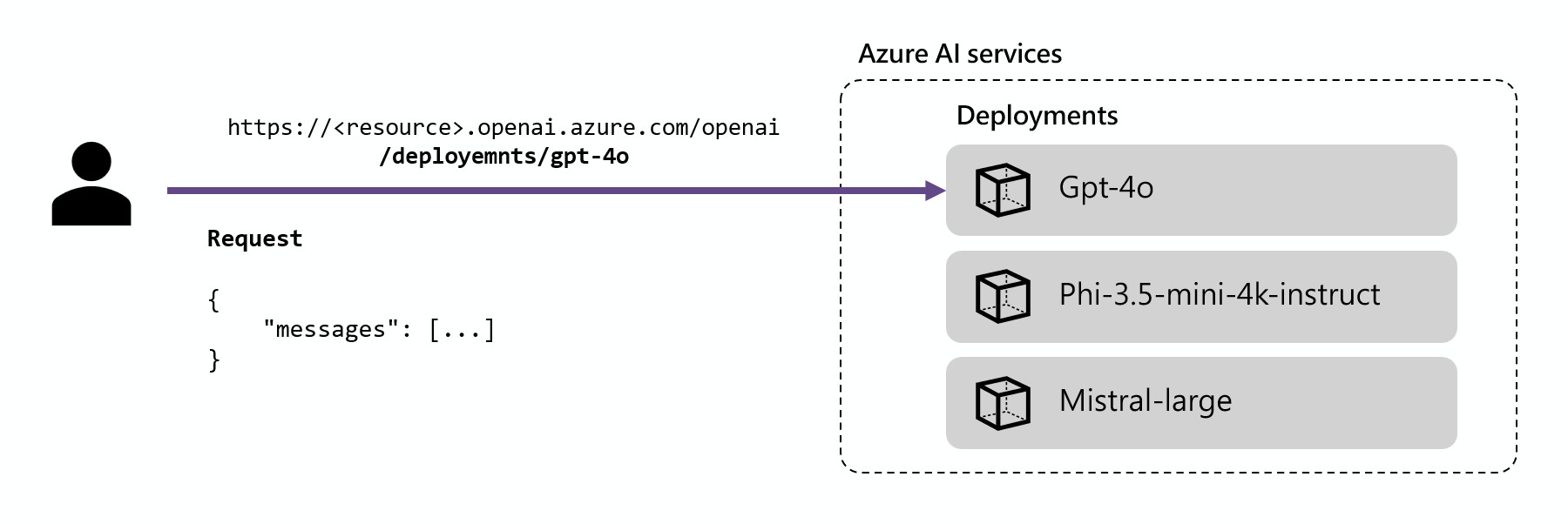
/deployments/<model-deployment-name>.
- Python
- JavaScript
- C#
- Java
- REST
Install the package Then, you can use the package to consume the model. The following example shows how to create a client to consume chat completions:
openai using your package manager, like pip:- Python
- JavaScript
- C#
- Java
- REST
Keyless authentication
Models deployed to Foundry Models in Foundry Tools support keyless authorization by using Microsoft Entra ID. Keyless authorization enhances security, simplifies the user experience, reduces operational complexity, and provides robust compliance support for modern development. It makes keyless authorization a strong choice for organizations adopting secure and scalable identity management solutions. To use keyless authentication, configure your resource and grant access to users to perform inference. After you configure the resource and grant access, authenticate as follows:- Python
- C#
- JavaScript
- Java
- REST
Install the OpenAI SDK using a package manager like pip:For Microsoft Entra ID authentication, also install:Use the package to consume the model. The following example shows how to create a client to consume chat completions with Microsoft Entra ID and make a test call to the chat completions endpoint with your model deployment.Replace Expected outputReference: OpenAI Python SDK and DefaultAzureCredential class.
<resource> with your Foundry resource name. Find it in the Azure portal or by running az cognitiveservices account list. Replace DeepSeek-V3.1 with your actual deployment name.