Items marked (preview) in this article are currently in public preview. This preview is provided without a service-level agreement, and we don’t recommend it for production workloads. Certain features might not be supported or might have constrained capabilities. For more information, see Supplemental Terms of Use for Microsoft Azure Previews.
Features
- Agent Evaluation: Automate pre-production assessment of Microsoft Foundry agents in your CI/CD workflow.
- Evaluators: Use any evaluators from the Foundry evaluator catalog.
- Statistical Analysis: Evaluation results include confidence intervals and test for statistical significance to determine if changes are meaningful and not due to random variation.
Evaluator categories
- Agent evaluators: Process and system-level evaluators for agent workflows.
- RAG evaluators: Evaluate end-to-end and retrieval processes in RAG systems.
- Risk and safety evaluators: Assess risks and safety concerns in responses.
- General purpose evaluators: Quality evaluation such as coherence and fluency.
- OpenAI-based graders: Use OpenAI graders including string check, text similarity, score/label model.
- Custom evaluators: Define your own custom evaluators using Python code or LLM-as-a-judge patterns.
Prerequisites
- A project. To learn more, see Create a project.
- A Foundry agent.
- The AI Agent Evaluation extension installed in your Azure DevOps organization.
Inputs
Parameters
| Name | Required? | Description |
|---|---|---|
| azure-ai-project-endpoint | Yes | Endpoint of your Microsoft Foundry Project. To find this value, open your project in Foundry portal and copy the endpoint from the Overview page. |
| deployment-name | Yes | The name of an Azure AI model deployment to use for evaluation. Find existing deployments under Models + endpoints in the Foundry portal. |
| data-path | Yes | Path to the data file that contains the evaluators and input queries for evaluations. |
| agent-ids | Yes | ID of one or more agents to evaluate in format agent-name:version (for example, my-agent:1 or my-agent:1,my-agent:2). Multiple agents are comma-separated and compared with statistical test results. |
| baseline-agent-id | No | ID of the baseline agent to compare against when evaluating multiple agents. If not provided, the first agent is used. |
To find your agent ID and version, open your project in Foundry portal, go to Agents, select your agent, and copy the Agent ID from the details pane. The version is the deployment version number (for example,
my-agent:1).Data file
The input data file should be a JSON file with the following structure:| Field | Type | Required? | Description |
|---|---|---|---|
| name | string | Yes | Name of the evaluation dataset. |
| evaluators | string[] | Yes | List of evaluator names to use. Check out the list of available evaluators in your project’s evaluator catalog in Foundry portal: Build > Evaluations > Evaluator catalog. |
| data | object[] | Yes | Array of input objects with query and optional evaluator fields like ground_truth, context. Automapped to evaluators; use data_mapping to override. |
| openai_graders | object | No | Configuration for OpenAI-based evaluators (label_model, score_model, string_check, etc.). |
| evaluator_parameters | object | No | Evaluator-specific initialization parameters (for example, thresholds, custom settings). |
| data_mapping | object | No | Custom data field mappings (autogenerated from data if not provided). |
Basic sample data file
Additional sample data files
| Filename | Description |
|---|---|
| dataset-tiny.json | Dataset with small number of test queries and evaluators. |
| dataset.json | Dataset with all supported evaluator types and enough queries for confidence interval calculation and statistical test. |
| dataset-builtin-evaluators.json | Built-in Foundry evaluators example (for example, coherence, fluency, relevance, groundedness, metrics). |
| dataset-openai-graders.json | OpenAI-based graders example (label models, score models, text similarity, string checks). |
| dataset-custom-evaluators.json | Custom evaluators example with evaluator parameters. |
| dataset-data-mapping.json | Data mapping example showing how to override automatic field mappings with custom data column names. |
Sample pipeline
To use this extension, add theAIAgentEvaluation@2 task to your Azure Pipeline. The following example shows a complete pipeline that authenticates by using an Azure Resource Manager service connection and evaluates an agent.
Evaluation results and outputs
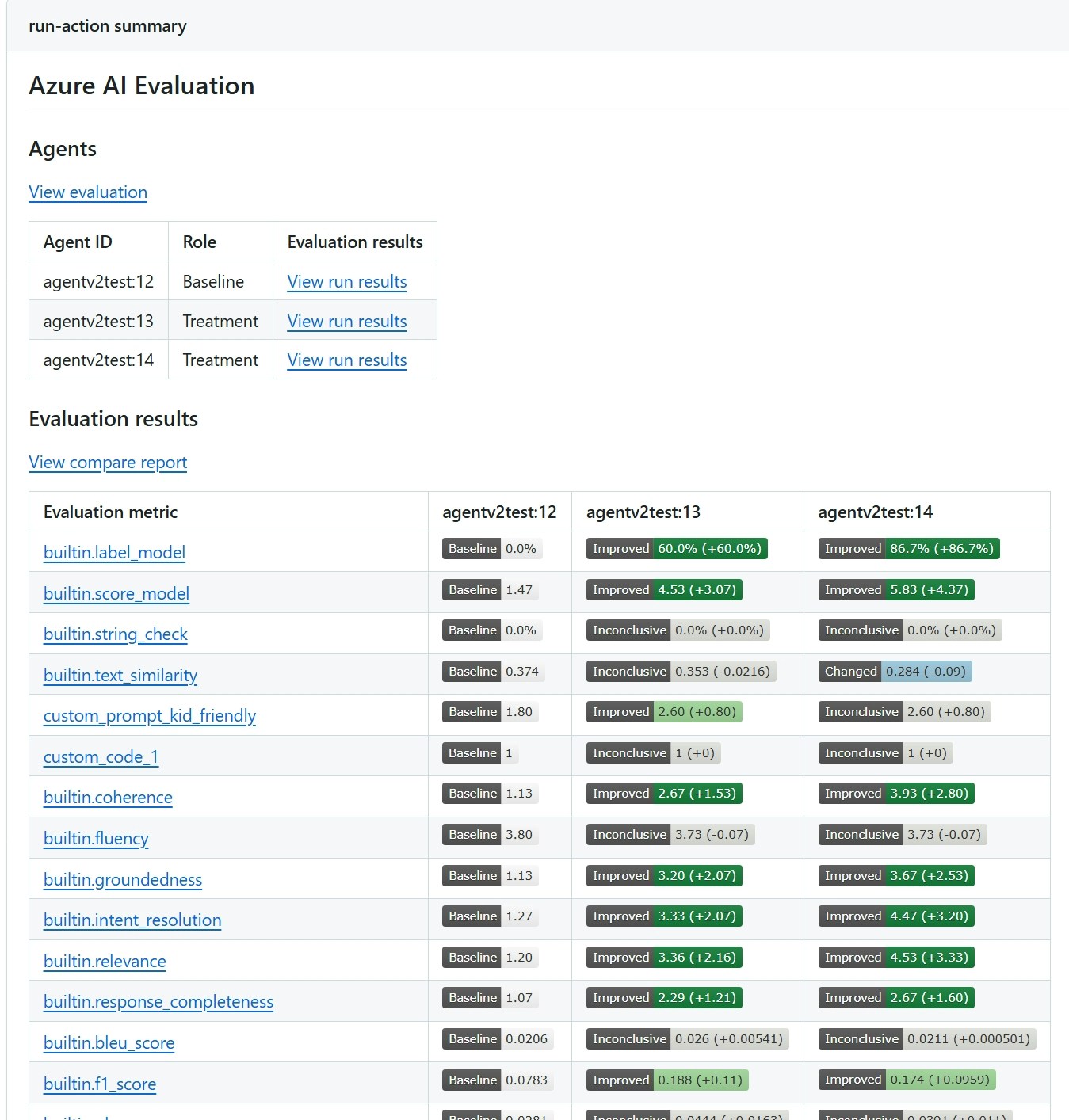
You see evaluation results in the Azure DevOps pipeline summary. The report shows evaluation scores for each metric, confidence intervals, and - when you evaluate multiple agents - a pairwise statistical comparison that indicates whether differences are meaningful or within random variation. The following screenshot shows a sample report comparing two agents.