
Evaluate your AI agents (preview)

Items marked (preview) in this article are currently in public preview. This preview is provided without a service-level agreement, and we don’t recommend it for production workloads. Certain features might not be supported or might have constrained capabilities. For more information, see Supplemental Terms of Use for Microsoft Azure Previews.
Evaluation is essential for ensuring your agent meets quality and safety standards before deployment. By running evaluations during development, you establish a baseline for your agent’s performance and can set acceptance thresholds, such as an 85% task adherence passing rate, before releasing it to users. In this article, you learn how to:
  • Set up the SDK client for evaluation.
  • Choose evaluators for quality, safety, and agent behavior.
  • Create a test dataset and run an evaluation.
  • Interpret results and integrate them into your workflow.
The Microsoft Foundry SDK for evaluation and Foundry portal are in public preview, but the APIs are generally available for model and dataset evaluation (agent evaluation remains in public preview). Evaluators marked (preview) in this article are currently in public preview everywhere.

Prerequisites

  • A Foundry project with an agent.
  • An Azure OpenAI deployment with a GPT model that supports chat completion (for example, gpt-4o or gpt-4o-mini).
  • Azure AI User role on the Foundry project.
Some evaluation features have regional restrictions. See supported regions for details.

Set up the client

Install the Foundry SDK and set up authentication:
pip install "azure-ai-projects>=2.0.0b1" azure-identity
Create the project client. The following code samples assume you run them in this context:
import os
from azure.identity import DefaultAzureCredential
from azure.ai.projects import AIProjectClient

endpoint = os.environ["AZURE_AI_PROJECT_ENDPOINT"]
model_deployment = os.environ["AZURE_AI_MODEL_DEPLOYMENT_NAME"]

credential = DefaultAzureCredential()
project_client = AIProjectClient(endpoint=endpoint, credential=credential)
client = project_client.get_openai_client()

Choose evaluators

Evaluators are functions that assess your agent’s responses. Some evaluators use AI models as judges, while others use rules or algorithms. For agent evaluation, consider this set:
EvaluatorWhat it measures
Task AdherenceDoes the agent follow its system instructions?
CoherenceIs the response logical and well-structured?
ViolenceDoes the response contain violent content?
For more built-in evaluators, see: To build your own evaluators, see Custom evaluators.

Create a test dataset

Create a JSONL file with test queries for your agent. Each line contains a JSON object with a query field:
{"query": "What's the weather in Seattle?"}
{"query": "Book a flight to Paris"}
{"query": "Tell me a joke"}
Upload this file as a dataset in your project:
dataset = project_client.datasets.upload_file(
    name="agent-test-queries",
    version="1",
    file_path="./test-queries.jsonl",
)

Run an evaluation

When you run an evaluation, the service sends each test query to your agent, captures the response, and applies your selected evaluators to score the results. First, configure your evaluators. Each evaluator needs a data mapping that tells it where to find inputs:
  • {{item.X}} references fields from your test data, like query.
  • {{sample.output_items}} references the full agent response, including tool calls.
  • {{sample.output_text}} references just the response message text.
AI-assisted evaluators, like Task Adherence and Coherence, require a model deployment in initialization_parameters. Some evaluators might require additional fields, like ground_truth or tool definitions. For more information, see the evaluator documentation.
testing_criteria = [
    {
        "type": "azure_ai_evaluator",
        "name": "Task Adherence",
        "evaluator_name": "builtin.task_adherence",
        "data_mapping": {
            "query": "{{item.query}}",
            "response": "{{sample.output_items}}",
        },
        "initialization_parameters": {"deployment_name": model_deployment},
    },
    {
        "type": "azure_ai_evaluator",
        "name": "Coherence",
        "evaluator_name": "builtin.coherence",
        "data_mapping": {
            "query": "{{item.query}}",
            "response": "{{sample.output_items}}",
        },
        "initialization_parameters": {"deployment_name": model_deployment},
    },
    {
        "type": "azure_ai_evaluator",
        "name": "Violence",
        "evaluator_name": "builtin.violence",
        "data_mapping": {
            "query": "{{item.query}}",
            "response": "{{sample.output_items}}",
        },
    },
]
Next, create the evaluation. An evaluation defines the test data schema and testing criteria. It serves as a container for multiple runs. All runs under the same evaluation conform to the same schema and produce the same set of metrics. This consistency is important for comparing results across runs.
data_source_config = {
    "type": "custom",
    "item_schema": {
        "type": "object",
        "properties": {
            "query": {"type": "string"},
        },
        "required": ["query"],
    },
    "include_sample_schema": True,
}

evaluation = client.evals.create(
    name="Agent Quality Evaluation",
    data_source_config=data_source_config,
    testing_criteria=testing_criteria,
)
Finally, create a run that sends your test queries to the agent and applies the evaluators:
eval_run = client.evals.runs.create(
    eval_id=evaluation.id,
    name="Agent Evaluation Run",
    data_source={
        "type": "azure_ai_target_completions",
        "source": {
            "type": "file_id",
            "id": dataset.id,
        },
        "input_messages": {
            "type": "template",
            "template": [{"type": "message", "role": "user", "content": {"type": "input_text", "text": "{{item.query}}"}}],
        },
        "target": {
            "type": "azure_ai_agent",
            "name": "my-agent",  # Replace with your agent name
            "version": "1",  # Optional; omit to use latest version
        },
    },
)

print(f"Evaluation run started: {eval_run.id}")

Interpret results

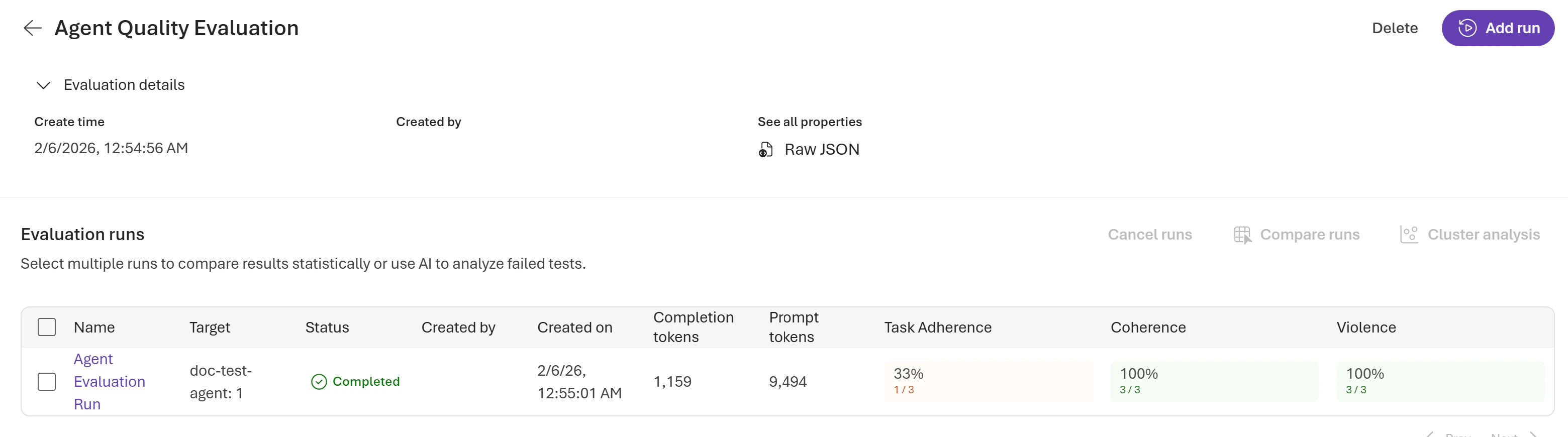
Evaluations typically complete in a few minutes, depending on the number of queries. Poll for completion and retrieve the report URL to view the results in the Microsoft Foundry portal under the Evaluations tab:
import time

# Wait for completion
while True:
    run = client.evals.runs.retrieve(run_id=eval_run.id, eval_id=evaluation.id)
    if run.status in ["completed", "failed"]:
        break
    time.sleep(5)

print(f"Status: {run.status}")
print(f"Report URL: {run.report_url}")
Screenshot showing evaluation results for an agent in the Microsoft Foundry portal.

Aggregated results

At the run level, you can see aggregated data, including pass and fail counts, token usage per model, and results per evaluator:
{
    "result_counts": {
        "total": 3,
        "passed": 1,
        "failed": 2,
        "errored": 0
    },
    "per_model_usage": [
        {
            "model_name": "gpt-4o-mini-2024-07-18",
            "invocation_count": 6,
            "total_tokens": 9285,
            "prompt_tokens": 8326,
            "completion_tokens": 959
        },
        ...
    ],
    "per_testing_criteria_results": [
        {
            "testing_criteria": "Task Adherence",
            "passed": 1,
            "failed": 2
        },
        ... // remaining testing criteria
    ]
}

Row level output

Each evaluation run returns output items per row in your test dataset, providing detailed visibility into your agent’s performance. Output items include the original query, agent response, individual evaluator results with scores and reasoning, and token usage:
{
    "object": "eval.run.output_item",
    "id": "1",
    "run_id": "evalrun_abc123",
    "eval_id": "eval_xyz789",
    "status": "completed",
    "datasource_item": {
        "query": "What's the weather in Seattle?",
        "response_id": "resp_abc123",
        "agent_name": "my-agent",
        "agent_version": "10",
        "sample.output_text": "I'd be happy to help with the weather! However, I need to check the current conditions. Let me look that up for you.",
        "sample.output_items": [
            ... // agent response messages with tool calls
        ]
    },
    
    "results": [
        {
            "type": "azure_ai_evaluator",
            "name": "Task Adherence",
            "metric": "task_adherence",
            "label": "pass",
            "reason": "Agent followed system instructions correctly",
            "threshold": 3,
            "passed": true,
            "sample":
            {
               ... // evaluator input/output and token usage
            }
        },
        ... // remaining evaluation results
    ]
}

Integrate into your workflow

Optimize and compare versions

Use evaluation to iterate and improve your agent:
  1. Run evaluation to identify weak areas. Use cluster analysis to find patterns and errors.
  2. Adjust agent instructions or tools based on findings.
  3. Reevaluate and compare runs to measure improvement.
  4. Repeat until quality thresholds are met.