
Connect an Azure AI Search index to Foundry agents

For a managed knowledge base experience, see Foundry IQ. For tool optimization, see best practices.
Ground your Foundry agent’s responses in your proprietary content by connecting it to an Azure AI Search index. The Azure AI Search tool retrieves indexed documents and generates answers with inline citations, enabling accurate, source-backed responses.

Usage support

Microsoft Foundry supportPython SDKC# SDKJavaScript SDKJava SDKREST APIBasic agent setupStandard agent setup
✔️✔️✔️✔️-✔️✔️✔️
Java SDK samples are coming soon.

Prerequisites

Estimated setup time: 15-30 minutes if you have an existing search index
  • A basic or standard agent environment.
  • The latest prerelease package. See the quickstart for details.
    • Python: pip install azure-ai-projects --pre
    • C#: Install the Azure.AI.Projects NuGet package (prerelease)
    • JavaScript/TypeScript: npm install @azure/ai-projects
  • An Azure subscription and Microsoft Foundry project with:
    • Project endpoint
    • Model deployment name
    • Authentication configured (for example, DefaultAzureCredential)
  • An Azure AI Search index configured for vector search with:
    • One or more Edm.String fields that are searchable and retrievable
    • One or more Collection(Edm.Single) vector fields that are searchable
    • At least one retrievable text field that contains the content you want the agent to cite
    • A retrievable field that contains a source URL (and optionally a title) so citations can include a link
  • A connection between your Foundry project and your Azure AI Search service (see Setup).
  • For keyless authentication, assign the following Azure role-based access control (RBAC) roles to your project’s managed identity:
    • Search Index Data Contributor
    • Search Service Contributor

Set environment variables

VariableDescription
FOUNDRY_PROJECT_ENDPOINTYour Foundry project endpoint.
FOUNDRY_MODEL_DEPLOYMENT_NAMEYour model deployment name.
AZURE_AI_SEARCH_CONNECTION_NAMEThe name of your project connection to Azure AI Search (used by the SDK samples to look up the connection ID).
AZURE_AI_SEARCH_CONNECTION_IDThe resource ID of your project connection to Azure AI Search (used by the TypeScript and REST samples).
AI_SEARCH_INDEX_NAMEYour Azure AI Search index name.

Configure tool parameters

Azure AI Search tool parameterRequiredNotes
project_connection_idYesThe resource ID of the project connection to Azure AI Search.
index_nameYesThe name of the index in your Azure AI Search resource.
top_kNoDefaults to 5.
query_typeNoDefaults to vector_semantic_hybrid. Supported values: simple, vector, semantic, vector_simple_hybrid, vector_semantic_hybrid.
filterNoApplies to all queries the agent makes to the index.

Code example

  • You need the latest prerelease package. For more information, see the quickstart.
  • If you’re using the REST or TypeScript sample, the connection ID is in the format /subscriptions/{{subscriptionId}}/resourceGroups/{{resourceGroupName}}/providers/Microsoft.CognitiveServices/accounts/{{foundryAccountName}}/projects/{{foundryProjectName}}/connections/{{connectionName}}.
  • If you’re using the Python or C# sample, you can provide the connection name and retrieve the connection ID with the SDK.

Quick verification

Before running the full sample, verify your Azure AI Search connection exists:
import os

from azure.ai.projects import AIProjectClient
from azure.identity import DefaultAzureCredential
from dotenv import load_dotenv

load_dotenv()

with (
    DefaultAzureCredential() as credential,
    AIProjectClient(endpoint=os.environ["FOUNDRY_PROJECT_ENDPOINT"], credential=credential) as project_client,
):
    print("Connected to project.")
    
    # Verify Azure AI Search connection exists
    connection_name = os.environ.get("AZURE_AI_SEARCH_CONNECTION_NAME")
    if connection_name:
        try:
            conn = project_client.connections.get(connection_name)
            print(f"Azure AI Search connection verified: {conn.name}")
            print(f"Connection ID: {conn.id}")
        except Exception as e:
            print(f"Azure AI Search connection '{connection_name}' not found: {e}")
    else:
        # List available connections to help find the right one
        print("AZURE_AI_SEARCH_CONNECTION_NAME not set. Available connections:")
        for conn in project_client.connections.list():
            print(f"  - {conn.name}")
If this code runs without errors, your credentials and Azure AI Search connection are configured correctly.

Full sample

import os
from dotenv import load_dotenv
from azure.identity import DefaultAzureCredential
from azure.ai.projects import AIProjectClient
from azure.ai.projects.models import (
    AzureAISearchAgentTool,
    PromptAgentDefinition,
    AzureAISearchToolResource,
    AISearchIndexResource,
    AzureAISearchQueryType,
)

load_dotenv()

project_client = AIProjectClient(
  endpoint=os.environ["FOUNDRY_PROJECT_ENDPOINT"],
    credential=DefaultAzureCredential(),
)

openai_client = project_client.get_openai_client()

with project_client:

    azs_connection = project_client.connections.get(os.environ["AZURE_AI_SEARCH_CONNECTION_NAME"])
    connection_id = azs_connection.id
    print(f"Azure AI Search connection ID: {connection_id}")

    agent = project_client.agents.create_version(
        agent_name="MyAgent",
        definition=PromptAgentDefinition(
          model=os.environ["FOUNDRY_MODEL_DEPLOYMENT_NAME"],
            instructions="""You are a helpful assistant. You must always provide citations for
            answers using the tool and render them as: `[message_idx:search_idx†source]`.""",
            tools=[
                AzureAISearchAgentTool(
                    azure_ai_search=AzureAISearchToolResource(
                        indexes=[
                            AISearchIndexResource(
                                project_connection_id=connection_id,
                                index_name=os.environ["AI_SEARCH_INDEX_NAME"],
                                query_type=AzureAISearchQueryType.SIMPLE,
                            ),
                        ]
                    )
                )
            ],
        ),
        description="You are a helpful agent.",
    )
    print(f"Agent created (id: {agent.id}, name: {agent.name}, version: {agent.version})")

    user_input = input(
        """Enter your question for the AI Search agent available in the index
        (e.g., 'Tell me about the mental health services available from Premera'): \n"""
    )

    stream_response = openai_client.responses.create(
        stream=True,
        tool_choice="required",
        input=user_input,
        extra_body={"agent": {"name": agent.name, "type": "agent_reference"}},
    )

    for event in stream_response:
        if event.type == "response.created":
            print(f"Follow-up response created with ID: {event.response.id}")
        elif event.type == "response.output_text.delta":
            print(f"Delta: {event.delta}")
        elif event.type == "response.text.done":
            print(f"\nFollow-up response done!")
        elif event.type == "response.output_item.done":
            if event.item.type == "message":
                item = event.item
                if item.content[-1].type == "output_text":
                    text_content = item.content[-1]
                    for annotation in text_content.annotations:
                        if annotation.type == "url_citation":
                            print(
                                f"URL Citation: {annotation.url}, "
                                f"Start index: {annotation.start_index}, "
                                f"End index: {annotation.end_index}"
                            )
        elif event.type == "response.completed":
            print(f"\nFollow-up completed!")
            print(f"Full response: {event.response.output_text}")

    print("\nCleaning up...")
    project_client.agents.delete_version(agent_name=agent.name, agent_version=agent.version)
    print("Agent deleted")

Expected outcome

The agent queries the search index and returns a response with inline citations. Console output shows the agent ID, streaming delta updates as the response generates, URL citations with start and end indices, and the final complete response text. The agent is then successfully deleted.

Quick verification

Before running the full sample, verify your Azure AI Search connection exists:
using Azure.AI.Projects;
using Azure.Identity;

var projectEndpoint = System.Environment.GetEnvironmentVariable("FOUNDRY_PROJECT_ENDPOINT");
var aiSearchConnectionName = System.Environment.GetEnvironmentVariable("AZURE_AI_SEARCH_CONNECTION_NAME");

AIProjectClient projectClient = new(endpoint: new Uri(projectEndpoint), tokenProvider: new DefaultAzureCredential());

// Verify Azure AI Search connection exists
try
{
    AIProjectConnection conn = projectClient.Connections.GetConnection(connectionName: aiSearchConnectionName);
    Console.WriteLine($"Azure AI Search connection verified: {conn.Name}");
    Console.WriteLine($"Connection ID: {conn.Id}");
}
catch (Exception ex)
{
    Console.WriteLine($"Azure AI Search connection '{aiSearchConnectionName}' not found: {ex.Message}");
    // List available connections
    Console.WriteLine("Available connections:");
    foreach (var conn in projectClient.Connections.GetConnections())
    {
        Console.WriteLine($"  - {conn.Name}");
    }
}
If this code runs without errors, your credentials and Azure AI Search connection are configured correctly.

Full sample

The following sample code shows synchronous examples of how to use the Azure AI Search tool in Azure.AI.Projects.OpenAI to query an index. For asynchronous C# examples, see the GitHub repo. This example shows how to use the Azure AI Search tool with agents to query an index.
// Read the environment variables to be used in the next steps.
var projectEndpoint = System.Environment.GetEnvironmentVariable("FOUNDRY_PROJECT_ENDPOINT");
var modelDeploymentName = System.Environment.GetEnvironmentVariable("FOUNDRY_MODEL_DEPLOYMENT_NAME");
var aiSearchConnectionName = System.Environment.GetEnvironmentVariable("AZURE_AI_SEARCH_CONNECTION_NAME");
var aiSearchIndexName = System.Environment.GetEnvironmentVariable("AI_SEARCH_INDEX_NAME");

// Create an AIProjectClient object that will be used to create the agent and query the index.
AIProjectClient projectClient = new(endpoint: new Uri(projectEndpoint), tokenProvider: new DefaultAzureCredential());

// Resolve the project connection ID from the connection name.
AIProjectConnection aiSearchConnection = projectClient.Connections.GetConnection(connectionName: aiSearchConnectionName);

// Create an AzureAISearchToolIndex object that defines the index and the search parameters.
AzureAISearchToolIndex index = new()
{
    ProjectConnectionId = aiSearchConnection.Id,
    IndexName = aiSearchIndexName,
    TopK = 5,
    Filter = "category eq 'sleeping bag'",
    QueryType = AzureAISearchQueryType.Simple
};

// Create the agent definition with the Azure AI Search tool.
PromptAgentDefinition agentDefinition = new(model: modelDeploymentName)
{
    Instructions = "You are a helpful assistant. You must always provide citations for answers using the tool and render them as: `\u3010message_idx:search_idx\u2020source\u3011`.",
    Tools = { new AzureAISearchTool(new AzureAISearchToolOptions(indexes: [index])) }
};

// Create the agent version with the agent definition.
AgentVersion agentVersion = projectClient.Agents.CreateAgentVersion(
    agentName: "myAgent",
    options: new(agentDefinition));

// Create an OpenAIResponse object with the ProjectResponsesClient object.
ProjectResponsesClient responseClient = projectClient.OpenAI.GetProjectResponsesClientForAgent(agentVersion.Name);
ResponseResult response = responseClient.CreateResponse("What is the temperature rating of the cozynights sleeping bag?");

// In the search, an index containing "embedding", "token", "category", "title", and "url" fields is used.
// The last two fields are needed to get citation title and URL, which the agent retrieves.
// To get the reference, you need to parse the output items.
string result = "";
foreach (ResponseItem item in response.OutputItems)
{
    if (item is MessageResponseItem messageItem)
    {
        foreach (ResponseContentPart content in messageItem.Content)
        {
            foreach (ResponseMessageAnnotation annotation in content.OutputTextAnnotations)
            {
                if (annotation is UriCitationMessageAnnotation uriAnnotation)
                {
                    result = $" [{uriAnnotation.Title}]({uriAnnotation.Uri})";
                }
            }
        }
    }
}

// Use the helper method to output the result.
Assert.That(response.Status, Is.EqualTo(ResponseStatus.Completed));
Console.WriteLine($"{response.GetOutputText()}{result}");

// Finally, delete all the resources you created in this sample.
projectClient.Agents.DeleteAgentVersion(agentName: agentVersion.Name, agentVersion: agentVersion.Version);

Expected outcome

The agent queries the specified index for information about the sleeping bag. The response includes the temperature rating and a formatted citation with the document title and URL. The response status is Completed, and the agent version is successfully deleted.

Use agents with Azure AI Search tool for streaming scenarios

This example shows how to use the Azure AI Search tool with agents to query an index in a streaming scenario.
// Read the environment variables to be used in the next steps
var projectEndpoint = System.Environment.GetEnvironmentVariable("FOUNDRY_PROJECT_ENDPOINT");
var modelDeploymentName = System.Environment.GetEnvironmentVariable("FOUNDRY_MODEL_DEPLOYMENT_NAME");
var aiSearchConnectionName = System.Environment.GetEnvironmentVariable("AZURE_AI_SEARCH_CONNECTION_NAME");
var aiSearchIndexName = System.Environment.GetEnvironmentVariable("AI_SEARCH_INDEX_NAME");

// Create an AIProjectClient object that will be used to create the agent and query the index.
AIProjectClient projectClient = new(endpoint: new Uri(projectEndpoint), tokenProvider: new DefaultAzureCredential());

// Resolve the project connection ID from the connection name.
AIProjectConnection aiSearchConnection = projectClient.Connections.GetConnection(connectionName: aiSearchConnectionName);

// Create an AzureAISearchToolIndex object that defines the index and the search parameters.
AzureAISearchToolIndex index = new()
{
    ProjectConnectionId = aiSearchConnection.Id,
    IndexName = aiSearchIndexName,
    TopK = 5,
    Filter = "category eq 'sleeping bag'",
    QueryType = AzureAISearchQueryType.Simple
};

// Create the agent definition with the Azure AI Search tool.
PromptAgentDefinition agentDefinition = new(model: modelDeploymentName)
{
    Instructions = "You are a helpful assistant. You must always provide citations for answers using the tool and render them as: `\u3010message_idx:search_idx\u2020source\u3011`.",
    Tools = { new AzureAISearchTool(new AzureAISearchToolOptions(indexes: [index])) }
};

// Create the agent version with the agent definition.
AgentVersion agentVersion = projectClient.Agents.CreateAgentVersion(
    agentName: "myAgent",
    options: new(agentDefinition));

// Create an OpenAIResponse object with the ProjectResponsesClient object.
ProjectResponsesClient responseClient = projectClient.OpenAI.GetProjectResponsesClientForAgent(agentVersion.Name);

string annotation = "";
string text = "";

// Stream the response from the agent and parse the output items for citations.
foreach (StreamingResponseUpdate streamResponse in responseClient.CreateResponseStreaming("What is the temperature rating of the cozynights sleeping bag?"))
{
    if (streamResponse is StreamingResponseCreatedUpdate createUpdate)
    {
        Console.WriteLine($"Stream response created with ID: {createUpdate.Response.Id}");
    }
    else if (streamResponse is StreamingResponseOutputTextDeltaUpdate textDelta)
    {
        Console.WriteLine($"Delta: {textDelta.Delta}");
    }
    else if (streamResponse is StreamingResponseOutputTextDoneUpdate textDoneUpdate)
    {
        text = textDoneUpdate.Text;
    }
    else if (streamResponse is StreamingResponseOutputItemDoneUpdate itemDoneUpdate)
    {
        if (annotation.Length == 0)
        {
            if (itemDoneUpdate.Item is MessageResponseItem messageItem)
            {
                // Use an index containing "embedding", "token", "category", "title", and "url" fields.
                // The last two fields are needed to get citation title and URL, retrieved by the agent.
                foreach (ResponseContentPart content in messageItem.Content)
                {
                    foreach (ResponseMessageAnnotation messageAnnotation in content.OutputTextAnnotations)
                    {
                        if (messageAnnotation is UriCitationMessageAnnotation uriAnnotation)
                        {
                            annotation = $" [{uriAnnotation.Title}]({uriAnnotation.Uri})";
                        }
                    }
                }
            }
        }
    }
    else if (streamResponse is StreamingResponseErrorUpdate errorUpdate)
    {
        throw new InvalidOperationException($"The stream has failed: {errorUpdate.Message}");
    }
}
Console.WriteLine($"{text}{annotation}");

// Finally, delete all the resources that were created in this sample.
projectClient.Agents.DeleteAgentVersion(agentName: agentVersion.Name, agentVersion: agentVersion.Version);

Expected outcome

The streaming response displays the agent’s response creation, text deltas as they stream in real-time, and a formatted citation when complete. The final output includes the sleeping bag temperature rating with document reference. The agent version is deleted after the query completes.

Use agents with Azure AI Search tool

The following example shows how to use the Azure AI Search tool with the REST API to query an index. The example uses cURL, but you can use any HTTP client. Before running this sample, obtain a bearer token for authentication. Use the Azure CLI to get a token:
az account get-access-token --resource https://cognitiveservices.azure.com
Set AGENT_TOKEN to the token value and API_VERSION to the current API version (for example, 2025-01-01-preview).
curl --request POST \
  --url "$FOUNDRY_PROJECT_ENDPOINT/openai/responses?api-version=$API_VERSION" \
  -H "Authorization: Bearer $AGENT_TOKEN" \
  -H "Content-Type: application/json" \
  --data '{
    "model": "$FOUNDRY_MODEL_DEPLOYMENT_NAME",
    "input": "Tell me about the mental health services available from Premera.",
    "tool_choice": "required",
    "tools": [
      {
        "type": "azure_ai_search",
        "azure_ai_search": {
          "indexes": [
            {
              "project_connection_id": "$AZURE_AI_SEARCH_CONNECTION_ID",
              "index_name": "$AI_SEARCH_INDEX_NAME",
              "query_type": "semantic",
              "top_k": 5
            }
          ]
        }
      }
    ]
  }'

Expected outcome

The API returns a JSON response containing the agent’s answer about mental health services from the Premera index. The response includes citations and references to the indexed documents that generated the answer.

Quick verification

Before running the full sample, verify your Azure AI Search connection exists:
import { DefaultAzureCredential } from "@azure/identity";
import { AIProjectClient } from "@azure/ai-projects";
import "dotenv/config";

const projectEndpoint = process.env["FOUNDRY_PROJECT_ENDPOINT"] || "<project endpoint>";
const aiSearchConnectionName = process.env["AZURE_AI_SEARCH_CONNECTION_NAME"] || "<ai search connection name>";

async function verifyConnection(): Promise<void> {
  const project = new AIProjectClient(projectEndpoint, new DefaultAzureCredential());
  console.log("Connected to project.");

  try {
    const conn = await project.connections.get(aiSearchConnectionName);
    console.log(`Azure AI Search connection verified: ${conn.name}`);
    console.log(`Connection ID: ${conn.id}`);
  } catch (error) {
    console.log(`Azure AI Search connection '${aiSearchConnectionName}' not found: ${error}`);
    // List available connections
    console.log("Available connections:");
    for await (const conn of project.connections.list()) {
      console.log(`  - ${conn.name}`);
    }
  }
}

verifyConnection().catch(console.error);
If this code runs without errors, your credentials and Azure AI Search connection are configured correctly.

Full sample

This sample demonstrates how to create an AI agent with Azure AI Search capabilities by using the AzureAISearchAgentTool and synchronous Azure AI Projects client. The agent can search indexed content and provide responses with citations from search results.
import { DefaultAzureCredential } from "@azure/identity";
import { AIProjectClient } from "@azure/ai-projects";
import * as readline from "readline";
import "dotenv/config";

// Load environment variables
const projectEndpoint = process.env["FOUNDRY_PROJECT_ENDPOINT"] || "<project endpoint>";
const deploymentName = process.env["FOUNDRY_MODEL_DEPLOYMENT_NAME"] || "<model deployment name>";
const aiSearchConnectionName =
  process.env["AZURE_AI_SEARCH_CONNECTION_NAME"] || "<ai search connection name>";
const aiSearchIndexName = process.env["AI_SEARCH_INDEX_NAME"] || "<ai search index name>";

export async function main(): Promise<void> {
  const project = new AIProjectClient(projectEndpoint, new DefaultAzureCredential());
  const openAIClient = await project.getOpenAIClient();

  // Get connection ID from connection name
  const aiSearchConnection = await project.connections.get(aiSearchConnectionName);
  console.log(`Azure AI Search connection ID: ${aiSearchConnection.id}`);

  console.log("Creating agent with Azure AI Search tool...");

  // Define Azure AI Search tool that searches indexed content
  const agent = await project.agents.createVersion("MyAISearchAgent", {
    kind: "prompt",
    model: deploymentName,
    instructions:
      "You are a helpful assistant. You must always provide citations for answers using the tool and render them as: `[message_idx:search_idx†source]`.",
    tools: [
      {
        type: "azure_ai_search",
        azure_ai_search: {
          indexes: [
            {
              project_connection_id: aiSearchConnection.id,
              index_name: aiSearchIndexName,
              query_type: "simple",
            },
          ],
        },
      },
    ],
  });
  console.log(`Agent created (id: ${agent.id}, name: ${agent.name}, version: ${agent.version})`);

  // Prompt user for input
  const rl = readline.createInterface({
    input: process.stdin,
    output: process.stdout,
  });

  const userInput = await new Promise<string>((resolve) => {
    rl.question(
      "Enter your question for the AI Search agent available in the index (e.g., 'Tell me about the mental health services available from Premera'): \n",
      (answer) => {
        rl.close();
        resolve(answer);
      },
    );
  });

  console.log("\nSending request to AI Search agent with streaming...");
  const streamResponse = await openAIClient.responses.create(
    {
      input: userInput,
      stream: true,
    },
    {
      body: {
        agent: { name: agent.name, type: "agent_reference" },
        tool_choice: "required",
      },
    },
  );

  // Process the streaming response
  for await (const event of streamResponse) {
    if (event.type === "response.created") {
      console.log(`Follow-up response created with ID: ${event.response.id}`);
    } else if (event.type === "response.output_text.delta") {
      process.stdout.write(event.delta);
    } else if (event.type === "response.output_text.done") {
      console.log("\n\nFollow-up response done!");
    } else if (event.type === "response.output_item.done") {
      if (event.item.type === "message") {
        const item = event.item;
        if (item.content && item.content.length > 0) {
          const lastContent = item.content[item.content.length - 1];
          if (lastContent.type === "output_text" && lastContent.annotations) {
            for (const annotation of lastContent.annotations) {
              if (annotation.type === "url_citation") {
                console.log(
                  `URL Citation: ${annotation.url}, Start index: ${annotation.start_index}, End index: ${annotation.end_index}`,
                );
              }
            }
          }
        }
      }
    } else if (event.type === "response.completed") {
      console.log("\nFollow-up completed!");
    }
  }

  // Clean up resources by deleting the agent version
  // This prevents accumulation of unused resources in your project
  console.log("\nCleaning up resources...");
  await project.agents.deleteVersion(agent.name, agent.version);
  console.log("Agent deleted");

  console.log("\nAzure AI Search agent sample completed!");
}

main().catch((err) => {
  console.error("The sample encountered an error:", err);
});

Expected outcome

The application creates an agent with Azure AI Search capabilities, prompts for user input, queries the search index, and streams the response with real-time delta updates. Console output includes the agent ID, streaming text deltas, URL citations with indices, and confirmation of successful agent deletion. The agent provides answers grounded in the indexed content with proper citations.

Limitations

Keep these constraints in mind when using the Azure AI Search tool:
  • Virtual network access: Azure AI Search doesn’t support virtual network (vNET) configurations with agents at this time.
  • The Azure AI Search tool can only target one index.
  • Your Azure AI Search resource and your Microsoft Foundry Agent must be in the same tenant.

Verify results

After you run a sample, validate that the agent is grounding responses from your index.
  1. Ask a question that you know is answered in a specific indexed document.
  2. Confirm the response includes citations formatted as [message_idx:search_idx†source].
  3. If you’re streaming, confirm you see url_citation annotations in the response with valid URLs.
  4. Verify the cited content matches your source documents in the search index.
If citations are missing or incorrect, see the Troubleshooting section.

Setup

In this section, you create a connection between the Microsoft Foundry project that contains your agent and the Azure AI Search service that contains your index. If you already connected your project to your search service, skip this section. To create the connection, you need your search service endpoint and authentication method. The following steps guide you through gathering these details.

Gather connection details

Before creating a project connection, gather your Azure AI Search service endpoint and authentication credentials. The project connection requires the endpoint of your search service and either key-based authentication or keyless authentication with Microsoft Entra ID. For keyless authentication, you must enable role-based access control (RBAC) and assign roles to your project’s managed identity. Although this method involves extra steps, it enhances security by eliminating the need for hard-coded API keys. Select the tab for your desired authentication method.
  1. Sign in to the Azure portal and select your search service.
  2. To get the endpoint:
    1. From the left pane, select Overview.
    2. Make a note of the URL, which should look like https://my-service.search.windows.net.
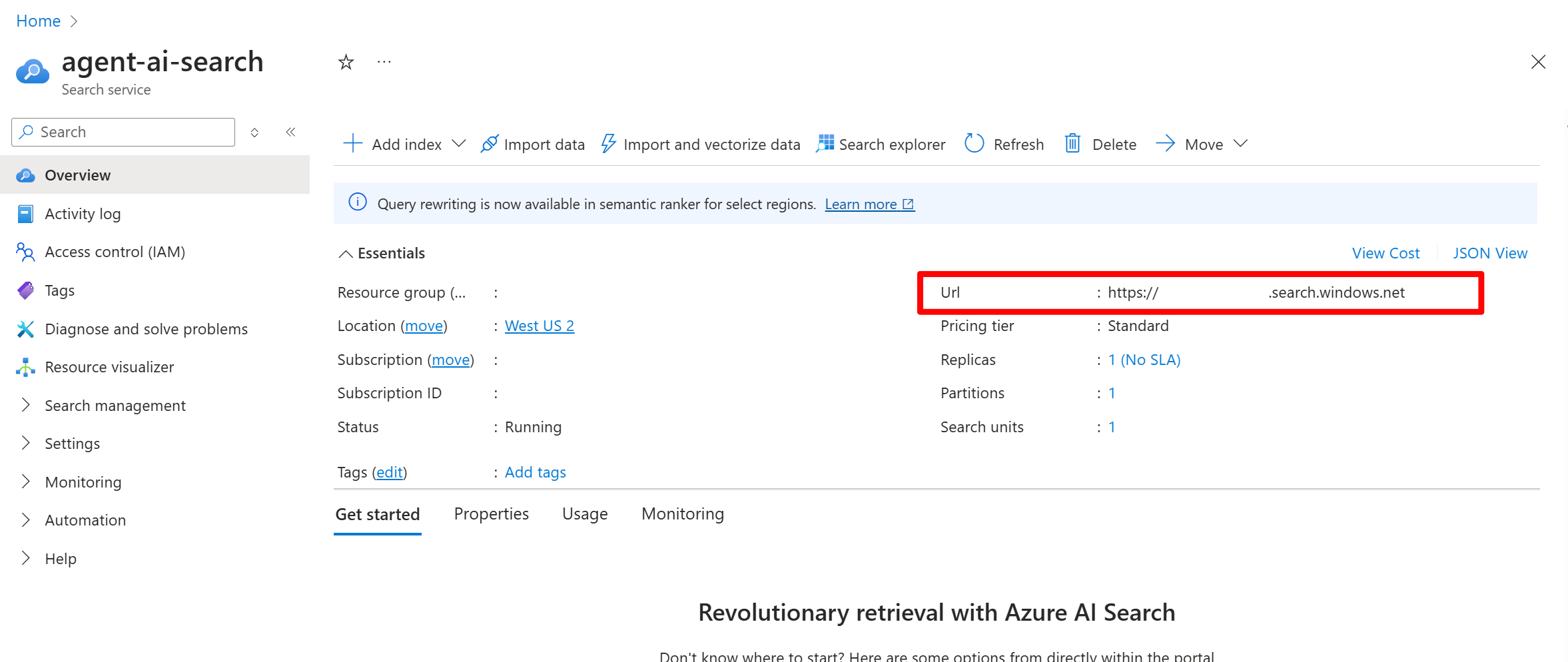
A screenshot of an AI Search resource Overview tab in the Azure portal.
  1. To get the API key:
    1. From the left pane, select Settings > Keys.
    2. Select Both to enable both key-based and keyless authentication, which is recommended for most scenarios.
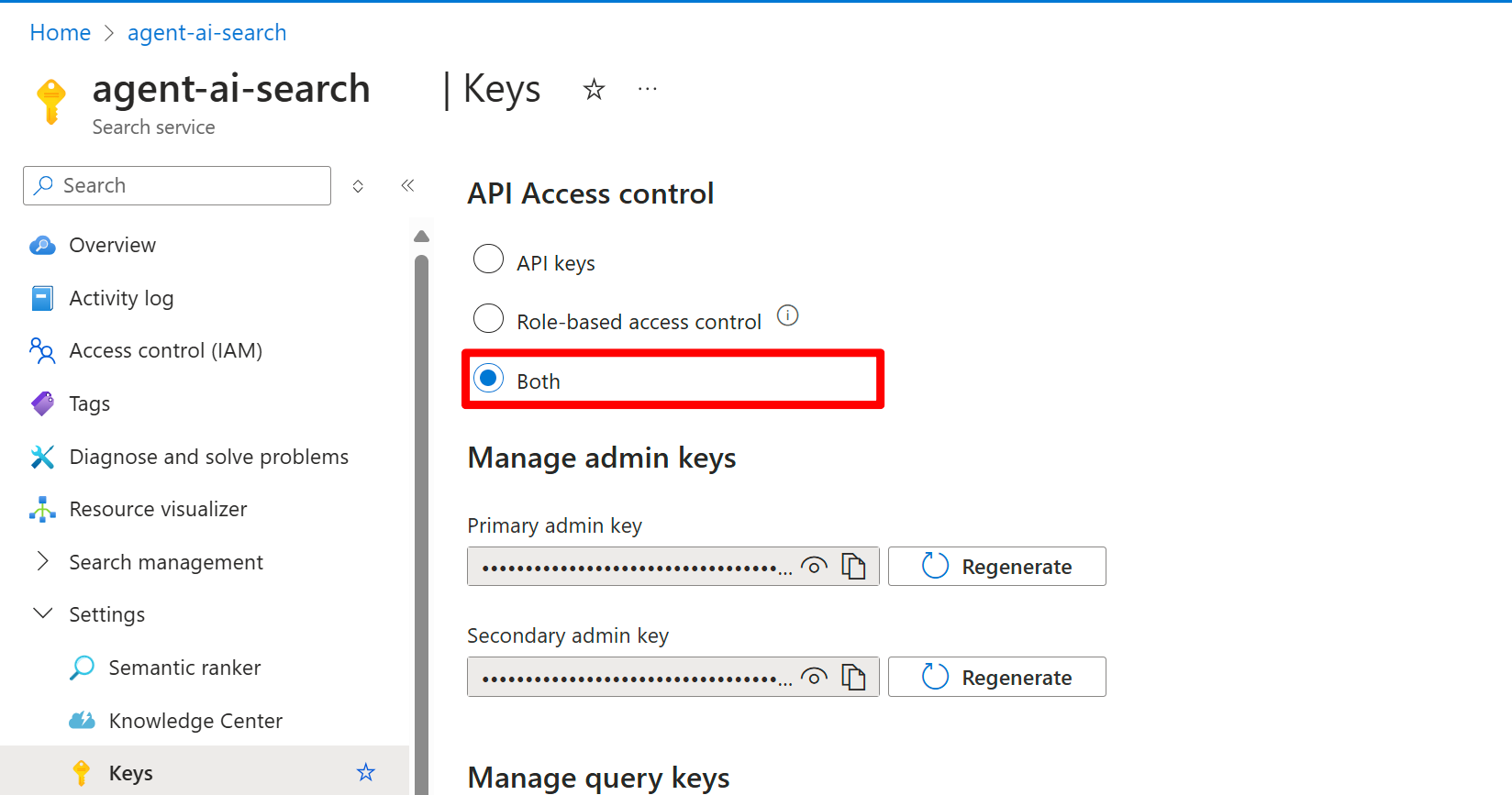
A screenshot of an AI Search resource Keys tab in the Azure portal.
  1. Make a note of one of the keys under Manage admin keys.

Create a project connection

Create the project connection by using the search service details you gathered. Use one of the following options.
Create the following connection.yml file:You can use a YAML configuration file for both key-based and keyless authentication. Replace the name, endpoint, and api_key (optional) placeholders with your search service details. For more information, see the Azure AI Search connection YAML schema.Here’s a key-based example:
name: my_project_acs_connection_keys
type: azure_ai_search
endpoint: https://contoso.search.windows.net/
api_key: XXXXXXXXXXXXXXX
Don’t put real keys in source control. Store secrets in a secure store (for example, Azure Key Vault) and inject them at deployment time.
Here’s a keyless example:
name: my_project_acs_connection_keyless
type: azure_ai_search
endpoint: https://contoso.search.windows.net/
Then, run the following command:Replace the placeholders with the resource group and project name.
az ml connection create --file connection.yml --resource-group <resource-group> --workspace-name <project-name>

Confirm the connection ID

If you use the REST or TypeScript sample, you need the project connection ID. Python
import os
from dotenv import load_dotenv
from azure.identity import DefaultAzureCredential
from azure.ai.projects import AIProjectClient

load_dotenv()

project_client = AIProjectClient(
  endpoint=os.environ["FOUNDRY_PROJECT_ENDPOINT"],
  credential=DefaultAzureCredential(),
)

connection = project_client.connections.get(os.environ["AZURE_AI_SEARCH_CONNECTION_NAME"])
print(connection.id)
C#
var projectEndpoint = System.Environment.GetEnvironmentVariable("FOUNDRY_PROJECT_ENDPOINT");
var aiSearchConnectionName = System.Environment.GetEnvironmentVariable("AZURE_AI_SEARCH_CONNECTION_NAME");

AIProjectClient projectClient = new(endpoint: new Uri(projectEndpoint), tokenProvider: new DefaultAzureCredential());
AIProjectConnection connection = projectClient.Connections.GetConnection(connectionName: aiSearchConnectionName);
Console.WriteLine(connection.Id);

Troubleshooting

IssueCauseResolution
Response has no citationsAgent instructions don’t request citationsUpdate your agent instructions to explicitly request citations in responses.
Response has no citations (streaming)Annotations not capturedConfirm you receive url_citation annotations when streaming. Check your stream processing logic.
Tool can’t access the index (401/403)Missing RBAC roles (keyless auth)Assign the Search Index Data Contributor and Search Service Contributor roles to the Foundry project’s managed identity. See Azure RBAC in Foundry.
Tool can’t access the index (401/403)Invalid or disabled API keyConfirm the API key is correct and enabled in the Azure AI Search resource.
Tool returns “index not found”Index name mismatchConfirm AI_SEARCH_INDEX_NAME matches the exact index name in your Azure AI Search resource (case-sensitive).
Tool returns “index not found”Wrong connection endpointConfirm the project connection points to the Azure AI Search resource that contains the index.
Search returns no resultsQuery doesn’t match indexed contentVerify the index contains the expected data. Use Azure AI Search’s test query feature to validate.
Slow search performanceIndex not optimizedReview index configuration, consider adding semantic ranking, or optimize the index schema.