Items marked (preview) in this article are currently in public preview. This preview is provided without a service-level agreement, and we don’t recommend it for production workloads. Certain features might not be supported or might have constrained capabilities. For more information, see Supplemental Terms of Use for Microsoft Azure Previews.
Foundry itself doesn’t provide automatic failover or disaster recovery.
Prerequisites
- An Azure subscription. If you don’t have one, create a free account.
- A Microsoft Foundry account and project. For more information, see the Microsoft Foundry Quickstart.
- Azure CLI installed (optional, for applying resource locks via command line).
- Appropriate RBAC roles:
- Owner or Contributor on the resource group to deploy and configure resources.
- User Access Administrator to assign RBAC roles to managed identities.
- Cosmos DB Operator for Azure Cosmos DB configuration.
- Search Service Contributor for Azure AI Search configuration.
- Storage Account Contributor for Azure Storage configuration.
Microsoft and you jointly operate the Foundry Agent Service. Microsoft runs the control plane and capability host platform. You own the durability of stateful dependencies (Azure Cosmos DB, Azure AI Search, Azure Storage) when you use Standard agent deployment mode. In Basic mode, Microsoft manages those data components and recovery options are limited. This shared responsibility model means your HA/DR design must cover each customer-managed component individually.
Identify Azure services for Foundry
Foundry is an Azure native service with fewer implicit dependencies than the earlier workspace model. Foundry projects can attach resources based on workload patterns, such as retrieval, orchestration, monitoring, and integration. Treat attached resources as optional unless your workload requires them. Service categories include:- Platform infrastructure (Microsoft-managed): Control plane and project metadata service components that Microsoft operates regionally.
- Optional workload and integration resources (customer-managed): Azure Storage, Azure Key Vault, Azure Container Registry (ACR), Application Insights, Azure Logic Apps, Azure Functions, Azure AI Search, Azure Cosmos DB, Azure Event Grid, SharePoint, Microsoft Purview (explicit connection), and other connection targets.
- Connections: Configuration objects that reference external Azure or SaaS services. You own their high availability configuration.
| Resource type | Example services | Managed by | Notes on availability |
|---|---|---|---|
| Platform infrastructure | Foundry control plane, project metadata | Microsoft | Regional; no customer action for zone configuration. |
| State stores (Standard agent mode) | Azure Cosmos DB, Azure AI Search, Azure Storage | You | Configure redundancy, backup, replication. |
| Security and secrets | Azure Key Vault | You | Automatic zone redundancy when supported; configure RBAC and purge protection. |
| Monitoring | Application Insights | You | Consider multiregion instances or failover strategy. |
| Image and artifact registry | Azure Container Registry | You | Use geo-replication as needed. |
| Integration and workflow | Logic Apps, Functions, Event Grid | You | Align region and DR strategy with agent dependencies. |
| Compliance and data mapping | Microsoft Purview (connected) | You | Enable continuity for eDiscovery scenarios. |
| Other knowledge and tool sources | SharePoint, custom APIs | You | Configure per service HA. |
Prevent disasters and data loss
Prevention is the primary defense against outages. Apply these recommendations to reduce the likelihood of incidents and design resiliency into your workload. For more information, see Design for resiliency.Prevent resource deletion
To prevent most accidental deletions, apply delete resource locks to critical resources. Locks protect against resource-level deletion but not data plane operations. Apply delete locks to these resources. The following table describes the protections and limitations for each resource:| Resource | Protection provided | Limitations |
|---|---|---|
| Foundry account | Prevents deletion of account, projects, models, connections, and agent capability hosts. | Doesn’t protect individual agents or threads. |
| Azure Cosmos DB account | Prevents deletion of account, enterprise_memory database, and containers. | Doesn’t protect data within containers. |
| Azure AI Search service | Prevents deletion of the search service instance. | Doesn’t protect indexes or data within indexes. |
| Azure Storage account | Prevents deletion of account and blob containers. | Doesn’t protect individual blobs. Users with the Owner role can remove the lock before deleting a container. |
denyAction effect to block resource provider delete requests. This layered approach strengthens protection regardless of each resource’s recovery capabilities.
The following Azure CLI command applies a delete lock to a Foundry account:
Implement least privilege access
Use Azure role-based access control (RBAC) to limit access to control and data planes. Grant only required permissions and audit them regularly. In production, don’t grant standing delete permissions on these resources to any principal. For data plane access to state stores, only the project’s managed identity should have standing write permissions. You can also destroy data through Agent Service REST APIs. Built-in AI roles like Foundry User can delete operational data by using these APIs or the Foundry portal. Accidents or abuse of these APIs can create recovery needs. No built-in AI role is read only for these data plane operations. For more information, see Azure AI Foundry REST API reference. Create custom roles to limit access to theseMicrosoft.CognitiveServices/*/write data actions.
The Foundry RBAC roles were recently renamed. Foundry User, Foundry Owner, Foundry Account Owner, and Foundry Project Manager were previously named Azure AI User, Azure AI Owner, Azure AI Account Owner, and Azure AI Project Manager. You might still see the previous names in some places while the rename rolls out. The role IDs and core permissions are unchanged by the rename.
Implement the single responsibility principle
Dedicate your Azure Cosmos DB account, Azure AI Search service, and Azure Storage account exclusively to your workload’s AI Agent Service. Sharing these resources with other Foundry accounts or workload components increases risk through broader permission surfaces and a larger blast radius. Unrelated operations from one workload should never remove or corrupt agent state in another workload. This separation also allows you to make per‑workload recovery decisions without needing to take an all-or-nothing approach.Use zone-redundant configurations
Use zone redundant configurations for your Azure Cosmos DB account, Azure AI Search service, and Azure Storage account. This setup protects against zone failures within a region. Zone redundant configurations don’t protect against full regional outages or human or automation errors. The Microsoft-hosted components of the Agent Service are zone redundant.Configure resources to support recovery
Configure these resources before an incident happens. The recovery steps in this guide assume you applied the following settings.| Resource | Recommended configurations | Purpose |
|---|---|---|
| Foundry account | Establish an explicit connection to Microsoft Purview. | Supports data continuity for compliance scenarios like eDiscovery requests after thread data is lost. |
| Foundry project | Use a user-assigned managed identity, not a system-assigned managed identity. | Supports restoration of access to agent dependencies without reapplying role assignments. |
| Foundry Agent Service | Use the Standard agent deployment mode. | Provides more recovery capabilities than Basic mode, which has almost no recovery options for resource loss. |
| Azure Cosmos DB | Enable Continuous backup with point-in-time restore. Select the 7-day or 30-day retention tier based on your recovery requirements. | Recover from accidental deletion of the enterprise_memory database, its containers, or the whole account. |
| Azure Cosmos DB | Use a unique, organization-specific name (for example, contoso-agents-cosmosdb). | During point-in-time restore, Cosmos DB creates a new account with the original name. If that name is already taken, the restore fails. |
| Azure Cosmos DB | Enable read replication to your designated failover region, and enable Service-Managed Failover. | Enables the Cosmos DB service to switch the write region from the primary region to the secondary region during a prolonged regional outage. |
| Azure AI Search | Use a unique, organization-specific name (for example, contoso-agents-search). | During restoration, a new service is created with the original name. If that name is already taken, the restore fails. |
| Azure Storage account | Use geo-zone-redundant storage (GZRS). Your workload’s recovery region can be the secondary region for this Storage account, but it’s not required. | Allows customer-managed failover to be initiated to the predetermined region. |
Deployment modes and recovery implications
In Standard deployment mode, you host agent state in your own Azure Cosmos DB, Azure AI Search, and Azure Storage accounts. This topology increases incident risk (for example, direct data deletion) but gives you control over recovery procedures. Basic mode provides almost no recovery capabilities for human or automation-based resource loss.Use user-assigned managed identities
When a component uses a managed identity to access a dependency, grant that identity the required role assignments. With a system-assigned managed identity, recreating the faulted resource generates a new principal ID. You must then reapply all role assignments on every dependency and delete orphaned assignments. Some dependencies might be owned by other teams, which adds coordination and delay during recovery. A user-assigned managed identity avoids this effort. After you restore the faulted resource, reattach the existing user-assigned managed identity. Existing role assignments remain valid.Avoid treating a single user-assigned managed identity as a universal identity for multiple unrelated uses.For example, assign a dedicated user-assigned managed identity per project. Even if two projects have identical role assignments today, treat that situation as temporary. Future divergence can grant unnecessary permissions to one project if they share an identity, violating least privilege. Separate identities also let dependency logs distinguish activity per project.
Use repeatable deployment techniques
Define the account, projects, capability host, and dependencies in infrastructure as code (IaC) such as Bicep or Terraform. Some recovery steps require redeploying resources exactly as they were. Treat IaC as the source of truth to reproduce configuration and role assignments quickly. Build your IaC modular so that you can independently deploy each project. Make agents redeployable. For ephemeral agents, existing application code is usually sufficient. For long‑lived agents, store their JSON definitions and knowledge or tool bindings in source control and automate deployment via pipeline calls to the Foundry APIs. Automatically update client configuration for new agent IDs. This process rehydrates agent definitions, knowledge files, and tool connections. Avoid untracked changes made directly in the Foundry portal or Azure portal. Untracked production changes make recovery slower and error-prone. If you still choose system-assigned identities (contrary to the recommendation to use user-assigned managed identities), design IaC to recreate, not mutate, each role assignment that references the project’s principal ID. The principal ID on role assignments is immutable and can’t be updated to a new value. Use aguid() expression that incorporates the principal ID so a regenerated identity produces a distinct role assignment name.
The following Bicep snippet shows a minimal template for Cosmos DB with continuous backup and a resource lock. Extend this template with Azure AI Search, Azure Storage (GZRS), and role assignments for your managed identity.
Minimize treating Azure AI Search as a primary data store
Azure AI Search is designed to hold a derived, query‑optimized projection of authoritative content that you store elsewhere. Don’t rely on it as the only location of knowledge assets. During recovery you must be able to recreate agents that reference file-based knowledge in either the production or recovery environment. User‑uploaded files attached within conversation threads generally can’t be recovered because they’re not registered or persisted outside the thread context. Set expectations that these attachments are transient and are lost in a disaster.Back up and restore agent data
Conversation thread history durability depends on the underlying Standard mode state stores: Cosmos DBenterprise_memory database, Azure AI Search indexes, and Storage blobs for attachments. There’s no built-in one-click export or import feature for complete conversation histories.
Back up agent definitions
Store agent JSON definitions and knowledge source references in source control. Use the Foundry REST API to periodically export agent configurations:- List your agents by calling the Agents API to retrieve agent IDs, names, tool bindings, and knowledge source configurations.
- Save each agent definition as a JSON file in your version control system.
- Include tool bindings, knowledge file references, and connection configurations alongside each agent definition.
- Automate this process in a CI/CD pipeline on a regular schedule (for example, daily or after each deployment).
Restore from Cosmos DB point-in-time backup
If theenterprise_memory database or its containers are accidentally deleted:
- Open the Azure portal and navigate to your Cosmos DB account.
- Select Point in time restore and choose a restore timestamp before the deletion occurred.
- Specify a new target account name for the restored data.
- After the restore completes, update the Foundry Agent Service connection to point to the restored Cosmos DB account.
- Verify agent functionality by running a test conversation in the restored environment.
Cosmos DB point-in-time restore creates a new account. You must update the Agent Service connection string and reapply role assignments if you use system-assigned managed identities. User-assigned managed identities reduce this overhead.
Preserve compliance data
Connect to Microsoft Purview to preserve lineage and classification metadata even if operational thread data is lost. This ensures eDiscovery and audit capabilities survive a disaster.Rebuild Azure AI Search indexes
If your Azure AI Search service is lost or corrupted, rebuild indexes from your authoritative data sources:- Create a new Azure AI Search service in the recovery region, or use the secondary service you provisioned in your multiregional deployment.
- Recreate index definitions from your IaC templates or source-controlled schema files.
- Repopulate indexes by running your data ingestion pipeline against the original data sources (for example, Azure Blob Storage, Azure SQL Database, or Cosmos DB).
- Update agent knowledge source references to point to the new search service endpoint.
- Verify index completeness by running representative search queries and comparing results against known baselines.
Plan for multiregional deployment
A multiregional deployment relies on creating Foundry resources and other infrastructure in two Azure regions. If a regional outage occurs, switch to the other region. When you plan where to deploy your resources, consider:- Regional availability: If possible, use a region in the same geographic area, not necessarily the closest one. To check regional availability for Foundry, see Azure products by region.
- Azure paired regions: Paired regions coordinate platform updates and prioritize recovery efforts where needed. However, not all regions are paired. For more information, see Azure paired regions.
-
Service availability: Decide whether to use hot/hot, hot/warm, or hot/cold for your solution’s resources.
- Hot/hot: Both regions are active at the same time, and either region is ready to use immediately.
- Hot/warm: The primary region is active. The secondary region has critical resources (for example, deployed models) ready to start. Deploy noncritical resources manually in the secondary region.
- Hot/cold: The primary region is active. The secondary region has Foundry and other resources deployed, along with the required data. Deploy resources such as models, model deployments, and pipelines manually.
| Strategy | Approximate RTO | Approximate RPO | Relative cost | Best for |
|---|---|---|---|---|
| Hot/hot | Minutes | Near zero | Highest: full duplicate resources running in both regions | Production workloads with zero-downtime requirements |
| Hot/warm | 30 minutes to 2 hours | Minutes to hours, depending on replication lag | Moderate: critical resources running, others on standby | Business-critical workloads that can tolerate brief disruption |
| Hot/cold | 2 to 8 hours | Hours, depending on backup frequency | Lowest: resources provisioned but not active | Development, staging, or cost-sensitive workloads with relaxed recovery targets |
| Azure service | Geo-replicated by | Configuration |
|---|---|---|
| Foundry projects | You | Create projects in the selected regions. |
| Key Vault | Microsoft | Use the same Azure Key Vault instance with the Foundry project and resources in both regions. Azure Key Vault automatically fails over to a secondary region. For more information, see Azure Key Vault availability and redundancy. |
| Storage account | You | Foundry projects don’t support default storage account failover using geo-redundant storage (GRS), geo-zone-redundant storage (GZRS), read-access geo-redundant storage (RA-GRS), or read-access geo-zone-redundant storage (RA-GZRS). Configure a storage account according to your needs, and use it for your project. All subsequent projects use the project’s storage account. For more information, see Azure Storage redundancy. |
| Azure Container Registry | You | Enable geo-replication on your Azure Container Registry instance to the paired region. Use the same instance for both projects. For more information, see Geo-replication in Azure Container Registry. |
| Application Insights | You | Create Application Insights for the project in both regions. To adjust the data retention period and details, see Data collection, retention, and storage in Application Insights. |
- Use Azure Resource Manager templates. Templates are infrastructure as code, and they let you quickly deploy services in both regions.
- To avoid drift between the two regions, update your continuous integration and deployment pipelines to deploy to both regions.
- Create role assignments for users in both regions.
- Create network resources such as Azure virtual networks and private endpoints for both regions. Ensure users can access both network environments. For example, configure VPN and DNS for both virtual networks.
Design for high availability
Configure availability zones
Some Azure services support availability zones. In regions that support availability zones, if a single zone fails, services configured for zone redundancy continue to operate. Services that aren’t zone-redundant might experience interruptions. The Microsoft-hosted components of the Agent Service are zone redundant. Verify that your customer-managed dependencies (Cosmos DB, AI Search, Storage) are also configured for zone redundancy. Learn more in Availability zone service support.Deploy critical components to multiple regions
Decide what level of business continuity you need. The level can differ between components of your solution. For example, you might use a hot/hot configuration for production pipelines or model deployments, and hot/cold for development. Foundry is a regional service that stores data on the service side and in a storage account in your subscription. If a regional disaster occurs, you can’t recover service data. You can recover data that the service stores in the storage account in your subscription if storage redundancy is enabled. Service-side data is mostly metadata like tags, asset names, and descriptions. Data in your storage account typically isn’t metadata, like uploaded data. For connections that are essential to business continuity:- Create two separate resources in two different regions (for example, two AI Services resources).
- Create two project connections, one for each regional resource.
- Verify both connections are active and accessible from your application.
- Deploy resources for any business-critical projects in both regions.
Isolate storage for large datasets
If you connect data to customize your AI application, you can use datasets in Azure AI and outside Azure AI. Dataset volume can be large, so keep this data in a separate storage account to limit blast radius and simplify replication.- Create a dedicated storage account for your large datasets, separate from the project’s primary storage.
- Evaluate the data replication strategy (LRS, GRS, GZRS) that makes the most sense for your recovery requirements.
- In the Foundry portal, create a connection to your data storage account. If you have multiple Foundry instances in different regions, you can point to the same storage account. Connections work across regions.
Monitor for early outage detection
Configure monitoring and alerting so your team detects regional degradation before it affects production workloads:- Enable Azure Service Health alerts for all Azure services in your Foundry workload. Service Health provides advance notice of planned maintenance and early warning of unplanned outages.
- Configure resource health alerts for your Cosmos DB, Azure OpenAI, and Storage accounts to detect individual resource failures.
- Set up Application Insights availability tests to probe your agent endpoints continuously from multiple geographic locations.
- Define alert action groups that notify your operations team through email, SMS, or your incident management system so failover decisions can be made quickly.
Configure model deployment resiliency
Azure OpenAI model deployments are a critical component of most Foundry workloads. Design your deployment topology for resiliency so that a regional outage or capacity constraint doesn’t take your application offline. This section covers Standard and Provisioned deployment strategies, API gateway patterns, and the supporting infrastructure that ties them together.Configure Standard deployments
Standard deployments offer the simplest path to resiliency because Data Zone and Global Standard options distribute requests across multiple regions automatically.If your data-residency requirements allow it, prefer Global Standard deployments. Data Zone deployments (US/EU) are the next best option for organizations that require data processing within a geographic boundary.
- Default to Data Zone deployments (US or EU options).
- Deploy two Azure OpenAI resources in the same Azure subscription. Place one resource in your preferred region and the other in your secondary (failover) region. Azure OpenAI allocates quota at the subscription-plus-region level, so both resources can share a subscription without affecting quota.
- Create one deployment for each model you plan to use in the primary region, and duplicate those model deployments in the secondary region. Allocate the full available quota in each Standard deployment. Full allocation provides higher throughput compared to splitting quota across multiple deployments.
- Select the deployment region based on your network topology. You can deploy an Azure OpenAI resource to any supported region and then create a private endpoint for that resource in a region closer to your application.
- After traffic enters the Azure OpenAI boundary, the service optimizes routing and processing across available compute in the data zone.
- Data Zone routing is more efficient and simpler than self-managed load balancing across multiple regional deployments.
- If a regional outage makes the primary deployment unreachable, route traffic to the secondary deployment in the passive region within the same subscription.
- Because both primary and secondary are Zone deployments, they draw from the same Zone capacity pool across all available regions in the Zone. The secondary deployment protects against the primary Azure OpenAI endpoint being unreachable.
- Use a Generative AI Gateway that supports load balancing and the circuit-breaker pattern, such as Azure API Management, in front of the Azure OpenAI endpoints to minimize disruption during a regional outage.
- If the quota in a given subscription is exhausted, deploy a new subscription in the same manner and place its endpoint behind the Generative AI Gateway.
Configure Provisioned deployments
Provisioned Throughput Unit (PTU) deployments guarantee dedicated capacity for latency-sensitive or mission-critical workloads. Combine an enterprise PTU pool with optional workload-specific deployments for maximum flexibility and resiliency.Create an enterprise PTU pool
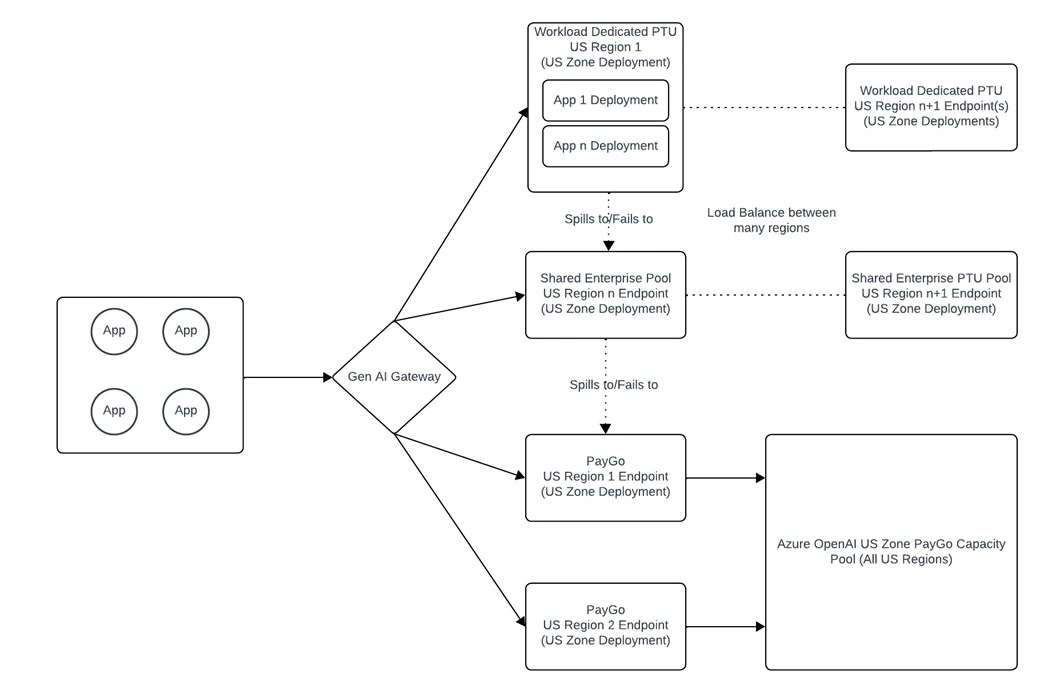
- For provisioned deployments, create a single Data Zone PTU deployment that serves as an enterprise pool of PTU. Use Azure API Management to manage traffic from multiple applications and to set throughput limits, logging, priority, and failover logic.
- Think of the enterprise PTU pool as a “private Standard deployment” that protects against the noisy-neighbor problem. When demand is high on Standard deployments, your organization has guaranteed, dedicated access to a capacity pool that only you can use.
- This approach gives you control over which applications experience increased latency first, allowing you to prioritize traffic to mission-critical applications.
- Provisioned deployments are backed by latency SLAs that make them preferable to Standard deployments for latency-sensitive workloads.
- Enterprise PTU deployments also achieve higher utilization rates because traffic is smoothed across application workloads, whereas individual workloads tend to produce more spikes.
- Place your primary enterprise PTU deployment in a different region than your primary Standard Zone deployment. If a regional outage occurs, you don’t lose access to both your PTU deployment and Standard Zone deployment simultaneously.
Workload-dedicated PTU deployments
Certain workloads might need their own dedicated provisioned deployment. If so, follow these guidelines:- Create a dedicated PTU deployment for that application.
- Place the workload PTU pool in a different region than the enterprise PTU pool to protect against regional failures. For example, put the workload PTU pool in Region A and the enterprise PTU pool in Region B.
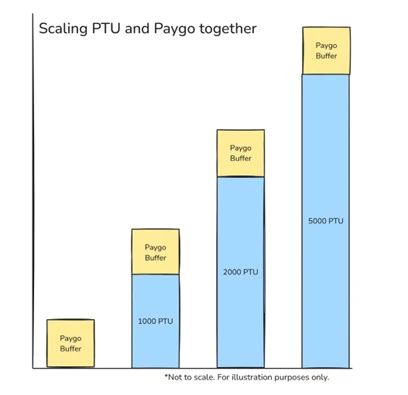
- Configure the failover chain so the workload-dedicated deployment fails over first to the enterprise PTU pool and then to the Standard deployment. When utilization of the workload PTU deployment exceeds 100%, requests are still serviced by PTU endpoints, maintaining a higher latency SLA for that application.
Set up a Generative AI Gateway
A Generative AI Gateway is a reverse proxy, typically Azure API Management, that sits in front of your Azure OpenAI endpoints and provides:- Load balancing across multiple Azure OpenAI endpoints.
- Circuit-breaker pattern to detect and route around unhealthy endpoints automatically.
- Rate limiting and throttling to protect backends from traffic surges.
- Centralized logging and observability across all model endpoints.
- Priority routing so mission-critical applications get capacity first during contention.
Supporting infrastructure for model endpoints
The infrastructure that supports your Azure OpenAI deployment architecture needs to be factored into your resiliency design. The specific components depend on whether applications consume Azure OpenAI over the internet or over a private network.Consumption through the Microsoft public backbone
Organizations consuming the service through the Microsoft public backbone should consider these design elements:- Deploy the Generative AI Gateway in a manner that ensures availability during an Azure regional outage. If you use Azure API Management, deploy separate APIM instances in multiple regions or use the multi-region gateway feature.
- Use a public global server load balancer to distribute traffic across multiple Generative AI Gateway instances in either an active/active or active/passive manner. Azure Front Door can fulfill this role.

Consumption through private networking
Organizations consuming the service through a private network should consider these design elements:- Deploy hybrid connectivity so it protects against the failure of an Azure region. Hybrid connectivity components include your on-premises network infrastructure and Microsoft ExpressRoute or VPN.
- Deploy the Generative AI Gateway for availability during regional outages. If you use Azure API Management, deploy separate APIM instances in multiple regions or use the multi-region gateway feature.
- Deploy Azure Private Link private endpoints for each Azure OpenAI instance in each Azure region. For Azure Private DNS, use a split-brain DNS approach if all application traffic flows through the Generative AI Gateway. This approach provides extra protection against a regional failure. If direct access outside the gateway is required, update Private DNS records manually during an Azure region loss.
- Use a private global server load balancer to distribute traffic across the Generative AI Gateway instances in an active/active or active/passive manner. Azure doesn’t provide a native global server load balancer for workloads that require private DNS resolution. In place of a global server load balancer, organizations can achieve an active/passive pattern through DNS record toggling for the Generative AI Gateway endpoint.
Initiate a failover
Switch to the failover project
When the primary project is unavailable, switch to the secondary project:- Identify your secondary project’s endpoint and connection details from your IaC configuration or deployment documentation.
-
Update your application configuration to point to the secondary project. Use environment variables or centralized configuration (such as Azure App Configuration) rather than hard-coded project references so that switching regions requires only a configuration change:
- Update the Foundry project endpoint URL to the secondary region.
- If you use the Generative AI Gateway, verify that the circuit breaker has already routed traffic to the secondary Azure OpenAI endpoints.
- Update any direct service connections (Cosmos DB, AI Search, Storage) if they aren’t shared across regions.
- Verify connectivity by running a test request against the secondary project endpoint.
- Resubmit any in-progress jobs, because jobs running during a service outage don’t automatically transition to the secondary project.
Verify failover readiness
Periodically validate that your secondary environment can handle production workloads. Perform these verification steps on a regular schedule (for example, quarterly):- Confirm that the secondary region’s Foundry project, deployed models, and connections are current and match the primary region’s configuration.
- Run a representative agent or pipeline job in the secondary project to verify end-to-end functionality, including access to Azure Cosmos DB, Azure AI Search, and Azure Storage.
- Validate that all RBAC role assignments for managed identities, users, and service principals are in place in the secondary region.
- Test DNS resolution and network connectivity, including private endpoints and VPN paths, from client environments to the secondary region.
- Document any gaps and update your IaC templates or deployment pipelines to close them before the next review cycle.
Recover deleted resources
If you delete a project and its resources, some resources support soft delete and can be recovered. Projects don’t support soft delete, so they can’t be recovered after deletion. The following table shows which services support soft delete.| Service | Soft delete enabled |
|---|---|
| Foundry project | No |
| Azure Storage | See Recover a deleted storage account |
| Azure Key Vault | Yes |
Troubleshoot common issues
| Issue | Possible cause | Resolution |
|---|---|---|
| Resource lock doesn’t prevent deletion | Lock applied at wrong scope | Verify the lock is applied directly to the resource, not just the resource group. Use az lock list --resource-group <rg> to confirm. |
| RBAC permission denied when configuring Cosmos DB | Missing role assignment | Ensure you have Cosmos DB Operator or Contributor role on the Cosmos DB account. |
| Failover project can’t access shared resources | Managed identity mismatch | If you use system-assigned identity, reapply role assignments. Consider switching to user-assigned managed identity. |
| Point-in-time restore fails for Cosmos DB | Continuous backup not enabled | Enable continuous backup before an incident occurs. This setting can’t be applied retroactively. |
| Cosmos DB restore fails with naming conflict | Account name already in use | Use a unique, organization-specific name when you first create the account. If a conflict occurs, restore to a different account name and update Agent Service connections. |
| Secondary deployment returns quota errors | Quota not allocated in failover region | Verify that you allocated full quota to both primary and secondary Azure OpenAI deployments. Check quota with az cognitiveservices account list-usage --name <account-name> --resource-group <resource-group>. |
| DNS resolution fails after region failover | Private DNS records not updated | If you use Private Link without a Generative AI Gateway, manually update Private DNS records to point to the secondary region’s private endpoints. |
| Agent can’t connect after Cosmos DB failover | Connection string points to old endpoint | Update the Agent Service connection to reference the new Cosmos DB account endpoint. Verify with a test conversation. |
| APIM gateway returns 503 during regional outage | Circuit breaker not configured | Configure the circuit breaker pattern in your Generative AI Gateway to automatically route around unhealthy backends. |
Related content
- Azure service-level agreements
- Azure Cosmos DB high availability
- Azure AI Search service reliability
- Azure Storage redundancy
- Azure Key Vault availability and redundancy
- Recover or purge deleted Foundry resources
- Generative AI Gateway guidance
- Azure API Management multi-region deployment
- Azure Front Door overview
- Design for high availability with ExpressRoute