Use the GPT Realtime API for speech and audio
This article refers to the Microsoft Foundry (new) portal.
| Connection method | Use case | Latency | Best for |
|---|---|---|---|
| WebRTC | Client-side applications | ~100ms | Web apps, mobile apps, browser-based experiences |
| WebSocket | Server-to-server | ~200ms | Backend services, batch processing, custom middleware |
| SIP | Telephony integration | Varies | Call centers, IVR systems, phone-based applications |
Supported models
The GPT real-time models are available for global deployments in East US 2 and Sweden Central regions.gpt-4o-mini-realtime-preview(2024-12-17)gpt-4o-realtime-preview(2024-12-17and2025-06-03)gpt-realtime(2025-08-28)gpt-realtime-mini(2025-10-06)gpt-realtime-mini-2025-12-15(2025-12-15)
Token limits vary by model:
- Preview models (gpt-4o-realtime-preview, gpt-4o-mini-realtime-preview): Input 128,000 / Output 4,096 tokens
- GA models (gpt-realtime, gpt-realtime-mini): Input 28,672 / Output 4,096 tokens
2025-04-01-preview in the URL for preview models. For GA models, use the GA API version (without the -preview suffix) when possible.
See the models and versions documentation for more information.
Get started
Before you can use GPT real-time audio, you need:- An Azure subscription - Create one for free.
- A Microsoft Foundry resource - Create a Microsoft Foundry resource in one of the supported regions.
- An API key or Microsoft Entra ID credentials for authentication. For production applications, we recommend using Microsoft Entra ID for enhanced security.
- A deployment of the
gpt-4o-realtime-preview,gpt-4o-mini-realtime-preview,gpt-realtime,gpt-realtime-mini, orgpt-realtime-mini-2025-12-15model in a supported region as described in the supported models section in this article.- In the Microsoft Foundry portal, load your project. Select Build in the upper right menu, then select the Models tab on the left pane, and Deploy a base model. Search for the model you want, and select Deploy on the model page.
- For steps to deploy and use the
gpt-4o-realtime-preview,gpt-4o-mini-realtime-preview,gpt-realtime,gpt-realtime-mini, orgpt-realtime-mini-2025-12-15model, see the real-time audio quickstart. - Try the WebRTC via HTML and JavaScript example to get started with the Realtime API via WebRTC.
- The Azure-Samples/aisearch-openai-rag-audio repo contains an example of how to implement RAG support in applications that use voice as their user interface, powered by the GPT realtime API for audio.
Session configuration
Often, the first event sent by the caller on a newly established/realtime session is a session.update payload. This event controls a wide set of input and output behavior, with output and response generation properties then later overridable using the response.create event.
The session.update event can be used to configure the following aspects of the session:
- Transcription of user input audio is opted into via the session’s
input_audio_transcriptionproperty. Specifying a transcription model (such aswhisper-1) in this configuration enables the delivery ofconversation.item.audio_transcription.completedevents. - Turn handling is controlled by the
turn_detectionproperty. This property’s type can be set tonone,semantic_vad, orserver_vadas described in the voice activity detection (VAD) and the audio buffer section. - Tools can be configured to enable the server to call out to external services or functions to enrich the conversation. Tools are defined as part of the
toolsproperty in the session configuration.
session.update that configures several aspects of the session, including tools, follows. All session parameters are optional and can be omitted if not needed.
session.updated event to confirm the session configuration.
Out-of-band responses
By default, responses generated during a session are added to the default conversation state. In some cases, you might want to generate responses outside the default conversation. This can be useful for generating multiple responses concurrently or for generating responses that don’t affect the default conversation state. For example, you can limit the number of turns considered by the model when generating a response. You can create out-of-band responses by setting theresponse.conversation field to the string none when creating a response with the response.create client event.
In the same response.create client event, you can also set the response.metadata field to help you identify which response is being generated for this client-sent event.
response.done event, the response contains the metadata you provided. You can identify the corresponding response for the client-sent event via the response.metadata field.
If you create any responses outside the default conversation, be sure to always check the
response.metadata field to help you identify the corresponding response for the client-sent event. You should even check the response.metadata field for responses that are part of the default conversation. That way, you can ensure that you’re handling the correct response for the client-sent event.Custom context for out-of-band responses
You can also construct a custom context that the model uses outside of the session’s default conversation. To create a response with custom context, set theconversation field to none and provide the custom context in the input array. The input array can contain new inputs or references to existing conversation items.
Voice activity detection (VAD) and the audio buffer
The server maintains an input audio buffer containing client-provided audio that hasn’t yet been committed to the conversation state. One of the key session-wide settings isturn_detection, which controls how data flow is handled between the caller and model. The turn_detection setting can be set to none, semantic_vad, or server_vad (to use server-side voice activity detection).
server_vad: Automatically chunks the audio based on periods of silence.semantic_vad: Chunks the audio when the model believes based on the words said by the user that they have completed their utterance.
server_vad) is enabled, and the server automatically generates responses when it detects the end of speech in the input audio buffer. You can change the behavior by setting the turn_detection property in the session configuration.
Manual turn handling (push-to-talk)
You can disable automatic voice activity detection by setting theturn_detection type to none. When VAD is disabled, the server doesn’t automatically generate responses when it detects the end of speech in the input audio buffer.
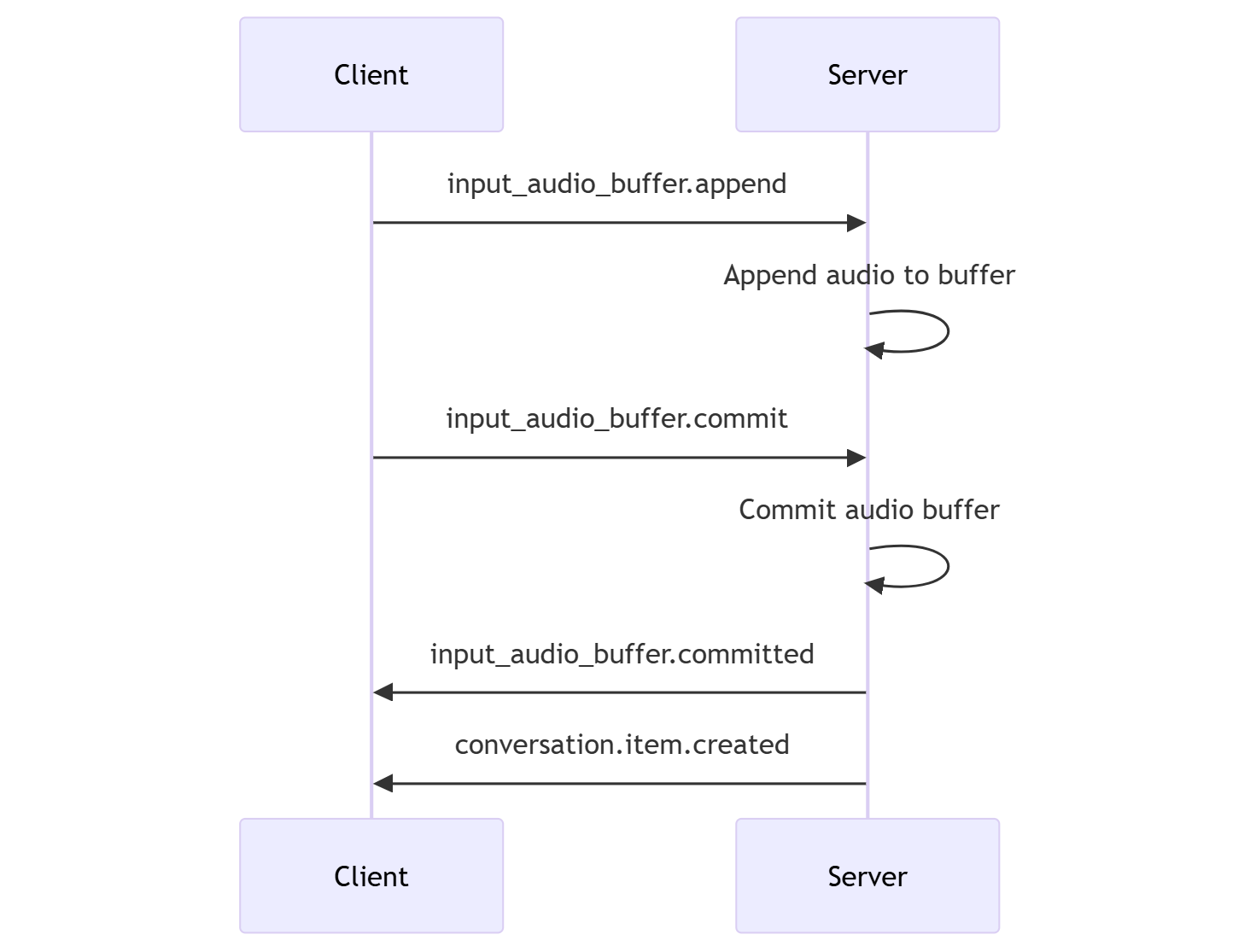
The session relies on caller-initiated input_audio_buffer.commit and response.create events to progress conversations and produce output. This setting is useful for push-to-talk applications or situations that have external audio flow control (such as caller-side VAD component). These manual signals can still be used in server_vad mode to supplement VAD-initiated response generation.
- The client can append audio to the buffer by sending the
input_audio_buffer.appendevent. - The client commits the input audio buffer by sending the
input_audio_buffer.commitevent. The commit creates a new user message item in the conversation. - The server responds by sending the
input_audio_buffer.committedevent. - The server responds by sending the
conversation.item.createdevent.
Server decision mode
You can configure the session to use server-side voice activity detection (VAD). Set theturn_detection type to server_vad to enable VAD.
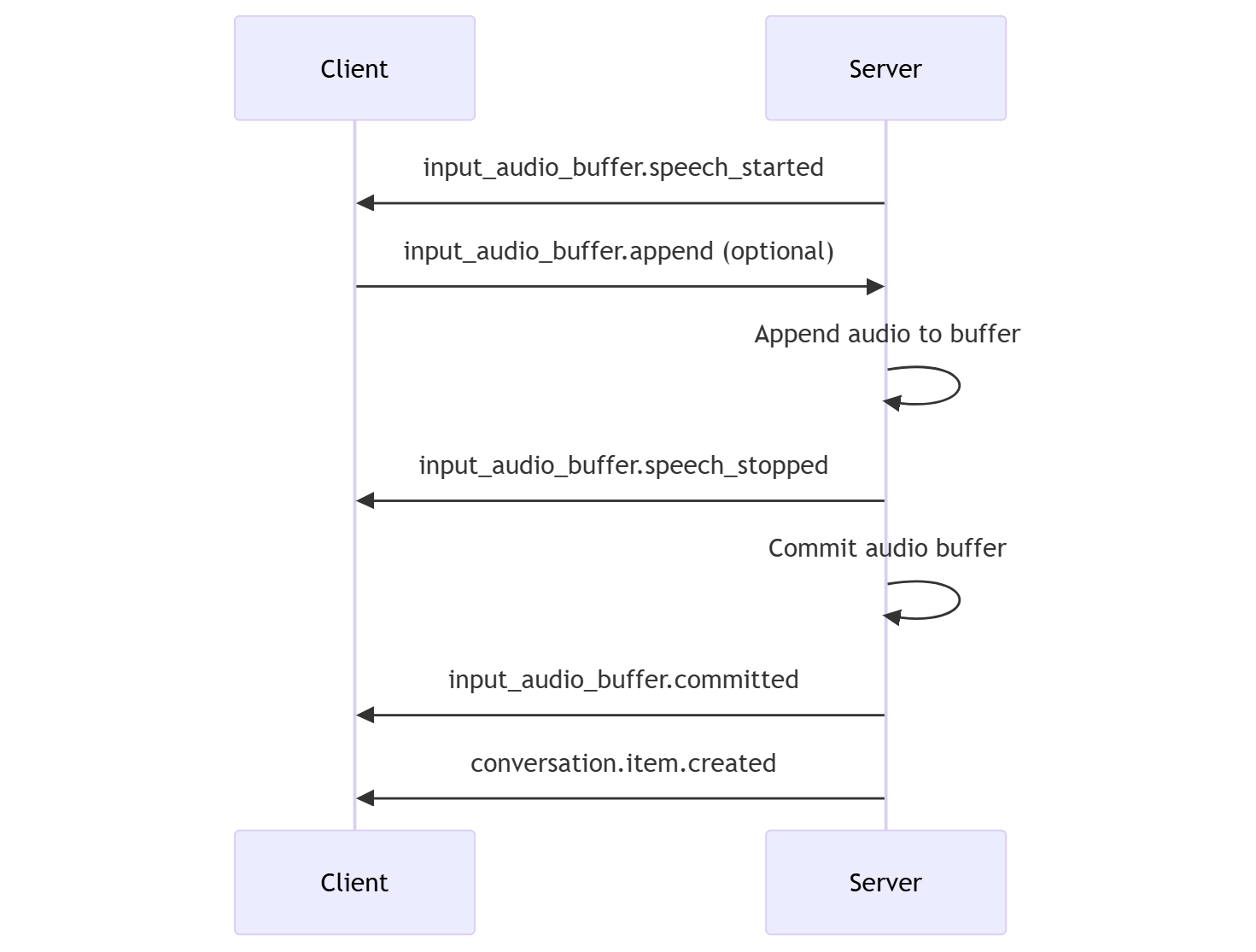
In this case, the server evaluates user audio from the client (as sent via input_audio_buffer.append) using a voice activity detection (VAD) component. The server automatically uses that audio to initiate response generation on applicable conversations when an end of speech is detected. Silence detection for the VAD can also be configured when specifying server_vad detection mode.
- The server sends the
input_audio_buffer.speech_startedevent when it detects the start of speech. - At any time, the client can optionally append audio to the buffer by sending the
input_audio_buffer.appendevent. - The server sends the
input_audio_buffer.speech_stoppedevent when it detects the end of speech. - The server commits the input audio buffer by sending the
input_audio_buffer.committedevent. - The server sends the
conversation.item.createdevent with the user message item created from the audio buffer.
Semantic VAD
Semantic VAD detects when the user has finished speaking based on the words they have uttered. The input audio is scored based on the probability that the user is done speaking. When the probability is low the model will wait for a timeout. When the probability is high there’s no need to wait. With the (semantic_vad) mode, the model is less likely to interrupt the user during a speech-to-speech conversation, or chunk a transcript before the user is done speaking.
VAD without automatic response generation
You can use server-side voice activity detection (VAD) without automatic response generation. This approach can be useful when you want to implement some degree of moderation. Setturn_detection.create_response to false via the session.update event. VAD detects the end of speech but the server doesn’t generate a response until you send a response.create event.
Conversation and response generation
The GPT real-time audio models are designed for real-time, low-latency conversational interactions. The API is built on a series of events that allow the client to send and receive messages, control the flow of the conversation, and manage the state of the session.Conversation sequence and items
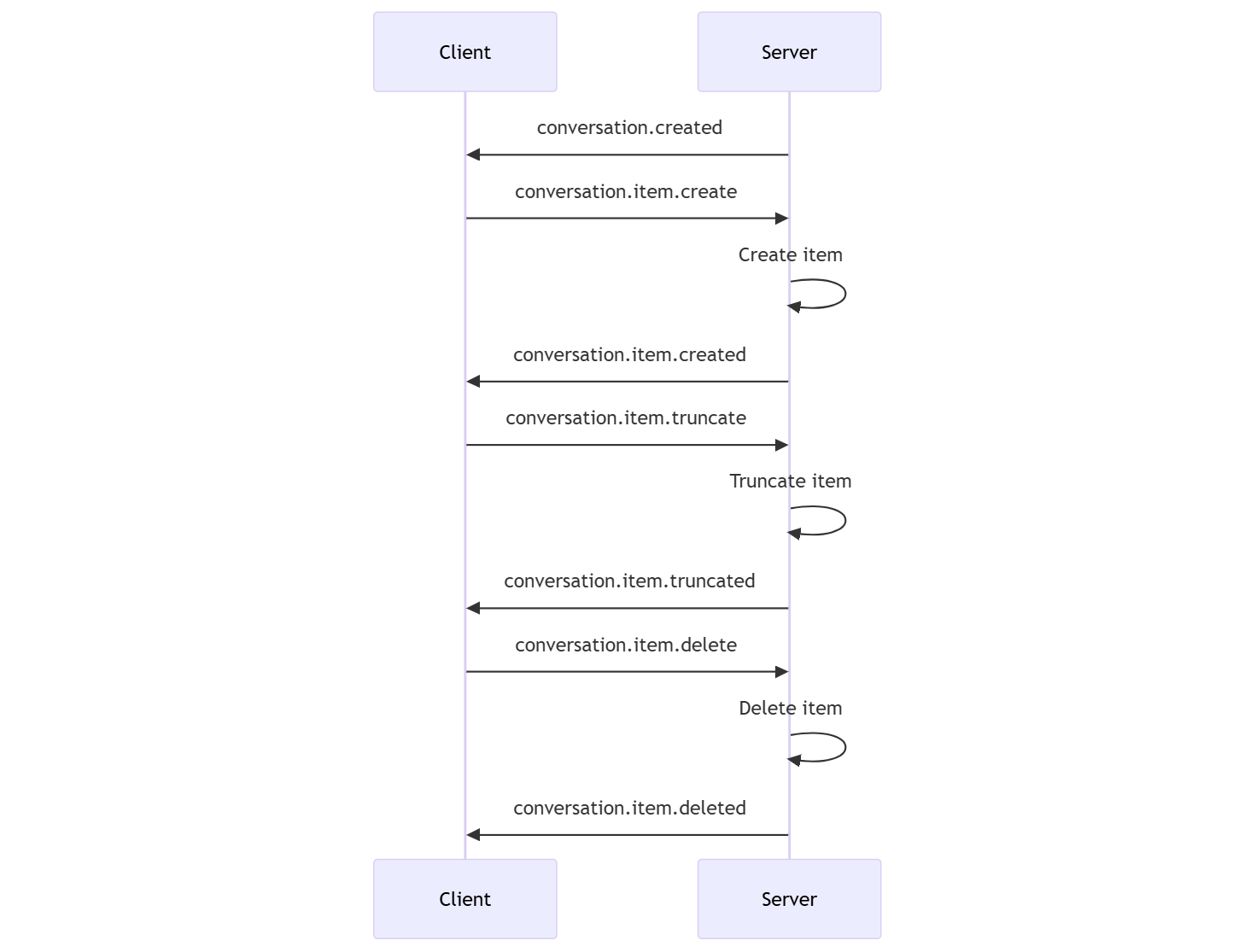
You can have one active conversation per session. The conversation accumulates input signals until a response is started, either via a direct event by the caller or automatically by voice activity detection (VAD).- The server
conversation.createdevent is returned right after session creation. - The client adds new items to the conversation with a
conversation.item.createevent. - The server
conversation.item.createdevent is returned when the client adds a new item to the conversation.
- The client truncates an earlier assistant audio message item with a
conversation.item.truncateevent. - The server
conversation.item.truncatedevent is returned to sync the client and server state. - The client deletes an item in the conversation with a
conversation.item.deleteevent. - The server
conversation.item.deletedevent is returned to sync the client and server state.
Response generation
To get a response from the model:- The client sends a
response.createevent. The server responds with aresponse.createdevent. The response can contain one or more items, each of which can contain one or more content parts. - Or, when using server-side voice activity detection (VAD), the server automatically generates a response when it detects the end of speech in the input audio buffer. The server sends a
response.createdevent with the generated response.
Response interruption
The clientresponse.cancel event is used to cancel an in-progress response.
A user might want to interrupt the assistant’s response or ask the assistant to stop talking. The server produces audio faster than real-time. The client can send a conversation.item.truncate event to truncate the audio before it’s played.
- The server’s understanding of the audio with the client’s playback is synchronized.
- Truncating audio deletes the server-side text transcript to ensure there isn’t text in the context that the user doesn’t know about.
- The server responds with a
conversation.item.truncatedevent.
Image input
Thegpt-realtime, gpt-realtime-mini, and gpt-realtime-mini-2025-12-15 models support image input as part of the conversation. The model can ground responses in what the user is currently seeing. You can send images to the model as part of a conversation item. The model can then generate responses that reference the images.
The following example json body adds an image to the conversation:
MCP server support
To enable MCP support in a Realtime API session, provide the URL of a remote MCP server in your session configuration. This allows the API service to automatically manage tool calls on your behalf. You can easily enhance your agent’s functionality by specifying a different MCP server in the session configuration—any tools available on that server will be accessible immediately. The following example json body sets up an MCP server:Text-in, audio-out example
Here’s an example of the event sequence for a simple text-in, audio-out conversation: When you connect to the/realtime endpoint, the server responds with a session.created event. The maximum session duration is 30 minutes.
response.create event in JSON format:
response.created event.
response.output_item.addedconversation.item.createdresponse.content_part.addedresponse.audio_transcript.deltaresponse.audio_transcript.deltaresponse.audio_transcript.deltaresponse.audio_transcript.deltaresponse.audio_transcript.deltaresponse.audio.deltaresponse.audio.deltaresponse.audio_transcript.deltaresponse.audio.deltaresponse.audio_transcript.deltaresponse.audio_transcript.deltaresponse.audio_transcript.deltaresponse.audio.deltaresponse.audio.deltaresponse.audio.deltaresponse.audio.deltaresponse.audio.doneresponse.audio_transcript.doneresponse.content_part.doneresponse.output_item.doneresponse.done
response.done event with the completed response. This event contains the audio transcript “Hello! How can I assist you today?”
Troubleshooting
This section provides guidance for common issues when using the Realtime API.Connection errors
| Error | Cause | Resolution |
|---|---|---|
| WebSocket connection failed | Network or firewall blocking WebSocket connections | Ensure port 443 is open and check proxy settings. Verify your endpoint URL is correct. |
| 401 Unauthorized | Invalid or expired API key, or incorrect Microsoft Entra ID configuration | Regenerate your API key in the Azure portal, or verify your managed identity configuration. |
| 429 Too Many Requests | Rate limit exceeded | Implement exponential backoff retry logic. Check your quota and limits. |
| Connection timeout | Network latency or server unavailability | Retry the connection. If using WebSocket, consider switching to WebRTC for lower latency. |
Audio format issues
The Realtime API expects audio in a specific format:- Format: PCM 16-bit (pcm16)
- Channels: Mono (single channel)
- Sample rate: 24kHz
- Verify your audio is in the correct format before sending.
- When using JSON transport, ensure audio chunks are base64-encoded.
- Check that audio chunks aren’t too large; send audio in small increments (recommended: 100ms chunks).
Session timeout
Realtime sessions have a maximum duration of 30 minutes. To handle long interactions:- Monitor the
session.createdevent’sexpires_atfield. - Implement session renewal logic before timeout.
- Save conversation context to restore state in a new session.
Related content
- Try the real-time audio quickstart
- See the Realtime API reference
- Learn more about Azure OpenAI quotas and limits