Use the GPT Realtime API via WebSockets
This article refers to the Microsoft Foundry (new) portal.
| Protocol | Best for | Latency | Complexity |
|---|---|---|---|
| WebRTC | Client-side apps (web, mobile) | Lowest (~50-100ms) | Higher |
| WebSocket | Server-to-server, batch processing | Moderate (~100-300ms) | Lower |
| SIP | Telephony integration | Varies | Highest |
Prerequisites
Before you can use GPT real-time audio, you need:- An Azure subscription. Create one for free.
- A Microsoft Foundry resource. Create the resource in one of the supported regions. For setup steps, see Create a Microsoft Foundry resource.
- A deployment of the
gpt-4o-realtime-preview,gpt-4o-mini-realtime-preview,gpt-realtime,gpt-realtime-mini, orgpt-realtime-mini-2025-12-15model in a supported region as described in the supported models section in this article.- In the Foundry portal, load your project. Select Build in the upper-right menu, then select the Models tab on the left pane, and select Deploy a base model. Search for the model you want, and select Deploy on the model page.
- Required libraries:
- Python:
pip install websockets azure-identity - JavaScript/Node.js:
npm install ws @azure/identity
- Python:
Supported models
The GPT real-time models are available for global deployments in the East US 2 and Sweden Central regions.gpt-4o-mini-realtime-preview(2024-12-17)gpt-4o-realtime-preview(2024-12-17)gpt-realtime(2025-08-28)gpt-realtime-mini(2025-10-06)gpt-realtime-mini-2025-12-15(2025-12-15)
Connection and authentication
The Realtime API (via/realtime) is built on the WebSockets API to facilitate fully asynchronous streaming communication between the end user and model.
The Realtime API is accessed via a secure WebSocket connection to the /realtime endpoint of your Azure OpenAI resource.
You can construct a full request URI by concatenating:
- The secure WebSocket (
wss://) protocol. - Your Azure OpenAI resource endpoint hostname, for example,
my-aoai-resource.openai.azure.com - The
openai/realtimeAPI path. - A
deploymentquery string parameter with the name of yourgpt-4o-realtime-preview,gpt-4o-mini-realtime-preview, orgpt-realtimemodel deployment. - (Preview version only) An
api-versionquery string parameter for a supported API version such as2025-04-01-preview.
/realtime request URI:
The GA API uses
model= as the query parameter name, while the preview API uses deployment=. Both refer to your deployed model name.- Microsoft Entra (recommended): Use token-based authentication with the
/realtimeAPI for an Azure OpenAI resource with managed identity enabled. Apply a retrieved authentication token using aBearertoken with theAuthorizationheader. - API key: An
api-keycan be provided in one of two ways:- Using an
api-keyconnection header on the pre-handshake connection. This option isn’t available in a browser environment. - Using an
api-keyquery string parameter on the request URI. Query string parameters are encrypted when using HTTPS/WSS.
- Using an
Realtime API via WebSockets architecture
Once the WebSocket connection session to/realtime is established and authenticated, the functional interaction takes place via events for sending and receiving WebSocket messages. These events each take the form of a JSON object.
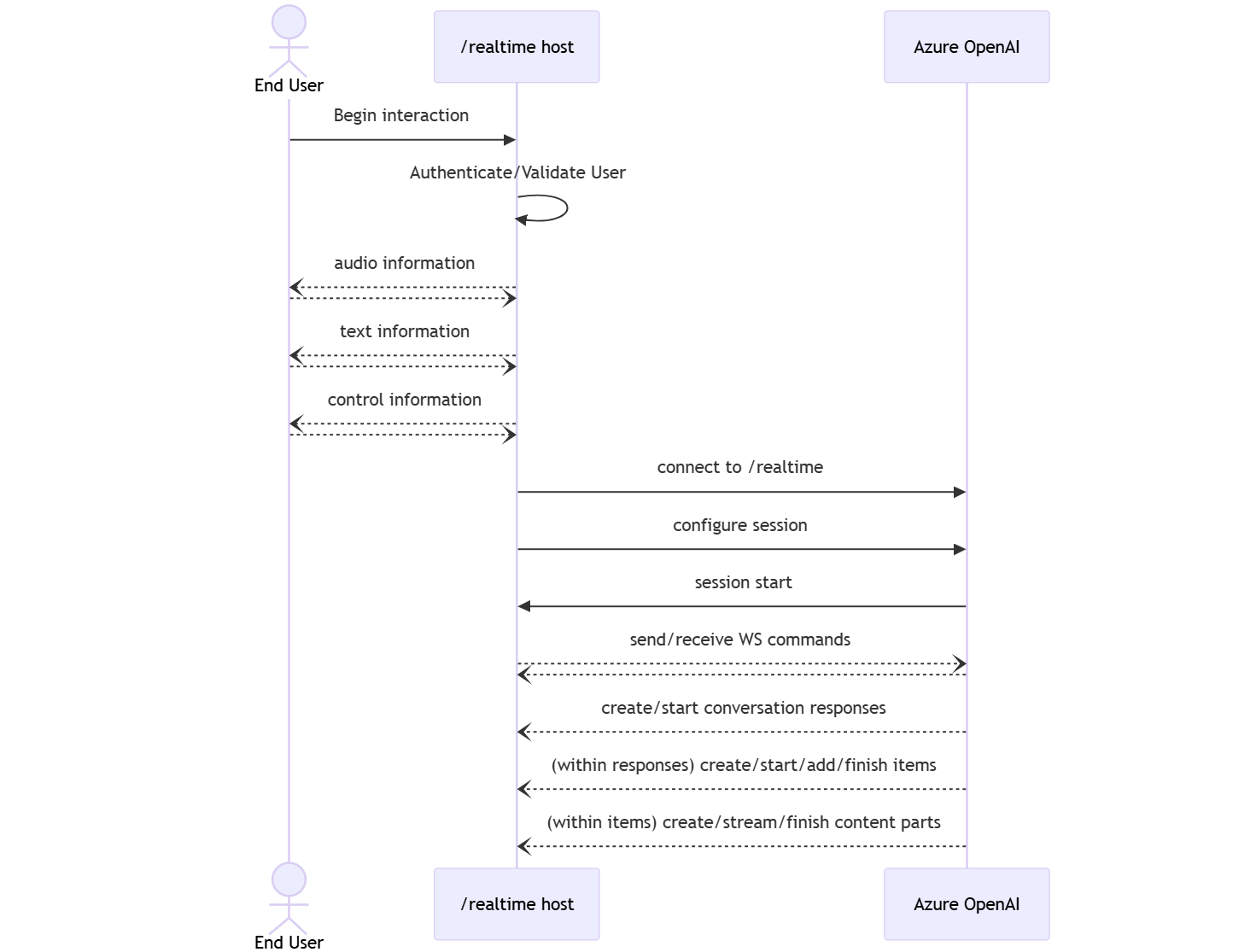
- A client-side caller establishes a connection to
/realtime, which starts a newsession. - A
sessionautomatically creates a defaultconversation. Multiple concurrent conversations aren’t supported. - The
conversationaccumulates input signals until aresponseis started, either via a direct event by the caller or automatically by voice activity detection (VAD). - Each
responseconsists of one or moreitems, which can encapsulate messages, function calls, and other information. - Each message
itemhascontent_part, allowing multiple modalities (text and audio) to be represented across a single item. - The
sessionmanages configuration of caller input handling (for example, user audio) and common output generation handling. - Each caller-initiated
response.createcan override some of the outputresponsebehavior, if desired. - Server-created
itemand thecontent_partin messages can be populated asynchronously and in parallel. For example, receiving audio, text, and function information concurrently in a round robin fashion.
Try the quickstart
Now that you’ve done the above steps, you can follow the instructions in the Realtime API quickstart to get started with the Realtime API via WebSockets.Related content
- Try the real-time audio quickstart
- See the Realtime API reference
- Learn more about Azure OpenAI quotas and limits