Models and capabilities
Use this table to learn the differences between the different image generation models, and to help you choose the best model for your image generation needs.| Aspect | GPT-Image-1.5 | GPT-Image-1 | GPT-Image-1-Mini | DALL·E 3 |
|---|---|---|---|---|
| Availability | Limited access preview (Apply for GPT-image-1.5 access) | Limited access preview (Apply for GPT-image-1 access) | Limited access preview (Apply for GPT-image-1 access) | Generally available |
| Strengths | Best for realism, instruction following, multimodal context, and improved speed/cost | Best for realism, instruction following, and multimodal context | Best for fast prototyping, bulk generation, or cost-sensitive use cases | Strong prompt adherence, natural text rendering, and stylistic diversity |
| Input / Output Modalities & Format | Accepts text + image inputs; outputs images only in base64 (no URL option). | Accepts text + image inputs; outputs images only in base64 (no URL option). | Accepts text + image inputs; outputs images only in base64 (no URL option). | Accepts text (primary) input; limited image editing inputs (with mask). Outputs as URL or base64. |
| Image Sizes / Resolutions | 1024×1024, 1024×1536, 1536×1024 | 1024×1024, 1024×1536, 1536×1024 | 1024×1024, 1024×1536, 1536×1024 | 1024×1024, 1024×1792, 1792×1024 |
| Quality Options | low, medium, high (default = high) | low, medium, high (default = high) | low, medium, high (default = medium) | standard, hd; style options: natural, vivid |
| Number of Images per Request | 1–10 images per request (n parameter) | 1–10 images per request (n parameter) | 1–10 images per request (n parameter) | Only 1 image per request (n must be 1) |
| Editing (inpainting / variations) | ✅ Supports inpainting and variations with mask + prompt | ✅ Supports inpainting and variations with mask + prompt | ✅ Supports inpainting and variations with mask + prompt | ✅ Supports inpainting and variations |
| Face Preservation | ✅ Advanced face preservation for realistic, consistent results | ✅ Advanced face preservation for realistic, consistent results | ❌ No dedicated face preservation; better for non-portrait/general creative imagery | ❌ No dedicated face preservation |
| Performance & Cost | High-fidelity, realism-optimized model; improved efficiency and latency over GPT-Image-1 | High-fidelity, realism-optimized model; higher latency and cost | Cost-efficient and faster for large-scale or iterative generation | Balanced performance; higher latency on complex prompts |
Quickstart
Use this guide to get started calling the Azure OpenAI in Microsoft Foundry Models image generation REST APIs by using Python.Prerequisites
- An Azure subscription. Create one for free.
- Python 3.8 or later version.
- The following Python libraries installed:
os,requests,json. - An Azure OpenAI resource created in a supported region. See Region availability.
- Then, you need to deploy a
gpt-image-1-series ordalle3model with your Azure resource. For more information, see Create a resource and deploy a model with Azure OpenAI.
Setup
Retrieve key and endpoint
To successfully call the Azure OpenAI APIs, you need the following information about your Azure OpenAI resource:| Variable | Name | Value |
|---|---|---|
| Endpoint | api_base | The endpoint value is located under Keys and Endpoint for your resource in the Azure portal. You can also find the endpoint via the Deployments page in Foundry portal. An example endpoint is: https://docs-test-001.openai.azure.com/. |
| Key | api_key | The key value is also located under Keys and Endpoint for your resource in the Azure portal. Azure generates two keys for your resource. You can use either value. |
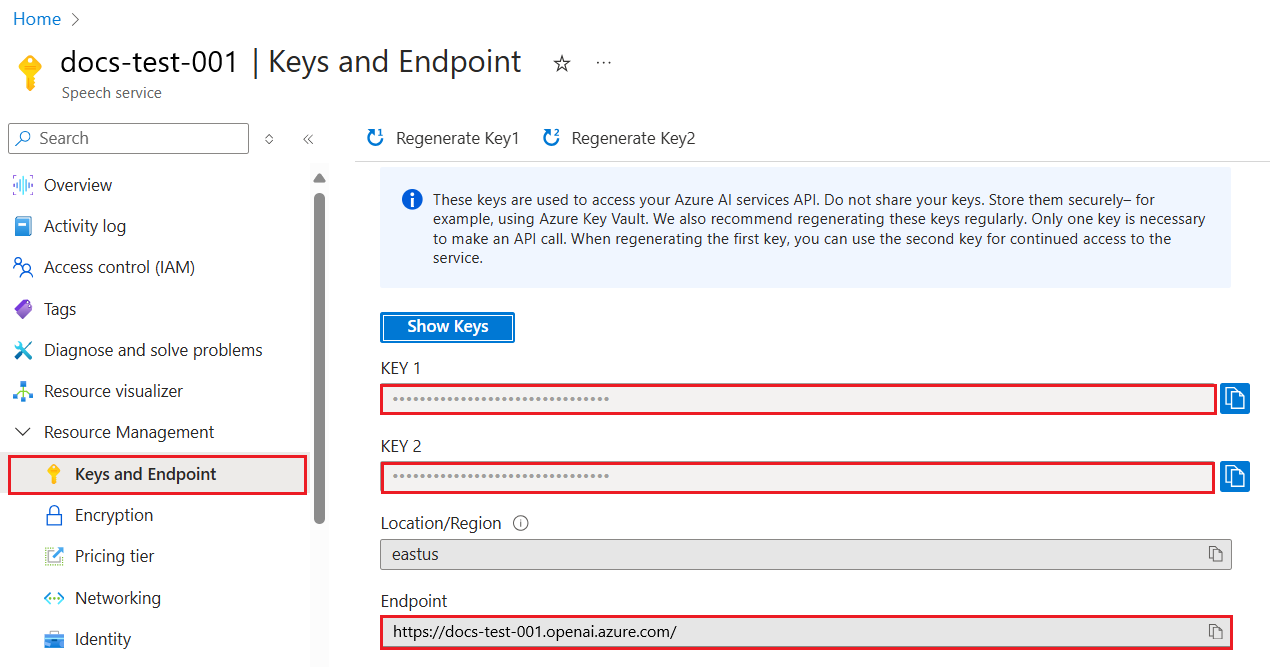
Environment variables
Create and assign persistent environment variables for your key and endpoint.Create a new Python application
Create a new Python file named quickstart.py. Open the new file in your preferred editor or IDE.- GPT-image-1 series
- DALL-E 3
-
Replace the contents of quickstart.py with the following code. Change the value of
promptto your preferred text. Also setdeploymentto the deployment name you chose when you deployed the GPT-image-1 series model.The script makes a synchronous image generation API call.
Remember to remove the key from your code when you’re done, and never post your key publicly. For production, use a secure way of storing and accessing your credentials. For more information, see Azure Key Vault.
-
Run the application with the
pythoncommand:Wait a few moments to get the response.
Output
The output from a successful image generation API call looks like the following example. Theurl field contains a URL where you can download the generated image. The URL stays active for 24 hours.
- A
createdtimestamp (Unix epoch time) - A
dataarray with at least one image object - Either a
url(temporary link valid for 24 hours) orb64_json(base64-encoded image data)
Common errors
| Error | Cause | Resolution |
|---|---|---|
DeploymentNotFound | The deployment name doesn’t exist or is misspelled | Verify the deployment name in the Azure portal or Foundry portal |
401 Unauthorized | Invalid or missing API key | Check that your AZURE_OPENAI_API_KEY environment variable is set correctly |
429 Too Many Requests | Rate limit exceeded | Implement retry logic with exponential backoff |
content_policy_violation | Prompt or generated output blocked by content filter | Modify the prompt to comply with the content policy |
InvalidPayload | Missing required parameters or invalid values | Check that prompt, size, and n are correctly specified |
Failed and the error.code value in the message is set to contentFilter. Here’s an example:
Generated image was filtered as a result of our safety system.. Here’s an example:
Clean up resources
If you want to clean up and remove an Azure OpenAI resource, you can delete the resource or resource group. Deleting the resource group also deletes any other resources associated with it. Use this guide to get started generating images with the Azure OpenAI SDK for Python. Library source code | Package | SamplesPrerequisites
- An Azure subscription. Create one for free.
- Python 3.8 or later version.
- An Azure OpenAI resource created in a compatible region. See Region availability.
- Access the Azure OpenAI resource endpoint and keys in the Azure portal.
- A deployed image generation model:
- DALL-E 3: Deploy a
dalle3model. Generally available. - GPT-image-1 series: Deploy a
gpt-image-1model. Requires limited access registration.
- DALL-E 3: Deploy a
Setup
Retrieve key and endpoint
To successfully call the Azure OpenAI APIs, you need the following information about your Azure OpenAI resource:| Variable | Name | Value |
|---|---|---|
| Endpoint | api_base | The endpoint value is located under Keys and Endpoint for your resource in the Azure portal. You can also find the endpoint via the Deployments page in Microsoft Foundry portal. An example endpoint is: https://docs-test-001.openai.azure.com/. |
| Key | api_key | The key value is also located under Keys and Endpoint for your resource in the Azure portal. Azure generates two keys for your resource. You can use either value. |
Environment variables
Create and assign persistent environment variables for your key and endpoint.Install the Python SDK
Open a command prompt and browse to your project folder. Install the OpenAI Python SDK by using the following command:Generate images
Create a new python file, quickstart.py. Open it in your preferred editor or IDE. Replace the contents of quickstart.py with the following code.- Make sure the
AZURE_OPENAI_ENDPOINTandAZURE_OPENAI_API_KEYenvironment variables are set. - Change the value of
promptto your preferred text. - Change the value of
modelto the name of your deployed DALL-E 3 model.
Remember to remove the key from your code when you’re done, and never post your key publicly. For production, use a secure way of storing and accessing your credentials. For more information, see Azure Key Vault.
python command:
Output
Azure OpenAI stores the output image in the generated_image.png file in your specified directory. The script also displays the image in your default image viewer. A successful response includes:- A
createdtimestamp - A
dataarray with at least one image object - Either a
url(temporary link valid for 24 hours) orb64_json(base64-encoded image data)
Common errors
| Error | Cause | Resolution |
|---|---|---|
DeploymentNotFound | The deployment name doesn’t exist or is misspelled | Verify the deployment name in the Azure portal or Foundry portal |
AuthenticationError | Invalid or missing API key | Check that your AZURE_OPENAI_API_KEY environment variable is set correctly |
RateLimitError | Rate limit exceeded | Implement retry logic with exponential backoff |
content_policy_violation | Prompt or generated output blocked by content filter | Modify the prompt to comply with the content policy |
Clean up resources
If you want to clean up and remove an Azure OpenAI resource, you can delete the resource or resource group. Deleting the resource group also deletes any other resources associated with it. Use this guide to get started generating images with the Azure OpenAI SDK for C#. Library source code | Package (NuGet) | SamplesPrerequisites
- An Azure subscription - Create one for free
- The .NET 7 SDK
- An Azure OpenAI resource created in a supported region (see Region availability). For more information, see Create a resource and deploy a model with Azure OpenAI.
Microsoft Entra ID prerequisites
For the recommended keyless authentication with Microsoft Entra ID, you need to:- Install the Azure CLI used for keyless authentication with Microsoft Entra ID.
- Assign the
Cognitive Services Userrole to your user account. You can assign roles in the Azure portal under Access control (IAM) > Add role assignment.
Set up
-
Create a new folder
image-quickstartand go to the quickstart folder with the following command: -
Create a new console application with the following command:
-
Install the OpenAI .NET client library with the dotnet add package command:
-
For the recommended keyless authentication with Microsoft Entra ID, install the Azure.Identity package with:
-
For the recommended keyless authentication with Microsoft Entra ID, sign in to Azure with the following command:
Retrieve resource information
You need to retrieve the following information to authenticate your application with your Azure OpenAI resource:- Microsoft Entra ID
- API key
| Variable name | Value |
|---|---|
AZURE_OPENAI_ENDPOINT | This value can be found in the Keys and Endpoint section when examining your resource from the Azure portal. |
AZURE_OPENAI_DEPLOYMENT_NAME | This value will correspond to the custom name you chose for your deployment when you deployed a model. This value can be found under Resource Management > Model Deployments in the Azure portal. |
Run the quickstart
The sample code in this quickstart uses Microsoft Entra ID for the recommended keyless authentication. If you prefer to use an API key, you can replace theDefaultAzureCredential object with an AzureKeyCredential object.
-
Replace the contents of
Program.cswith the following code and update the placeholder values with your own. -
Run the application using the
dotnet runcommand or the run button at the top of Visual Studio:
Output
The URL of the generated image is printed to the console.The Image APIs come with a content moderation filter. If the service recognizes your prompt as harmful content, it won’t return a generated image. For more information, see the content filter article.
Clean up resources
If you want to clean up and remove an Azure OpenAI resource, you can delete the resource. Before deleting the resource, you must first delete any deployed models. Use this guide to get started generating images with the Azure OpenAI SDK for Java. Library source code | Artifact (Maven) | SamplesPrerequisites
- An Azure subscription - Create one for free
- The current version of the Java Development Kit (JDK)
- Install Apache Maven.
- An Azure OpenAI resource created in a supported region (see Region availability). For more information, see Create a resource and deploy a model with Azure OpenAI.
Microsoft Entra ID prerequisites
For the recommended keyless authentication with Microsoft Entra ID, you need to:- Install the Azure CLI used for keyless authentication with Microsoft Entra ID.
- Assign the
Cognitive Services Userrole to your user account. You can assign roles in the Azure portal under Access control (IAM) > Add role assignment.
Set up
-
Create a new folder
image-quickstartand go to the quickstart folder with the following command: -
Install Apache Maven. Then run
mvn -vto confirm successful installation. -
Create a new
pom.xmlfile in the root of your project, and copy the following code into it: -
Install the Azure OpenAI SDK and dependencies.
-
For the recommended keyless authentication with Microsoft Entra ID, sign in to Azure with the following command:
Retrieve resource information
You need to retrieve the following information to authenticate your application with your Azure OpenAI resource:- Microsoft Entra ID
- API key
| Variable name | Value |
|---|---|
AZURE_OPENAI_ENDPOINT | This value can be found in the Keys and Endpoint section when examining your resource from the Azure portal. |
AZURE_OPENAI_DEPLOYMENT_NAME | This value will correspond to the custom name you chose for your deployment when you deployed a model. This value can be found under Resource Management > Model Deployments in the Azure portal. |
Run the app
The sample code in this quickstart uses Microsoft Entra ID for the recommended keyless authentication. If you prefer to use an API key, you can replace theDefaultAzureCredential object with an AzureKeyCredential object.
- Microsoft Entra ID
- API key
Follow these steps to create a console application for image generation.
- Create a new file named Quickstart.java in the same project root directory.
-
Copy the following code into Quickstart.java:
-
Run your new console application to generate an image:
Output
The URL of the generated image is printed to the console.The Image APIs come with a content moderation filter. If the service recognizes your prompt as harmful content, it won’t return a generated image. For more information, see the content filter article.
Clean up resources
If you want to clean up and remove an Azure OpenAI resource, you can delete the resource. Before deleting the resource, you must first delete any deployed models. Use this guide to get started generating images with the Azure OpenAI SDK for JavaScript. Reference documentation | Source code | Package (npm) | SamplesPrerequisites
- An Azure subscription - Create one for free
- LTS versions of Node.js
- Azure CLI used for passwordless authentication in a local development environment, create the necessary context by signing in with the Azure CLI.
- An Azure OpenAI resource created in a supported region (see Region availability). For more information, see Create a resource and deploy a model with Azure OpenAI.
Microsoft Entra ID prerequisites
For the recommended keyless authentication with Microsoft Entra ID, you need to:- Install the Azure CLI used for keyless authentication with Microsoft Entra ID.
- Assign the
Cognitive Services Userrole to your user account. You can assign roles in the Azure portal under Access control (IAM) > Add role assignment.
Setup
-
Create a new folder
image-quickstartand go to the quickstart folder with the following command: -
Create the
package.jsonwith the following command: -
Install the OpenAI client library for JavaScript with:
-
For the recommended passwordless authentication:
Retrieve resource information
You need to retrieve the following information to authenticate your application with your Azure OpenAI resource:- Microsoft Entra ID
- API key
| Variable name | Value |
|---|---|
AZURE_OPENAI_ENDPOINT | This value can be found in the Keys and Endpoint section when examining your resource from the Azure portal. |
AZURE_OPENAI_DEPLOYMENT_NAME | This value will correspond to the custom name you chose for your deployment when you deployed a model. This value can be found under Resource Management > Model Deployments in the Azure portal. |
To use the recommended keyless authentication with the SDK, make sure that the
AZURE_OPENAI_API_KEY environment variable isn’t set.Generate images with DALL-E
- Microsoft Entra ID
- API key
-
Create the
index.jsfile with the following code: -
Sign in to Azure with the following command:
-
Run the JavaScript file.
Output
The URL of the generated image is printed to the console.The Image APIs come with a content moderation filter. If the service recognizes your prompt as harmful content, it won’t return a generated image. For more information, see the content filter article.
Clean up resources
If you want to clean up and remove an Azure OpenAI resource, you can delete the resource. Before deleting the resource, you must first delete any deployed models. Use this guide to get started generating images with the Azure OpenAI SDK for JavaScript. Reference documentation | Source code | Package (npm) | SamplesPrerequisites
- An Azure subscription - Create one for free
- LTS versions of Node.js
- TypeScript
- Azure CLI used for passwordless authentication in a local development environment, create the necessary context by signing in with the Azure CLI.
- An Azure OpenAI resource created in a supported region (see Region availability). For more information, see Create a resource and deploy a model with Azure OpenAI.
Microsoft Entra ID prerequisites
For the recommended keyless authentication with Microsoft Entra ID, you need to:- Install the Azure CLI used for keyless authentication with Microsoft Entra ID.
- Assign the
Cognitive Services Userrole to your user account. You can assign roles in the Azure portal under Access control (IAM) > Add role assignment.
Setup
-
Create a new folder
image-quickstartand go to the quickstart folder with the following command: -
Create the
package.jsonwith the following command: -
Update the
package.jsonto ECMAScript with the following command: -
Install the OpenAI client library for JavaScript with:
-
For the recommended passwordless authentication:
Retrieve resource information
You need to retrieve the following information to authenticate your application with your Azure OpenAI resource:- Microsoft Entra ID
- API key
| Variable name | Value |
|---|---|
AZURE_OPENAI_ENDPOINT | This value can be found in the Keys and Endpoint section when examining your resource from the Azure portal. |
AZURE_OPENAI_DEPLOYMENT_NAME | This value will correspond to the custom name you chose for your deployment when you deployed a model. This value can be found under Resource Management > Model Deployments in the Azure portal. |
To use the recommended keyless authentication with the SDK, make sure that the
AZURE_OPENAI_API_KEY environment variable isn’t set.Generate images with DALL-E
- Microsoft Entra ID
- API key
-
Create the
index.tsfile with the following code: -
Create the
tsconfig.jsonfile to transpile the TypeScript code and copy the following code for ECMAScript. -
Transpile from TypeScript to JavaScript.
-
Sign in to Azure with the following command:
-
Run the code with the following command:
Output
The URL of the generated image is printed to the console.The Image APIs come with a content moderation filter. If the service recognizes your prompt as harmful content, it won’t return a generated image. For more information, see the content filter article.
Clean up resources
If you want to clean up and remove an Azure OpenAI resource, you can delete the resource. Before deleting the resource, you must first delete any deployed models. Use this guide to get started generating images with the Azure OpenAI SDK for Go. Library source code | Package | SamplesPrerequisites
- An Azure subscription - Create one for free
- Go 1.8+
- An Azure OpenAI resource created in a supported region (see Region availability). For more information, see Create a resource and deploy a model with Azure OpenAI.
Microsoft Entra ID prerequisites
For the recommended keyless authentication with Microsoft Entra ID, you need to:- Install the Azure CLI used for keyless authentication with Microsoft Entra ID.
- Assign the
Cognitive Services Userrole to your user account. You can assign roles in the Azure portal under Access control (IAM) > Add role assignment.
Setup
-
Create a new folder
dall-e-quickstartand go to the quickstart folder with the following command: -
For the recommended keyless authentication with Microsoft Entra ID, sign in to Azure with the following command:
Retrieve resource information
You need to retrieve the following information to authenticate your application with your Azure OpenAI resource:- Microsoft Entra ID
- API key
| Variable name | Value |
|---|---|
AZURE_OPENAI_ENDPOINT | This value can be found in the Keys and Endpoint section when examining your resource from the Azure portal. |
AZURE_OPENAI_DEPLOYMENT_NAME | This value will correspond to the custom name you chose for your deployment when you deployed a model. This value can be found under Resource Management > Model Deployments in the Azure portal. |
Run the quickstart
The sample code in this quickstart uses Microsoft Entra ID for the recommended keyless authentication. If you prefer to use an API key, you can replace theNewDefaultAzureCredential implementation with NewKeyCredential.
- Microsoft Entra ID
- API key
To run the sample:
-
Create a new file named quickstart.go. Copy the following code into the quickstart.go file.
-
Run the following command to create a new Go module:
-
Run
go mod tidyto install the required dependencies: -
Run the following command to run the sample:
Output
The URL of the generated image is printed to the console.The Image APIs come with a content moderation filter. If the service recognizes your prompt as harmful content, it won’t return a generated image. For more information, see the content filter article.
Clean up resources
If you want to clean up and remove an Azure OpenAI resource, you can delete the resource or resource group. Deleting the resource group also deletes any other resources associated with it. Use this guide to get started calling the Azure OpenAI in Microsoft Foundry Models image generation APIs with PowerShell.Prerequisites
- An Azure subscription. Create one for free.
- For this task, the latest version of PowerShell 7 is recommended because the examples use new features not available in Windows PowerShell 5.1.
- An Azure OpenAI resource created in a supported region (see Region availability). For more information, see Create a resource and deploy a model with Azure OpenAI.
Microsoft Entra ID prerequisites
For the recommended keyless authentication with Microsoft Entra ID, you need to:- Install the Azure CLI used for keyless authentication with Microsoft Entra ID.
- Assign the
Cognitive Services Userrole to your user account. You can assign roles in the Azure portal under Access control (IAM) > Add role assignment.
Retrieve resource information
You need to retrieve the following information to authenticate your application with your Azure OpenAI resource:- Microsoft Entra ID
- API key
| Variable name | Value |
|---|---|
AZURE_OPENAI_ENDPOINT | This value can be found in the Keys and Endpoint section when examining your resource from the Azure portal. |
AZURE_OPENAI_DEPLOYMENT_NAME | This value will correspond to the custom name you chose for your deployment when you deployed a model. This value can be found under Resource Management > Model Deployments in the Azure portal. |
Generate images
-
For the recommended keyless authentication with Microsoft Entra ID, sign in to Azure with the following command:
-
Get an Azure OpenAI auth token and set it as an environment variable for the current PowerShell session:
- Create a new PowerShell file called quickstart.ps1. Then open it up in your preferred editor or IDE.
-
Replace the contents of quickstart.ps1 with the following code. Make sure
AZURE_OPENAI_ENDPOINTis set, and change the value ofpromptto your preferred text. To use API key authentication instead of keyless authentication, setAZURE_OPENAI_API_KEYand uncomment the'api-key'line.
For production, use a secure way of storing and accessing your credentials like The PowerShell Secret Management with Azure Key Vault. For more information about credential security, see this security article.
-
Run the script using PowerShell:
The script loops until the generated image is ready.
Output
PowerShell requests the image from Azure OpenAI and stores the output image in the generated_image.png file in your specified directory. For convenience, the full path for the file is returned at the end of the script. The Image APIs come with a content moderation filter. If the service recognizes your prompt as harmful content, it doesn’t generate an image. For more information, see Content filtering.Clean up resources
If you want to clean up and remove an Azure OpenAI resource, you can delete the resource or resource group. Deleting the resource group also deletes any other resources associated with it. Use this guide to get started generating images with Azure OpenAI in your browser with Microsoft Foundry.Prerequisites
- An Azure subscription. Create one for free.
- An Azure OpenAI resource created in a supported region. See Region availability. For more information, see Create a resource and deploy a model with Azure OpenAI.
Go to Foundry
Browse to Foundry and sign in with the credentials associated with your Azure OpenAI resource. During or after the sign-in workflow, select the appropriate directory, Azure subscription, and Azure OpenAI resource. From the Foundry landing page, create or select a new project. Navigate to the Models + endpoints page on the left nav. Select Deploy model and then choose one of the DALL-E models from the list. Complete the deployment process. On the model’s page, select Open in playground.Try out image generation
Start exploring Azure OpenAI capabilities with a no-code approach through the Images playground. Enter your image prompt into the text box and select Generate. When the AI-generated image is ready, it appears on the page.The Image APIs come with a content moderation filter. If Azure OpenAI recognizes your prompt as harmful content, it doesn’t return a generated image. For more information, see Content filtering.
Clean up resources
If you want to clean up and remove an Azure OpenAI resource, you can delete the resource or resource group. Deleting the resource group also deletes any other resources associated with it.Quotas and limits
Image generation has default rate limits per deployment:| Model | Default quota (images/min) |
|---|---|
| DALL-E 3 | 2 |
| GPT-image-1 series | 5 |
Call the image generation API
The following command shows the most basic way to use an image model with code. If this is your first time using these models programmatically, start with the quickstart.Prerequisites
- An Azure subscription. You can create one for free.
- An Azure OpenAI resource created in a supported region. See Region availability.
- Deploy a
dall-e-3orgpt-image-1-series model with your Azure OpenAI resource. For more information on deployments, see Create a resource and deploy a model with Azure OpenAI.- GPT-image-1 series models are newer and feature a number of improvements over DALL-E 3. They are available in limited access: Apply for GPT-image-1 access; Apply for GPT-image-1.5 access.
- Python 3.8 or later.
- Install the required packages:
pip install openai azure-identity
- Install the required packages:
- GPT-image-1 series
- DALL-E 3
Send a POST request to:URL:Replace the following values:
<your_resource_name>is the name of your Azure OpenAI resource.<your_deployment_name>is the name of your GPT-image-1 series model deployment.<api_version>is the version of the API you want to use. For example,2025-04-01-preview.
Content-Type:application/jsonapi-key:<your_API_key>
Output
- GPT-image-1 series
- DALL-E 3
The response from a successful image generation API call looks like the following example. The
b64_json field contains the output image data.The
response_format parameter isn’t supported for GPT-image-1 series models, which always return base64-encoded images.Streaming
Streaming lets you receive partial images as they’re generated, providing faster visual feedback for your users. This is useful for applications where you want to show generation progress. Thepartial_images parameter (1-3) controls how many intermediate images are returned before the final result.
You can stream image generation requests to gpt-image-1-series models by setting the stream parameter to true, and setting the partial_images parameter to a value between 0 and 3.
Specify API options
The following API body parameters are available for image generation models.- GPT-image-1 series
- DALL-E 3
Size
Specify the size of the generated images. Must be one of1024x1024, 1024x1536, or 1536x1024 for GPT-image-1 series models. Square images are faster to generate.Quality
There are three options for image quality:low, medium, and high. Lower quality images can be generated faster.The default value is high.Number
You can generate between one and 10 images in a single API call. The default value is1.User ID
Use the user parameter to specify a unique identifier for the user making the request. This identifier is useful for tracking and monitoring usage patterns. The value can be any string, such as a user ID or email address.Output format
Use the output_format parameter to specify the format of the generated image. Supported formats arePNG and JPEG. The default is PNG.WEBP images aren’t supported in the Azure OpenAI in Microsoft Foundry Models.
Compression
Use the output_compression parameter to specify the compression level for the generated image. Input an integer between0 and 100, where 0 is no compression and 100 is maximum compression. The default is 100.Streaming
Use the stream parameter to enable streaming responses. When set totrue, the API returns partial images as they’re generated. This feature provides faster visual feedback for users and improves perceived latency. Set the partial_images parameter to control how many partial images are generated (1-3).Transparency
Set the background parameter totransparent and output_format to PNG on an image generate request to get an image with a transparent background.Call the image edit API
The Image Edit API enables you to modify existing images based on text prompts you provide. The API call is similar to the image generation API call, but you also need to provide an input image.- GPT-image-1 series
- DALL-E 3
The input image must be less than 50 MB in size and must be a PNG or JPG file.
<your_resource_name>is the name of your Azure OpenAI resource.<your_deployment_name>is the name of your GPT-image-1 series model deployment.<api_version>is the version of the API you want to use. For example,2025-04-01-preview.
Content-Type:multipart/form-dataapi-key:<your_API_key>
The Image Edit API takes multipart/form data, not JSON data. The example below shows sample form data that would be attached to a cURL request.
API response output
The response from a successful image editing API call looks like the following example. Theb64_json field contains the output image data.Specify image edit API options
The following API body parameters are available for image editing models, in addition to the ones available for image generation models.Image
The image value indicates the image file you want to edit.Input fidelity
The input_fidelity parameter controls how much effort the model puts into matching the style and features, especially facial features, of input images.This parameter lets you make subtle edits to an image without changing unrelated areas. When you use high input fidelity, faces are preserved more accurately than in standard mode.Input fidelity is not supported by the
gpt-image-1-mini model.Mask
The mask parameter uses the same type as the main image input parameter. It defines the area of the image that you want the model to edit, using fully transparent pixels (alpha of zero) in those areas. The mask must be a PNG file and have the same dimensions as the input image.Streaming
Use the stream parameter to enable streaming responses. When set totrue, the API returns partial images as they’re generated. This feature provides faster visual feedback for users and improves perceived latency. Set the partial_images parameter to control how many partial images are generated (1-3).Transparency
Set the background parameter totransparent and output_format to PNG on an image generate request to get an image with a transparent background.Write effective text-to-image prompts
Your prompts should describe the content you want to see in the image and the visual style of the image. When you write prompts, consider that the Image APIs come with a content moderation filter. If the service recognizes your prompt as harmful content, it doesn’t generate an image. For more information, see Content filtering.Responsible AI and Image Generation
Azure OpenAI’s image generation models include built-in Responsible AI (RAI) protections to help ensure safe and compliant use. In addition, Azure provides input and output moderation across all image generation models, along with Azure-specific safeguards such as content filtering and abuse monitoring. These systems help detect and prevent the generation or misuse of harmful, unsafe, or policy-violating content. Customers can learn more about these safeguards and how to customize them here:- Learn more: Explore content filtering
- Request customization: Apply to opt out of content filtering
Special considerations for generating images of minors
Photorealistic images of minors are blocked by default. Customers can request access to this model capability. Enterprise-tier customers are automatically approved.Troubleshooting
API call rejection
Prompts and images are filtered based on our content policy. The API returns an error when a prompt or image is flagged. If your prompt is flagged, theerror.code value in the message is set to contentFilter. Here’s an example:
Rate limit errors
If you receive a 429 error, you’ve exceeded your rate limit. Wait before retrying or request a quota increase in the Azure portal.Authentication errors
If you receive a 401 error:- API key auth: Verify your API key is correct and not expired.
- Managed identity: Ensure your identity has the Cognitive Services OpenAI User role on the resource.
Timeout errors
Image generation can take up to 60 seconds for complex prompts. If you experience timeouts:- Use streaming to get partial results sooner.
- Simplify your prompt.
- Try a smaller image size.
Related content
- Learn about image generation tokens