langchain-azure-ai package to add Azure Content Safety in Foundry Tools
capabilities to your LangChain agents. You learn how to apply content
moderation, prompt shielding, groundedness detection, and protected material
scanning as middleware in your agent graphs.
Prerequisites
- An Azure subscription. Create one for free.
- A Foundry project.
- A deployed chat model (for example,
gpt-4.1) in your project. - Python 3.10 or later.
- Azure CLI signed in (
az login) soDefaultAzureCredentialcan authenticate.
Configure your environment
Set one of the following connection patterns:- Project endpoint with Microsoft Entra ID (recommended).
- Direct endpoint with an API key.
Connect to content safety
Use classes in the namespacelangchain_azure_ai.agents.middleware.* to add
Content Safety capabilities to your agents. The package automatically
detects the project connection when you set the AZURE_AI_PROJECT_ENDPOINT
environment variable. Microsoft Entra ID is the default authentication
method, but key-based authentication is also available.
Content moderation
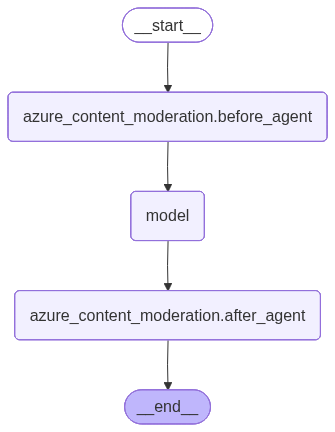
Azure Content Safety in Foundry Tools flags objectionable content with AI algorithms. AttachAzureContentModerationMiddleware to your agent to
enable content moderation.
Raise an error on violations
Setexit_behavior="error" to raise a ContentSafetyViolationError
exception when a violation is detected:
Replace offending content
Setexit_behavior="replace" to remove offending content instead of raising
an exception. Use violation_message to customize the replacement text.
exit_behavior="replace"
removes offending content automatically. Inspect the content safety
annotations on the message:
Prompt shielding
Prompt Shields in Azure Content Safety in Foundry Tools detects and blocks adversarial prompt injection attacks on large language models (LLMs). The middleware analyzes prompts and documents before the model generates content.Continue on detection
Setexit_behavior="continue" to annotate the message without blocking
execution:
AzurePromptShieldMiddleware hooks before model execution and analyzes
inbound messages for injection attempts. With exit_behavior="continue",
the request proceeds but an annotation is added to the message.
The following diagram shows how the prompt shield hooks into the agent graph:
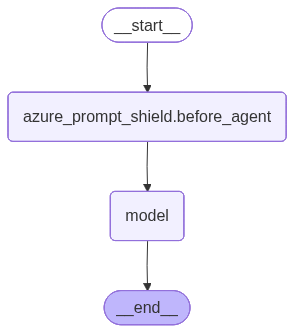
exit_behavior="continue" is set, the request proceeds and an annotation is
added to the message.
Raise an error on detection
Setexit_behavior="error" to raise an exception when a prompt injection is
detected:
Groundedness detection
Groundedness detection identifies when a model generates content beyond what the source data supports. This capability is useful in retrieval-augmented generation (RAG) patterns to ensure the model’s response stays faithful to retrieved documents. Uselangchain_azure_ai.agents.middleware.AzureGroundednessMiddleware to
evaluate AI generated content against grounding sources.
The following example:
- Creates an in-memory vector store with sample documents.
- Defines a tool that retrieves relevant content from the store.
- Creates an agent with
AzureGroundednessMiddlewareto evaluate responses.
Set up the vector store and retriever tool
Create the agent with groundedness middleware
AzureGroundednessMiddleware automatically gathers the answer from
the last AIMessage, the question from the last HumanMessage, and the grounding
sources from SystemMessage / ToolMessage content and AIMessage citation
annotations in the conversation history. See configure grounding.
The following diagram shows how groundedness middleware integrates into the agent graph:
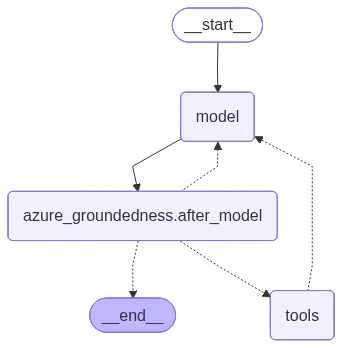
exit_behavior="continue" is set, execution proceeds and only the
annotation is added.
Improve grounding with a stricter prompt
Adjust the system prompt to instruct the model to rely exclusively on retrieved information:Configure grounding
You can change how context, questions, and answers are collected by the middleware. This is useful when:- Your application stores retrieved documents in a custom state key.
- You want to restrict grounding sources to a specific subset of messages (e.g. only tool results, excluding the system prompt).
- You need access to the run-scoped execution context (e.g.
runtime.contextorruntime.store) to build the inputs.
ToolMessage messages:
Protected material detection
Protected material detection identifies AI-generated content that matches known copyrighted sources. UseAzureProtectedMaterialMiddleware with
type="text" for text content or type="code" for code that matches
existing GitHub repositories.
exit_behavior="continue", flagged content is annotated
but execution proceeds.
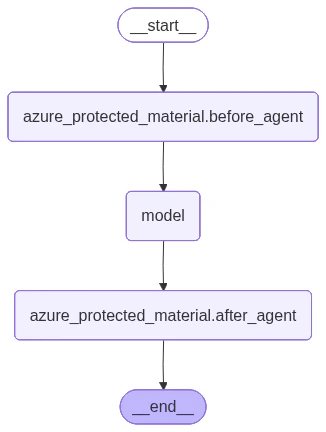
The following diagram shows how protected material middleware integrates into the agent graph: