Microsoft Foundry evolved through several naming and architectural changes. If you’re moving from the classic portal experience, this article helps you plan and execute the transition with reference mappings for terminology, capabilities, SDKs, and portal navigation.
Product naming: Microsoft’s AI Platform has evolved from Azure AI Studio → Azure AI Foundry → to Microsoft Foundry (current). Similarly, our AI services portfolio evolved with the platform from Azure Cognitive Services → Azure AI Services → to Foundry Tools (current). Despite the platform evolution, the Azure resource type remains Microsoft.CognitiveServices/accounts. All names in this documentation refer to the same evolving platform.

Prerequisites

  • An Azure account with an active subscription. Create one for free.
  • A Foundry project.
  • For SDK migration: Python 3.9+ or .NET 8+, with azure-ai-projects 2.x and openai packages installed.
  • For resource upgrade: Owner or Contributor role on the Azure OpenAI resource you plan to upgrade.
Key migration dates:

Plan your migration

Follow these steps to move from the classic portal experience to the current Foundry portal:
  1. Review terminology changes. Scan the terminology mapping to understand renamed concepts and new resource types.
  2. Check the feature comparison. Use the feature comparison table to identify capabilities that are new, enhanced, or classic-only.
  3. Update your SDK packages. Replace deprecated packages using the SDK mapping table.
  4. Migrate agents to the Responses API. Rewrite agents that use the Assistants API to use the Responses API before the August 2026 sunset.
  5. Verify your Foundry resource region supports the Responses API. The Responses API and Foundry Agent Service aren’t available in every Azure region. If your Foundry resource is in an unsupported region, agents and other Responses API features don’t work in the current portal. Check the Responses API region availability list before migrating.
  6. Validate in the new portal. Use the portal navigation reference to verify your workflows in the current experience.
The Responses API isn’t available in all Azure regions. If your Foundry resource is in an unsupported region, you can’t create or run agents in the current Foundry portal. Before migrating, verify your resource is in a supported region. If it isn’t, create a new Foundry resource in a supported region.

Terminology mapping

The following table maps classic concepts to their current equivalents.
ConceptClassic termCurrent termNotes
Portal (main)Foundry (classic) portalFoundry portalToggle in portal banner switches between them.
Portal settingsManagement CenterOperate sectionNavigation reorganized.
Resource typeAzure OpenAI + HubFoundry ResourceSingle AIServices kind with child projects.
AI servicesAzure AI ServicesFoundry ToolsSpeech, Vision, Language, Content Safety, Content Understanding.
Model billingModel-as-a-Service (MaaS)Foundry Direct ModelsFirst-party models billed directly via Azure meters.
RBAC rolesCognitive Services OpenAI UserFoundry User, Foundry Project Manager, Foundry OwnerNew roles with control/data plane separation.
API wire protocolAssistants APIResponses APIAssistants API sunset: August 26, 2026.
API versioningMonthly api-version paramsv1 stable routesNo version parameter required.
Conversation stateThreadsConversationsConversations store items (messages, tool calls, outputs), not just messages.
Chat messagesMessagesItemsItems are a superset of messages.
ExecutionRuns (async, polled)Responses (sync by default)No polling loop required.
Agent definitionAssistants / AgentsAgent VersionsVersioned, with explicit kind (prompt, workflow, hosted).
Agent creationcreate_agent()create_version()Uses PromptAgentDefinition.
EndpointsMultiple (openai, azureml, cognitiveservices, search, speech)Single project endpoint + OpenAI v1 endpointSimplified endpoint management.
DocumentationClassic docsCurrent docsContent in two separate doc sets.
The Foundry RBAC roles were recently renamed. Foundry User, Foundry Owner, Foundry Account Owner, and Foundry Project Manager were previously named Azure AI User, Azure AI Owner, Azure AI Account Owner, and Azure AI Project Manager. You might still see the previous names in some places while the rename rolls out. The role IDs and core permissions are unchanged by the rename.

SDK mapping

Use the following table to identify which SDK packages map to the current Foundry experience and which ones they replace.
SDK packageClassic equivalentStatusNotes
openaiazure-ai-inferenceUse for model inferenceazure-ai-inference retiring May 30, 2026.
OpenAI() with base_urlAzureOpenAI()Use standard clientAzure-specific code eliminated.
azure-ai-projects 2.xazure-ai-projects 1.xStable — targets the new portal1.x targets the classic portal experience.
azure-ai-projects 2.xazure-ai-generativeStableCapabilities merged into project client.
azure-ai-projects 2.xazure-ai-mlStableFor hub-to-project migration scenarios.
azure-ai-projects (remote) + azure-ai-evaluation (local)azure-ai-evaluation (standalone)StableRemote evaluations via project client; local evaluations unchanged.
azure-search-documents (via project connections)azure-search-documentsStableSeparate package, discoverable through project client.
Ensure the SDK version matches your portal experience. Using a 2.x SDK sample with a 1.x setup (or vice versa) causes errors.
The following example shows the most common SDK migration — replacing the Azure-specific AzureOpenAI client with the standard OpenAI client. Classic (before):
from openai import AzureOpenAI

client = AzureOpenAI(
    azure_endpoint="https://my-resource.openai.azure.com",
    api_key="my-key",
    api_version="2024-12-01-preview"
)
Current (after):
from openai import OpenAI
from azure.identity import DefaultAzureCredential, get_bearer_token_provider

client = OpenAI(
    base_url="https://my-project.services.ai.azure.com/openai/v1",
    default_headers={"Authorization": f"Bearer {get_bearer_token_provider(DefaultAzureCredential(), 'https://cognitiveservices.azure.com/.default')()}"}
)

Feature comparison

The following tables compare feature availability between the classic and current portal experiences.

Available in both portals

FeatureClassicCurrentNotes
Foundry projects
Chat completions
Fine-tuning
EvaluationsEnhanced in current portal
Model catalogExpanded in current portal

New in the current portal

These features are available only in the current Foundry portal:
FeatureStatus
Responses APIGA
Agents v2 (Responses API)GA
Tool catalog (1,400+ tools)GA (check label on individual tools in the catalog to determine if they are GA or Preview)
Multi-agent workflowsPreview
Agent memoryPreview
Agent publishing to M365/TeamsGA
Foundry IQPreview
Hosted agentsPreview
A2A protocolPreview
Foundry Control PlanePreview

Classic-only (migration required)

FeatureClassicCurrentMigration action
Azure OpenAI resourcesUse Foundry resourceUpgrade to a Foundry resource
Hub-based projectsNot visibleSwitch to classic portal or migrate to Foundry projects
The classic portal uses a single customizable left pane for all navigation, with Management center at the bottom. The current portal splits features across five top-level sections, each with its own left pane.
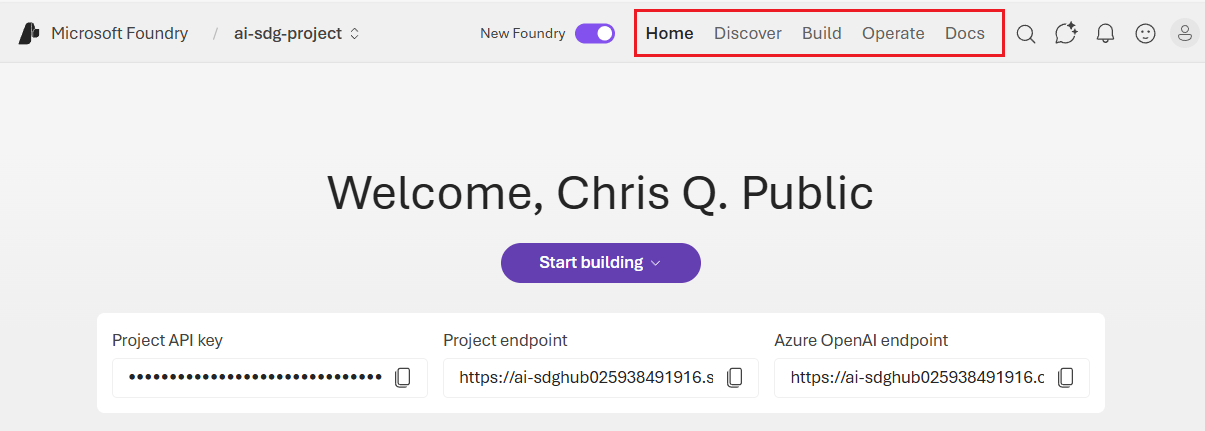
Screenshot of home page of the current Foundry portal.
SectionScopeWhat you find there
HomeSelected projectProject overview and quick actions
DiscoverSelected projectModel catalog and model benchmarks
BuildSelected projectAgents, models, playgrounds, evaluations, fine-tuning
OperateAll projectsAdmin, quota, compliance, fleet health, tracing
DocsN/ADocumentation links
The following table maps frequently used classic portal locations to their current equivalents.
TaskClassic portal locationCurrent portal location
View model deploymentsModels + endpoints in the left paneBuild > Models
Open a playgroundPlaygrounds in the left paneBuild > Models > select a model
Build agentsAgents in the left paneBuild > Agents
Browse the model catalogModel catalog in the left paneDiscover > Model catalog
View evaluationsEvaluation in the left paneBuild > Evaluations
Fine-tune a modelFine-tuning in the left paneBuild > Fine-tuning
Tracing and monitoringTracing in the left paneOperate > Tracing
Manage quotasManagement center > QuotaOperate > Quota
Manage users and permissionsManagement center > UsersOperate > Admin
View all projects and resourcesManagement center > All resourcesOperate > Admin
Connected resourcesManagement center > Connected resourcesOperate > Admin > select a project
Guardrails and content filtersGuardrails + controls in the left paneOperate > Compliance

Switch between portal experiences

You can switch between the classic and current portal experiences at any time. The toggle preserves your current context, such as the project you’re working in.
The current portal shows only Foundry projects. If you need to access hub-based projects or other resource types, switch back to the classic portal.
  1. Look for the New Foundry toggle in the top banner.
  2. Select the toggle to switch between the classic and current experiences.
  3. The page reloads with the selected portal interface.

Troubleshoot common migration issues

SymptomCauseResolution
ModuleNotFoundError or unexpected API behaviorSDK version doesn’t match your portal targetCheck the SDK mapping table and install the correct package version
Projects missing from the new portalHub-based projects aren’t visible in the current portalSwitch to the classic portal to access hub-based projects, or migrate to Foundry projects (article appears in the classic documentation)
Endpoint connection failuresOld multi-endpoint URLs no longer resolveUpdate to the single project endpoint format (https://<project>.services.ai.azure.com)
AuthenticationError with new clientAPI key used with OpenAI() client without proper headerUse DefaultAzureCredential with a bearer token provider as shown in the SDK migration example
Agent code returns 404 or MethodNotAllowedAssistants API calls sent to a Responses API endpointRewrite agent code to use the Responses API (create_version() instead of create_agent())
Agents unavailable in the current portalFoundry resource is in a region that doesn’t support the Responses APICreate a Foundry resource in a supported region