Prerequisites
- An Azure subscription - Create one for free.
- A Microsoft Foundry project with a model of the deployment type
GlobalStandardorDataZoneStandarddeployed. - Model versions
2025-12-01or later.
Key use cases
- Consistent, low latency for responsive user experiences.
- Pay-as-you-go simplicity with no long-term commitments.
- Business-hour or bursty traffic that benefits from scalable, cost-efficient performance. Optionally, you can combine priority processing with Provisioned Throughput Units (PTU) for steady-state capacity and cost optimization.
Latency target
| Model | Latency target value2 |
|---|---|
| gpt-5.5, 2026-04-24 | 99% > 100 Tokens Per Second |
| gpt-5.4, 2026-03-051 | 99% > 50 Tokens Per Second |
| gpt-5.2, 2025-12-11 | 99% > 50 Tokens Per Second |
| gpt-5.1, 2025-11-13 | 99% > 50 Tokens Per Second |
| gpt-4.1, 2025-04-141 | 99% > 80 Tokens Per Second |
Priority processing availability by deployment type
Priority processing can be enabled in Global standard deployments or Data Zone standard (US) deployments. For pricing information, see the Azure OpenAI pricing page.- Global standard
- Data Zone standard
Global standard model availability
| Region | gpt-5.5, 2026-04-24 | gpt-5.4-mini, 2026-03-17 | gpt-5.4, 2026-03-05 | gpt-5.2, 2025-12-11 | gpt-5.1, 2025-11-13 | gpt-4.1, 2025-04-14 |
|---|---|---|---|---|---|---|
| australiaeast | - | ✅ | ✅ | ✅ | ✅ | ✅ |
| brazilsouth | - | ✅ | ✅ | ✅ | ✅ | ✅ |
| canadacentral | - | ✅ | ✅ | ✅ | ✅ | ✅ |
| canadaeast | - | ✅ | ✅ | ✅ | ✅ | ✅ |
| centralus | - | ✅ | ✅ | ✅ | ✅ | ✅ |
| eastus | - | ✅ | ✅ | ✅ | ✅ | ✅ |
| eastus2 | ✅ | ✅ | ✅ | ✅ | ✅ | - |
| francecentral | - | ✅ | ✅ | ✅ | ✅ | ✅ |
| germanywestcentral | - | ✅ | ✅ | ✅ | ✅ | ✅ |
| italynorth | - | ✅ | ✅ | ✅ | ✅ | ✅ |
| japaneast | - | ✅ | ✅ | ✅ | ✅ | ✅ |
| koreacentral | - | ✅ | ✅ | ✅ | ✅ | ✅ |
| northcentralus | - | ✅ | ✅ | ✅ | ✅ | ✅ |
| norwayeast | - | ✅ | ✅ | ✅ | ✅ | ✅ |
| polandcentral | ✅ | ✅ | ✅ | ✅ | ✅ | ✅ |
| southafricanorth | - | ✅ | ✅ | ✅ | ✅ | ✅ |
| southcentralus | ✅ | ✅ | ✅ | ✅ | ✅ | ✅ |
| southeastasia | - | ✅ | ✅ | ✅ | ✅ | ✅ |
| southindia | - | ✅ | ✅ | ✅ | ✅ | ✅ |
| spaincentral | - | ✅ | ✅ | ✅ | ✅ | ✅ |
| swedencentral | ✅ | ✅ | ✅ | ✅ | ✅ | ✅ |
| switzerlandnorth | - | ✅ | ✅ | ✅ | ✅ | ✅ |
| switzerlandwest | - | ✅ | ✅ | ✅ | ✅ | ✅ |
| uaenorth | - | ✅ | ✅ | ✅ | ✅ | ✅ |
| uksouth | - | ✅ | ✅ | ✅ | ✅ | ✅ |
| westeurope | - | ✅ | ✅ | ✅ | ✅ | ✅ |
| westus | - | ✅ | ✅ | ✅ | ✅ | ✅ |
| westus3 | - | ✅ | ✅ | ✅ | ✅ | ✅ |
Enable priority processing at the deployment level
You can enable priority processing at the deployment level and (optionally) at the request level.Priority processing can be enabled in Global standard or Data Zone standard (US) deployments. Priority processing uses the same quota as standard processing.
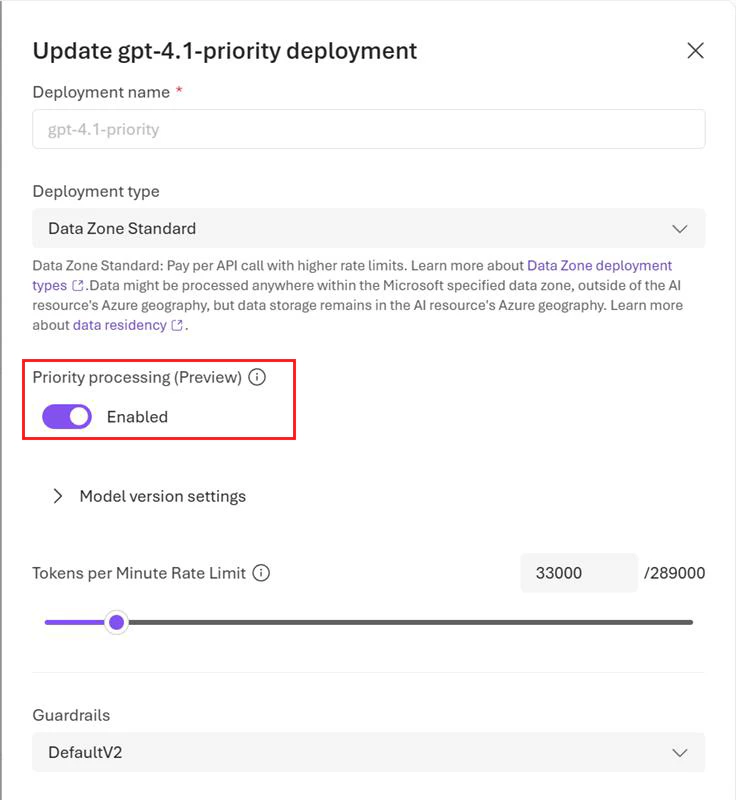
If you prefer to use code to enable priority processing at the deployment level, you can do so via the REST API for deployment by setting the
service_tier attribute as follows: "properties" : {"service_tier" : "priority"}. Allowed values for the service_tier attribute are default and priority. default implies standard processing, while priority enables priority processing.View usage metrics
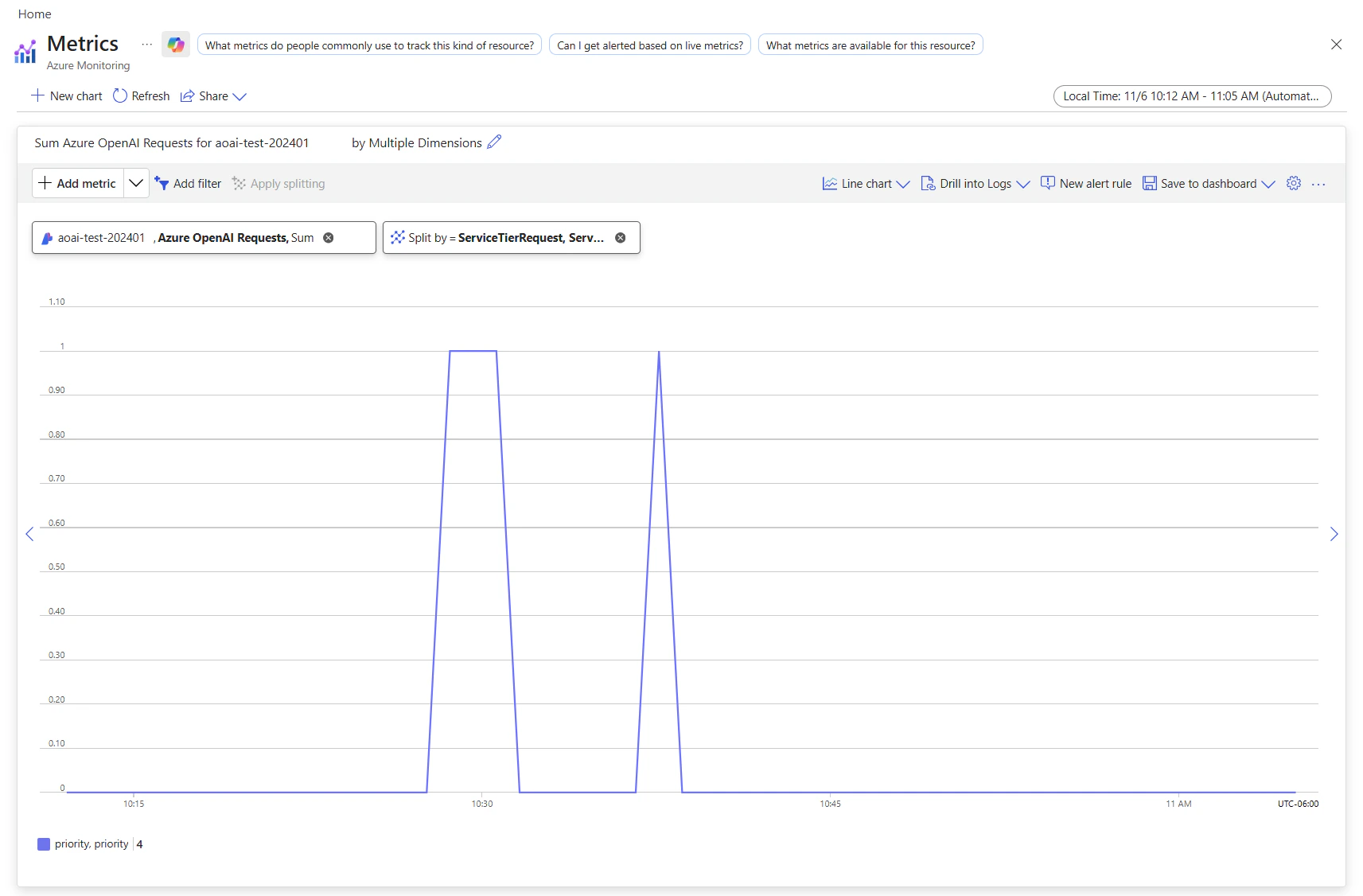
You can view the utilization measure for your resource in the Azure Monitor section in the Azure portal. To view the volume of requests processed by standard processing versus priority processing, split by the service tier (standard or priority) that was in the original request:- Sign in to https://portal.azure.com.
- Go to your Azure OpenAI resource and select the Metrics option from the left navigation.
- On the metrics page, add the Azure OpenAI requests metric. You can also select other metrics like Azure OpenAI latency, Azure OpenAI usage, and others.
- Select Add filter to select the standard deployment for which priority processing requests were processed.
- Select Apply splitting to split the values by ServiceTierRequest and ServiceTierResponse.
Monitor costs
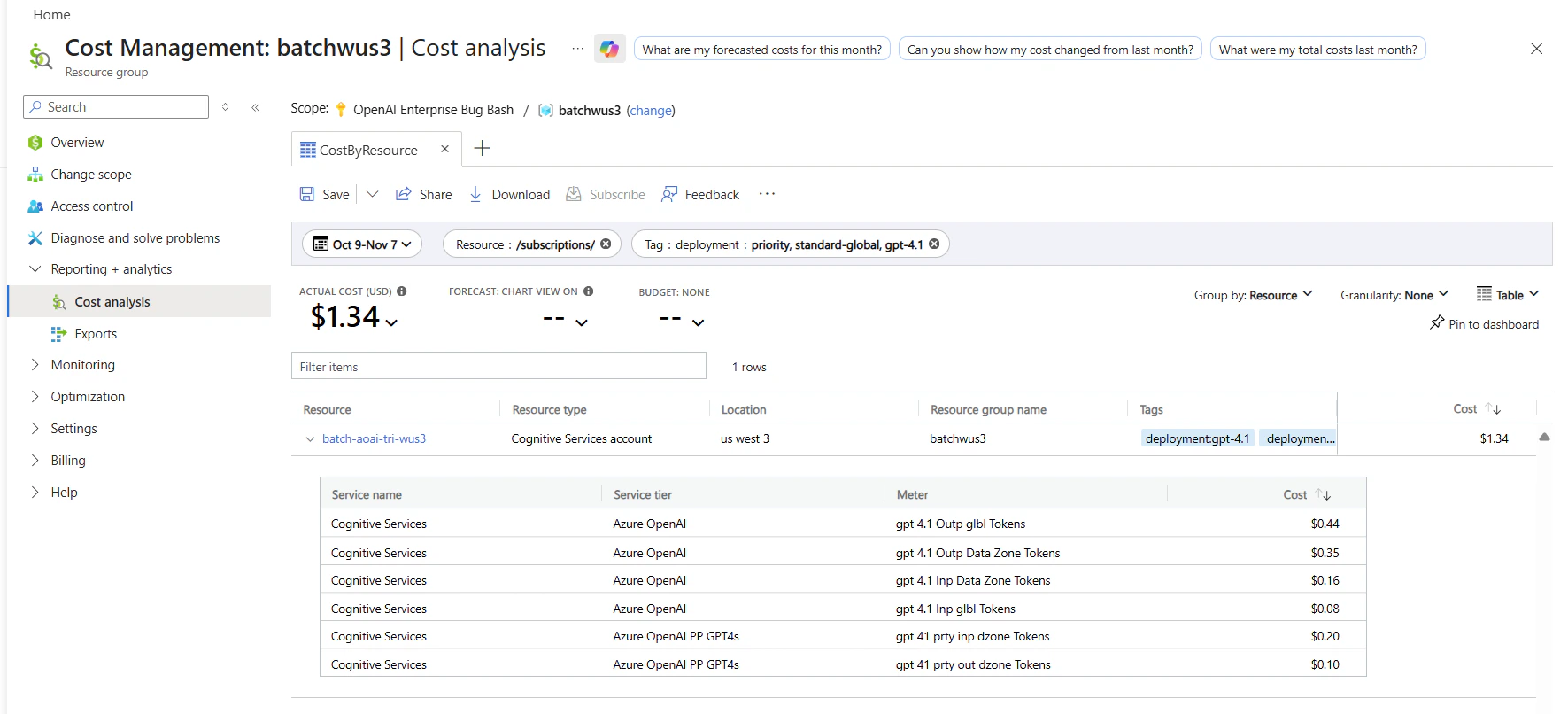
You can see a breakdown of costs for priority and standard requests in the Azure portal’s cost analysis page by filtering on deployment name and billing tags as follows:- Go to the cost analysis page in the Azure portal.
- (Optional) Filter by resource.
- To filter by deployment name: Add a filter for billing Tag > select deployment as the value, then choose your deployment name.
Enable priority processing at the request level
Enabling priority processing at the request level is optional. Both the chat completions API and responses API have an optional attributeservice_tier that specifies the processing type to use when serving a request. The following example shows how to set service_tier to priority in a responses request.
service_tier attribute to override the deployment-level setting. service_tier can take the values auto, default, and priority.
-
If you don’t set the attribute, it defaults to
auto. -
service_tier = automeans the request uses the service tier configured in the deployment. -
service_tier = defaultmeans the request uses the standard pricing and performance for the selected model. -
service_tier = prioritymeans the request uses the priority processing service tier.
service_tier.
| Deployment-level setting | Request-level setting | Request processed by service tier |
|---|---|---|
| default | auto, default | Standard |
| default | priority | Priority processing |
| priority | auto, priority | Priority processing |
| priority | default | Standard |
Limitations
- The service currently doesn’t support regional standard deployments and EU datazone standard deployments.
-
The service might re-route some priority requests to standard processing* during these scenarios:
- If rapid increases to your priority processing tokens per minute lead to hitting ramp rate limits. Currently, the ramp rate limit is defined as increasing traffic by more than 50% tokens per minute in less than 15 minutes.
- During periods of peak requests to priority processing.
- Long context requests sent to certain models listed in the Latency target table.
service_tier = default in the response, while requests processed by priority processing tier include service_tier = priority in the response.
Troubleshooting
| Issue | Cause | Resolution |
|---|---|---|
| Requests downgraded to standard tier | One of these situations: - Traffic ramped up more than 50% tokens per minute in under 15 minutes, hitting the ramp rate limit. - Requests sent during periods of peak requests to priority processing. - Long context requests sent to certain models listed in the Latency target table. | - Increase traffic gradually, if you’ve encountered ramp rate limits. - Consider purchasing PTU for steady-state capacity. |