Supported underlying models
With the2025-11-18 version, Model Router adds nine new models including Anthropic’s Claude, DeepSeek, Llama, Grok models to support a total of 18 models available for routing your prompts.
You don’t need to separately deploy the supported LLMs for use with model router, with the exception of the Claude models. To use model router with your Claude models, first deploy them from the model catalog. The deployments will get invoked by Model router if they’re selected for routing.
| Model router version | Underlying models | Underlying model version |
|---|---|---|
2025-11-18 | gpt-4.1 gpt-4.1-mini gpt-4.1-nano o4-mini gpt-5-nano gpt-5-mini gpt-51 gpt-5-chat Deepseek-v3.12 gpt-oss-120b2 llama4-maverick-instruct2 grok-42 grok-4-fast2 claude-haiku-4-53 claude-opus-4-13 claude-sonnet-4-53 | 2025-04-14 2025-04-14 2025-04-14 2025-04-16 2025-08-07 2025-08-07 2025-08-07 2025-08-07 N/A N/A N/A N/A N/A 2024-11-20 2024-07-18 2025-10-01 2025-08-05 2025-09-29 |
2025-08-07 | gpt-4.1 gpt-4.1-mini gpt-4.1-nano o4-mini gpt-51 gpt-5-mini gpt-5-nano gpt-5-chat | 2025-04-14 2025-04-14 2025-04-14 2025-04-16 2025-08-07 2025-08-07 2025-08-07 2025-08-07 |
2025-05-19 | gpt-4.1 gpt-4.1-mini gpt-4.1-nano o4-mini | 2025-04-14 2025-04-14 2025-04-14 2025-04-16 |
- 1Requires registration.
- 2Model router support is in preview.
- 3Model router support is in preview. Requires deployment of model for use with Model router.
Deploy a model router model
Model router is packaged as a single Foundry model that you deploy. Start by following the steps in the resource deployment guide. In the model catalog, findmodel-router in the Models list and select it. Choose Default settings for the Balanced routing mode and route between all supported models. To enable more configuration options, choose Custom settings.
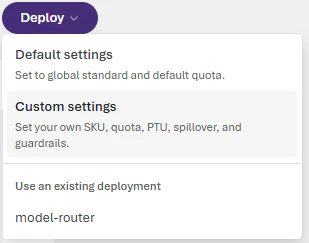
Your deployment settings apply to all underlying chat models that model router uses.
- Don’t deploy the underlying chat models separately. Model router works independently of your other deployed models.
- Select a content filter when you deploy the model router model or apply a filter later. The content filter applies to all content passed to and from the model router; don’t set content filters for each underlying chat model.
- Your tokens-per-minute rate limit setting applies to all activity to and from the model router; don’t set rate limits for each underlying chat model.
Select a routing mode
Changes to the routing mode can take up to five minutes to take effect.
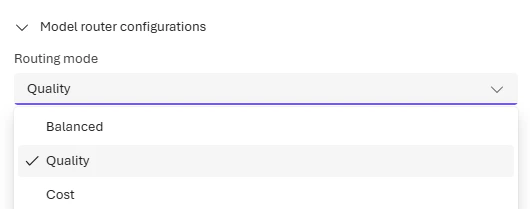
- Balanced (default): Most workloads. Optimizes cost while maintaining quality.
- Quality: Critical tasks like legal review, medical summaries, or complex reasoning.
- Cost: High-volume, budget-sensitive workloads like content classification or simple Q&A.
Select your model subset
Changes to the model subset can take up to five minutes to take effect.
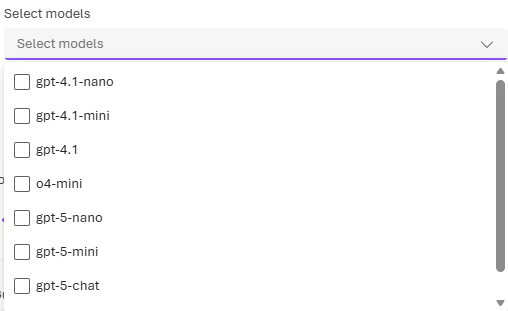
To include models by Anthropic (Claude) in your model router deployment, you need to deploy them yourself to your Foundry resource. See Deploy and use Claude models.
You must select at least one model for routing. If no models are selected, the deployment uses the default model set for your routing mode.
Test model router with the Completions API
You can use model router through the chat completions API in the same way you’d use other OpenAI chat models. Set themodel parameter to the name of our model router deployment, and set the messages parameter to the messages you want to send to the model.
Test model router in the playground
In the Foundry portal, go to your model router deployment on the Models + endpoints page and select it to open the model playground. In the playground, enter messages and see the model’s responses. Each response shows which underlying model the router selected.You can set the
Temperature and Top_P parameters to the values you prefer (see the concepts guide), but note that reasoning models (o-series) don’t support these parameters. If model router selects a reasoning model for your prompt, it ignores the Temperature and Top_P input parameters.The parameters stop, presence_penalty, frequency_penalty, logit_bias, and logprobs are similarly dropped for o-series models but used otherwise.Starting with the
2025-11-18 version, the reasoning_effort parameter (see the Reasoning models guide) is now supported in model router. If the model router selects a reasoning model for your prompt, it will use your reasoning_effort input value with the underlying model.Connect model router to a Foundry agent
If you’ve created an AI agent in Foundry, you can connect your model router deployment to be used as the agent’s base model. Select it from the model dropdown menu in the agent playground. Your agent will have all the tools and instructions you’ve configured for it, but the underlying model that processes its responses will be selected by model router.If you use Agent service tools in your flows, only OpenAI models will be used for routing.
Output format
The JSON response you receive from a model router model is identical to the standard chat completions API response. Note that the"model" field reveals which underlying model was selected to respond to the prompt.
The following example response was generated using API version 2025-11-18:
Monitor model router metrics
Monitor performance
Monitor the performance of your model router deployment in Azure Monitor (AzMon) in the Azure portal.- Go to the Monitoring > Metrics page for your Azure OpenAI resource in the Azure portal.
- Filter by the deployment name of your model router model.
- Split the metrics by underlying models if needed.
Monitor costs
You can monitor the costs of model router, which is the sum of the costs incurred by the underlying models.- Visit the Resource Management -> Cost analysis page in the Azure portal.
- If needed, filter by Azure resource.
- Then, filter by deployment name: Filter by “Tag”, select Deployment as the type of the tag, and then select your model router deployment name as the value.
Troubleshoot model router
Common issues
| Issue | Cause | Resolution |
|---|---|---|
| Rate limit exceeded | Too many requests to model router deployment | Increase tokens-per-minute quota or implement retry with exponential backoff |
| Unexpected model selection | Routing logic selected different model than expected | Review routing mode settings; consider using model subset to constrain options |
| High latency | Router overhead plus underlying model processing | Use Cost mode for latency-sensitive workloads; smaller models respond faster |
| Claude model not routing | Claude models require separate deployment | Deploy Claude models from model catalog before enabling in subset |
Error codes
For API error codes and troubleshooting, see the Azure OpenAI REST API reference.Next steps
- Model router concepts - Learn how routing modes work
- Quotas and limits - Rate limits for model router
- Create an agent - Use model router with Foundry agents