Supported models
You don’t need to separately deploy the supported LLMs for use with model router, with the exception of the Claude models. To use model router with your Claude models, first deploy them from the model catalog. The deployments will get invoked by Model router if they’re selected for routing.
| Model router version | Format | Model | Version |
|---|---|---|---|
2025-11-18 (latest) | OpenAI OpenAI OpenAI OpenAI OpenAI OpenAI OpenAI OpenAI OpenAI OpenAI OpenAI OpenAI OpenAI OpenAI OpenAI OpenAI OpenAI DeepSeek DeepSeek OpenAI Meta xAI xAI Anthropic Anthropic Anthropic Anthropic Anthropic | gpt-4.0 gpt-4.0-mini gpt-4.1 gpt-4.1-mini gpt-4.1-nano o4-mini gpt-5-nano gpt-5-mini gpt-5 gpt-5-chat gpt-5.2 gpt-5.2-chat gpt-5.3-chat gpt-5.4-nano gpt-5.4-mini gpt-5.4 gpt-5.5 Deepseek-V3.12 Deepseek-V3.22gpt-oss-120b2 Llama-4-Maverick-17B-128E-Instruct-FP82 grok-42 grok-4-fast-reasoning2 claude-haiku-4-53 claude-sonnet-4-53 claude-opus-4-13 claude-opus-4-63 claude-opus-4-73 | 2024-11-20 2024-07-18 2025-04-14 2025-04-14 2025-04-14 2025-04-16 2025-08-07 2025-08-07 2025-08-07 2025-08-07 2025-12-11 2025-12-11 2026-03-03 2026-03-17 2026-03-17 2026-03-05 2026-04-24 1 1 1 1 1 1 20251001 20250929 20250805 1 1 |
2025-08-07 | OpenAI OpenAI OpenAI OpenAI OpenAI OpenAI OpenAI OpenAI | gpt-4.1 gpt-4.1-mini gpt-4.1-nano o4-mini gpt-51 gpt-5-mini gpt-5-nano gpt-5-chat | 2025-04-14 2025-04-14 2025-04-14 2025-04-16 2025-08-07 2025-08-07 2025-08-07 2025-08-07 |
2025-05-19 | OpenAI OpenAI OpenAI OpenAI | gpt-4.1 gpt-4.1-mini gpt-4.1-nano o4-mini | 2025-04-14 2025-04-14 2025-04-14 2025-04-16 |
- 1Requires registration.
- 2Model router support is in preview.
- 3Model router support is in preview. Requires deployment of model for use with Model router.
Deploy a model router model
Model router is packaged as a single Foundry model that you deploy. Start by following the steps in the resource deployment guide. To deploy programmatically without the portal, use the REST API examples in the deployment sections that follow.If your organization uses the built-in Azure Policy for model deployment, make sure the policy’s allowed publishers include
Microsoft (the publisher of model router) and the publisher of each model you deploy for routing (for example, Anthropic for Claude models). Otherwise, the policy blocks the deployment.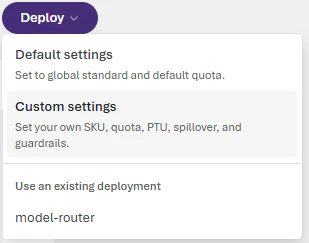
Default deployment
Go to the Microsoft Foundry portal and navigate to the model catalog. Findmodel-router in the Models list and select it. Choose Default settings for the Balanced routing mode and route between all supported models.
Before you run the REST examples, sign in with Azure CLI and save a management-plane bearer token as AZURE_AI_AUTH_TOKEN.
Optional: customize deployment settings
To enable more configuration options, choose Custom settings.Your deployment settings apply to all underlying chat models that model router uses.
- Don’t deploy the underlying chat models separately. Model router works independently of your other deployed models.
- Select a content filter when you deploy the model router model or apply a filter later. The content filter applies to all content passed to and from the model router; don’t set content filters for each underlying chat model.
- Your tokens-per-minute rate limit setting applies to all activity to and from the model router; don’t set rate limits for each underlying chat model.
Optional: change the routing mode
Sign in to Microsoft Foundry. Make sure the New Foundry toggle is on. These steps refer to Foundry (new).
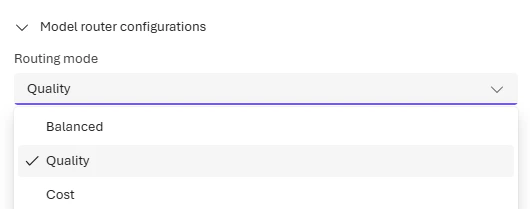
- Balanced (default): Most workloads. Optimizes cost while maintaining quality.
- Quality: Critical tasks like legal review, medical summaries, or complex reasoning.
- Cost: High-volume, budget-sensitive workloads like content classification or simple Q&A.
Changes to the routing mode can take up to five minutes to take effect.
Optional: route to a model subset
Sign in to Microsoft Foundry. Make sure the New Foundry toggle is on. These steps refer to Foundry (new).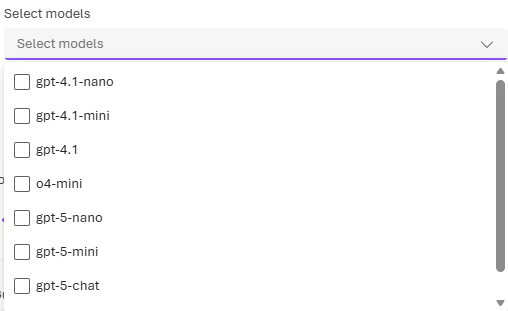
To include models by Anthropic (Claude) in your model router deployment, you need to deploy them yourself to your Foundry resource. See Deploy and use Claude models.
Changes to the model subset can take up to five minutes to take effect.
Configure custom settings with the REST API
Use the following example when you want to set both the routing mode and a model subset in the same deployment request. Add arouting block only when you want to override the default Balanced mode or restrict the routed model set. The following example keeps the combined custom request with both a routing mode and a model subset.
The deployment request body uses
format, name, and version for the model router itself and for each model in the routing subset. Find the correct values for each model in the supported models table in this article.If you include Anthropic Claude models in the
routing.models array, you must first deploy them to the same Foundry account with a matching SKU. Otherwise the request fails with an InvalidResourceProperties error. Deploy Claude models from the Foundry model catalog before you reference them in a model router deployment. See Deploy and use Claude models.Test model router with Foundry Responses and Chat Completions
Call model router the same way you call any OpenAI chat model. Set themodel parameter to the name of your model router deployment. You can use either the Microsoft Foundry SDK with the Responses API or the OpenAI Python SDK with the Chat Completions API.
Install the required packages before you run the samples:
- Foundry Responses:
pip install azure-ai-projects>=2.0.0 azure-identity - Chat Completions:
pip install openai>=1.75.0
- Reference:
AzureOpenAI(OpenAI Python SDK) - Reference:
AIProjectClient
Test model router in the playground
In the Foundry portal, go to your model router deployment on the Models + endpoints page and select it to open the model playground. In the playground, enter messages and see the model’s responses. Each response shows which underlying model the router selected.You can set the
Temperature and Top_P parameters to the values you prefer (see the concepts guide), but note that reasoning models (o-series) don’t support these parameters. If model router selects a reasoning model for your prompt, it ignores the Temperature and Top_P input parameters.The parameters stop, presence_penalty, frequency_penalty, logit_bias, and logprobs are similarly dropped for o-series models but used otherwise.Starting with the
2025-11-18 (latest) version, the reasoning_effort parameter (see the Reasoning models guide) is now supported in model router. If the model router selects a reasoning model for your prompt, it uses your reasoning_effort input value with the underlying model.Connect model router to a Foundry agent
Sign in to Microsoft Foundry. Make sure the New Foundry toggle is on. These steps refer to Foundry (new).If you use Agent service tools in your flows, only OpenAI models will be used for routing.
Output format
The JSON response you receive from a model router model is identical to the standard chat completions API response. Note that the"model" field reveals which underlying model was selected to respond to the prompt.
The following example response was generated using API version 2025-11-18:
Govern model router deployments with Azure Policy
If your organization restricts which models developers can deploy, model router honors the same built-in Foundry model deployment policy that governs standard model deployments. Policy is enforced at deploy time across the Foundry portal, REST API, Azure CLI, and ARM templates. For the IT admin assignment steps and the developer experience, see Govern model router deployments with Azure Policy.Evaluate model router for your workload
Before you commit production traffic to model router, benchmark it against your current baseline model on three dimensions: quality, cost, and latency. The Foundry Evaluations service doesn’t integrate with model router directly, so use the purpose-built evaluation toolkit described here.Quality
Use an LLM-as-a-judge approach where a separate, capable model scores responses from both model router and your baseline:- Run pairwise comparisons with response order swapped to eliminate position bias.
- Score each response independently on accuracy, completeness, clarity, and helpfulness (1–5 scale).
- Use at least 100 prompts from your actual workload for statistically reliable results. Fewer than 30 prompts gives only directional signal.
Cost
Compare per-request cost using token counts and per-model pricing:- Account for the router markup on input tokens plus the underlying model’s input and output pricing.
- Aggregate savings as a percentage:
1 − (router_cost / baseline_cost). - Check cost savings per category if your dataset includes prompt categories (for example, code generation vs. summarization).
Latency
Measure wall-clock response time for both endpoints:- Compare percentiles (p50, p90, p95) rather than averages — percentiles reflect real user experience better than mean values that can be skewed by outliers.
- Call endpoints sequentially per prompt so neither is disadvantaged by concurrent load.
Evaluation toolkit
Use the Model Router Auto Evaluation toolkit to run this benchmark with your own prompts. The toolkit supports:- A no-keys demo with mock data so you can explore the dashboard before configuring endpoints.
- Live evaluation against your model router and baseline deployments.
- JSONL, CSV, or SQL dataset input.
- A self-contained HTML report with quality, cost, and latency charts.
- Checkpoint and resume for large-scale runs (500+ prompts).
Monitor model router metrics
Monitor performance
Monitor the performance of your model router deployment in Azure Monitor (AzMon) in the Azure portal.- Go to the Monitoring > Metrics page for your Azure OpenAI resource in the Azure portal.
- Filter by the deployment name of your model router model.
- Split the metrics by underlying models if needed.
Monitor costs
You can monitor the costs of model router, which is the sum of the costs incurred by the underlying models.- Visit the Resource Management -> Cost analysis page in the Azure portal.
- If needed, filter by Azure resource.
- Then, filter by deployment name: Filter by “Tag”, select Deployment as the type of the tag, and then select your model router deployment name as the value.
Troubleshoot model router
Common issues
| Issue | Cause | Resolution |
|---|---|---|
| Rate limit exceeded | Too many requests to model router deployment | Increase tokens-per-minute quota or implement retry with exponential backoff |
| Unexpected model selection | Routing logic selected different model than expected | Review routing mode settings; consider using model subset to constrain options |
| High latency | Router overhead plus underlying model processing | Use Cost mode for latency-sensitive workloads; smaller models respond faster |
| Claude model not routing | Claude models require separate deployment | Deploy Claude models from model catalog before enabling in subset |
Error codes
For API error codes and troubleshooting, see the Azure OpenAI REST API reference.Resources
The following open-source repositories demonstrate model router in different scenarios. Each repo is on GitHub — learn, fork, and extend to accelerate your learning. Most samples require an existing model router deployment; see Deploy a model router model to get started.| Resource | Learn | Extend |
|---|---|---|
| Model Router Capabilities Interactive Demo (Python) | Compare Balanced, Cost, and Quality routing modes with custom prompts. View live benchmark data for cost savings, latency, and routing distribution. | Add your own prompt sets, integrate with your CI pipeline, or connect to your deployment for A/B testing. |
| Routed Models Distribution Analysis (Python) | Run batches of prompts across routing profiles and model subsets. See which models the router selects and in what proportions. | Plug in representative prompt logs to evaluate tradeoffs before adopting a routing policy at scale. |
| Multi-team sceanrios with Quality & Cost benchmarking (Python, workshop) | Deploy model router, run benchmarks against fixed-model deployments, and analyze cost and latency optimization in a multi-team enterprise scenario. | Swap in your own models, prompts, and routing profiles to benchmark against your workload patterns. |
| On-Call Copilot Multi-Agent Demo (Python) | See how model router dynamically selects the right model per agent step — a fast, low-cost model for classification and a reasoning model for root-cause analysis. | Adapt the multi-agent architecture, agent roles, and escalation paths for your own operations or support scenarios. |
These samples are intended for learning and experimentation only and are not production-ready. Before deploying any code derived from these repositories, review it against your organization’s security, compliance, and responsible AI policies. See the Microsoft Responsible AI principles for guidance.
Next steps
- Model router concepts - Learn how routing modes work
- Quotas and limits - Rate limits for model router
- Create an agent - Use model router with Foundry agents