- Set up the SDK client for evaluation.
- Generate a rubric evaluator tailored to your agent, and pair it with built-in evaluators.
- Create a test dataset and run an evaluation.
- Interpret results and integrate them into your workflow.
Prerequisites
- Python 3.8 or later.
- A Foundry project with an agent or hosted agent.
- An Azure OpenAI deployment with a GPT model that supports chat completion (for example,
gpt-4oorgpt-4o-mini). - Foundry User role on the Foundry project.
The Foundry RBAC roles were recently renamed. Foundry User, Foundry Owner, Foundry Account Owner, and Foundry Project Manager were previously named Azure AI User, Azure AI Owner, Azure AI Account Owner, and Azure AI Project Manager. You might still see the previous names in some places while the rename rolls out. The role IDs and core permissions are unchanged by the rename.
- For all evaluation role requirements, see Set up permissions for evaluation workflows.
Some evaluation features - including rubric generation, synthetic and trace-based dataset creation, and risk and safety evaluators - have regional restrictions. See Rate limits, region support, and enterprise features for evaluation for the full list.
Set up the client
Install the Foundry SDK and set up authentication:- Python
- JavaScript/TypeScript
Choose evaluators
Evaluators score your agent’s responses. The recommended primary measure for agent evaluation is a rubric evaluator—a set of weighted scoring dimensions that an LLM judge applies to every response, so you can express the exact criteria that matter (for example, policy enforcement, tool usage accuracy, or communication clarity) and score consistently at scale. For details, see Rubric evaluators. Pair your rubric with additional evaluators to get full coverage of your evaluation scope:- Agent evaluators — Evaluate how effectively agents handle tasks, tools, and user intent.
- Quality evaluators — Measure the overall quality of generated responses.
- Text similarity evaluators — Compare generated text against reference answers using NLP metrics.
- Safety evaluators — Identify potential content and security risks in generated output.
- Custom evaluators — Build your own evaluators when the rubric and built-ins don’t cover your criteria.
Create a test dataset
Create a JSONL file with test queries for your agent. Each line contains a JSON object with aquery field:
- Python
- JavaScript/TypeScript
Run an evaluation
When you run an evaluation, the service sends each test query to your agent, captures the response, and applies your selected evaluators to score the results. First, configure your testing criteria. Reference the generated rubric evaluator by name. Each entry usesdata_mapping to point at fields in the test data and agent response, and initialization_parameters to pass evaluator settings:
{{item.X}}references fields from your test data, likequery.{{sample.output_items}}references the full agent response, including tool calls.{{sample.output_text}}references just the response message text.initialization_parameters={"deployment_name": <model>}supplies the judge model. Typically required for LLM judge evaluators. For per-evaluator parameters, see built-in evaluators.
- Python
- JavaScript/TypeScript
evaluator_name="builtin.<name>". For example, add Violence (content safety) and Coherence (LLM judge quality):Interpret results
Evaluations typically complete in a few minutes, depending on the number of queries. Poll for completion and retrieve the report URL to view the results in the Microsoft Foundry portal under the Evaluations tab: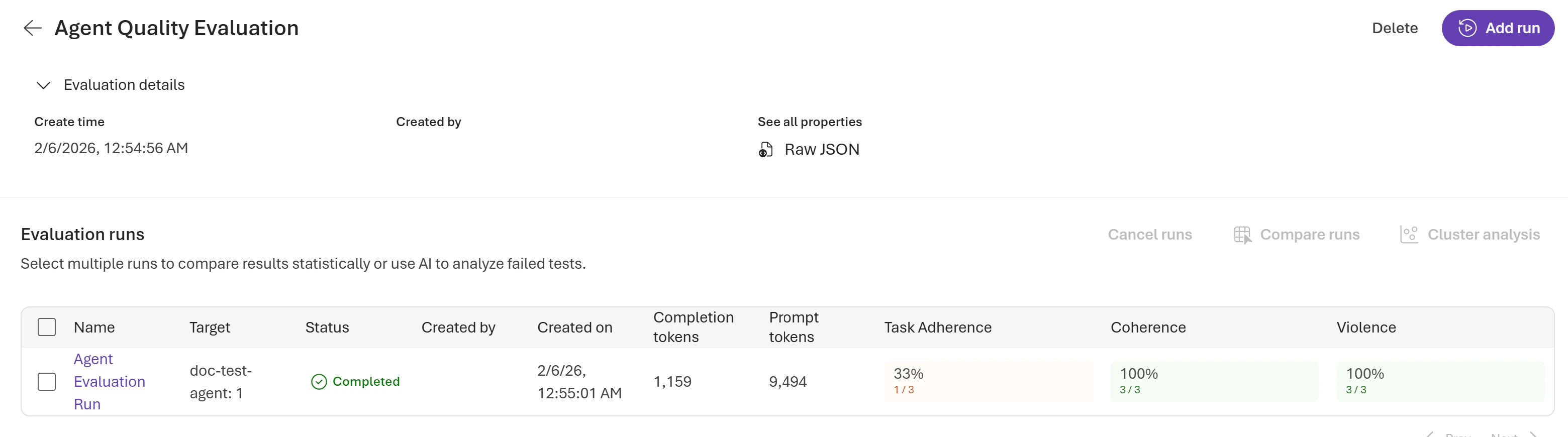
Aggregated results
At the run level, you can see aggregated data, including pass and fail counts, token usage per model, and results per evaluator:Row level output
Each evaluation run returns output items per row in your test dataset, providing detailed visibility into your agent’s performance. Output items include the original query, agent response, individual evaluator results with scores and reasoning, and token usage:properties.dimension_scores array shows the per-dimension breakdown the LLM judge produced. Each dimension’s score is on a 1–5 scale. The top-level score is the weighted average of applicable dimension scores, normalized to a 0–1 range. For the full output schema, see Rubric evaluators.
Integrate into your workflow
- CI/CD pipeline: Use evaluation as a quality gate in your deployment pipeline. For detailed integration, see Run evaluations with GitHub Actions.
- Production monitoring: Monitor your agent in production by using continuous evaluation. For setup instructions, see Set up continuous evaluation.
Optimize and compare versions
Use evaluation to iterate and improve your agent:- Run evaluation to identify weak areas. Use cluster analysis to find patterns and errors.
- Adjust agent instructions or tools based on findings.
- Reevaluate and compare runs to measure improvement.
- Repeat until quality thresholds are met.
Related content
- Rubric evaluators
- Generate a synthetic evaluation dataset
- Convert agent traces into evaluation datasets
- Python SDK evaluation samples
- Rubric evaluator generation sample (Python)
- Run AI red teaming
- Agent Monitoring Dashboard
- Agent evaluators reference
- REST API reference
- Trace evaluation in the cloud
- Set up tracing in Microsoft Foundry