Items marked preview in this article are currently in preview. This preview is provided without a service-level agreement, and Microsoft doesn’t recommend it for production workloads. Certain features might not be supported or might have constrained capabilities. For more information, see Supplemental Terms of Use for Microsoft Azure Previews.
Features
- Agent Evaluation: Automate pre-production assessment of Microsoft Foundry agents in your CI/CD workflow.
- Evaluators: Use any evaluators from the Foundry evaluator catalog.
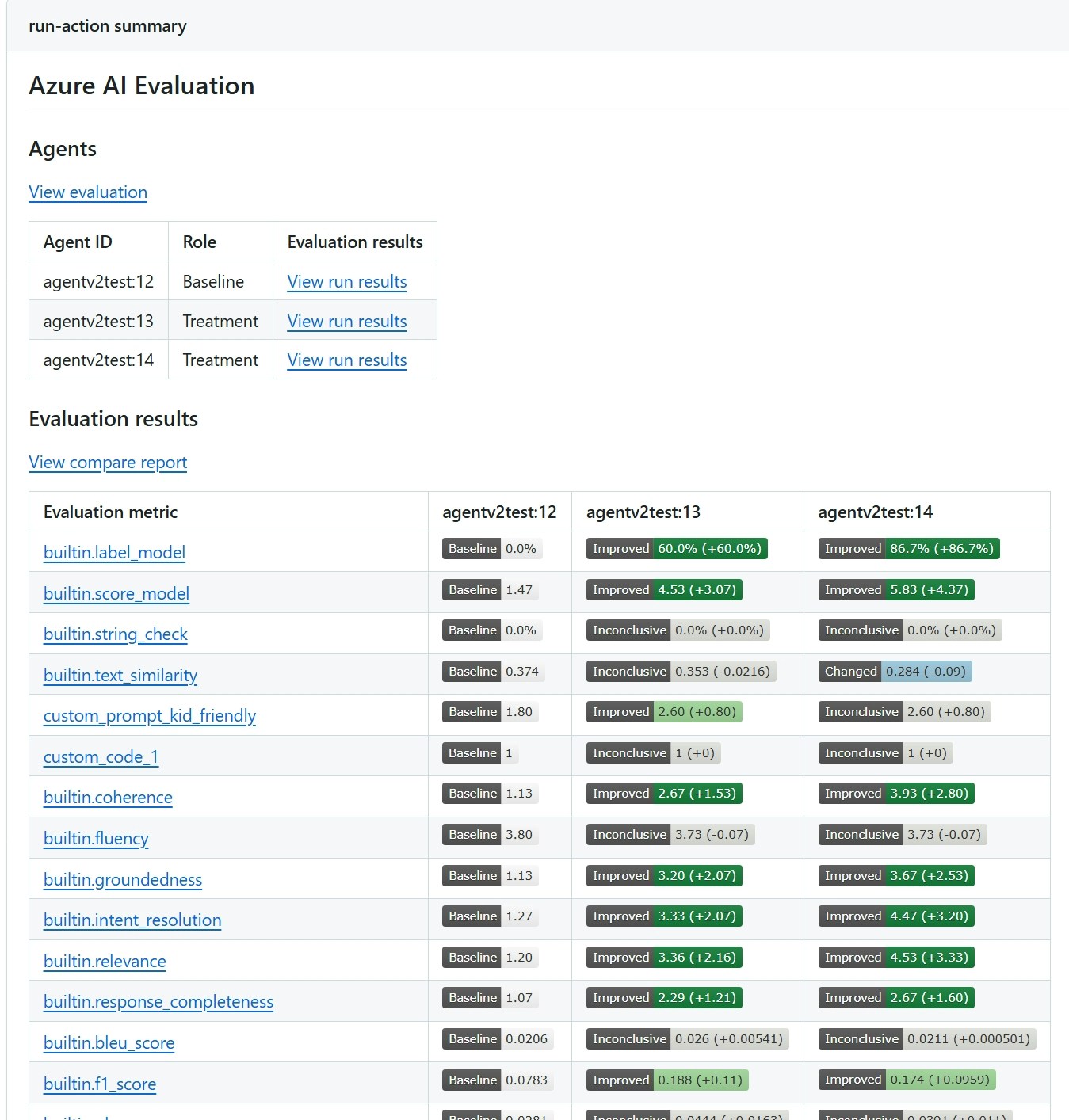
- Statistical Analysis: Evaluation results include confidence intervals and test for statistical significance to determine if changes are meaningful and not due to random variation.
Evaluator categories
- Agent evaluators: Process and system-level evaluators for agent workflows.
- RAG evaluators: Evaluate end-to-end and retrieval processes in RAG systems.
- Risk and safety evaluators: Assess risks and safety concerns in responses.
- General purpose evaluators: Quality evaluation such as coherence and fluency.
- OpenAI-based graders: Use OpenAI graders including string check, text similarity, score/label model.
- Custom evaluators: Define your own custom evaluators using Python code or LLM-as-a-judge patterns.
Prerequisites
- A project. To learn more, see Create a project.
- A Foundry agent.
- The AI Agent Evaluation extension installed in your Azure DevOps organization.
Inputs
Parameters
To find your agent ID and version, open your project in Foundry portal, go to Agents, select your agent, and copy the Agent ID from the details pane. The version is the deployment version number (for example,
my-agent:1).Data file
The input data file should be a JSON file with the following structure:Basic sample data file
Additional sample data files
Sample pipeline
To use this extension, add theAIAgentEvaluation@2 task to your Azure Pipeline. The following example shows a complete pipeline that authenticates by using an Azure Resource Manager service connection and evaluates an agent.
Evaluation results and outputs
You see evaluation results in the Azure DevOps pipeline summary. The report shows evaluation scores for each metric, confidence intervals, and - when you evaluate multiple agents - a pairwise statistical comparison that indicates whether differences are meaningful or within random variation. The following screenshot shows a sample report comparing two agents.