Prerequisites
- An Azure subscription. If you don’t have one, create a free account.
- A Microsoft Foundry resource. If you don’t have one, create a resource and deploy a model.
- At least one model deployment in your resource.
- The latest version of the OpenAI SDK for your language (Python, JavaScript, C#, or Java), or a REST client such as
curl. - To use keyless authentication, the required Microsoft Entra ID role assignments on the resource.
Deployments
Foundry uses deployments as aliases for model access. A deployment gives a model a name and a set of configurations. You access a model by using its deployment name in your requests. A deployment defines:- A model name
- A model version
- A provisioning or capacity type1
- A content filtering configuration1
- A rate limiting configuration1
Azure OpenAI inference endpoint
The Azure OpenAI API exposes the full capabilities of OpenAI models and supports more features like assistants, threads, files, and batch inference. You can also use it to access non-OpenAI models. Azure OpenAI endpoints are formatted ashttps://<resource-name>.openai.azure.com. Endpoints map to deployments, and each deployment has its own associated URL. However, you can use the same authentication mechanism to consume more than one deployment. For more information, see the reference page for Azure OpenAI API.
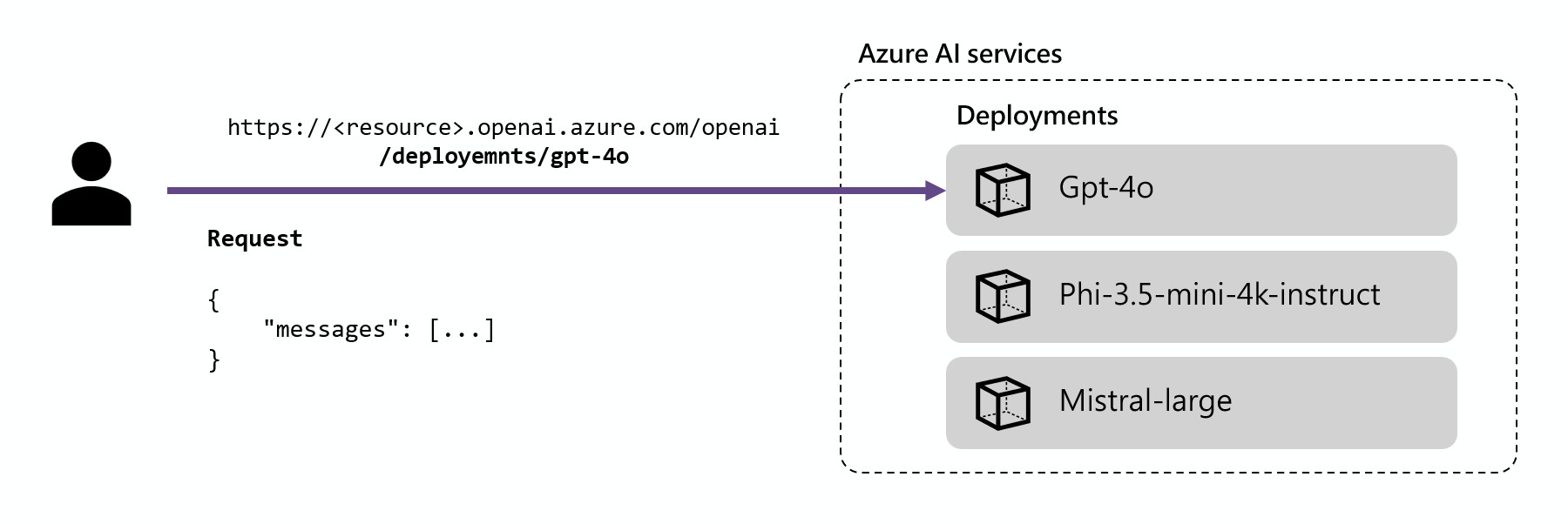
/deployments/<model-deployment-name>. When you use the OpenAI v1 API, call the /openai/v1/ route on the base URL, https://<resource-name>.openai.azure.com/openai/v1/, and pass the deployment name in the model field of your request. The /openai/v1/ route uses implicit versioning, so you don’t pass an api-version.
The following examples use the Responses API, which supports the latest inference features.
The Responses API works with Azure OpenAI models and with Foundry Models sold by Azure that support it, such as DeepSeek, Llama, and Grok models. If a deployment doesn’t support the Responses API, the request returns
400 Model not supported. In that case, use the Chat Completions API by calling client.chat.completions.create instead.Use API key authentication
You can authenticate inference requests with an API key from your Foundry resource. API keys are quick to set up, but they grant full access to the resource, are hard to scope to specific users or actions, and require manual rotation to stay secure. For production workloads, use keyless authentication with Microsoft Entra ID instead. In the following example,deepseek-v3-0324 is the name of a model deployment in the Microsoft Foundry resource. Replace it with your own deployment name, and store your API key in the AZURE_INFERENCE_CREDENTIAL environment variable.
- Python
- JavaScript
- C#
- Java
- REST
Install the Create a client that points to the Azure OpenAI v1 endpoint, and then generate a response. The
openai package by using pip:/openai/v1/ route uses implicit versioning, so you don’t pass an api-version. Pass your deployment name in the model field:Use keyless authentication
Deployed Foundry Models support keyless authorization with Microsoft Entra ID. Keyless authorization enhances security, simplifies the user experience, reduces operational complexity, and provides robust compliance support. Use keyless authorization if your organization uses secure and scalable identity management solutions. To use keyless authentication, configure your resource and grant access to users to perform inference. After you configure the resource and grant access, authenticate as follows:- Python
- C#
- JavaScript
- Java
- REST
Install the OpenAI SDK using a package manager like pip:For Microsoft Entra ID authentication, also install:Use the package to consume the model. The following example shows how to create a client and make a test call to the Responses API by using Microsoft Entra ID and your model deployment.Replace Expected outputReference: OpenAI Python SDK and DefaultAzureCredential class.
<resource> with your Foundry resource name. Find it in the Azure portal or by running az cognitiveservices account list. Replace deepseek-v3-0324 with your actual deployment name.