- Where your data is processed (global, data zone, or Azure geography)
- How you pay (pay-per-token or reserved capacity)
- Performance characteristics (latency variance, throughput limits)
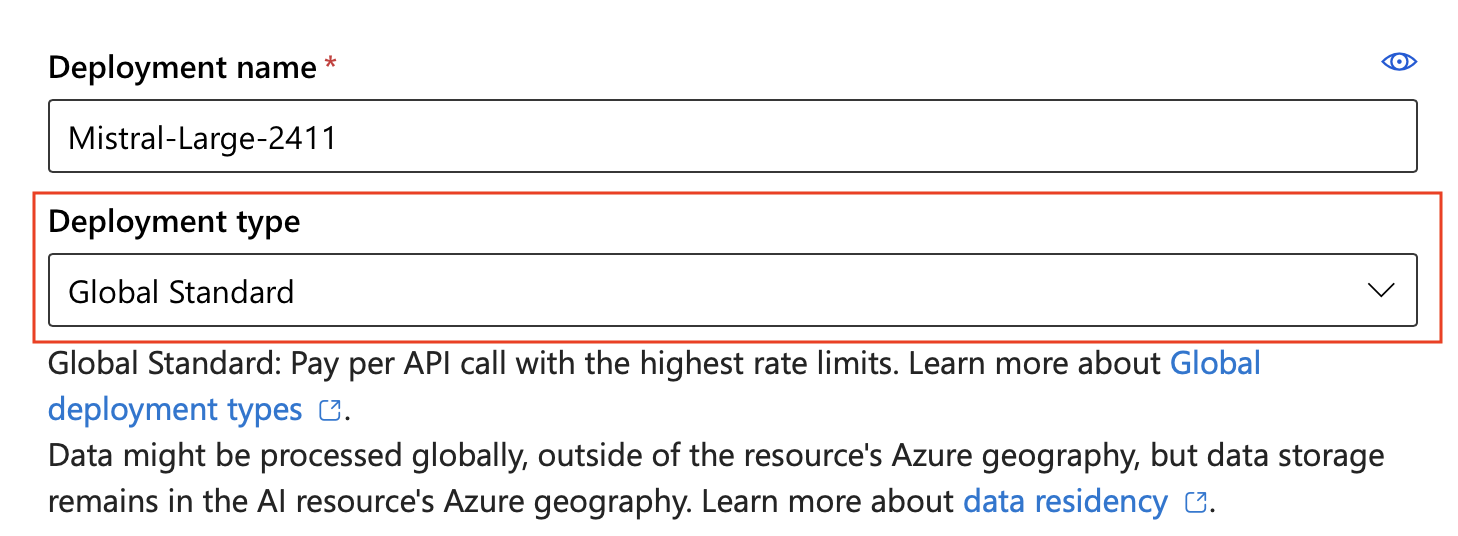
Data residency for all deployment types: Data stored at rest remains in the designated Azure geography. However, inferencing data is processed as follows:
- Global types: May be processed in any Azure region
- Data Zone types: The service processes data only within the Microsoft-specified data zone (US, EU, or Asia Pacific (APAC)).
- Standard and Regional Provisioned types: Prompts and responses are processed within the customer-specified Azure geography and might be processed between regions within that geography for operational purposes.
Start with Global Standard
For most workloads, start with Global Standard. It launches first when a new model releases, has the lowest price, and offers the broadest region coverage. Move to another deployment type only when you have a specific reason, such as data residency, reserved throughput, or asynchronous batch processing. New deployment types become available in a set order: Global, then Data Zone, then geography-based. Geography-based deployment types arrive last, have no guaranteed availability date, and depend on capacity that frees up as older models retire. For the authoritative launch order, see Model launch and availability.Deployment type comparison
Instant models let you run inference without creating a deployment, so they aren’t deployment types. To try a model instantly, see Instant access to models.Not all models support all deployment types. Check Foundry Models sold by Azure for model availability by deployment type and region.
Choose the right deployment type
Use the following table for a quick recommendation, then refine it with the criteria that follow.By data residency requirement
- No restrictions: Use Global Standard or Global Provisioned
- EU, US, or APAC data zone: Use Data Zone Standard or Data Zone Provisioned in a region within that data zone
- Azure geography: Use Standard or Regional Provisioned
By workload pattern
- Quick start, prototyping, or trying a new model: Use instant access (preview) (no deployment needed)
- Variable, bursty traffic: Use Standard or Global Standard (pay-per-token)
- Consistent high volume: Use Provisioned types (reserved capacity)
- Large batch jobs (not time-sensitive): Use Global Batch or Data Zone Batch (50% cost savings)
- Fine-tuned model evaluation: Use Developer (no SLA, lowest cost)
By latency requirement
- Low latency variance required: Use Provisioned types
- Latency variance acceptable: Use Standard types
- Evaluating a fine-tuned model: Use developer (no SLA; not intended for latency-sensitive workloads).
Data processing locations
Standard and provisioned deployments both offer three data-processing options: global, data zone, and Azure geography. Global Standard is a common starting point for most workloads.Global deployments
Global deployments use Azure’s global infrastructure to dynamically route traffic to available datacenters. Global deployments offer the highest initial throughput limits and broadest model availability. For high-volume workloads, you might experience increased latency variation. If you require lower latency variance at scale, use provisioned deployment types. Global deployments receive new models and features first.Data Zone deployments
For Global deployment types, the service can process prompts and responses in any geography where the model is deployed. For Data Zone deployment types, the service processes prompts and responses only within the specified data zone:- United States: The service processes data anywhere within the US.
- European Union: The service processes data within the Azure EU Data Boundary.
- Asia Pacific: The service processes data within the APAC data zone.
With Global Standard and Data Zone Standard deployment types, if the primary region experiences an interruption in service, all traffic initially routed to this region is affected. To learn more, see the high availability and disaster recovery guide.
Global Standard
- SKU name in code:
GlobalStandard
Global Provisioned
- SKU name in code:
GlobalProvisionedManaged
Global Batch
- SKU name in code:
GlobalBatch
- Large-scale data processing: Analyze datasets in parallel.
- Content generation: Create large volumes of text, such as product descriptions or articles.
- Document review and summarization: Process and summarize lengthy documents.
- Customer support automation: Handle numerous queries simultaneously.
- Data extraction and analysis: Extract and analyze information from large amounts of unstructured data.
- Natural language processing (NLP) tasks: Perform sentiment analysis or translation on large datasets.
Batch deployments trade real-time responsiveness for cost savings. Batch requests don’t have a real-time SLA — they target completion within 24 hours but might take longer.
Data Zone Standard
- SKU name in code:
DataZoneStandard
Data Zone Provisioned
- SKU name in code:
DataZoneProvisionedManaged
Data Zone Batch
- SKU name in code:
DataZoneBatch
Standard
- SKU name in code:
Standard
Regional Provisioned
- SKU name in code:
ProvisionedManaged
Developer (for fine-tuned models)
- SKU name in code:
DeveloperTier
Troubleshooting deployment issues
Common issues when creating or using deployments:
For quota limits by deployment type, see Foundry Models quotas and limits.
Restrict deployment types with Azure Policy
Azure Policy helps enforce organizational standards and assess compliance at scale. Through its compliance dashboard, you can evaluate the overall state of the environment and drill down to per-resource, per-policy granularity. Azure Policy also supports bulk remediation for existing resources and automatic remediation for new resources. Learn more about Azure Policy and specific built-in controls for Foundry Tools. Use the following policy to disable access to a specific Foundry deployment type. ReplaceGlobalStandard with the SKU name for the deployment type you want to restrict.
Related content
- Deploy Microsoft Foundry Models in the Foundry portal
- Create and deploy an Azure OpenAI in Microsoft Foundry Models resource
- Foundry Models sold by Azure
- Model region availability by deployment type
- Microsoft Foundry Models quotas and limits
- Provisioned throughput concepts
- Global Batch processing
- Azure OpenAI Service pricing
- Data privacy and security for Foundry Models
- High availability and disaster recovery