> ## Documentation Index
> Fetch the complete documentation index at: https://hobbyist-e43fa225.mintlify.site/llms.txt
> Use this file to discover all available pages before exploring further.

# Get started with Voice Live for real-time voice agents

> Learn how to use Voice Live API for real-time voice agents with Azure Speech in Foundry Tools.

export const ZonePivot = ({group, options = [], defaultValue, label = "Choose an experience"}) => {
  const values = options.map(option => option.id);
  const optionKey = options.map(option => `${option.id}:${option.title}`).join("|");
  const [activePivot, setActivePivot] = useState(defaultValue || values[0]);
  const slugify = value => value.toLowerCase().replace(/[^a-z0-9]+/g, "-").replace(/^-|-$/g, "");
  const resolvePivot = () => {
    if (typeof window === "undefined") return defaultValue || values[0];
    const params = new URLSearchParams(window.location.search);
    const requested = params.get("pivots");
    if (requested) {
      const requestedIds = requested.split(",").map(value => value.trim()).filter(Boolean);
      const match = requestedIds.find(id => values.includes(id));
      if (match) return match;
    }
    const hash = window.location.hash.replace(/^#/, "");
    if (hash) {
      const match = options.find(option => option.id === hash || slugify(option.title) === hash);
      if (match) return match.id;
    }
    try {
      const stored = window.localStorage.getItem(`foundry-zone-pivot:${group}`);
      if (values.includes(stored)) return stored;
    } catch {
      return defaultValue || values[0];
    }
    return defaultValue || values[0];
  };
  const publishPivotChange = value => {
    if (typeof window === "undefined") return;
    window.dispatchEvent(new CustomEvent("foundry-zone-pivot-change", {
      detail: {
        group,
        value
      }
    }));
  };
  const syncTableOfContents = () => {
    if (typeof window === "undefined") return;
    window.requestAnimationFrame(() => {
      const toc = document.getElementById("table-of-contents-content");
      if (!toc) return;
      const links = Array.from(toc.querySelectorAll('a[href^="#"]'));
      for (const link of links) {
        const item = link.closest("li");
        const rawId = link.getAttribute("href")?.slice(1);
        if (!item || !rawId) continue;
        let id = rawId;
        try {
          id = decodeURIComponent(rawId);
        } catch {}
        item.style.display = document.getElementById(id) ? "" : "none";
      }
    });
  };
  useEffect(() => {
    const resolvedPivot = resolvePivot();
    setActivePivot(resolvedPivot);
    publishPivotChange(resolvedPivot);
    window.setTimeout(syncTableOfContents, 0);
  }, [group, defaultValue, values.join("|"), optionKey]);
  const selectPivot = value => {
    setActivePivot(value);
    if (typeof window !== "undefined") {
      try {
        window.localStorage.setItem(`foundry-zone-pivot:${group}`, value);
      } catch {}
      const url = new URL(window.location.href);
      const current = url.searchParams.get("pivots");
      const preserved = current ? current.split(",").map(id => id.trim()).filter(id => id && !values.includes(id)) : [];
      url.searchParams.set("pivots", [...preserved, value].join(","));
      window.history.replaceState(null, "", `${url.pathname}${url.search}${url.hash}`);
    }
    publishPivotChange(value);
    window.setTimeout(syncTableOfContents, 0);
  };
  if (options.length < 2) return null;
  return <div className="not-prose my-6 border-b border-slate-200 pb-3 dark:border-slate-800">
      <div className="mb-2 text-xs font-semibold uppercase tracking-wide text-slate-500 dark:text-slate-400">
        {label}
      </div>
      <div className="flex flex-wrap gap-2" role="tablist" aria-label={label}>
        {options.map(option => {
    const selected = option.id === activePivot;
    return <button key={option.id} type="button" role="tab" aria-selected={selected} onClick={() => selectPivot(option.id)} className={`rounded-md border px-3 py-1.5 text-sm font-medium transition ${selected ? "border-slate-900 bg-slate-900 text-white shadow-sm dark:border-slate-100 dark:bg-slate-100 dark:text-slate-950" : "border-slate-200 bg-white text-slate-700 hover:border-slate-400 hover:text-slate-950 dark:border-slate-700 dark:bg-slate-950 dark:text-slate-200 dark:hover:border-slate-500"}`}>
              {option.title}
            </button>;
  })}
      </div>
    </div>;
};

export const ZoneContent = ({group, value, options = [], values = [], defaultValue, children}) => {
  const optionKey = options.map(option => `${option.id}:${option.title}`).join("|");
  const [activePivot, setActivePivot] = useState(defaultValue || values[0]);
  const slugify = value => value.toLowerCase().replace(/[^a-z0-9]+/g, "-").replace(/^-|-$/g, "");
  const resolvePivot = () => {
    if (typeof window === "undefined") return defaultValue || values[0];
    const params = new URLSearchParams(window.location.search);
    const requested = params.get("pivots");
    if (requested) {
      const requestedIds = requested.split(",").map(value => value.trim()).filter(Boolean);
      const match = requestedIds.find(id => values.includes(id));
      if (match) return match;
    }
    const hash = window.location.hash.replace(/^#/, "");
    if (hash) {
      const match = options.find(option => option.id === hash || slugify(option.title) === hash);
      if (match) return match.id;
    }
    try {
      const stored = window.localStorage.getItem(`foundry-zone-pivot:${group}`);
      if (values.includes(stored)) return stored;
    } catch {
      return defaultValue || values[0];
    }
    return defaultValue || values[0];
  };
  useEffect(() => {
    setActivePivot(resolvePivot());
  }, [group, defaultValue, values.join("|"), optionKey]);
  useEffect(() => {
    const onPivotChange = event => {
      if (event.detail?.group === group && values.includes(event.detail.value)) {
        setActivePivot(event.detail.value);
      }
    };
    window.addEventListener("foundry-zone-pivot-change", onPivotChange);
    return () => window.removeEventListener("foundry-zone-pivot-change", onPivotChange);
  }, [group, values.join("|")]);
  if (activePivot !== value) return null;
  return <>{children}</>;
};

<ZonePivot group="ai-foundry-portal__programming-language-csharp__programming-language-java__programming-language-python" options={[{"id": "ai-foundry-portal", "title": "Foundry portal"}, {"id": "programming-language-python", "title": "Python"}, {"id": "programming-language-csharp", "title": "C#"}, {"id": "programming-language-java", "title": "Java"}]} defaultValue="ai-foundry-portal" />

<ZoneContent group="ai-foundry-portal__programming-language-csharp__programming-language-java__programming-language-python" value="ai-foundry-portal" options={[{"id": "ai-foundry-portal", "title": "Foundry portal"}, {"id": "programming-language-python", "title": "Python"}, {"id": "programming-language-csharp", "title": "C#"}, {"id": "programming-language-java", "title": "Java"}]} values={["ai-foundry-portal", "programming-language-python", "programming-language-csharp", "programming-language-java"]} defaultValue="ai-foundry-portal">
  In this article, you learn how to use Voice Live with generative AI and Azure Speech in Foundry Tools in the [Microsoft Foundry portal](https://ai.azure.com/?cid=learnDocs).

  You create and run an application to use Voice Live directly with generative AI models for real-time voice agents.

  * Using models directly allows specifying custom instructions (prompts) for each session, offering more flexibility for dynamic or experimental use cases.

  * Models may be preferable when you want fine-grained control over session parameters or need to frequently adjust the prompt or configuration without updating an agent in the portal.

  * The code for model-based sessions is simpler in some respects, as it does not require managing agent IDs or agent-specific setup.

  * Direct model use is suitable for scenarios where agent-level abstraction or built-in logic is unnecessary.

  To instead use the Voice Live API with agents, see the [Voice Live API agents quickstart](https://learn.microsoft.com/azure/ai-services/speech-service/voice-live-agents-quickstart).

  ## Prerequisites

  * An Azure subscription. [Create one for free](https://azure.microsoft.com/pricing/purchase-options/azure-account?cid=msft_learn).
  * A Foundry project. If you need to create a project, see [Create a Microsoft Foundry project](https://learn.microsoft.com/en-us/azure/ai-foundry/how-to/create-projects). For more information about region availability, see the [Voice Live overview documentation](../../../voice-live).

  <Tip>
    To use Voice Live, you don't need to deploy an audio model with your Microsoft Foundry resource. Voice Live is fully managed, and the model is automatically deployed for you. For more information about models availability, see the [Voice Live overview documentation](../../../voice-live).
  </Tip>

  ## Try out Voice Live in the Speech playground

  <Tabs>
    <Tab title="Foundry (new) portal">
      To try out the Voice Live demo, follow these steps:

      1. Sign in to [Microsoft Foundry](https://ai.azure.com/?cid=learnDocs). Make sure the **New Foundry** toggle is on. These steps refer to **Foundry (new)**.

      <img src="https://mintcdn.com/hobbyist-e43fa225/_qpHdwibkfCcXaky/images/new-foundry.png?fit=max&auto=format&n=_qpHdwibkfCcXaky&q=85&s=1338a0cf43c92807e8bcccdd0223d052" width="184" height="36" data-path="images/new-foundry.png" />

      1. Select **Build** from the top right menu.
      2. Select **Models** on the left pane.
      3. The **AI Services** tab shows the Azure AI models that can be used out of the box in the Foundry portal. **Select Azure Speech - Voice Live** to open the Voice Live playground.
      4. Select a scenario and a voice using the dropdown menus. Optionally configure other parameters of the voice agent's behavior. The **Proactive engagement** toggle, for example, allows the agent to speak first in the conversation.
      5. When you're ready, select **Start** to start chatting with the voice agent using your device's microphone and speakers.
      6. Select **End** to end the chat session.

      ## Other Foundry (new) features

      The following Speech features are available in the Foundry (new) portal:

      * [Speech MCP server](https://learn.microsoft.com/azure/ai-foundry/agents/how-to/tools/azure-ai-speech)
      * [Speech to text quickstart](https://learn.microsoft.com/azure/ai-services/speech-service/get-started-speech-to-text)
      * [Text to speech quickstart](https://learn.microsoft.com/azure/ai-services/speech-service/get-started-text-to-speech)
      * [Text to speech avatar quickstart](https://learn.microsoft.com/azure/ai-services/speech-service/text-to-speech-avatar/batch-synthesis-avatar)
      * [Voice live quickstart](https://learn.microsoft.com/azure/ai-services/speech-service/voice-live-quickstart)
    </Tab>

    <Tab title="Foundry (classic) portal">
      To try out the Voice Live demo, follow these steps:

      1. Sign in to [Microsoft Foundry](https://ai.azure.com/?cid=learnDocs).  Make sure the **New Foundry** toggle is off.  These steps refer to **Foundry (classic)**.

      <img src="https://mintcdn.com/hobbyist-e43fa225/i8cG-y5gTtUVot10/images/classic-foundry.png?fit=max&auto=format&n=i8cG-y5gTtUVot10&q=85&s=3cbdc91c816894804a08542085e32659" width="184" height="36" data-path="images/classic-foundry.png" />

      1. Select **Playgrounds** from the left pane.
      2. In the **Speech playground** tile, select **Try the Speech playground**.
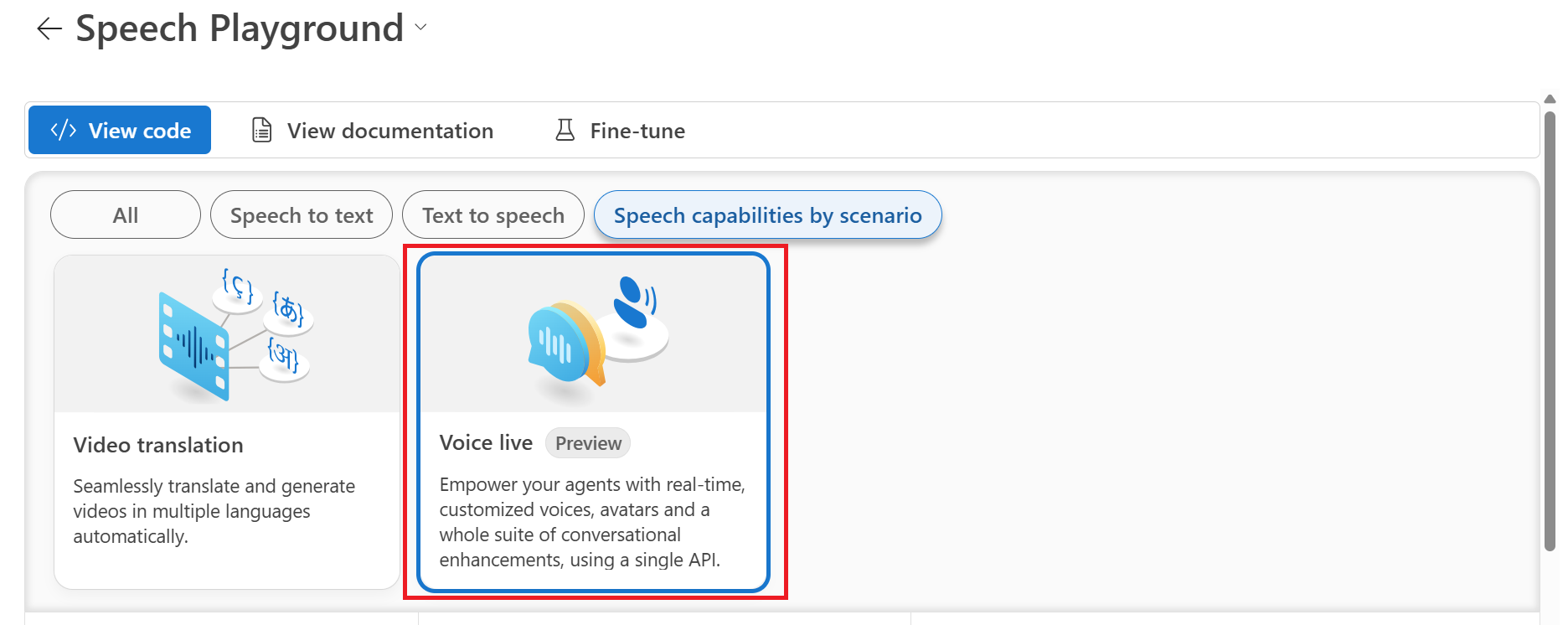
      3. Select **Speech capabilities by scenario** > **Voice Live**.

      <Frame>
        <img src="https://mintcdn.com/hobbyist-e43fa225/i8cG-y5gTtUVot10/images/capabilities-by-scenario.png?fit=max&auto=format&n=i8cG-y5gTtUVot10&q=85&s=2008d8a9d4c2dfcbc8bfbe26fdef8e12" alt="Screenshot of filtering Speech service capabilities by scenario." width="1872" height="746" data-path="images/capabilities-by-scenario.png" />
      </Frame>

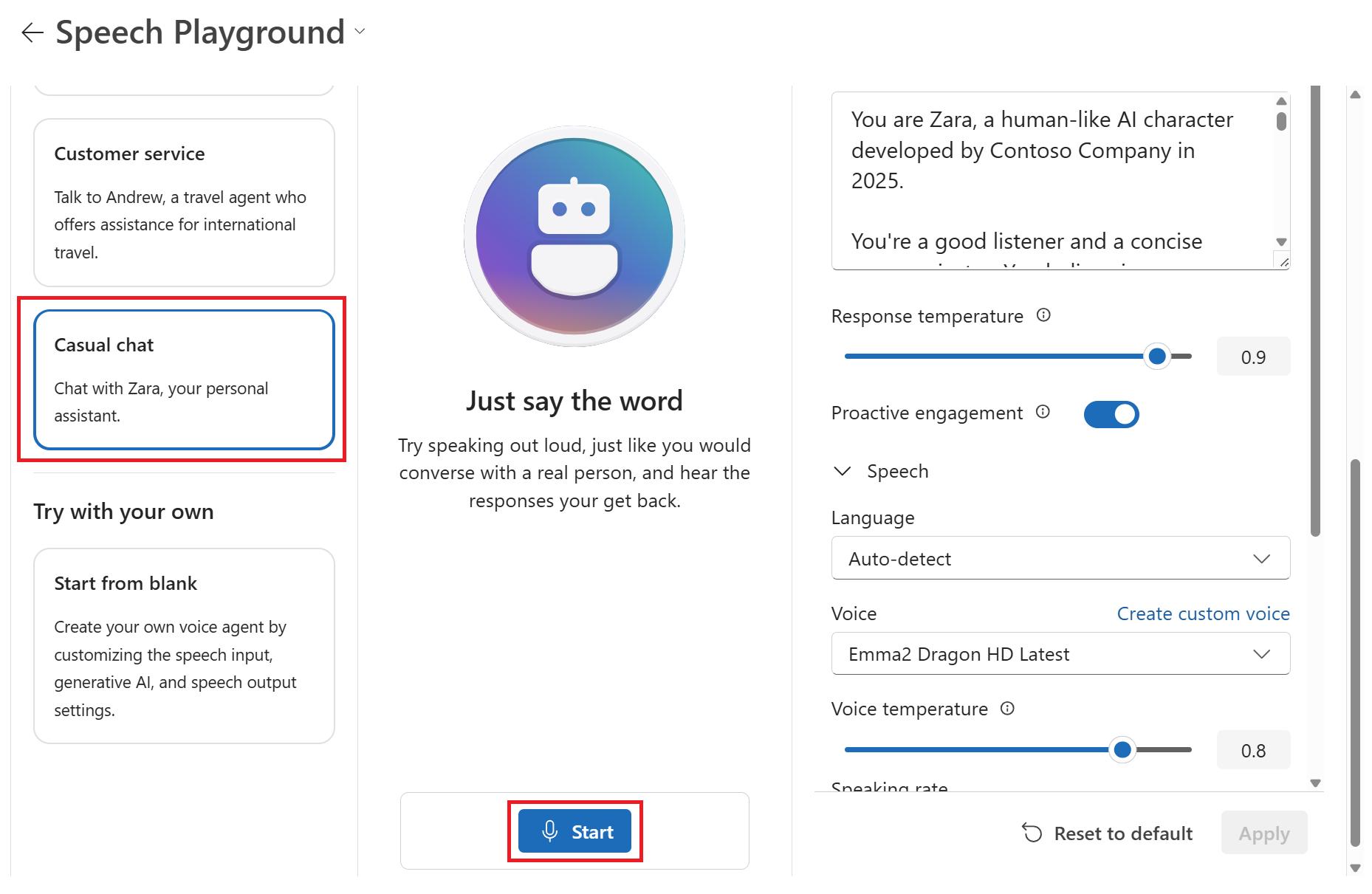
      1. Select a sample scenario, such as **Casual chat**.

      <Frame>
        <img src="https://mintcdn.com/hobbyist-e43fa225/i8cG-y5gTtUVot10/images/casual-chat-start.png?fit=max&auto=format&n=i8cG-y5gTtUVot10&q=85&s=7039e33a21c9af66596617b7fd0d2894" alt="Screenshot of selecting the casual chat example scenario in the Speech playground." width="1858" height="1211" data-path="images/casual-chat-start.png" />
      </Frame>

      1. Select **Start** to start chatting with the chat agent.

      2. Select **End** to end the chat session.

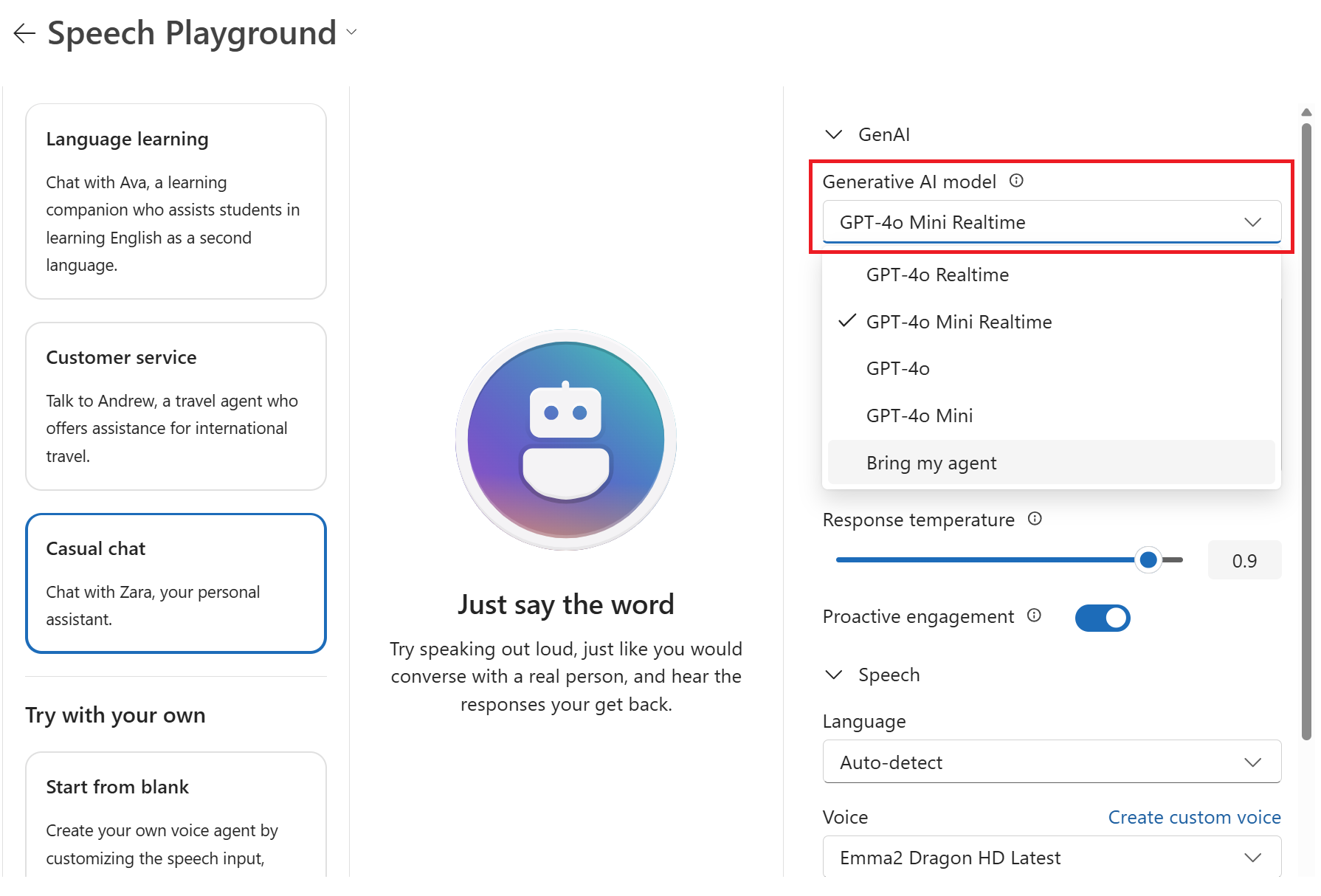
      3. Select a new generative AI model from the drop-down list via **Configuration** > **GenAI** > **Generative AI model**.

      <Note>
        You can also select an agent that you configured in the **Agents** playground. For more information, see the [Voice Live with Foundry agents quickstart](https://learn.microsoft.com/azure/ai-services/speech-service/voice-live-agents-quickstart).
      </Note>

      <Frame>
        <img src="https://mintcdn.com/hobbyist-e43fa225/i8cG-y5gTtUVot10/images/casual-chat-generative-ai-select.png?fit=max&auto=format&n=i8cG-y5gTtUVot10&q=85&s=3f3370c15720b9207a10ae1594beefb6" alt="Screenshot of the casual chat example scenario in the Speech playground." width="1790" height="1214" data-path="images/casual-chat-generative-ai-select.png" />
      </Frame>

      1. Edit other settings as needed, such as the **Response instructions**, **Voice**, and **Speaking rate**. The **Proactive engagement** allows the agent to speak first in the conversation.

      2. Select **Start** to start speaking again and select **End** to end the chat session.
    </Tab>
  </Tabs>
</ZoneContent>

<ZoneContent group="ai-foundry-portal__programming-language-csharp__programming-language-java__programming-language-python" value="programming-language-python" options={[{"id": "ai-foundry-portal", "title": "Foundry portal"}, {"id": "programming-language-python", "title": "Python"}, {"id": "programming-language-csharp", "title": "C#"}, {"id": "programming-language-java", "title": "Java"}]} values={["ai-foundry-portal", "programming-language-python", "programming-language-csharp", "programming-language-java"]} defaultValue="ai-foundry-portal">
  In this article, you learn how to use Voice Live with [Microsoft Foundry models](https://learn.microsoft.com/azure/ai-foundry/concepts/foundry-models-overview) using the VoiceLive SDK for Python.

  [Reference documentation](https://learn.microsoft.com/python/api/overview/azure/ai-voicelive-readme) | [Package (PyPi)](https://pypi.org/project/azure-ai-voicelive/) | [Additional samples on GitHub](https://aka.ms/voicelive/github-python)

  You create and run an application to use Voice Live directly with generative AI models for real-time voice agents.

  * Using models directly allows specifying custom instructions (prompts) for each session, offering more flexibility for dynamic or experimental use cases.

  * Models may be preferable when you want fine-grained control over session parameters or need to frequently adjust the prompt or configuration without updating an agent in the portal.

  * The code for model-based sessions is simpler in some respects, as it does not require managing agent IDs or agent-specific setup.

  * Direct model use is suitable for scenarios where agent-level abstraction or built-in logic is unnecessary.

  To instead use the Voice Live API with agents, see the [Voice Live API agents quickstart](https://learn.microsoft.com/azure/ai-services/speech-service/voice-live-agents-quickstart).

  ## Prerequisites

  * An Azure subscription. [Create one for free](https://azure.microsoft.com/pricing/purchase-options/azure-account?cid=msft_learn).
  * <a href="https://www.python.org/" target="_blank">Python 3.10 or later version</a>. If you don't have a suitable version of Python installed, you can follow the instructions in the [VS Code Python Tutorial](https://code.visualstudio.com/docs/python/python-tutorial#_install-a-python-interpreter) for the easiest way of installing Python on your operating system.
  * A [Microsoft Foundry resource](../../../../multi-service-resource) created in one of the supported regions. For more information about region availability, see [Region support](https://learn.microsoft.com/azure/ai-services/speech-service/regions).

  <Tip>
    To use Voice Live, you don't need to deploy an audio model with your Microsoft Foundry resource. Voice Live is fully managed, and the model is automatically deployed for you. For more information about models availability, see the [Voice Live overview documentation](../../../voice-live).
  </Tip>

  ## Microsoft Entra ID prerequisites

  For the recommended keyless authentication with Microsoft Entra ID, you need to:

  * Install the [Azure CLI](https://learn.microsoft.com/cli/azure/install-azure-cli) used for keyless authentication with Microsoft Entra ID.
  * Assign the `Cognitive Services User` role to your user account. You can assign roles in the Azure portal under **Access control (IAM)** > **Add role assignment**.

  ## Set up

  1. Create a new folder `voice-live-quickstart` and go to the quickstart folder with the following command:

     ```shell theme={null}
     mkdir voice-live-quickstart && cd voice-live-quickstart
     ```

  2. Create a virtual environment. If you already have Python 3.10 or higher installed, you can create a virtual environment using the following commands:

     # [Windows](#tab/windows)

     ```bash theme={null}
     py -3 -m venv .venv
     .venv\scripts\activate
     ```

     # [Linux](#tab/linux)

     ```bash theme={null}
     python3 -m venv .venv
     source .venv/bin/activate
     ```

     # [macOS](#tab/macos)

     ```bash theme={null}
     python3 -m venv .venv
     source .venv/bin/activate
     ```

     ***

     Activating the Python environment means that when you run `python` or `pip` from the command line, you then use the Python interpreter contained in the `.venv` folder of your application. You can use the `deactivate` command to exit the python virtual environment, and can later reactivate it when needed.

  <Tip>
    We recommend that you create and activate a new Python environment to use to install the packages you need for this tutorial. Don't install packages into your global python installation. You should always use a virtual or conda environment when installing python packages, otherwise you can break your global installation of Python.
  </Tip>

  1. Create a file named **requirements.txt**. Add the following packages to the file:

     ```txt theme={null}
     azure-ai-voicelive[aiohttp]
     pyaudio
     python-dotenv
     azure-identity
     ```

  2. Install the packages:

     ```bash theme={null}
     pip install -r requirements.txt
     ```

  ## Retrieve resource information

  Create a new file named `.env` in the folder where you want to run the code.

  In the `.env` file, add the following environment variables for authentication:

  ```plaintext theme={null}
  AZURE_VOICELIVE_ENDPOINT=<your_endpoint>
  AZURE_VOICELIVE_MODEL=<your_model>
  AZURE_VOICELIVE_API_VERSION=2025-10-01
  AZURE_VOICELIVE_API_KEY=<your_api_key> # Only required if using API key authentication
  ```

  Replace the default values with your actual endpoint, model, API version, and API key.

  <Tabs>
    <Tab title="Microsoft Entra ID">
      | Variable name                 | Value                                                                                                                                                                                          |
      | ----------------------------- | ---------------------------------------------------------------------------------------------------------------------------------------------------------------------------------------------- |
      | `AZURE_VOICELIVE_ENDPOINT`    | This value can be found in the **Keys and Endpoint** section when examining your resource from the Azure portal.                                                                               |
      | `AZURE_VOICELIVE_MODEL`       | The model you want to use. For example, `gpt-4o` or `gpt-realtime-mini`. For more information about models availability, see the [Voice Live API overview documentation](../../../voice-live). |
      | `AZURE_VOICELIVE_API_VERSION` | The API version you want to use. For example, `2025-10-01`.                                                                                                                                    |

      Learn more about [keyless authentication](https://learn.microsoft.com/azure/ai-services/authentication) and [setting environment variables](https://learn.microsoft.com/azure/ai-services/cognitive-services-environment-variables).
    </Tab>

    <Tab title="API key">
      | Variable name                 | Value                                                                                                                                                                                          |
      | ----------------------------- | ---------------------------------------------------------------------------------------------------------------------------------------------------------------------------------------------- |
      | `AZURE_VOICELIVE_ENDPOINT`    | This value can be found in the **Keys and Endpoint** section when examining your resource from the Azure portal.                                                                               |
      | `AZURE_VOICELIVE_MODEL`       | The model you want to use. For example, `gpt-4o` or `gpt-realtime-mini`. For more information about models availability, see the [Voice Live API overview documentation](../../../voice-live). |
      | `AZURE_VOICELIVE_API_VERSION` | The API version you want to use. For example, `2025-10-01`.                                                                                                                                    |
      | `AZURE_VOICELIVE_API_KEY`     | This value can be found in the **Keys and Endpoint** section when examining your resource from the Azure portal. You can use either `KEY1` or `KEY2`.                                          |

      Learn more about finding API keys and setting environment variables in the [Environment variables guide](https://learn.microsoft.com/azure/ai-services/cognitive-services-environment-variables).
    </Tab>
  </Tabs>

  ## Start a conversation

  The sample code in this quickstart uses either Microsoft Entra ID or an API key for authentication. You can set the script argument to be either your API key or your access token.

  1. Create the `voice-live-quickstart.py` file with the following code:

     ```python theme={null}
     # -------------------------------------------------------------------------
     # Copyright (c) Microsoft Corporation. All rights reserved.
     # Licensed under the MIT License.
     # -------------------------------------------------------------------------
     from __future__ import annotations
     import os
     import sys
     import argparse
     import asyncio
     import base64
     from datetime import datetime
     import logging
     import queue
     import signal
     from typing import Union, Optional, TYPE_CHECKING, cast

     from azure.core.credentials import AzureKeyCredential
     from azure.core.credentials_async import AsyncTokenCredential
     from azure.identity.aio import AzureCliCredential, DefaultAzureCredential

     from azure.ai.voicelive.aio import connect
     from azure.ai.voicelive.models import (
         AudioEchoCancellation,
         AudioNoiseReduction,
         AzureStandardVoice,
         InputAudioFormat,
         Modality,
         OutputAudioFormat,
         RequestSession,
         ServerEventType,
         ServerVad
     )
     from dotenv import load_dotenv
     import pyaudio

     if TYPE_CHECKING:
         # Only needed for type checking; avoids runtime import issues
         from azure.ai.voicelive.aio import VoiceLiveConnection

     ## Change to the directory where this script is located
     os.chdir(os.path.dirname(os.path.abspath(__file__)))

     # Environment variable loading
     load_dotenv('./.env', override=True)

     # Set up logging
     ## Add folder for logging
     if not os.path.exists('logs'):
         os.makedirs('logs')

     ## Add timestamp for logfiles
     timestamp = datetime.now().strftime("%Y-%m-%d_%H-%M-%S")

     ## Set up logging
     logging.basicConfig(
         filename=f'logs/{timestamp}_voicelive.log',
         filemode="w",
         format='%(asctime)s:%(name)s:%(levelname)s:%(message)s',
         level=logging.INFO
     )
     logger = logging.getLogger(__name__)

     class AudioProcessor:
         """
         Handles real-time audio capture and playback for the voice assistant.

         Threading Architecture:
         - Main thread: Event loop and UI
         - Capture thread: PyAudio input stream reading
         - Send thread: Async audio data transmission to VoiceLive
         - Playback thread: PyAudio output stream writing
         """

         loop: asyncio.AbstractEventLoop

         class AudioPlaybackPacket:
             """Represents a packet that can be sent to the audio playback queue."""
             def __init__(self, seq_num: int, data: Optional[bytes]):
                 self.seq_num = seq_num
                 self.data = data

         def __init__(self, connection):
             self.connection = connection
             self.audio = pyaudio.PyAudio()

             # Audio configuration - PCM16, 24kHz, mono as specified
             self.format = pyaudio.paInt16
             self.channels = 1
             self.rate = 24000
             self.chunk_size = 1200 # 50ms

             # Capture and playback state
             self.input_stream = None

             self.playback_queue: queue.Queue[AudioProcessor.AudioPlaybackPacket] = queue.Queue()
             self.playback_base = 0
             self.next_seq_num = 0
             self.output_stream: Optional[pyaudio.Stream] = None

             logger.info("AudioProcessor initialized with 24kHz PCM16 mono audio")

         def start_capture(self):
             """Start capturing audio from microphone."""
             def _capture_callback(
                 in_data,      # data
                 _frame_count,  # number of frames
                 _time_info,    # dictionary
                 _status_flags):
                 """Audio capture thread - runs in background."""
                 audio_base64 = base64.b64encode(in_data).decode("utf-8")
                 asyncio.run_coroutine_threadsafe(
                     self.connection.input_audio_buffer.append(audio=audio_base64), self.loop
                 )
                 return (None, pyaudio.paContinue)

             if self.input_stream:
                 return

             # Store the current event loop for use in threads
             self.loop = asyncio.get_event_loop()

             try:
                 self.input_stream = self.audio.open(
                     format=self.format,
                     channels=self.channels,
                     rate=self.rate,
                     input=True,
                     frames_per_buffer=self.chunk_size,
                     stream_callback=_capture_callback,
                 )
                 logger.info("Started audio capture")

             except Exception:
                 logger.exception("Failed to start audio capture")
                 raise

         def start_playback(self):
             """Initialize audio playback system."""
             if self.output_stream:
                 return

             remaining = bytes()
             def _playback_callback(
                 _in_data,
                 frame_count,  # number of frames
                 _time_info,
                 _status_flags):

                 nonlocal remaining
                 frame_count *= pyaudio.get_sample_size(pyaudio.paInt16)

                 out = remaining[:frame_count]
                 remaining = remaining[frame_count:]

                 while len(out) < frame_count:
                     try:
                         packet = self.playback_queue.get_nowait()
                     except queue.Empty:
                         out = out + bytes(frame_count - len(out))
                         continue
                     except Exception:
                         logger.exception("Error in audio playback")
                         raise

                     if not packet or not packet.data:
                         # None packet indicates end of stream
                         logger.info("End of playback queue.")
                         break

                     if packet.seq_num < self.playback_base:
                         # skip requested
                         # ignore skipped packet and clear remaining
                         if len(remaining) > 0:
                             remaining = bytes()
                         continue

                     num_to_take = frame_count - len(out)
                     out = out + packet.data[:num_to_take]
                     remaining = packet.data[num_to_take:]

                 if len(out) >= frame_count:
                     return (out, pyaudio.paContinue)
                 else:
                     return (out, pyaudio.paComplete)

             try:
                 self.output_stream = self.audio.open(
                     format=self.format,
                     channels=self.channels,
                     rate=self.rate,
                     output=True,
                     frames_per_buffer=self.chunk_size,
                     stream_callback=_playback_callback
                 )
                 logger.info("Audio playback system ready")
             except Exception:
                 logger.exception("Failed to initialize audio playback")
                 raise

         def _get_and_increase_seq_num(self):
             seq = self.next_seq_num
             self.next_seq_num += 1
             return seq

         def queue_audio(self, audio_data: Optional[bytes]) -> None:
             """Queue audio data for playback."""
             self.playback_queue.put(
                 AudioProcessor.AudioPlaybackPacket(
                     seq_num=self._get_and_increase_seq_num(),
                     data=audio_data))

         def skip_pending_audio(self):
             """Skip current audio in playback queue."""
             self.playback_base = self._get_and_increase_seq_num()

         def shutdown(self):
             """Clean up audio resources."""
             if self.input_stream:
                 self.input_stream.stop_stream()
                 self.input_stream.close()
                 self.input_stream = None

             logger.info("Stopped audio capture")

             # Inform thread to complete
             if self.output_stream:
                 self.skip_pending_audio()
                 self.queue_audio(None)
                 self.output_stream.stop_stream()
                 self.output_stream.close()
                 self.output_stream = None

             logger.info("Stopped audio playback")

             if self.audio:
                 self.audio.terminate()

             logger.info("Audio processor cleaned up")

     class BasicVoiceAssistant:
         """Basic voice assistant implementing the VoiceLive SDK patterns."""

         def __init__(
             self,
             endpoint: str,
             credential: Union[AzureKeyCredential, AsyncTokenCredential],
             model: str,
             voice: str,
             instructions: str,
         ):

             self.endpoint = endpoint
             self.credential = credential
             self.model = model
             self.voice = voice
             self.instructions = instructions
             self.connection: Optional["VoiceLiveConnection"] = None
             self.audio_processor: Optional[AudioProcessor] = None
             self.session_ready = False
             self._active_response = False
             self._response_api_done = False

         async def start(self):
             """Start the voice assistant session."""
             try:
                 logger.info("Connecting to VoiceLive API with model %s", self.model)

                 # Connect to VoiceLive WebSocket API
                 async with connect(
                     endpoint=self.endpoint,
                     credential=self.credential,
                     model=self.model,
                 ) as connection:
                     conn = connection
                     self.connection = conn

                     # Initialize audio processor
                     ap = AudioProcessor(conn)
                     self.audio_processor = ap

                     # Configure session for voice conversation
                     await self._setup_session()

                     # Start audio systems
                     ap.start_playback()

                     logger.info("Voice assistant ready! Start speaking...")
                     print("\n" + "=" * 60)
                     print("🎤 VOICE ASSISTANT READY")
                     print("Start speaking to begin conversation")
                     print("Press Ctrl+C to exit")
                     print("=" * 60 + "\n")

                     # Process events
                     await self._process_events()
             finally:
                 if self.audio_processor:
                     self.audio_processor.shutdown()

         async def _setup_session(self):
             """Configure the VoiceLive session for audio conversation."""
             logger.info("Setting up voice conversation session...")

             # Create voice configuration
             voice_config: Union[AzureStandardVoice, str]
             if self.voice.startswith("en-US-") or self.voice.startswith("en-CA-") or "-" in self.voice:
                 # Azure voice
                 voice_config = AzureStandardVoice(name=self.voice)
             else:
                 # OpenAI voice (alloy, echo, fable, onyx, nova, shimmer)
                 voice_config = self.voice

             # Create turn detection configuration
             turn_detection_config = ServerVad(
                 threshold=0.5,
                 prefix_padding_ms=300,
                 silence_duration_ms=500)

             # Create session configuration
             session_config = RequestSession(
                 modalities=[Modality.TEXT, Modality.AUDIO],
                 instructions=self.instructions,
                 voice=voice_config,
                 input_audio_format=InputAudioFormat.PCM16,
                 output_audio_format=OutputAudioFormat.PCM16,
                 turn_detection=turn_detection_config,
                 input_audio_echo_cancellation=AudioEchoCancellation(),
                 input_audio_noise_reduction=AudioNoiseReduction(type="azure_deep_noise_suppression"),
             )

             conn = self.connection
             assert conn is not None, "Connection must be established before setting up session"
             await conn.session.update(session=session_config)

             logger.info("Session configuration sent")

         async def _process_events(self):
             """Process events from the VoiceLive connection."""
             try:
                 conn = self.connection
                 assert conn is not None, "Connection must be established before processing events"
                 async for event in conn:
                     await self._handle_event(event)
             except Exception:
                 logger.exception("Error processing events")
                 raise

         async def _handle_event(self, event):
             """Handle different types of events from VoiceLive."""
             logger.debug("Received event: %s", event.type)
             ap = self.audio_processor
             conn = self.connection
             assert ap is not None, "AudioProcessor must be initialized"
             assert conn is not None, "Connection must be established"

             if event.type == ServerEventType.SESSION_UPDATED:
                 logger.info("Session ready: %s", event.session.id)
                 self.session_ready = True

                 # Start audio capture once session is ready
                 ap.start_capture()

             elif event.type == ServerEventType.INPUT_AUDIO_BUFFER_SPEECH_STARTED:
                 logger.info("User started speaking - stopping playback")
                 print("🎤 Listening...")

                 ap.skip_pending_audio()

             elif event.type == ServerEventType.INPUT_AUDIO_BUFFER_SPEECH_STOPPED:
                 logger.info("🎤 User stopped speaking")
                 print("🤔 Processing...")

             elif event.type == ServerEventType.RESPONSE_CREATED:
                 logger.info("🤖 Assistant response created")
                 self._active_response = True
                 self._response_api_done = False

             elif event.type == ServerEventType.RESPONSE_AUDIO_DELTA:
                 logger.debug("Received audio delta")
                 ap.queue_audio(event.delta)

             elif event.type == ServerEventType.RESPONSE_AUDIO_DONE:
                 logger.info("🤖 Assistant finished speaking")
                 print("🎤 Ready for next input...")

             elif event.type == ServerEventType.RESPONSE_DONE:
                 logger.info("✅ Response complete")
                 self._active_response = False
                 self._response_api_done = True

             elif event.type == ServerEventType.ERROR:
                 msg = event.error.message
                 if "Cancellation failed: no active response" in msg:
                     logger.debug("Benign cancellation error: %s", msg)
                 else:
                     logger.error("❌ VoiceLive error: %s", msg)
                     print(f"Error: {msg}")

             elif event.type == ServerEventType.CONVERSATION_ITEM_CREATED:
                 logger.debug("Conversation item created: %s", event.item.id)

             else:
                 logger.debug("Unhandled event type: %s", event.type)

     def parse_arguments():
         """Parse command line arguments."""
         parser = argparse.ArgumentParser(
             description="Basic Voice Assistant using Azure VoiceLive SDK",
             formatter_class=argparse.ArgumentDefaultsHelpFormatter,
         )

         parser.add_argument(
             "--api-key",
             help="Azure VoiceLive API key. If not provided, will use AZURE_VOICELIVE_API_KEY environment variable.",
             type=str,
             default=os.environ.get("AZURE_VOICELIVE_API_KEY"),
         )

         parser.add_argument(
             "--endpoint",
             help="Azure VoiceLive endpoint",
             type=str,
             default=os.environ.get("AZURE_VOICELIVE_ENDPOINT", "https://your-resource-name.services.ai.azure.com/"),
         )

         parser.add_argument(
             "--model",
             help="VoiceLive model to use",
             type=str,
             default=os.environ.get("AZURE_VOICELIVE_MODEL", "gpt-realtime"),
         )

         parser.add_argument(
             "--voice",
             help="Voice to use for the assistant. E.g. alloy, echo, fable, en-US-AvaNeural, en-US-GuyNeural",
             type=str,
             default=os.environ.get("AZURE_VOICELIVE_VOICE", "en-US-Ava:DragonHDLatestNeural"),
         )

         parser.add_argument(
             "--instructions",
             help="System instructions for the AI assistant",
             type=str,
             default=os.environ.get(
                 "AZURE_VOICELIVE_INSTRUCTIONS",
                 "You are a helpful AI assistant. Respond naturally and conversationally. "
                 "Keep your responses concise but engaging.",
             ),
         )

         parser.add_argument(
             "--use-token-credential", help="Use Azure token credential instead of API key", action="store_true", default=False
         )

         parser.add_argument("--verbose", help="Enable verbose logging", action="store_true")

         return parser.parse_args()

     def main():
         """Main function."""
         args = parse_arguments()

         # Set logging level
         if args.verbose:
             logging.getLogger().setLevel(logging.DEBUG)

         # Validate credentials
         if not args.api_key and not args.use_token_credential:
             print("❌ Error: No authentication provided")
             print("Please provide an API key using --api-key or set AZURE_VOICELIVE_API_KEY environment variable,")
             print("or use --use-token-credential for Azure authentication.")
             sys.exit(1)

         # Create client with appropriate credential
         credential: Union[AzureKeyCredential, AsyncTokenCredential]
         if args.use_token_credential:
             credential = AzureCliCredential()  # or DefaultAzureCredential() if needed
             logger.info("Using Azure token credential")
         else:
             credential = AzureKeyCredential(args.api_key)
             logger.info("Using API key credential")

         # Create and start voice assistant
         assistant = BasicVoiceAssistant(
             endpoint=args.endpoint,
             credential=credential,
             model=args.model,
             voice=args.voice,
             instructions=args.instructions,
         )

         # Setup signal handlers for graceful shutdown
         def signal_handler(_sig, _frame):
             logger.info("Received shutdown signal")
             raise KeyboardInterrupt()

         signal.signal(signal.SIGINT, signal_handler)
         signal.signal(signal.SIGTERM, signal_handler)

         # Start the assistant
         try:
             asyncio.run(assistant.start())
         except KeyboardInterrupt:
             print("\n👋 Voice assistant shut down. Goodbye!")
         except Exception as e:
             print("Fatal Error: ", e)

     if __name__ == "__main__":
         # Check audio system
         try:
             p = pyaudio.PyAudio()
             # Check for input devices
             input_devices = [
                 i
                 for i in range(p.get_device_count())
                 if cast(Union[int, float], p.get_device_info_by_index(i).get("maxInputChannels", 0) or 0) > 0
             ]
             # Check for output devices
             output_devices = [
                 i
                 for i in range(p.get_device_count())
                 if cast(Union[int, float], p.get_device_info_by_index(i).get("maxOutputChannels", 0) or 0) > 0
             ]
             p.terminate()

             if not input_devices:
                 print("❌ No audio input devices found. Please check your microphone.")
                 sys.exit(1)
             if not output_devices:
                 print("❌ No audio output devices found. Please check your speakers.")
                 sys.exit(1)

         except Exception as e:
             print(f"❌ Audio system check failed: {e}")
             sys.exit(1)

         print("🎙️  Basic Voice Assistant with Azure VoiceLive SDK")
         print("=" * 50)

         # Run the assistant
         main()
     ```

  2. Sign in to Azure with the following command:

     ```shell theme={null}
     az login
     ```

  3. Run the Python file.

     ```shell theme={null}
     python voice-live-quickstart.py --use-token-credential
     ```

  4. The Voice Live API starts to return audio with the model's initial response. You can interrupt the model by speaking. Enter "Ctrl+C" to quit the conversation.

  ## Output

  The output of the script is printed to the console. You see messages indicating the status of system. The audio is played back through your speakers or headphones.

  ```console theme={null}
  ============================================================
  🎤 VOICE ASSISTANT READY
  Start speaking to begin conversation
  Press Ctrl+C to exit
  ============================================================

  🎤 Listening...
  🤔 Processing...
  🎤 Ready for next input...
  🎤 Listening...
  🤔 Processing...
  🎤 Ready for next input...
  🎤 Listening...
  🤔 Processing...
  🎤 Ready for next input...
  🎤 Listening...
  🤔 Processing...
  🎤 Listening...
  🎤 Ready for next input...
  🤔 Processing...
  🎤 Ready for next input...
  ```

  The script that you ran creates a log file named `<timestamp>_voicelive.log` in the `logs` folder.

  The default loglevel is set to **INFO** but you can change it by running the quickstart with the command line parameter `--verbose` or by changing the logging config within the code as follows:

  ```python theme={null}
  logging.basicConfig(
      filename=f'logs/{timestamp}_voicelive.log',
      filemode="w",
      format='%(asctime)s:%(name)s:%(levelname)s:%(message)s',
      level=logging.INFO
  )
  ```

  The log file contains information about the connection to the Voice Live API, including the request and response data. You can view the log file to see the details of the conversation.

  ```text theme={null}
  2025-10-02 14:47:37,901:__main__:INFO:Using Azure token credential
  2025-10-02 14:47:37,901:__main__:INFO:Connecting to VoiceLive API with model gpt-realtime
  2025-10-02 14:47:37,901:azure.core.pipeline.policies.http_logging_policy:INFO:Request URL: 'https://login.microsoftonline.com/organizations/v2.0/.well-known/openid-configuration'
  Request method: 'GET'
  Request headers:
      'User-Agent': 'azsdk-python-identity/1.22.0 Python/3.11.9 (Windows-10-10.0.26200-SP0)'
  No body was attached to the request
  2025-10-02 14:47:38,057:azure.core.pipeline.policies.http_logging_policy:INFO:Response status: 200
  Response headers:
      'Date': 'Thu, 02 Oct 2025 21:47:37 GMT'
      'Content-Type': 'application/json; charset=utf-8'
      'Content-Length': '1641'
      'Connection': 'keep-alive'
      'Cache-Control': 'max-age=86400, private'
      'Strict-Transport-Security': 'REDACTED'
      'X-Content-Type-Options': 'REDACTED'
      'Access-Control-Allow-Origin': 'REDACTED'
      'Access-Control-Allow-Methods': 'REDACTED'
      'P3P': 'REDACTED'
      'x-ms-request-id': 'f81adfa1-8aa3-4ab6-a7b8-908f411e0d00'
      'x-ms-ests-server': 'REDACTED'
      'x-ms-srs': 'REDACTED'
      'Content-Security-Policy-Report-Only': 'REDACTED'
      'Cross-Origin-Opener-Policy-Report-Only': 'REDACTED'
      'Reporting-Endpoints': 'REDACTED'
      'X-XSS-Protection': 'REDACTED'
      'Set-Cookie': 'REDACTED'
      'X-Cache': 'REDACTED'
  2025-10-02 14:47:42,105:azure.core.pipeline.policies.http_logging_policy:INFO:Request URL: 'https://login.microsoftonline.com/organizations/oauth2/v2.0/token'
  Request method: 'POST'
  Request headers:
      'Accept': 'application/json'
      'x-client-sku': 'REDACTED'
      'x-client-ver': 'REDACTED'
      'x-client-os': 'REDACTED'
      'x-ms-lib-capability': 'REDACTED'
      'client-request-id': 'REDACTED'
      'x-client-current-telemetry': 'REDACTED'
      'x-client-last-telemetry': 'REDACTED'
      'X-AnchorMailbox': 'REDACTED'
      'User-Agent': 'azsdk-python-identity/1.22.0 Python/3.11.9 (Windows-10-10.0.26200-SP0)'
  A body is sent with the request
  2025-10-02 14:47:42,466:azure.core.pipeline.policies.http_logging_policy:INFO:Response status: 200
  Response headers:
      'Date': 'Thu, 02 Oct 2025 21:47:42 GMT'
      'Content-Type': 'application/json; charset=utf-8'
      'Content-Length': '6587'
      'Connection': 'keep-alive'
      'Cache-Control': 'no-store, no-cache'
      'Pragma': 'no-cache'
      'Expires': '-1'
      'Strict-Transport-Security': 'REDACTED'
      'X-Content-Type-Options': 'REDACTED'
      'P3P': 'REDACTED'
      'client-request-id': 'REDACTED'
      'x-ms-request-id': '2e82e728-22c0-4568-b3ed-f00ec79a2500'
      'x-ms-ests-server': 'REDACTED'
      'x-ms-clitelem': 'REDACTED'
      'x-ms-srs': 'REDACTED'
      'Content-Security-Policy-Report-Only': 'REDACTED'
      'Cross-Origin-Opener-Policy-Report-Only': 'REDACTED'
      'Reporting-Endpoints': 'REDACTED'
      'X-XSS-Protection': 'REDACTED'
      'Set-Cookie': 'REDACTED'
      'X-Cache': 'REDACTED'
  2025-10-02 14:47:42,467:azure.identity._internal.interactive:INFO:InteractiveBrowserCredential.get_token succeeded
  2025-10-02 14:47:42,884:__main__:INFO:AudioProcessor initialized with 24kHz PCM16 mono audio
  2025-10-02 14:47:42,884:__main__:INFO:Setting up voice conversation session...
  2025-10-02 14:47:42,887:__main__:INFO:Session configuration sent
  2025-10-02 14:47:42,943:__main__:INFO:Audio playback system ready
  2025-10-02 14:47:42,943:__main__:INFO:Voice assistant ready! Start speaking...
  2025-10-02 14:47:42,975:__main__:INFO:Session ready: sess_CMLRGjWnakODcHn583fXf
  2025-10-02 14:47:42,994:__main__:INFO:Started audio capture
  2025-10-02 14:47:47,513:__main__:INFO:\U0001f3a4 User started speaking - stopping playback
  2025-10-02 14:47:47,593:__main__:INFO:Stopped audio playback
  2025-10-02 14:47:51,757:__main__:INFO:\U0001f3a4 User stopped speaking
  2025-10-02 14:47:51,813:__main__:INFO:Audio playback system ready
  2025-10-02 14:47:51,816:__main__:INFO:\U0001f916 Assistant response created
  2025-10-02 14:47:58,009:__main__:INFO:\U0001f916 Assistant finished speaking
  2025-10-02 14:47:58,009:__main__:INFO:\u2705 Response complete
  2025-10-02 14:48:07,309:__main__:INFO:Received shutdown signal
  ```
</ZoneContent>

<ZoneContent group="ai-foundry-portal__programming-language-csharp__programming-language-java__programming-language-python" value="programming-language-csharp" options={[{"id": "ai-foundry-portal", "title": "Foundry portal"}, {"id": "programming-language-python", "title": "Python"}, {"id": "programming-language-csharp", "title": "C#"}, {"id": "programming-language-java", "title": "Java"}]} values={["ai-foundry-portal", "programming-language-python", "programming-language-csharp", "programming-language-java"]} defaultValue="ai-foundry-portal">
  In this article, you learn how to use Voice Live with Microsoft Foundry models using the VoiceLive SDK for C#.

  [Reference documentation](https://learn.microsoft.com/dotnet/api/overview/azure/ai.voicelive-readme) | [Package (NuGet)](https://www.nuget.org/packages/Azure.AI.VoiceLive) | [Additional samples on GitHub](https://aka.ms/voicelive/github-csharp)

  You create and run an application to use Voice Live directly with generative AI models for real-time voice agents.

  * Using models directly allows specifying custom instructions (prompts) for each session, offering more flexibility for dynamic or experimental use cases.

  * Models may be preferable when you want fine-grained control over session parameters or need to frequently adjust the prompt or configuration without updating an agent in the portal.

  * The code for model-based sessions is simpler in some respects, as it does not require managing agent IDs or agent-specific setup.

  * Direct model use is suitable for scenarios where agent-level abstraction or built-in logic is unnecessary.

  To instead use the Voice Live API with agents, see the [Voice Live API agents quickstart](https://learn.microsoft.com/azure/ai-services/speech-service/voice-live-agents-quickstart).

  ## Prerequisites

  * An Azure subscription. [Create one for free](https://azure.microsoft.com/pricing/purchase-options/azure-account?cid=msft_learn).
  * A [Microsoft Foundry resource](../../../../multi-service-resource) created in one of the supported regions. For more information about region availability, see the [Voice Live overview documentation](../../../voice-live).
  * [.NET SDK](https://dotnet.microsoft.com/download) version 6.0 or later installed.

  ## Start a voice conversation

  Follow these steps to create a console application and install the Speech SDK.

  1. Open a command prompt window in the folder where you want the new project. Run this command to create a console application with the .NET CLI.

     ```dotnetcli theme={null}
     dotnet new console
     ```

     This command creates the *Program.cs* file in your project directory.

  2. Install the Voice Live SDK, Azure Identity, and NAudio in your new project with the .NET CLI.

     ```dotnetcli theme={null}
     dotnet add package Azure.AI.VoiceLive
     dotnet add package Azure.Identity
     dotnet add package NAudio
     dotnet add package System.CommandLine --version 2.0.0-beta4.22272.1
     dotnet add package Microsoft.Extensions.Configuration.Json
     dotnet add package Microsoft.Extensions.Configuration.EnvironmentVariables
     dotnet add package Microsoft.Extensions.Logging.Console
     ```

  3. Create a new file named `appsettings.json` in the folder where you want to run the code. In that file, add the following JSON content:

     ```json theme={null}
     {
       "VoiceLive": {
         "ApiKey": "your-api-key-here",
         "Endpoint": "https://your-resource-name.services.ai.azure.com/",
         "Model": "gpt-realtime",
         "Voice": "en-US-Ava:DragonHDLatestNeural",
         "Instructions": "You are a helpful AI assistant. Respond naturally and conversationally. Keep your responses concise but engaging."
       },
       "Logging": {
         "LogLevel": {
           "Default": "Information",
           "Azure.AI.VoiceLive": "Debug"
         }
       }
     }
     ```

     The sample code in this quickstart uses either Microsoft Entra ID or an API key for authentication. You can set the script argument to be either your API key or your access token.
     We recommend using Microsoft Entra ID authentication instead of setting the `ApiKey` value and running the quickstart with the `--use-token-credential` argument.

     Replace the `ApiKey` value (optional) with your Foundry API key, and replace the `Endpoint` value with your resource endpoint. You can also change the Model, Voice, and Instructions values as needed.

     Learn more about [keyless authentication](https://learn.microsoft.com/azure/ai-services/authentication) and [setting environment variables](https://learn.microsoft.com/azure/ai-services/cognitive-services-environment-variables).

  4. In the file `csharp.csproj` add the following information to connect the appsettings.json:
     ```text theme={null}
     <ItemGroup>
     <None Update="appsettings.json">
         <CopyToOutputDirectory>PreserveNewest</CopyToOutputDirectory>
     </None>
     </ItemGroup>
     ```

  5. Replace the contents of `Program.cs` with the following code. This code creates a basic voice agent using one of the built-in models. For a more detailed version, see sample on [GitHub](https://github.com/Azure/azure-sdk-for-net/tree/main/sdk/ai/Azure.AI.VoiceLive/samples/BasicVoiceAssistant).

     ```csharp theme={null}
     // Copyright (c) Microsoft Corporation. All rights reserved.
     // Licensed under the MIT License.

     using System;
     using System.CommandLine;
     using System.Threading;
     using System.Threading.Tasks;
     using System.Threading.Channels;
     using System.Collections.Generic;
     using Azure.AI.VoiceLive;
     using Azure.Core;
     using Azure.Core.Pipeline;
     using Azure.Identity;
     using Microsoft.Extensions.Configuration;
     using Microsoft.Extensions.Logging;
     using NAudio.Wave;

     namespace Azure.AI.VoiceLive.Samples
     {
         /// <summary>
         /// FILE: Program.cs (Consolidated)
         /// </summary>
         /// <remarks>
         /// DESCRIPTION:
         ///     This consolidated sample demonstrates the fundamental capabilities of the VoiceLive SDK by creating
         ///     a basic voice assistant that can engage in natural conversation with proper interruption
         ///     handling. This serves as the foundational example that showcases the core value
         ///     proposition of unified speech-to-speech interaction.
         ///     
         ///     All necessary code has been consolidated into this single file for easy distribution and execution.
         ///
         /// USAGE:
         ///     dotnet run
         ///
         ///     Set the environment variables with your own values before running the sample:
         ///     1) AZURE_VOICELIVE_API_KEY - The Azure VoiceLive API key
         ///     2) AZURE_VOICELIVE_ENDPOINT - The Azure VoiceLive endpoint
         ///
         ///     Or update appsettings.json with your values.
         ///
         /// REQUIREMENTS:
         ///     - Azure.AI.VoiceLive
         ///     - Azure.Identity
         ///     - NAudio (for audio capture and playback)
         ///     - Microsoft.Extensions.Configuration
         ///     - System.CommandLine
         ///     - System.Threading.Channels
         /// </remarks>
         public class Program
         {
             /// <summary>
             /// Main entry point for the Voice Assistant sample.
             /// </summary>
             /// <param name="args"></param>
             /// <returns></returns>
             public static async Task<int> Main(string[] args)
             {
                 // Create command line interface
                 var rootCommand = CreateRootCommand();
                 return await rootCommand.InvokeAsync(args).ConfigureAwait(false);
             }

             private static RootCommand CreateRootCommand()
             {
                 var rootCommand = new RootCommand("Basic Voice Assistant using Azure VoiceLive SDK");

                 var apiKeyOption = new Option<string?>(
                     "--api-key",
                     "Azure VoiceLive API key. If not provided, will use AZURE_VOICELIVE_API_KEY environment variable.");

                 var endpointOption = new Option<string>(
                     "--endpoint",
                     () => "wss://api.voicelive.com/v1",
                     "Azure VoiceLive endpoint");

                 var modelOption = new Option<string>(
                     "--model",
                     () => "gpt-4o",
                     "VoiceLive model to use");

                 var voiceOption = new Option<string>(
                     "--voice",
                     () => "en-US-AvaNeural",
                     "Voice to use for the assistant");

                 var instructionsOption = new Option<string>(
                     "--instructions",
                     () => "You are a helpful AI assistant. Respond naturally and conversationally. Keep your responses concise but engaging.",
                     "System instructions for the AI assistant");

                 var useTokenCredentialOption = new Option<bool>(
                     "--use-token-credential",
                     "Use Azure token credential instead of API key");

                 var verboseOption = new Option<bool>(
                     "--verbose",
                     "Enable verbose logging");

                 rootCommand.AddOption(apiKeyOption);
                 rootCommand.AddOption(endpointOption);
                 rootCommand.AddOption(modelOption);
                 rootCommand.AddOption(voiceOption);
                 rootCommand.AddOption(instructionsOption);
                 rootCommand.AddOption(useTokenCredentialOption);
                 rootCommand.AddOption(verboseOption);

                 rootCommand.SetHandler(async (
                     string? apiKey,
                     string endpoint,
                     string model,
                     string voice,
                     string instructions,
                     bool useTokenCredential,
                     bool verbose) =>
                 {
                     await RunVoiceAssistantAsync(apiKey, endpoint, model, voice, instructions, useTokenCredential, verbose).ConfigureAwait(false);
                 },
                 apiKeyOption,
                 endpointOption,
                 modelOption,
                 voiceOption,
                 instructionsOption,
                 useTokenCredentialOption,
                 verboseOption);

                 return rootCommand;
             }

             private static async Task RunVoiceAssistantAsync(
                 string? apiKey,
                 string endpoint,
                 string model,
                 string voice,
                 string instructions,
                 bool useTokenCredential,
                 bool verbose)
             {
                 // Setup configuration
                 var configuration = new ConfigurationBuilder()
                     .AddJsonFile("appsettings.json", optional: true)
                     .AddEnvironmentVariables()
                     .Build();

                 // Override with command line values if provided
                 apiKey ??= configuration["VoiceLive:ApiKey"] ?? Environment.GetEnvironmentVariable("AZURE_VOICELIVE_API_KEY");
                 endpoint = configuration["VoiceLive:Endpoint"] ?? endpoint;
                 model = configuration["VoiceLive:Model"] ?? model;
                 voice = configuration["VoiceLive:Voice"] ?? voice;
                 instructions = configuration["VoiceLive:Instructions"] ?? instructions;

                 // Setup logging
                 using var loggerFactory = LoggerFactory.Create(builder =>
                 {
                     builder.AddConsole();
                     if (verbose)
                     {
                         builder.SetMinimumLevel(LogLevel.Debug);
                     }
                     else
                     {
                         builder.SetMinimumLevel(LogLevel.Information);
                     }
                 });

                 var logger = loggerFactory.CreateLogger<Program>();

                 // Validate credentials
                 if (string.IsNullOrEmpty(apiKey) && !useTokenCredential)
                 {
                     Console.WriteLine("❌ Error: No authentication provided");
                     Console.WriteLine("Please provide an API key using --api-key or set AZURE_VOICELIVE_API_KEY environment variable,");
                     Console.WriteLine("or use --use-token-credential for Azure authentication.");
                     return;
                 }

                 // Check audio system before starting
                 if (!CheckAudioSystem(logger))
                 {
                     return;
                 }

                 try
                 {
                     // Create client with appropriate credential
                     VoiceLiveClient client;
                     if (useTokenCredential)
                     {
                         var tokenCredential = new DefaultAzureCredential();
                         client = new VoiceLiveClient(new Uri(endpoint), tokenCredential, new VoiceLiveClientOptions());
                         logger.LogInformation("Using Azure token credential");
                     }
                     else
                     {
                         var keyCredential = new Azure.AzureKeyCredential(apiKey!);
                         client = new VoiceLiveClient(new Uri(endpoint), keyCredential, new VoiceLiveClientOptions());
                         logger.LogInformation("Using API key credential");
                     }

                     // Create and start voice assistant
                     using var assistant = new BasicVoiceAssistant(
                         client,
                         model,
                         voice,
                         instructions,
                         loggerFactory);

                     // Setup cancellation token for graceful shutdown
                     using var cancellationTokenSource = new CancellationTokenSource();
                     Console.CancelKeyPress += (sender, e) =>
                     {
                         e.Cancel = true;
                         logger.LogInformation("Received shutdown signal");
                         cancellationTokenSource.Cancel();
                     };

                     // Start the assistant
                     await assistant.StartAsync(cancellationTokenSource.Token).ConfigureAwait(false);
                 }
                 catch (OperationCanceledException)
                 {
                     Console.WriteLine("\n👋 Voice assistant shut down. Goodbye!");
                 }
                 catch (Exception ex)
                 {
                     logger.LogError(ex, "Fatal error");
                     Console.WriteLine($"❌ Error: {ex.Message}");
                 }
             }

             private static bool CheckAudioSystem(ILogger logger)
             {
                 try
                 {
                     // Try input (default device)
                     using (var waveIn = new WaveInEvent
                     {
                         WaveFormat = new WaveFormat(24000, 16, 1),
                         BufferMilliseconds = 50
                     })
                     {
                         // Start/Stop to force initialization and surface any device errors
                         waveIn.DataAvailable += (_, __) => { };
                         waveIn.StartRecording();
                         waveIn.StopRecording();
                     }

                     // Try output (default device)
                     var buffer = new BufferedWaveProvider(new WaveFormat(24000, 16, 1))
                     {
                         BufferDuration = TimeSpan.FromMilliseconds(200)
                     };

                     using (var waveOut = new WaveOutEvent { DesiredLatency = 100 })
                     {
                         waveOut.Init(buffer);
                         // Playing isn't strictly required to validate a device, but it's safe
                         waveOut.Play();
                         waveOut.Stop();
                     }

                     logger.LogInformation("Audio system check passed (default input/output initialized).");
                     return true;
                 }
                 catch (Exception ex)
                 {
                     Console.WriteLine($"❌ Audio system check failed: {ex.Message}");
                     return false;
                 }
             }
         }

         /// <summary>
         /// Basic voice assistant implementing the VoiceLive SDK patterns.
         ///</summary>
         /// <remarks>
         /// This sample now demonstrates some of the new convenience methods added to the VoiceLive SDK:
         /// - ClearStreamingAudioAsync() - Clears all input audio currently being streamed
         /// - CancelResponseAsync() - Cancels the current response generation (existing method)
         /// - ConfigureSessionAsync() - Configures session options (existing method)
         ///
         /// Additional convenience methods available but not shown in this sample:
         /// - StartAudioTurnAsync() / EndAudioTurnAsync() / CancelAudioTurnAsync() - Audio turn management
         /// - AppendAudioToTurnAsync() - Append audio data to an ongoing turn
         /// - ConnectAvatarAsync() - Connect avatar with SDP for media negotiation
         ///
         /// These methods provide a more developer-friendly API similar to the OpenAI SDK,
         /// eliminating the need to manually construct and populate ClientEvent classes.
         /// </remarks>
         public class BasicVoiceAssistant : IDisposable
         {
             private readonly VoiceLiveClient _client;
             private readonly string _model;
             private readonly string _voice;
             private readonly string _instructions;
             private readonly ILogger<BasicVoiceAssistant> _logger;
             private readonly ILoggerFactory _loggerFactory;

             private VoiceLiveSession? _session;
             private AudioProcessor? _audioProcessor;
             private bool _disposed;
         // Tracks whether an assistant response is currently active (created and not yet completed)
         private bool _responseActive;
         // Tracks whether the assistant can still cancel the current response (between ResponseCreated and ResponseDone)
         private bool _canCancelResponse;

             /// <summary>
             /// Initializes a new instance of the BasicVoiceAssistant class.
             /// </summary>
             /// <param name="client">The VoiceLive client.</param>
             /// <param name="model">The model to use.</param>
             /// <param name="voice">The voice to use.</param>
             /// <param name="instructions">The system instructions.</param>
             /// <param name="loggerFactory">Logger factory for creating loggers.</param>
             public BasicVoiceAssistant(
                 VoiceLiveClient client,
                 string model,
                 string voice,
                 string instructions,
                 ILoggerFactory loggerFactory)
             {
                 _client = client ?? throw new ArgumentNullException(nameof(client));
                 _model = model ?? throw new ArgumentNullException(nameof(model));
                 _voice = voice ?? throw new ArgumentNullException(nameof(voice));
                 _instructions = instructions ?? throw new ArgumentNullException(nameof(instructions));
                 _loggerFactory = loggerFactory ?? throw new ArgumentNullException(nameof(loggerFactory));
                 _logger = loggerFactory.CreateLogger<BasicVoiceAssistant>();
             }

             /// <summary>
             /// Start the voice assistant session.
             /// </summary>
             /// <param name="cancellationToken">Cancellation token for stopping the session.</param>
             public async Task StartAsync(CancellationToken cancellationToken = default)
             {
                 try
                 {
                     _logger.LogInformation("Connecting to VoiceLive API with model {Model}", _model);

                     // Start VoiceLive session
                     _session = await _client.StartSessionAsync(_model, cancellationToken).ConfigureAwait(false);

                     // Initialize audio processor
                     _audioProcessor = new AudioProcessor(_session, _loggerFactory.CreateLogger<AudioProcessor>());

                     // Configure session for voice conversation
                     await SetupSessionAsync(cancellationToken).ConfigureAwait(false);

                     // Start audio systems
                     await _audioProcessor.StartPlaybackAsync().ConfigureAwait(false);
                     await _audioProcessor.StartCaptureAsync().ConfigureAwait(false);

                     _logger.LogInformation("Voice assistant ready! Start speaking...");
                     Console.WriteLine();
                     Console.WriteLine("=" + new string('=', 59));
                     Console.WriteLine("🎤 VOICE ASSISTANT READY");
                     Console.WriteLine("Start speaking to begin conversation");
                     Console.WriteLine("Press Ctrl+C to exit");
                     Console.WriteLine("=" + new string('=', 59));
                     Console.WriteLine();

                     // Process events
                     await ProcessEventsAsync(cancellationToken).ConfigureAwait(false);
                 }
                 catch (OperationCanceledException)
                 {
                     _logger.LogInformation("Received cancellation signal, shutting down...");
                 }
                 catch (Exception ex)
                 {
                     _logger.LogError(ex, "Connection error");
                     throw;
                 }
                 finally
                 {
                     // Cleanup
                     if (_audioProcessor != null)
                     {
                         await _audioProcessor.CleanupAsync().ConfigureAwait(false);
                     }
                 }
             }

             /// <summary>
             /// Configure the VoiceLive session for audio conversation.
             /// </summary>
             private async Task SetupSessionAsync(CancellationToken cancellationToken)
             {
                 _logger.LogInformation("Setting up voice conversation session...");

                 // Azure voice
                 var azureVoice = new AzureStandardVoice(_voice);

                 // Create strongly typed turn detection configuration
                 var turnDetectionConfig = new ServerVadTurnDetection
                 {
                     Threshold = 0.5f,
                     PrefixPadding = TimeSpan.FromMilliseconds(300),
                     SilenceDuration = TimeSpan.FromMilliseconds(500)
                 };

                 // Create conversation session options
                 var sessionOptions = new VoiceLiveSessionOptions
                 {
                     InputAudioEchoCancellation = new AudioEchoCancellation(),
                     Model = _model,
                     Instructions = _instructions,
                     Voice = azureVoice,
                     InputAudioFormat = InputAudioFormat.Pcm16,
                     OutputAudioFormat = OutputAudioFormat.Pcm16,
                     TurnDetection = turnDetectionConfig
                 };

                 // Ensure modalities include audio
                 sessionOptions.Modalities.Clear();
                 sessionOptions.Modalities.Add(InteractionModality.Text);
                 sessionOptions.Modalities.Add(InteractionModality.Audio);

                 await _session!.ConfigureSessionAsync(sessionOptions, cancellationToken).ConfigureAwait(false);

                 _logger.LogInformation("Session configuration sent");
             }

             /// <summary>
             /// Process events from the VoiceLive session.
             /// </summary>
             private async Task ProcessEventsAsync(CancellationToken cancellationToken)
             {
                 try
                 {
                     await foreach (SessionUpdate serverEvent in _session!.GetUpdatesAsync(cancellationToken).ConfigureAwait(false))
                     {
                         await HandleSessionUpdateAsync(serverEvent, cancellationToken).ConfigureAwait(false);
                     }
                 }
                 catch (OperationCanceledException)
                 {
                     _logger.LogInformation("Event processing cancelled");
                 }
                 catch (Exception ex)
                 {
                     _logger.LogError(ex, "Error processing events");
                     throw;
                 }
             }

             /// <summary>
             /// Handle different types of server events from VoiceLive.
             /// </summary>
             private async Task HandleSessionUpdateAsync(SessionUpdate serverEvent, CancellationToken cancellationToken)
             {
                 _logger.LogDebug("Received event: {EventType}", serverEvent.GetType().Name);

                 switch (serverEvent)
                 {
                     case SessionUpdateSessionCreated sessionCreated:
                         await HandleSessionCreatedAsync(sessionCreated, cancellationToken).ConfigureAwait(false);
                         break;

                     case SessionUpdateSessionUpdated sessionUpdated:
                         _logger.LogInformation("Session updated successfully");

                         // Start audio capture once session is ready
                         if (_audioProcessor != null)
                         {
                             await _audioProcessor.StartCaptureAsync().ConfigureAwait(false);
                         }
                         break;

                     case SessionUpdateInputAudioBufferSpeechStarted speechStarted:
                         _logger.LogInformation("🎤 User started speaking - stopping playback");
                         Console.WriteLine("🎤 Listening...");

                         // Stop current assistant audio playback (interruption handling)
                         if (_audioProcessor != null)
                         {
                             await _audioProcessor.StopPlaybackAsync().ConfigureAwait(false);
                         }

                         // Only attempt cancellation / clearing if a response is active and cancellable
                         if (_responseActive && _canCancelResponse)
                         {
                             // Cancel any ongoing response
                             try
                             {
                                 await _session!.CancelResponseAsync(cancellationToken).ConfigureAwait(false);
                                 _logger.LogInformation("🛑 Active response cancelled due to user barge-in");
                             }
                             catch (Exception ex)
                             {
                                 if (ex.Message.Contains("no active response", StringComparison.OrdinalIgnoreCase))
                                 {
                                     _logger.LogDebug("Cancellation benign: response already completed");
                                 }
                                 else
                                 {
                                     _logger.LogWarning(ex, "Response cancellation failed during barge-in");
                                 }
                             }

                             // Clear any streaming audio still in transit
                             try
                             {
                                 await _session!.ClearStreamingAudioAsync(cancellationToken).ConfigureAwait(false);
                                 _logger.LogInformation("✨ Cleared streaming audio after cancellation");
                             }
                             catch (Exception ex)
                             {
                                 _logger.LogDebug(ex, "ClearStreamingAudio call failed (may not be supported in all scenarios)");
                             }
                         }
                         else
                         {
                             _logger.LogDebug("No active/cancellable response during barge-in; skipping cancellation");
                         }
                         break;

                     case SessionUpdateInputAudioBufferSpeechStopped speechStopped:
                         _logger.LogInformation("🎤 User stopped speaking");
                         Console.WriteLine("🤔 Processing...");

                         // Restart playback system for response
                         if (_audioProcessor != null)
                         {
                             await _audioProcessor.StartPlaybackAsync().ConfigureAwait(false);
                         }
                         break;

                     case SessionUpdateResponseCreated responseCreated:
                         _logger.LogInformation("🤖 Assistant response created");
                         _responseActive = true;
                         _canCancelResponse = true;
                         break;

                     case SessionUpdateResponseAudioDelta audioDelta:
                         // Stream audio response to speakers
                         _logger.LogDebug("Received audio delta");

                         if (audioDelta.Delta != null && _audioProcessor != null)
                         {
                             byte[] audioData = audioDelta.Delta.ToArray();
                             await _audioProcessor.QueueAudioAsync(audioData).ConfigureAwait(false);
                         }
                         break;

                     case SessionUpdateResponseAudioDone audioDone:
                         _logger.LogInformation("🤖 Assistant finished speaking");
                         Console.WriteLine("🎤 Ready for next input...");
                         break;

                     case SessionUpdateResponseDone responseDone:
                         _logger.LogInformation("✅ Response complete");
                         _responseActive = false;
                         _canCancelResponse = false;
                         break;

                     case SessionUpdateError errorEvent:
                         _logger.LogError("❌ VoiceLive error: {ErrorMessage}", errorEvent.Error?.Message);
                         Console.WriteLine($"Error: {errorEvent.Error?.Message}");
                         _responseActive = false;
                         _canCancelResponse = false;
                         break;

                     default:
                         _logger.LogDebug("Unhandled event type: {EventType}", serverEvent.GetType().Name);
                         break;
                 }
             }

             /// <summary>
             /// Handle session created event.
             /// </summary>
             private async Task HandleSessionCreatedAsync(SessionUpdateSessionCreated sessionCreated, CancellationToken cancellationToken)
             {
                 _logger.LogInformation("Session ready: {SessionId}", sessionCreated.Session?.Id);

                 // Start audio capture once session is ready
                 if (_audioProcessor != null)
                 {
                     await _audioProcessor.StartCaptureAsync().ConfigureAwait(false);
                 }
             }

             /// <summary>
             /// Dispose of resources.
             /// </summary>
             public void Dispose()
             {
                 if (_disposed)
                     return;

                 _audioProcessor?.Dispose();
                 _session?.Dispose();
                 _disposed = true;
             }
         }

         /// <summary>
         /// Handles real-time audio capture and playback for the voice assistant.
         ///
         /// This processor demonstrates some of the new VoiceLive SDK convenience methods:
         /// - Uses existing SendInputAudioAsync() method for audio streaming
         /// - Shows how convenience methods simplify audio operations
         ///
         /// Additional convenience methods available in the SDK:
         /// - StartAudioTurnAsync() / AppendAudioToTurnAsync() / EndAudioTurnAsync() - Audio turn management
         /// - ClearStreamingAudioAsync() - Clear all streaming audio
         /// - ConnectAvatarAsync() - Avatar connection with SDP
         ///
         /// Threading Architecture:
         /// - Main thread: Event loop and UI
         /// - Capture thread: NAudio input stream reading
         /// - Send thread: Async audio data transmission to VoiceLive
         /// - Playback thread: NAudio output stream writing
         /// </summary>
         public class AudioProcessor : IDisposable
         {
             private readonly VoiceLiveSession _session;
             private readonly ILogger<AudioProcessor> _logger;

             // Audio configuration - PCM16, 24kHz, mono as specified
             private const int SampleRate = 24000;
             private const int Channels = 1;
             private const int BitsPerSample = 16;

             // NAudio components
             private WaveInEvent? _waveIn;
             private WaveOutEvent? _waveOut;
             private BufferedWaveProvider? _playbackBuffer;

             // Audio capture and playback state
             private bool _isCapturing;
             private bool _isPlaying;

             // Audio streaming channels
             private readonly Channel<byte[]> _audioSendChannel;
             private readonly Channel<byte[]> _audioPlaybackChannel;
             private readonly ChannelWriter<byte[]> _audioSendWriter;
             private readonly ChannelReader<byte[]> _audioSendReader;
             private readonly ChannelWriter<byte[]> _audioPlaybackWriter;
             private readonly ChannelReader<byte[]> _audioPlaybackReader;

             // Background tasks
             private Task? _audioSendTask;
             private Task? _audioPlaybackTask;
             private readonly CancellationTokenSource _cancellationTokenSource;
             private CancellationTokenSource _playbackCancellationTokenSource;

             /// <summary>
             /// Initializes a new instance of the AudioProcessor class.
             /// </summary>
             /// <param name="session">The VoiceLive session for audio communication.</param>
             /// <param name="logger">Logger for diagnostic information.</param>
             public AudioProcessor(VoiceLiveSession session, ILogger<AudioProcessor> logger)
             {
                 _session = session ?? throw new ArgumentNullException(nameof(session));
                 _logger = logger ?? throw new ArgumentNullException(nameof(logger));

                 // Create unbounded channels for audio data
                 _audioSendChannel = Channel.CreateUnbounded<byte[]>();
                 _audioSendWriter = _audioSendChannel.Writer;
                 _audioSendReader = _audioSendChannel.Reader;

                 _audioPlaybackChannel = Channel.CreateUnbounded<byte[]>();
                 _audioPlaybackWriter = _audioPlaybackChannel.Writer;
                 _audioPlaybackReader = _audioPlaybackChannel.Reader;

                 _cancellationTokenSource = new CancellationTokenSource();
                 _playbackCancellationTokenSource = new CancellationTokenSource();

                 _logger.LogInformation("AudioProcessor initialized with {SampleRate}Hz PCM16 mono audio", SampleRate);
             }

             /// <summary>
             /// Start capturing audio from microphone.
             /// </summary>
             public Task StartCaptureAsync()
             {
                 if (_isCapturing)
                     return Task.CompletedTask;

                 _isCapturing = true;

                 try
                 {
                     _waveIn = new WaveInEvent
                     {
                         WaveFormat = new WaveFormat(SampleRate, BitsPerSample, Channels),
                         BufferMilliseconds = 50 // 50ms buffer for low latency
                     };

                     _waveIn.DataAvailable += OnAudioDataAvailable;
                     _waveIn.RecordingStopped += OnRecordingStopped;

                     _waveIn.DeviceNumber = 0;

                     _waveIn.StartRecording();

                     // Start audio send task
                     _audioSendTask = ProcessAudioSendAsync(_cancellationTokenSource.Token);

                     _logger.LogInformation("Started audio capture");
                     return Task.CompletedTask;
                 }
                 catch (Exception ex)
                 {
                     _logger.LogError(ex, "Failed to start audio capture");
                     _isCapturing = false;
                     throw;
                 }
             }

             /// <summary>
             /// Stop capturing audio.
             /// </summary>
             public async Task StopCaptureAsync()
             {
                 if (!_isCapturing)
                     return;

                 _isCapturing = false;

                 if (_waveIn != null)
                 {
                     _waveIn.StopRecording();
                     _waveIn.DataAvailable -= OnAudioDataAvailable;
                     _waveIn.RecordingStopped -= OnRecordingStopped;
                     _waveIn.Dispose();
                     _waveIn = null;
                 }

                 // Complete the send channel and wait for the send task
                 _audioSendWriter.TryComplete();
                 if (_audioSendTask != null)
                 {
                     await _audioSendTask.ConfigureAwait(false);
                     _audioSendTask = null;
                 }

                 _logger.LogInformation("Stopped audio capture");
             }

             /// <summary>
             /// Initialize audio playback system.
             /// </summary>
             public Task StartPlaybackAsync()
             {
                 if (_isPlaying)
                     return Task.CompletedTask;

                 _isPlaying = true;

                 try
                 {
                     _waveOut = new WaveOutEvent
                     {
                         DesiredLatency = 100 // 100ms latency
                     };

                     _playbackBuffer = new BufferedWaveProvider(new WaveFormat(SampleRate, BitsPerSample, Channels))
                     {
                         BufferDuration = TimeSpan.FromSeconds(10), // 10 second buffer
                         DiscardOnBufferOverflow = true
                     };

                     _waveOut.Init(_playbackBuffer);
                     _waveOut.Play();

                     _playbackCancellationTokenSource = new CancellationTokenSource();

                     // Start audio playback task
                     _audioPlaybackTask = ProcessAudioPlaybackAsync();

                     _logger.LogInformation("Audio playback system ready");
                     return Task.CompletedTask;
                 }
                 catch (Exception ex)
                 {
                     _logger.LogError(ex, "Failed to initialize audio playback");
                     _isPlaying = false;
                     throw;
                 }
             }

             /// <summary>
             /// Stop audio playback and clear buffer.
             /// </summary>
             public async Task StopPlaybackAsync()
             {
                 if (!_isPlaying)
                     return;

                 _isPlaying = false;

                 // Clear the playback channel
                 while (_audioPlaybackReader.TryRead(out _))
                 { }

                 if (_playbackBuffer != null)
                 {
                     _playbackBuffer.ClearBuffer();
                 }

                 if (_waveOut != null)
                 {
                     _waveOut.Stop();
                     _waveOut.Dispose();
                     _waveOut = null;
                 }

                 _playbackBuffer = null;

                 // Complete the playback channel and wait for the playback task
                 _playbackCancellationTokenSource.Cancel();

                 if (_audioPlaybackTask != null)
                 {
                     await _audioPlaybackTask.ConfigureAwait(false);
                     _audioPlaybackTask = null;
                 }

                 _logger.LogInformation("Stopped audio playback");
             }

             /// <summary>
             /// Queue audio data for playback.
             /// </summary>
             /// <param name="audioData">The audio data to queue.</param>
             public async Task QueueAudioAsync(byte[] audioData)
             {
                 if (_isPlaying && audioData.Length > 0)
                 {
                     await _audioPlaybackWriter.WriteAsync(audioData).ConfigureAwait(false);
                 }
             }

             /// <summary>
             /// Event handler for audio data available from microphone.
             /// </summary>
             private void OnAudioDataAvailable(object? sender, WaveInEventArgs e)
             {
                 if (_isCapturing && e.BytesRecorded > 0)
                 {
                     byte[] audioData = new byte[e.BytesRecorded];
                     Array.Copy(e.Buffer, 0, audioData, 0, e.BytesRecorded);

                     // Queue audio data for sending (non-blocking)
                     if (!_audioSendWriter.TryWrite(audioData))
                     {
                         _logger.LogWarning("Failed to queue audio data for sending - channel may be full");
                     }
                 }
             }

             /// <summary>
             /// Event handler for recording stopped.
             /// </summary>
             private void OnRecordingStopped(object? sender, StoppedEventArgs e)
             {
                 if (e.Exception != null)
                 {
                     _logger.LogError(e.Exception, "Audio recording stopped due to error");
                 }
             }

             /// <summary>
             /// Background task to process audio data and send to VoiceLive service.
             /// </summary>
             private async Task ProcessAudioSendAsync(CancellationToken cancellationToken)
             {
                 try
                 {
                     await foreach (byte[] audioData in _audioSendReader.ReadAllAsync(cancellationToken).ConfigureAwait(false))
                     {
                         if (cancellationToken.IsCancellationRequested)
                             break;

                         try
                         {
                             // Send audio data directly to the session using the convenience method
                             // This demonstrates the existing SendInputAudioAsync convenience method
                             // Other available methods: StartAudioTurnAsync, AppendAudioToTurnAsync, EndAudioTurnAsync
                             await _session.SendInputAudioAsync(audioData, cancellationToken).ConfigureAwait(false);
                         }
                         catch (Exception ex)
                         {
                             _logger.LogError(ex, "Error sending audio data to VoiceLive");
                             // Continue processing other audio data
                         }
                     }
                 }
                 catch (OperationCanceledException)
                 {
                     // Expected when cancellation is requested
                 }
                 catch (Exception ex)
                 {
                     _logger.LogError(ex, "Error in audio send processing");
                 }
             }

             /// <summary>
             /// Background task to process audio playback.
             /// </summary>
             private async Task ProcessAudioPlaybackAsync()
             {
                 try
                 {
                     CancellationTokenSource combinedTokenSource = CancellationTokenSource.CreateLinkedTokenSource(_playbackCancellationTokenSource.Token, _cancellationTokenSource.Token);
                     var cancellationToken = combinedTokenSource.Token;

                     await foreach (byte[] audioData in _audioPlaybackReader.ReadAllAsync(cancellationToken).ConfigureAwait(false))
                     {
                         if (cancellationToken.IsCancellationRequested)
                             break;

                         try
                         {
                             if (_playbackBuffer != null && _isPlaying)
                             {
                                 _playbackBuffer.AddSamples(audioData, 0, audioData.Length);
                             }
                         }
                         catch (Exception ex)
                         {
                             _logger.LogError(ex, "Error in audio playback");
                             // Continue processing other audio data
                         }
                     }
                 }
                 catch (OperationCanceledException)
                 {
                     // Expected when cancellation is requested
                 }
                 catch (Exception ex)
                 {
                     _logger.LogError(ex, "Error in audio playback processing");
                 }
             }

             /// <summary>
             /// Clean up audio resources.
             /// </summary>
             public async Task CleanupAsync()
             {
                 await StopCaptureAsync().ConfigureAwait(false);
                 await StopPlaybackAsync().ConfigureAwait(false);

                 _cancellationTokenSource.Cancel();

                 // Wait for background tasks to complete
                 var tasks = new List<Task>();
                 if (_audioSendTask != null)
                     tasks.Add(_audioSendTask);
                 if (_audioPlaybackTask != null)
                     tasks.Add(_audioPlaybackTask);

                 if (tasks.Count > 0)
                 {
                     await Task.WhenAll(tasks).ConfigureAwait(false);
                 }

                 _logger.LogInformation("Audio processor cleaned up");
             }

             /// <summary>
             /// Dispose of resources.
             /// </summary>
             public void Dispose()
             {
                 CleanupAsync().Wait();
                 _cancellationTokenSource.Dispose();
             }
         }
     }
     ```

  6. Run your console application to start the live conversation:

     ```dotnetcli theme={null}
     dotnet run --use-token-credential
     ```

  ## Output

  The output of the script is printed to the console. You see messages indicating the status of the connection, audio stream, and playback. The audio is played back through your speakers or headphones.

  ```console theme={null}
  info: Azure.AI.VoiceLive.Samples.Program[0]
        Audio system check passed (default input/output initialized).
  info: Azure.AI.VoiceLive.Samples.Program[0]
        Using Azure token credential
  info: Azure.AI.VoiceLive.Samples.BasicVoiceAssistant[0]
        Connecting to VoiceLive API with model gpt-realtime
  info: Azure.AI.VoiceLive.Samples.AudioProcessor[0]
        AudioProcessor initialized with 24000Hz PCM16 mono audio
  info: Azure.AI.VoiceLive.Samples.BasicVoiceAssistant[0]
        Setting up voice conversation session...
  info: Azure.AI.VoiceLive.Samples.BasicVoiceAssistant[0]
        Session configuration sent
  info: Azure.AI.VoiceLive.Samples.AudioProcessor[0]
        Audio playback system ready
  info: Azure.AI.VoiceLive.Samples.AudioProcessor[0]
        Started audio capture
  info: Azure.AI.VoiceLive.Samples.BasicVoiceAssistant[0]
        Voice assistant ready! Start speaking...

  ============================================================
  🎤 VOICE ASSISTANT READY
  Start speaking to begin conversation
  Press Ctrl+C to exit
  ============================================================

  info: Azure.AI.VoiceLive.Samples.BasicVoiceAssistant[0]
        Session ready: sess_CVnpwfxxxxxACIzrrr7
  info: Azure.AI.VoiceLive.Samples.BasicVoiceAssistant[0]
        Session updated successfully
  🎤 Listening...
  info: Azure.AI.VoiceLive.Samples.BasicVoiceAssistant[0]
        🎤 User started speaking - stopping playback
  info: Azure.AI.VoiceLive.Samples.AudioProcessor[0]
        Stopped audio playback
  info: Azure.AI.VoiceLive.Samples.BasicVoiceAssistant[0]
        ✨ Used ClearStreamingAudioAsync convenience method
  🤔 Processing...
  info: Azure.AI.VoiceLive.Samples.BasicVoiceAssistant[0]
        🎤 User stopped speaking
  info: Azure.AI.VoiceLive.Samples.AudioProcessor[0]
        Audio playback system ready
  info: Azure.AI.VoiceLive.Samples.BasicVoiceAssistant[0]
        🤖 Assistant response created
  🎤 Ready for next input...
  info: Azure.AI.VoiceLive.Samples.BasicVoiceAssistant[0]
        🤖 Assistant finished speaking
  info: Azure.AI.VoiceLive.Samples.BasicVoiceAssistant[0]
        ✅ Response complete
  info: Azure.AI.VoiceLive.Samples.Program[0]
        Received shutdown signal
  info: Azure.AI.VoiceLive.Samples.BasicVoiceAssistant[0]
        Event processing cancelled
  info: Azure.AI.VoiceLive.Samples.AudioProcessor[0]
        Stopped audio capture
  info: Azure.AI.VoiceLive.Samples.AudioProcessor[0]
        Stopped audio playback
  info: Azure.AI.VoiceLive.Samples.AudioProcessor[0]
        Audio processor cleaned up
  info: Azure.AI.VoiceLive.Samples.AudioProcessor[0]
        Audio processor cleaned up
  ```
</ZoneContent>

<ZoneContent group="ai-foundry-portal__programming-language-csharp__programming-language-java__programming-language-python" value="programming-language-java" options={[{"id": "ai-foundry-portal", "title": "Foundry portal"}, {"id": "programming-language-python", "title": "Python"}, {"id": "programming-language-csharp", "title": "C#"}, {"id": "programming-language-java", "title": "Java"}]} values={["ai-foundry-portal", "programming-language-python", "programming-language-csharp", "programming-language-java"]} defaultValue="ai-foundry-portal">
  In this article, you learn how to use Voice Live with [Microsoft Foundry models](https://learn.microsoft.com/azure/ai-foundry/concepts/foundry-models-overview) using the VoiceLive SDK for Java.

  [Reference documentation](https://learn.microsoft.com/java/api/overview/azure/ai-voicelive-readme) | [Package (Maven)](https://central.sonatype.com/artifact/com.azure/azure-ai-voicelive/overview) | [Additional samples on GitHub](https://aka.ms/voicelive/github-java)

  You create and run an application to use Voice Live directly with generative AI models for real-time voice agents.

  * Using models directly allows specifying custom instructions (prompts) for each session, offering more flexibility for dynamic or experimental use cases.

  * Models may be preferable when you want fine-grained control over session parameters or need to frequently adjust the prompt or configuration without updating an agent in the portal.

  * The code for model-based sessions is simpler in some respects, as it does not require managing agent IDs or agent-specific setup.

  * Direct model use is suitable for scenarios where agent-level abstraction or built-in logic is unnecessary.

  To instead use the Voice Live API with agents, see the [Voice Live API agents quickstart](https://learn.microsoft.com/azure/ai-services/speech-service/voice-live-agents-quickstart).

  ## Prerequisites

  * An Azure subscription. [Create one for free](https://azure.microsoft.com/pricing/purchase-options/azure-account?cid=msft_learn).
  * <a href="https://www.oracle.com/java/technologies/downloads/" target="_blank">Java Development Kit (JDK) 11 or later</a>.
  * <a href="https://maven.apache.org/download.cgi" target="_blank">Apache Maven</a> for dependency management and building the project.
  * A [Foundry resource](../../../../multi-service-resource) created in one of the supported regions. For more information about region availability, see [Region support](https://learn.microsoft.com/azure/ai-services/speech-service/regions).
  * API key or [Azure CLI](https://learn.microsoft.com/cli/azure/install-azure-cli) for authentication.

  <Tip>
    To use Voice Live, you don't need to deploy an audio model with your Foundry resource. Voice Live is fully managed, and the model is automatically deployed for you. For more information about models availability, see the [Voice Live overview documentation](../../../voice-live).
  </Tip>

  <Note>
    For keyless authentication with Microsoft Entra ID, install the [Azure CLI](https://learn.microsoft.com/cli/azure/install-azure-cli) and assign the `Cognitive Services User` role to your user account. You can assign roles in the Azure portal under **Access control (IAM)** > **Add role assignment**.
  </Note>

  ## Setup

  1. Create a new folder `voice-live-quickstart` and go to the quickstart folder with the following command:

     ```shell theme={null}
     mkdir voice-live-quickstart && cd voice-live-quickstart
     ```

  2. Create a `pom.xml` file in the root of your project directory with the following content:

     ```xml theme={null}
     <?xml version="1.0" encoding="UTF-8"?>
     <project xmlns="http://maven.apache.org/POM/4.0.0"
              xmlns:xsi="http://www.w3.org/2001/XMLSchema-instance"
              xsi:schemaLocation="http://maven.apache.org/POM/4.0.0 http://maven.apache.org/xsd/maven-4.0.0.xsd">
         <modelVersion>4.0.0</modelVersion>

         <groupId>com.azure.ai.voicelive</groupId>
         <artifactId>model-quickstart</artifactId>
         <version>1.0.0</version>
         <packaging>jar</packaging>

         <name>Azure VoiceLive Model Quickstart</name>
         <description>Model quickstart sample for Azure AI VoiceLive SDK</description>

         <properties>
             <maven.compiler.source>11</maven.compiler.source>
             <maven.compiler.target>11</maven.compiler.target>
             <project.build.sourceEncoding>UTF-8</project.build.sourceEncoding>
         </properties>

         <dependencies>
             <!-- Azure VoiceLive SDK -->
             <dependency>
                 <groupId>com.azure</groupId>
                 <artifactId>azure-ai-voicelive</artifactId>
                 <version>1.0.0-beta.1</version>
             </dependency>

             <!-- Azure Core -->
             <dependency>
                 <groupId>com.azure</groupId>
                 <artifactId>azure-core</artifactId>
                 <version>1.53.0</version>
             </dependency>

             <!-- Azure Identity for authentication -->
             <dependency>
                 <groupId>com.azure</groupId>
                 <artifactId>azure-identity</artifactId>
                 <version>1.11.0</version>
             </dependency>

             <!-- Reactor Core for reactive programming -->
             <dependency>
                 <groupId>io.projectreactor</groupId>
                 <artifactId>reactor-core</artifactId>
                 <version>3.5.11</version>
             </dependency>

             <!-- SLF4J for logging -->
             <dependency>
                 <groupId>org.slf4j</groupId>
                 <artifactId>slf4j-api</artifactId>
                 <version>2.0.9</version>
             </dependency>
             <dependency>
                 <groupId>org.slf4j</groupId>
                 <artifactId>slf4j-simple</artifactId>
                 <version>2.0.9</version>
             </dependency>
         </dependencies>

         <build>
             <sourceDirectory>.</sourceDirectory>
             <plugins>
                 <plugin>
                     <groupId>org.apache.maven.plugins</groupId>
                     <artifactId>maven-compiler-plugin</artifactId>
                     <version>3.11.0</version>
                     <configuration>
                         <source>11</source>
                         <target>11</target>
                     </configuration>
                 </plugin>
                 <plugin>
                     <groupId>org.codehaus.mojo</groupId>
                     <artifactId>exec-maven-plugin</artifactId>
                     <version>3.1.0</version>
                     <configuration>
                         <mainClass>ModelQuickstart</mainClass>
                     </configuration>
                 </plugin>
             </plugins>
         </build>
     </project>
     ```

  <Note>
    The `<sourceDirectory>.</sourceDirectory>` configuration tells Maven to look for Java source files in the current directory instead of the default `src/main/java` structure. This allows for a simpler flat project structure.
  </Note>

  1. Install the dependencies:

     ```shell theme={null}
     mvn clean install
     ```

  2. **Configure authentication** - Copy `application.properties.sample` to `application.properties` and update with your values:

     ```properties theme={null}
     azure.voicelive.endpoint=https://your-resource-name.services.ai.azure.com/
     azure.voicelive.api-key=your-api-key
     azure.voicelive.api-version=2025-10-01
     ```

  <Note>
    You can also use environment variables instead of `application.properties`. Set `AZURE_VOICELIVE_ENDPOINT` and `AZURE_VOICELIVE_API_KEY`. The application will check `application.properties` first, then fall back to environment variables.
  </Note>

  1. **Run the sample**:

     ```shell theme={null}
     mvn exec:java
     ```

     To use Azure token credential authentication instead of API key:

     ```shell theme={null}
     az login
     mvn exec:java -Dexec.args="--use-token-credential"
     ```

  <Note>
    In some terminals like PowerShell you might need to escape the arguments. In PowerShell use ``mvn exec:java `"-Dexec.args=--use-token-credential`"``
  </Note>

  ## Retrieve resource information

  Create a new file named `.env` in the folder where you want to run the code.

  In the `.env` file, add the following environment variables for authentication:

  ```plaintext theme={null}
  AZURE_VOICELIVE_ENDPOINT=<your_endpoint>
  AZURE_VOICELIVE_MODEL=<your_model>
  AZURE_VOICELIVE_API_VERSION=2025-10-01
  AZURE_VOICELIVE_API_KEY=<your_api_key> # Only required if using API key authentication
  ```

  Replace the default values with your actual endpoint, model, API version, and API key.

  <Tabs>
    <Tab title="Microsoft Entra ID">
      | Variable name                 | Value                                                                                                                                                                                          |
      | ----------------------------- | ---------------------------------------------------------------------------------------------------------------------------------------------------------------------------------------------- |
      | `AZURE_VOICELIVE_ENDPOINT`    | This value can be found in the **Keys and Endpoint** section when examining your resource from the Azure portal.                                                                               |
      | `AZURE_VOICELIVE_MODEL`       | The model you want to use. For example, `gpt-4o` or `gpt-realtime-mini`. For more information about models availability, see the [Voice Live API overview documentation](../../../voice-live). |
      | `AZURE_VOICELIVE_API_VERSION` | The API version you want to use. For example, `2025-10-01`.                                                                                                                                    |

      Learn more about [keyless authentication](https://learn.microsoft.com/azure/ai-services/authentication) and [setting environment variables](https://learn.microsoft.com/azure/ai-services/cognitive-services-environment-variables).
    </Tab>

    <Tab title="API key">
      | Variable name                 | Value                                                                                                                                                                                          |
      | ----------------------------- | ---------------------------------------------------------------------------------------------------------------------------------------------------------------------------------------------- |
      | `AZURE_VOICELIVE_ENDPOINT`    | This value can be found in the **Keys and Endpoint** section when examining your resource from the Azure portal.                                                                               |
      | `AZURE_VOICELIVE_MODEL`       | The model you want to use. For example, `gpt-4o` or `gpt-realtime-mini`. For more information about models availability, see the [Voice Live API overview documentation](../../../voice-live). |
      | `AZURE_VOICELIVE_API_VERSION` | The API version you want to use. For example, `2025-10-01`.                                                                                                                                    |
      | `AZURE_VOICELIVE_API_KEY`     | This value can be found in the **Keys and Endpoint** section when examining your resource from the Azure portal. You can use either `KEY1` or `KEY2`.                                          |

      Learn more about finding API keys and setting environment variables in the [Environment variables guide](https://learn.microsoft.com/azure/ai-services/cognitive-services-environment-variables).
    </Tab>
  </Tabs>

  ## Add sample code

  Create the `ModelQuickstart.java` file with the following code:

  ```java theme={null}
  // Copyright (c) Microsoft Corporation. All rights reserved.
  // Licensed under the MIT License.

  import com.azure.ai.voicelive.VoiceLiveAsyncClient;
  import com.azure.ai.voicelive.VoiceLiveClientBuilder;
  import com.azure.ai.voicelive.VoiceLiveServiceVersion;
  import com.azure.ai.voicelive.VoiceLiveSessionAsyncClient;
  import com.azure.ai.voicelive.models.AudioEchoCancellation;
  import com.azure.ai.voicelive.models.AudioInputTranscriptionOptions;
  import com.azure.ai.voicelive.models.AudioInputTranscriptionOptionsModel;
  import com.azure.ai.voicelive.models.AudioNoiseReduction;
  import com.azure.ai.voicelive.models.AudioNoiseReductionType;
  import com.azure.ai.voicelive.models.ClientEventSessionUpdate;
  import com.azure.ai.voicelive.models.InputAudioFormat;
  import com.azure.ai.voicelive.models.InteractionModality;
  import com.azure.ai.voicelive.models.AzureStandardVoice;
  import com.azure.ai.voicelive.models.OutputAudioFormat;
  import com.azure.ai.voicelive.models.ServerEventType;
  import com.azure.ai.voicelive.models.ServerVadTurnDetection;
  import com.azure.ai.voicelive.models.SessionUpdate;
  import com.azure.ai.voicelive.models.SessionUpdateError;
  import com.azure.ai.voicelive.models.SessionUpdateResponseAudioDelta;
  import com.azure.ai.voicelive.models.SessionUpdateSessionUpdated;
  import com.azure.ai.voicelive.models.VoiceLiveSessionOptions;
  import com.azure.core.credential.KeyCredential;
  import com.azure.core.credential.TokenCredential;
  import com.azure.core.util.BinaryData;
  import com.azure.identity.AzureCliCredentialBuilder;
  import reactor.core.publisher.Mono;
  import reactor.core.scheduler.Schedulers;

  import javax.sound.sampled.AudioFormat;
  import javax.sound.sampled.AudioSystem;
  import javax.sound.sampled.DataLine;
  import javax.sound.sampled.LineUnavailableException;
  import javax.sound.sampled.SourceDataLine;
  import javax.sound.sampled.TargetDataLine;

  import java.io.FileInputStream;
  import java.io.IOException;
  import java.io.InputStream;
  import java.util.Arrays;
  import java.util.Properties;
  import java.util.concurrent.BlockingQueue;
  import java.util.concurrent.LinkedBlockingQueue;
  import java.util.concurrent.atomic.AtomicBoolean;
  import java.util.concurrent.atomic.AtomicInteger;
  import java.util.concurrent.atomic.AtomicReference;

  /**
      * Complete voice assistant sample demonstrating full-featured real-time voice conversation.
      *
      * <p><strong>NOTE:</strong> This is a comprehensive sample showing all features together.
      * For easier understanding, see these focused samples:</p>
      * <ul>
      *   <li>{@link BasicVoiceConversationSample} - Minimal setup and session management</li>
      *   <li>{@link MicrophoneInputSample} - Audio capture from microphone</li>
      *   <li>{@link AudioPlaybackSample} - Audio playback to speakers</li>
      *   <li>{@link AuthenticationMethodsSample} - Different authentication methods</li>
      * </ul>
      *
      * <p>This sample demonstrates:</p>
      * <ul>
      *   <li>Real-time microphone audio capture</li>
      *   <li>Streaming audio to VoiceLive service</li>
      *   <li>Receiving and playing audio responses</li>
      *   <li>Voice Activity Detection (VAD) with interruption handling</li>
      *   <li>Multi-threaded audio processing</li>
      *   <li>Audio transcription with Whisper</li>
      *   <li>Noise reduction and echo cancellation</li>
      *   <li>Dual authentication support (API key and token credential)</li>
      * </ul>
      *
      * <p><strong>Environment Variables Required:</strong></p>
      * <ul>
      *   <li>AZURE_VOICELIVE_ENDPOINT - The VoiceLive service endpoint URL</li>
      *   <li>AZURE_VOICELIVE_API_KEY - The API key (required if not using --use-token-credential)</li>
      * </ul>
      *
      * <p><strong>Audio Requirements:</strong></p>
      * The sample requires a working microphone and speakers/headphones.
      * Audio format is 24kHz, 16-bit PCM, mono as required by the VoiceLive service.
      *
      * <p><strong>How to Run:</strong></p>
      * <pre>{@code
      * # With API Key (default):
      * mvn exec:java -Dexec.mainClass="com.azure.ai.voicelive.VoiceAssistantSample" -Dexec.classpathScope=test
      *
      * # With Token Credential:
      * mvn exec:java -Dexec.mainClass="ModelQuickstart" -Dexec.classpathScope=test -Dexec.args="--use-token-credential"
      * }</pre>
      */
  public final class ModelQuickstart {

      // Service configuration constants
      private static final String DEFAULT_API_VERSION = "2025-10-01";
      private static final String DEFAULT_MODEL = "gpt-realtime";
      private static final String DEFAULT_VOICE = "en-US-Ava:DragonHDLatestNeural";
      private static final String DEFAULT_INSTRUCTIONS = "You are a helpful AI voice assistant. Respond naturally and conversationally. Keep your responses concise but engaging. Speak as if having a real conversation.";

      // Environment variable names
      private static final String ENV_ENDPOINT = "AZURE_VOICELIVE_ENDPOINT";
      private static final String ENV_API_KEY = "AZURE_VOICELIVE_API_KEY";

      // Audio format constants (VoiceLive requirements)
      private static final int SAMPLE_RATE = 24000;          // 24kHz as required by VoiceLive
      private static final int CHANNELS = 1;                 // Mono
      private static final int SAMPLE_SIZE_BITS = 16;        // 16-bit PCM
      private static final int CHUNK_SIZE = 1200;            // 50ms chunks (24000 * 0.05)
      private static final int AUDIO_BUFFER_SIZE_MULTIPLIER = 4;

      // Private constructor to prevent instantiation
      private ModelQuickstart() {
          throw new UnsupportedOperationException("Utility class cannot be instantiated");
      }

      /**
          * Audio packet for playback queue management.
          * Uses sequence numbers to support interruption handling.
          */
      private static class AudioPlaybackPacket {
          final int sequenceNumber;
          final byte[] audioData;

          AudioPlaybackPacket(int sequenceNumber, byte[] audioData) {
              this.sequenceNumber = sequenceNumber;
              this.audioData = audioData;
          }
      }

      /**
          * Handles real-time audio capture from microphone and playback to speakers.
          *
          * <p>This class manages two separate threads:</p>
          * <ul>
          *   <li>Capture thread: Continuously reads audio from microphone and sends to VoiceLive service</li>
          *   <li>Playback thread: Receives audio responses and plays them through speakers</li>
          * </ul>
          *
          * <p>Supports interruption handling where user speech can cancel ongoing assistant responses.</p>
          */
      private static class AudioProcessor {
          private final VoiceLiveSessionAsyncClient session;
          private final AudioFormat audioFormat;

          // Audio capture components
          private TargetDataLine microphone;
          private final AtomicBoolean isCapturing = new AtomicBoolean(false);

          // Audio playback components
          private SourceDataLine speaker;
          private final BlockingQueue<AudioPlaybackPacket> playbackQueue = new LinkedBlockingQueue<>();
          private final AtomicBoolean isPlaying = new AtomicBoolean(false);
          private final AtomicInteger nextSequenceNumber = new AtomicInteger(0);
          private final AtomicInteger playbackBase = new AtomicInteger(0);

          AudioProcessor(VoiceLiveSessionAsyncClient session) {
              this.session = session;
              this.audioFormat = new AudioFormat(
                  AudioFormat.Encoding.PCM_SIGNED,
                  SAMPLE_RATE,
                  SAMPLE_SIZE_BITS,
                  CHANNELS,
                  CHANNELS * SAMPLE_SIZE_BITS / 8, // frameSize
                  SAMPLE_RATE,
                  false // bigEndian
              );
          }

          /**
              * Start capturing audio from microphone
              */
          void startCapture() {
              if (isCapturing.get()) {
                  return;
              }

              try {
                  DataLine.Info micInfo = new DataLine.Info(TargetDataLine.class, audioFormat);

                  if (!AudioSystem.isLineSupported(micInfo)) {
                      throw new UnsupportedOperationException("Microphone not supported with required format");
                  }

                  microphone = (TargetDataLine) AudioSystem.getLine(micInfo);
                  microphone.open(audioFormat, CHUNK_SIZE * AUDIO_BUFFER_SIZE_MULTIPLIER);
                  microphone.start();

                  isCapturing.set(true);

                  // Start capture thread
                  Thread captureThread = new Thread(this::captureAudioLoop, "VoiceLive-AudioCapture");
                  captureThread.setDaemon(true);
                  captureThread.start();

                  System.out.println("🎤 Microphone capture started");

              } catch (LineUnavailableException e) {
                  System.err.println("❌ Failed to start microphone: " + e.getMessage());
                  throw new RuntimeException("Failed to initialize microphone", e);
              }
          }

          /**
              * Starts audio playback system.
              */
          void startPlayback() {
              if (isPlaying.get()) {
                  return;
              }

              try {
                  DataLine.Info speakerInfo = new DataLine.Info(SourceDataLine.class, audioFormat);

                  if (!AudioSystem.isLineSupported(speakerInfo)) {
                      throw new UnsupportedOperationException("Speaker not supported with required format");
                  }

                  speaker = (SourceDataLine) AudioSystem.getLine(speakerInfo);
                  speaker.open(audioFormat, CHUNK_SIZE * AUDIO_BUFFER_SIZE_MULTIPLIER);
                  speaker.start();

                  isPlaying.set(true);

                  // Start playback thread
                  Thread playbackThread = new Thread(this::playbackAudioLoop, "VoiceLive-AudioPlayback");
                  playbackThread.setDaemon(true);
                  playbackThread.start();

                  System.out.println("🔊 Audio playback started");

              } catch (LineUnavailableException e) {
                  System.err.println("❌ Failed to start speaker: " + e.getMessage());
                  throw new RuntimeException("Failed to initialize speaker", e);
              }
          }

          /**
              * Audio capture loop - runs in separate thread
              */
          private void captureAudioLoop() {
              byte[] buffer = new byte[CHUNK_SIZE * 2]; // 16-bit samples
              System.out.println("🎤 Audio capture loop started");

              while (isCapturing.get() && microphone != null) {
                  try {
                      int bytesRead = microphone.read(buffer, 0, buffer.length);
                      if (bytesRead > 0) {
                          // Send audio to VoiceLive service
                          byte[] audioChunk = Arrays.copyOf(buffer, bytesRead);

                          // Send audio asynchronously using the session's audio buffer append
                          session.sendInputAudio(BinaryData.fromBytes(audioChunk))
                              .subscribeOn(Schedulers.boundedElastic())
                              .subscribe(
                                  v -> {}, // onNext
                                  error -> {
                                      // Only log non-interruption errors
                                      if (!error.getMessage().contains("cancelled")) {
                                          System.err.println("❌ Error sending audio: " + error.getMessage());
                                      }
                                  }
                              );
                      }
                  } catch (Exception e) {
                      if (isCapturing.get()) {
                          System.err.println("❌ Error in audio capture: " + e.getMessage());
                      }
                      break;
                  }
              }
              System.out.println("🎤 Audio capture loop ended");
          }

          /**
              * Audio playback loop - runs in separate thread
              */
          private void playbackAudioLoop() {
              while (isPlaying.get()) {
                  try {
                      AudioPlaybackPacket packet = playbackQueue.take(); // Blocking wait

                      if (packet.audioData == null) {
                          // Shutdown signal
                          break;
                      }

                      // Check if packet should be skipped (interrupted)
                      int currentBase = playbackBase.get();
                      if (packet.sequenceNumber < currentBase) {
                          // Skip interrupted audio
                          continue;
                      }

                      // Play the audio
                      if (speaker != null && speaker.isOpen()) {
                          speaker.write(packet.audioData, 0, packet.audioData.length);
                      }

                  } catch (InterruptedException e) {
                      Thread.currentThread().interrupt();
                      break;
                  } catch (Exception e) {
                      System.err.println("❌ Error in audio playback: " + e.getMessage());
                  }
              }
          }

          /**
              * Queue audio data for playback
              */
          void queueAudio(byte[] audioData) {
              if (audioData != null && audioData.length > 0) {
                  int seqNum = nextSequenceNumber.getAndIncrement();
                  playbackQueue.offer(new AudioPlaybackPacket(seqNum, audioData));
              }
          }

          /**
              * Skip pending audio (for interruption handling)
              */
          void skipPendingAudio() {
              playbackBase.set(nextSequenceNumber.get());
              playbackQueue.clear();

              // Also drain the speaker buffer to stop playback immediately
              if (speaker != null && speaker.isOpen()) {
                  speaker.flush();
              }
          }

          /**
              * Stop capture and playback
              */
          void shutdown() {
              // Stop capture
              isCapturing.set(false);
              if (microphone != null) {
                  microphone.stop();
                  microphone.close();
                  microphone = null;
              }
              System.out.println("🎤 Microphone capture stopped");

              // Stop playback
              isPlaying.set(false);
              playbackQueue.offer(new AudioPlaybackPacket(-1, null)); // Shutdown signal
              if (speaker != null) {
                  speaker.stop();
                  speaker.close();
                  speaker = null;
              }
              System.out.println("🔊 Audio playback stopped");
          }
      }

      /**
          * Configuration class to hold application settings.
          */
      private static class Config {
          String endpoint;
          String apiKey;
          String model = DEFAULT_MODEL;
          String voice = DEFAULT_VOICE;
          String instructions = DEFAULT_INSTRUCTIONS;
          boolean useTokenCredential = false;

          static Config load(String[] args) {
              Config config = new Config();
              
              // 1. Load from application.properties first
              Properties props = loadProperties();
              if (props != null) {
                  config.endpoint = props.getProperty("azure.voicelive.endpoint");
                  config.apiKey = props.getProperty("azure.voicelive.api-key");
                  config.model = props.getProperty("azure.voicelive.model", DEFAULT_MODEL);
                  config.voice = props.getProperty("azure.voicelive.voice", DEFAULT_VOICE);
                  config.instructions = props.getProperty("azure.voicelive.instructions", DEFAULT_INSTRUCTIONS);
              }
              
              // 2. Override with environment variables if present
              if (System.getenv(ENV_ENDPOINT) != null) {
                  config.endpoint = System.getenv(ENV_ENDPOINT);
              }
              if (System.getenv(ENV_API_KEY) != null) {
                  config.apiKey = System.getenv(ENV_API_KEY);
              }
              if (System.getenv("AZURE_VOICELIVE_MODEL") != null) {
                  config.model = System.getenv("AZURE_VOICELIVE_MODEL");
              }
              if (System.getenv("AZURE_VOICELIVE_VOICE") != null) {
                  config.voice = System.getenv("AZURE_VOICELIVE_VOICE");
              }
              if (System.getenv("AZURE_VOICELIVE_INSTRUCTIONS") != null) {
                  config.instructions = System.getenv("AZURE_VOICELIVE_INSTRUCTIONS");
              }
              
              // 3. Parse command line arguments (highest priority)
              for (int i = 0; i < args.length; i++) {
                  switch (args[i]) {
                      case "--endpoint":
                          if (i + 1 < args.length) config.endpoint = args[++i];
                          break;
                      case "--api-key":
                          if (i + 1 < args.length) config.apiKey = args[++i];
                          break;
                      case "--model":
                          if (i + 1 < args.length) config.model = args[++i];
                          break;
                      case "--voice":
                          if (i + 1 < args.length) config.voice = args[++i];
                          break;
                      case "--instructions":
                          if (i + 1 < args.length) config.instructions = args[++i];
                          break;
                      case "--use-token-credential":
                          config.useTokenCredential = true;
                          break;
                  }
              }
              
              return config;
          }
      }

      /**
          * Load configuration from application.properties file.
          */
      private static Properties loadProperties() {
          Properties props = new Properties();
          try (InputStream input = new FileInputStream("application.properties")) {
              props.load(input);
              System.out.println("✓ Loaded configuration from application.properties");
              return props;
          } catch (IOException e) {
              // File not found or cannot be read - this is OK, will use env vars
              return null;
          }
      }

      /**
          * Main method to run the voice assistant sample.
          *
          * <p>Configuration priority (highest to lowest):</p>
          * <ol>
          *   <li>Command line arguments</li>
          *   <li>Environment variables</li>
          *   <li>application.properties file</li>
          * </ol>
          *
          * <p>Supported command line arguments:</p>
          * <ul>
          *   <li>--endpoint &lt;url&gt; - VoiceLive endpoint URL</li>
          *   <li>--api-key &lt;key&gt; - API key for authentication</li>
          *   <li>--model &lt;model&gt; - Model to use (default: gpt-realtime)</li>
          *   <li>--voice &lt;voice&gt; - Voice name (e.g., en-US-Ava:DragonHDLatestNeural)</li>
          *   <li>--instructions &lt;text&gt; - Custom system instructions</li>
          *   <li>--use-token-credential - Use Azure CLI authentication instead of API key</li>
          * </ul>
          *
          * @param args Command line arguments
          */
      public static void main(String[] args) {
          // Load configuration
          Config config = Config.load(args);

          // Validate configuration
          if (config.endpoint == null) {
              printUsage();
              return;
          }

          if (!config.useTokenCredential && config.apiKey == null) {
              System.err.println("❌ API key is required when not using --use-token-credential");
              System.err.println("   Set it via:");
              System.err.println("   - application.properties: azure.voicelive.api-key=<your-key>");
              System.err.println("   - Environment variable: AZURE_VOICELIVE_API_KEY=<your-key>");
              System.err.println("   - Command line: --api-key <your-key>");
              printUsage();
              return;
          }

          // Check audio system availability
          if (!checkAudioSystem()) {
              System.err.println("❌ Audio system check failed. Please ensure microphone and speakers are available.");
              return;
          }

          System.out.println("🎙️ Starting Voice Assistant...");
          System.out.println("   Model: " + config.model);
          if (config.voice != null) {
              System.out.println("   Voice: " + config.voice);
          }

          try {
              if (config.useTokenCredential) {
                  // Use token credential authentication (Azure CLI)
                  System.out.println("🔑 Using Token Credential authentication (Azure CLI)");
                  System.out.println("   Make sure you have run 'az login' before running this sample");
                  TokenCredential credential = new AzureCliCredentialBuilder().build();
                  runVoiceAssistant(config, credential);
              } else {
                  // Use API Key authentication
                  System.out.println("🔑 Using API Key authentication");
                  runVoiceAssistant(config, new KeyCredential(config.apiKey));
              }
              System.out.println("✓ Voice Assistant completed successfully");
          } catch (Exception e) {
              System.err.println("❌ Voice Assistant failed: " + e.getMessage());
              e.printStackTrace();
          }
      }

      /**
          * Check if audio system is available
          */
      private static boolean checkAudioSystem() {
          try {
              AudioFormat format = new AudioFormat(SAMPLE_RATE, SAMPLE_SIZE_BITS, CHANNELS, true, false);

              // Check microphone
              DataLine.Info micInfo = new DataLine.Info(TargetDataLine.class, format);
              if (!AudioSystem.isLineSupported(micInfo)) {
                  System.err.println("❌ No compatible microphone found");
                  return false;
              }

              // Check speaker
              DataLine.Info speakerInfo = new DataLine.Info(SourceDataLine.class, format);
              if (!AudioSystem.isLineSupported(speakerInfo)) {
                  System.err.println("❌ No compatible speaker found");
                  return false;
              }

              System.out.println("✓ Audio system check passed");
              return true;

          } catch (Exception e) {
              System.err.println("❌ Audio system check failed: " + e.getMessage());
              return false;
          }
      }

      /**
          * Prints usage instructions for setting up environment variables.
          */
      private static void printUsage() {
          System.err.println("\n═══════════════════════════════════════════════════════════════");
          System.err.println("Usage: mvn exec:java [options]");
          System.err.println("═══════════════════════════════════════════════════════════════");
          System.err.println("\nConfiguration (in priority order):");
          System.err.println("  1. Command line arguments (--endpoint, --api-key, etc.)");
          System.err.println("  2. Environment variables (AZURE_VOICELIVE_ENDPOINT, etc.)");
          System.err.println("  3. application.properties file");
          System.err.println("\nCommand Line Options:");
          System.err.println("  --endpoint <url>         VoiceLive endpoint URL");
          System.err.println("  --api-key <key>          API key for authentication");
          System.err.println("  --model <model>          Model to use (default: gpt-realtime)");
          System.err.println("  --voice <voice>          Voice name (e.g., en-US-Ava:DragonHDLatestNeural)");
          System.err.println("  --instructions <text>    Custom system instructions");
          System.err.println("  --use-token-credential   Use Azure CLI authentication");
          System.err.println("\nExamples:");
          System.err.println("  # Using application.properties:");
          System.err.println("  mvn exec:java");
          System.err.println("\n  # Using command line arguments:");
          System.err.println("  mvn exec:java -Dexec.args=\"--endpoint https://... --api-key <key>\"");
          System.err.println("\n  # Using Azure CLI authentication:");
          System.err.println("  mvn exec:java -Dexec.args=\"--use-token-credential\"");
          System.err.println("\n  # With custom model and voice:");
          System.err.println("  mvn exec:java -Dexec.args=\"--model gpt-4.1 --voice en-US-JennyNeural\"");
          System.err.println("═══════════════════════════════════════════════════════════════\n");
      }

      /**
          * Run the voice assistant with API key authentication.
          *
          * @param config The configuration object
          * @param credential The API key credential
          */
      private static void runVoiceAssistant(Config config, KeyCredential credential) {
          System.out.println("🔧 Initializing VoiceLive client:");
          System.out.println("   Endpoint: " + config.endpoint);

          // Create the VoiceLive client
          VoiceLiveAsyncClient client = new VoiceLiveClientBuilder()
              .endpoint(config.endpoint)
              .credential(credential)
              .serviceVersion(VoiceLiveServiceVersion.V2025_10_01)
              .buildAsyncClient();

          runVoiceAssistantWithClient(client, config);
      }

      /**
          * Run the voice assistant with Azure AD authentication.
          *
          * @param config The configuration object
          * @param credential The token credential
          */
      private static void runVoiceAssistant(Config config, TokenCredential credential) {
          System.out.println("🔧 Initializing VoiceLive client:");
          System.out.println("   Endpoint: " + config.endpoint);

          // Create the VoiceLive client
          VoiceLiveAsyncClient client = new VoiceLiveClientBuilder()
              .endpoint(config.endpoint)
              .credential(credential)
              .serviceVersion(VoiceLiveServiceVersion.V2025_10_01)
              .buildAsyncClient();

          runVoiceAssistantWithClient(client, config);
      }

      /**
          * Run the voice assistant with the configured client.
          *
          * @param client The VoiceLive async client
          * @param config The configuration object
          */
      private static void runVoiceAssistantWithClient(VoiceLiveAsyncClient client, Config config) {
          System.out.println("✓ VoiceLive client created");

          // Configure session options for voice conversation
          VoiceLiveSessionOptions sessionOptions = createVoiceSessionOptions(config);
          AtomicReference<AudioProcessor> audioProcessorRef = new AtomicReference<>();

          // Execute the reactive workflow - start with the configured model
          client.startSession(config.model)
              .flatMap(session -> {
                  System.out.println("✓ Session started successfully");

                  // Create audio processor
                  AudioProcessor audioProcessor = new AudioProcessor(session);
                  audioProcessorRef.set(audioProcessor);

                  // Subscribe to receive server events asynchronously
                  session.receiveEvents()
                      .doOnSubscribe(subscription -> System.out.println("🔗 Subscribed to event stream"))
                      .doOnComplete(() -> System.out.println("⚠️ Event stream completed (this might indicate a connection issue)"))
                      .doOnError(error -> System.out.println("❌ Event stream error: " + error.getMessage()))
                      .subscribe(
                          event -> handleServerEvent(event, audioProcessor),
                          error -> System.err.println("❌ Error receiving events: " + error.getMessage()),
                          () -> System.out.println("✓ Event stream completed")
                      );

                  System.out.println("📤 Sending session.update configuration...");
                  ClientEventSessionUpdate updateEvent = new ClientEventSessionUpdate(sessionOptions);
                  session.sendEvent(updateEvent)
                      .doOnSuccess(v -> System.out.println("✓ Session configuration sent"))
                      .doOnError(error -> System.err.println("❌ Failed to send session.update: " + error.getMessage()))
                      .subscribe();

                  // Start audio systems
                  audioProcessor.startPlayback();

                  System.out.println("🎤 VOICE ASSISTANT READY");
                  System.out.println("Start speaking to begin conversation");
                  System.out.println("Press Ctrl+C to exit");

                  // Install shutdown hook for graceful cleanup
                  Runtime.getRuntime().addShutdownHook(new Thread(() -> {
                      System.out.println("\n🛑 Shutting down gracefully...");
                      audioProcessor.shutdown();
                  }));

                  // Keep the reactive chain alive to continue processing events
                  // Mono.never() prevents the chain from completing, allowing the event stream to run
                  // The shutdown hook above handles cleanup when the JVM exits (Ctrl+C)
                  // Note: In production, use a proper signal mechanism (e.g., CountDownLatch, CompletableFuture)
                  return Mono.never();
              })
              .doOnError(error -> System.err.println("❌ Error: " + error.getMessage()))
              .doFinally(signalType -> {
                  // Cleanup audio processor
                  AudioProcessor audioProcessor = audioProcessorRef.get();
                  if (audioProcessor != null) {
                      audioProcessor.shutdown();
                  }
              })
              .block(); // Block only for demo purposes; use reactive patterns in production
      }

      /**
          * Create session configuration for voice conversation
          */
      private static VoiceLiveSessionOptions createVoiceSessionOptions(Config config) {
          System.out.println("🔧 Creating session configuration:");

          // Create server VAD configuration similar to Python sample
          ServerVadTurnDetection turnDetection = new ServerVadTurnDetection()
              .setThreshold(0.5)
              .setPrefixPaddingMs(300)
              .setSilenceDurationMs(500)
              .setInterruptResponse(true)
              .setAutoTruncate(true)
              .setCreateResponse(true);

          // Create audio input transcription configuration
          AudioInputTranscriptionOptions transcriptionOptions = new AudioInputTranscriptionOptions(AudioInputTranscriptionOptionsModel.WHISPER_1);

          VoiceLiveSessionOptions options = new VoiceLiveSessionOptions()
              .setInstructions(config.instructions)
              // Voice: AzureStandardVoice for Azure TTS voices (e.g., en-US-Ava:DragonHDLatestNeural)
              .setVoice(BinaryData.fromObject(new AzureStandardVoice(config.voice)))
              .setModalities(Arrays.asList(InteractionModality.TEXT, InteractionModality.AUDIO))
              .setInputAudioFormat(InputAudioFormat.PCM16)
              .setOutputAudioFormat(OutputAudioFormat.PCM16)
              .setInputAudioSamplingRate(SAMPLE_RATE)
              .setInputAudioNoiseReduction(new AudioNoiseReduction(AudioNoiseReductionType.NEAR_FIELD))
              .setInputAudioEchoCancellation(new AudioEchoCancellation())
              .setInputAudioTranscription(transcriptionOptions)
              .setTurnDetection(turnDetection);

          System.out.println("✓ Session configuration created");
          return options;
      }

      /**
          * Handle incoming server events
          */
      private static void handleServerEvent(SessionUpdate event, AudioProcessor audioProcessor) {
          ServerEventType eventType = event.getType();

          try {
              if (eventType == ServerEventType.SESSION_CREATED) {
                  System.out.println("✓ Session created - initializing...");
              } else if (eventType == ServerEventType.SESSION_UPDATED) {
                  System.out.println("✓ Session updated - starting microphone");

                  // Now that bufferObject() bug is fixed in generated code, we can access the typed class
                  if (event instanceof SessionUpdateSessionUpdated) {
                      SessionUpdateSessionUpdated sessionUpdated = (SessionUpdateSessionUpdated) event;

                      // Print the full JSON representation
                      System.out.println("📄 Session Updated Event (Full JSON):");
                      String eventJson = BinaryData.fromObject(sessionUpdated).toString();
                      System.out.println(eventJson);
                  }

                  audioProcessor.startCapture();
              } else if (eventType == ServerEventType.INPUT_AUDIO_BUFFER_SPEECH_STARTED) {
                  System.out.println("🎤 Speech detected");
                  // Server handles interruption automatically with interruptResponse=true
                  // Just clear any pending audio in the playback queue
                  audioProcessor.skipPendingAudio();
              } else if (eventType == ServerEventType.INPUT_AUDIO_BUFFER_SPEECH_STOPPED) {
                  System.out.println("🤔 Speech ended - processing...");
              } else if (eventType == ServerEventType.RESPONSE_AUDIO_DELTA) {
                  // Handle audio response - extract and queue for playback
                  if (event instanceof SessionUpdateResponseAudioDelta) {
                      SessionUpdateResponseAudioDelta audioEvent = (SessionUpdateResponseAudioDelta) event;
                      byte[] audioData = audioEvent.getDelta();
                      if (audioData != null && audioData.length > 0) {
                          audioProcessor.queueAudio(audioData);
                      }
                  }
              } else if (eventType == ServerEventType.RESPONSE_AUDIO_DONE) {
                  System.out.println("🎤 Ready for next input...");
              } else if (eventType == ServerEventType.RESPONSE_DONE) {
                  System.out.println("✅ Response complete");
              } else if (eventType == ServerEventType.ERROR) {
                  if (event instanceof SessionUpdateError) {
                      SessionUpdateError errorEvent = (SessionUpdateError) event;
                      System.out.println("❌ VoiceLive error: " + errorEvent.getError().getMessage());
                  } else {
                      System.out.println("❌ VoiceLive error occurred");
                  }
              }
          } catch (Exception e) {
              System.err.println("❌ Error handling event: " + e.getMessage());
              e.printStackTrace();
          }
      }
  }
  ```

  The Voice Live API starts to return audio with the model's initial response. You can interrupt the model by speaking. Enter "Ctrl+C" to quit the conversation.

  ## Output

  The output of the application is printed to the console. You see messages indicating the status of the system:

  ```console theme={null}
  [INFO] Scanning for projects...
  [INFO] 
  [INFO] --------------< com.azure.ai.voicelive:model-quickstart >---------------
  [INFO] Building Azure VoiceLive Model Quickstart 1.0.0
  [INFO]   from pom.xml
  [INFO] --------------------------------[ jar ]---------------------------------
  [INFO] 
  [INFO] --- exec:3.1.0:java (default-cli) @ model-quickstart ---
  ? Loaded configuration from application.properties
  ? Audio system check passed
  ?? Starting Voice Assistant...
     Model: gpt-realtime
     Voice: en-US-Ava:DragonHDLatestNeural
  ? Using API Key authentication
  ? Initializing VoiceLive client:
     Endpoint: https://jagoerge-voicelive-weu-resource.services.ai.azure.com/
  ? VoiceLive client created
  ? Creating session configuration:
  ? Session configuration created
  [ModelQuickstart.main()] INFO com.azure.ai.voicelive.VoiceLiveSessionAsyncClient - WebSocket connection parameters -> endpoint: wss://my-resource.services.ai.azure.com/voice-live/realtime?api-version=2025-10-01&model=gpt-realtime headers: api-key=0XxX...x0xX
  [reactor-http-nio-2] INFO com.azure.ai.voicelive.VoiceLiveSessionAsyncClient - WebSocket connection established
  [reactor-http-nio-2] INFO com.azure.ai.voicelive.VoiceLiveSessionAsyncClient - Receive flux subscribed
  [reactor-http-nio-2] INFO com.azure.ai.voicelive.VoiceLiveSessionAsyncClient - Send stream subscribed
  [reactor-http-nio-2] INFO com.azure.ai.voicelive.VoiceLiveSessionAsyncClient - WebSocket session ready
  ? Session started successfully
  ? Subscribed to event stream
  ? Sending session.update configuration...
  ? Session configuration sent
  ? Audio playback started
  ? VOICE ASSISTANT READY
  Start speaking to begin conversation
  Press Ctrl+C to exit
  ? Session created - initializing...
  ? Session updated - starting microphone
  ? Session Updated Event (Full JSON):
  {"event_id":"event_7VOMH1ALSp5A0Fa17nSZKM","session":{"model":"gpt-realtime","modalities":["audio","text"],"voice":{"name":"en-US-Ava:DragonHDLatestNeural","type":"azure-standard"},"instructions":"You are a helpful AI voice assistant. Respond naturally and conversationally. Keep your responses concise but engaging. Speak as if having a real conversation.","input_audio_sampling_rate":24000,"input_audio_format":"pcm16","output_audio_format":"pcm16","turn_detection":{"type":"server_vad","threshold":0.5,"prefix_padding_ms":300,"silence_duration_ms":500,"auto_truncate":true,"create_response":true,"interrupt_response":true},"input_audio_noise_reduction":{"type":"near_field"},"input_audio_echo_cancellation":{"type":"server_echo_cancellation"},"input_audio_transcription":{"model":"azure-speech","language":""},"tools":[],"tool_choice":"auto","temperature":0.8,"max_response_output_tokens":"inf","id":"sess_7cMSK58ShfrUY1RKnZ6Eoy"},"type":"session.updated"}
  ? Microphone capture started
  ? Audio capture loop started
  ? Speech detected
  ? Speech ended - processing...
  ? Ready for next input...
  ? Response complete
  ? Speech detected
  ? Speech ended - processing...
  ? Ready for next input...
  ? Response complete
  ? Speech detected
  ? Speech ended - processing...
  ? Ready for next input...
  ? Speech detected
  ? Response complete
  ? Speech ended - processing...

  ? Shutting down gracefully...
  ? Audio capture loop ended
  ? Microphone capture stopped
  ? Audio playback stopped
  ```

  ## Logging configuration

  The sample uses SLF4J for logging. By default, the logging level is set to INFO. You can configure logging by creating a `simplelogger.properties` file in the project root directory (same folder as `pom.xml`):

  ```properties theme={null}
  # SLF4J Simple Logger Configuration
  org.slf4j.simpleLogger.defaultLogLevel=info
  org.slf4j.simpleLogger.showDateTime=true
  org.slf4j.simpleLogger.dateTimeFormat=yyyy-MM-dd HH:mm:ss:SSS

  # Set log level for VoiceLive SDK
  org.slf4j.simpleLogger.log.com.azure.ai.voicelive=debug

  # Set log level for Azure Core
  org.slf4j.simpleLogger.log.com.azure.core=info
  ```

  To enable debug logging, change the log level to `debug`:

  ```properties theme={null}
  org.slf4j.simpleLogger.defaultLogLevel=debug
  ```

  ## Clean up resources

  When you're done with the quickstart, you can delete the resources you created:

  ```shell theme={null}
  rm -rf voice-live-quickstart
  ```

</ZoneContent>

## Related content

* Try the [Voice Live agents quickstart](/tools-and-knowledge/voice-live-agents-quickstart)
* Learn more about [How to use the Voice Live API](./voice-live-how-to)
* See the [Voice Live API reference](./voice-live-api-reference-2025-10-01)