> ## Documentation Index
> Fetch the complete documentation index at: https://hobbyist-e43fa225.mintlify.site/llms.txt
> Use this file to discover all available pages before exploring further.
# How to use model router for Microsoft Foundry
> Learn how to use the model router in Azure OpenAI to select the best model for your task.
Model router is a trained language model that selects the best large language model (LLM) to respond to a prompt in real time. It uses different preexisting models to deliver high performance and save on compute costs, all in one model deployment. To learn more about how model router works, its advantages, and limitations, see the [Model router concepts guide](/models/model-router). To understand the architecture and routing logic, see [How model router works](/models/model-router-how-it-works).
## Supported models
You don't need to separately deploy the supported LLMs for use with model router, with the exception of the Claude models. To use model router with your Claude models, first deploy them from the model catalog. The deployments will get invoked by Model router if they're selected for routing.
### Model router version `2025-11-18` (latest)
| Format | Model | Version |
| :-------- | :--------------------------------------------------- | :----------: |
| OpenAI | `gpt-4.0` | `2024-11-20` |
| OpenAI | `gpt-4.0-mini` | `2024-07-18` |
| OpenAI | `gpt-4.1` | `2025-04-14` |
| OpenAI | `gpt-4.1-mini` | `2025-04-14` |
| OpenAI | `gpt-4.1-nano` | `2025-04-14` |
| OpenAI | `o4-mini` | `2025-04-16` |
| OpenAI | `gpt-5-nano` | `2025-08-07` |
| OpenAI | `gpt-5-mini` | `2025-08-07` |
| OpenAI | `gpt-5` | `2025-08-07` |
| OpenAI | `gpt-5-chat` | `2025-08-07` |
| OpenAI | `gpt-5.2` | `2025-12-11` |
| OpenAI | `gpt-5.2-chat` | `2025-12-11` |
| OpenAI | `gpt-5.3-chat` | `2026-03-03` |
| OpenAI | `gpt-5.4-nano` | `2026-03-17` |
| OpenAI | `gpt-5.4-mini` | `2026-03-17` |
| OpenAI | `gpt-5.4` | `2026-03-05` |
| OpenAI | `gpt-5.5` | `2026-04-24` |
| DeepSeek | `Deepseek-V3.1`2 | `1` |
| DeepSeek | `Deepseek-V3.2`2 | `1` |
| OpenAI | `gpt-oss-120b`2 | `1` |
| Meta | `Llama-4-Maverick-17B-128E-Instruct-FP8`2 | `1` |
| xAI | `grok-4`2 | `1` |
| xAI | `grok-4-fast-reasoning`2 | `1` |
| Anthropic | `claude-haiku-4-5`3 | `20251001` |
| Anthropic | `claude-sonnet-4-5`3 | `20250929` |
| Anthropic | `claude-opus-4-1`3 | `20250805` |
| Anthropic | `claude-opus-4-6`3 | `1` |
| Anthropic | `claude-opus-4-7`3 | `1` |
* 1Requires registration.
* 2Model router support is in preview.
* 3Model router support is in preview. Requires deployment of model for use with Model router.
## Deploy a model router model
Model router is packaged as a single Foundry model that you deploy. Start by following the steps in the [resource deployment guide](https://learn.microsoft.com/azure/ai-foundry/openai/how-to/create-resource).
To deploy programmatically without the portal, use the REST API examples in the deployment sections that follow.
If your organization uses the [built-in Azure Policy for model deployment](https://learn.microsoft.com/azure/ai-foundry/how-to/model-deployment-policy), make sure the policy's allowed publishers include `Microsoft` (the publisher of model router) and the publisher of each model you deploy for routing (for example, `Anthropic` for Claude models). Otherwise, the policy blocks the deployment.
By default, model router deploys with the **Balanced** routing mode and routes across the full supported model set. You only need to change the routing mode or select a model subset when you want custom routing behavior.
 ### Default deployment
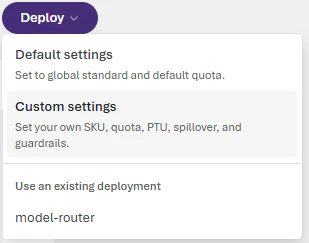
Go to the Microsoft Foundry portal and navigate to the model catalog. Find `model-router` in the **Models** list and select it. Choose **Default settings** for the **Balanced** routing mode and route between all supported models.
The REST API deployment path targets the Microsoft Foundry account resource directly and doesn't require a Foundry project. This makes it a good option for existing customers who deploy and manage Foundry models without a project association.
Before you run the REST examples, sign in with Azure CLI and save a management-plane bearer token as `AZURE_AI_AUTH_TOKEN`.
```bash theme={null}
export AZURE_AI_AUTH_TOKEN=$(az account get-access-token --resource https://management.azure.com --query accessToken -o tsv)
```
Deploy model router programmatically with the Azure Management REST API. The following example creates a default deployment and relies on the built-in **Balanced** routing mode and full supported model set.
```bash theme={null}
curl -X PUT "https://management.azure.com/subscriptions/00000000-0000-0000-0000-000000000000/resourceGroups/my-resource-group/providers/Microsoft.CognitiveServices/accounts/my-foundry-account/deployments/model-router-deployment?api-version=2025-10-01-preview" \
-H "Content-Type: application/json" \
-H "Authorization: Bearer $AZURE_AI_AUTH_TOKEN" \
-d '{
"sku": {"name": "GlobalStandard", "capacity": 10},
"properties": {
"model": {"format": "OpenAI", "name": "model-router", "version": "2025-11-18"}
}
}'
```
### Optional: customize deployment settings
To enable more configuration options, choose **Custom settings**.
Your deployment settings apply to all underlying chat models that model router uses.
* Don't deploy the underlying chat models separately. Model router works independently of your other deployed models.
* Select a content filter when you deploy the model router model or apply a filter later. The content filter applies to all content passed to and from the model router; don't set content filters for each underlying chat model.
* Your tokens-per-minute rate limit setting applies to all activity to and from the model router; don't set rate limits for each underlying chat model.
#### Optional: change the routing mode
Sign in to [Microsoft Foundry](https://ai.azure.com/?cid=learnDocs). Make sure the **New Foundry** toggle is on. These steps refer to **Foundry (new)**.
### Default deployment
Go to the Microsoft Foundry portal and navigate to the model catalog. Find `model-router` in the **Models** list and select it. Choose **Default settings** for the **Balanced** routing mode and route between all supported models.
The REST API deployment path targets the Microsoft Foundry account resource directly and doesn't require a Foundry project. This makes it a good option for existing customers who deploy and manage Foundry models without a project association.
Before you run the REST examples, sign in with Azure CLI and save a management-plane bearer token as `AZURE_AI_AUTH_TOKEN`.
```bash theme={null}
export AZURE_AI_AUTH_TOKEN=$(az account get-access-token --resource https://management.azure.com --query accessToken -o tsv)
```
Deploy model router programmatically with the Azure Management REST API. The following example creates a default deployment and relies on the built-in **Balanced** routing mode and full supported model set.
```bash theme={null}
curl -X PUT "https://management.azure.com/subscriptions/00000000-0000-0000-0000-000000000000/resourceGroups/my-resource-group/providers/Microsoft.CognitiveServices/accounts/my-foundry-account/deployments/model-router-deployment?api-version=2025-10-01-preview" \
-H "Content-Type: application/json" \
-H "Authorization: Bearer $AZURE_AI_AUTH_TOKEN" \
-d '{
"sku": {"name": "GlobalStandard", "capacity": 10},
"properties": {
"model": {"format": "OpenAI", "name": "model-router", "version": "2025-11-18"}
}
}'
```
### Optional: customize deployment settings
To enable more configuration options, choose **Custom settings**.
Your deployment settings apply to all underlying chat models that model router uses.
* Don't deploy the underlying chat models separately. Model router works independently of your other deployed models.
* Select a content filter when you deploy the model router model or apply a filter later. The content filter applies to all content passed to and from the model router; don't set content filters for each underlying chat model.
* Your tokens-per-minute rate limit setting applies to all activity to and from the model router; don't set rate limits for each underlying chat model.
#### Optional: change the routing mode
Sign in to [Microsoft Foundry](https://ai.azure.com/?cid=learnDocs). Make sure the **New Foundry** toggle is on. These steps refer to **Foundry (new)**.
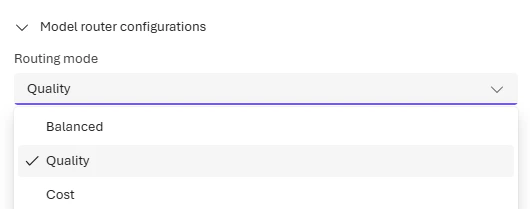
 Use the **Routing mode** dropdown to select a routing profile. This sets the routing logic for your deployment.
 **When to use each mode:**
* **Balanced** (default): Most workloads. Optimizes cost while maintaining quality.
* **Quality**: Critical tasks like legal review, medical summaries, or complex reasoning.
* **Cost**: High-volume, budget-sensitive workloads like content classification or simple Q\&A.
Changes to the routing mode can take up to five minutes to take effect.
#### Optional: route to a model subset
Sign in to [Microsoft Foundry](https://ai.azure.com/?cid=learnDocs). Make sure the **New Foundry** toggle is on. These steps refer to **Foundry (new)**.
The latest version of model router supports custom subsets: you can specify which underlying models to include in routing decisions. This gives you more control over cost, compliance, and performance characteristics.
In the model router deployment pane, select **Route to a subset of models**. Then select the underlying models you want to enable. You must select at least one model for routing. If no models are selected, the deployment uses the default model set for your routing mode.
**When to use each mode:**
* **Balanced** (default): Most workloads. Optimizes cost while maintaining quality.
* **Quality**: Critical tasks like legal review, medical summaries, or complex reasoning.
* **Cost**: High-volume, budget-sensitive workloads like content classification or simple Q\&A.
Changes to the routing mode can take up to five minutes to take effect.
#### Optional: route to a model subset
Sign in to [Microsoft Foundry](https://ai.azure.com/?cid=learnDocs). Make sure the **New Foundry** toggle is on. These steps refer to **Foundry (new)**.
The latest version of model router supports custom subsets: you can specify which underlying models to include in routing decisions. This gives you more control over cost, compliance, and performance characteristics.
In the model router deployment pane, select **Route to a subset of models**. Then select the underlying models you want to enable. You must select at least one model for routing. If no models are selected, the deployment uses the default model set for your routing mode.
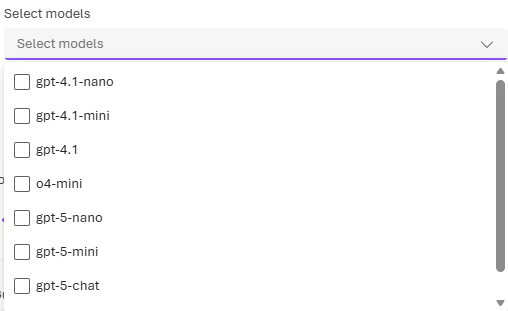 New models introduced later are excluded by default until explicitly added.
To include models by Anthropic (Claude) in your model router deployment, you need to deploy them yourself to your Foundry resource. See [Deploy and use Claude models](/models/use-foundry-models-claude).
Changes to the model subset can take up to five minutes to take effect.
#### Configure custom settings with the REST API
Use the following example when you want to set both the routing mode and a model subset in the same deployment request.
Add a `routing` block only when you want to override the default **Balanced** mode or restrict the routed model set. The following example keeps the combined custom request with both a routing mode and a model subset.
The deployment request body uses `format`, `name`, and `version` for the model router itself and for each model in the routing subset. Find the correct values for each model in the supported models table in this article.
```bash theme={null}
curl -X PUT "https://management.azure.com/subscriptions/00000000-0000-0000-0000-000000000000/resourceGroups/my-resource-group/providers/Microsoft.CognitiveServices/accounts/my-foundry-account/deployments/model-router-deployment?api-version=2025-10-01-preview" \
-H "Content-Type: application/json" \
-H "Authorization: Bearer $AZURE_AI_AUTH_TOKEN" \
-d '{
"sku": {"name": "GlobalStandard", "capacity": 10},
"properties": {
"model": {"format": "OpenAI", "name": "model-router", "version": "2025-11-18"},
"routing": {
"mode": "balanced",
"models": [
{"format": "OpenAI", "name": "gpt-4.1", "version": "2025-04-14"},
{"format": "OpenAI", "name": "gpt-5.2-chat", "version": "2025-12-11"},
{"format": "Meta", "name": "Llama-4-Maverick-17B-128E-Instruct-FP8", "version": "1"}
]
}
}
}'
```
For the full runnable sample and other deployment options (routing mode only, model subset only), see the [Model Router REST sample](https://github.com/microsoft-foundry/foundry-samples/blob/main/samples/REST/model-router/deploy-model-router-all-configs.sh) in the foundry-samples repository.
If you include Anthropic Claude models in the `routing.models` array, you must first deploy them to the same Foundry account with a matching SKU. Otherwise the request fails with an `InvalidResourceProperties` error. Deploy Claude models from the Foundry model catalog before you reference them in a model router deployment. See [Deploy and use Claude models](/models/use-foundry-models-claude).
## Test model router with Foundry Responses and Chat Completions
Call model router the same way you call any OpenAI chat model. Set the `model` parameter to the name of your model router deployment. You can use either the Microsoft Foundry SDK with the Responses API or the OpenAI Python SDK with the Chat Completions API.
Install the required packages before you run the samples:
* **Foundry Responses**: `pip install azure-ai-projects>=2.0.0 azure-identity`
* **Chat Completions**: `pip install openai>=1.75.0`
```python Foundry Responses theme={null}
"""
Foundry Model Router - Foundry Responses SDK (AIProjectClient) Example
This example demonstrates how to use the Azure AI Projects SDK
(AIProjectClient) to get an authenticated OpenAI client and call the
Responses API with a Foundry Model Router deployment.
NOTE: AIProjectClient requires Entra ID authentication (DefaultAzureCredential),
not API keys. You must be logged in via `az login` before running this.
Prerequisites:
- An Azure AI Foundry project with a "model-router" deployment
- Azure CLI installed and logged in (`az login`)
- A .env file in the repo root with AZURE_AI_PROJECT_ENDPOINT and
MODEL_DEPLOYMENT_NAME
Usage:
pip install -r requirements.txt
az login
python model-router-foundry-responses-sdk.py
"""
import os
from pathlib import Path
from azure.ai.projects import AIProjectClient
from azure.identity import DefaultAzureCredential
from dotenv import load_dotenv
# Load environment variables from .env in the repo root
load_dotenv(Path(__file__).resolve().parent.parent / ".env", override=True)
project_endpoint = os.environ["AZURE_AI_PROJECT_ENDPOINT"]
deployment = os.environ["MODEL_DEPLOYMENT_NAME"]
#
with (
DefaultAzureCredential() as credential,
AIProjectClient(endpoint=project_endpoint, credential=credential) as project_client,
project_client.get_openai_client() as openai_client,
):
response = openai_client.responses.create(
model=deployment,
input="In one sentence, name the most popular tourist destination in Seattle.",
)
#
print("--- Foundry Responses SDK Output ---")
print(f"Routed to model: {response.model}")
print(f"Response:\n{response.output_text}")
print(
f"\nUsage: {response.usage.input_tokens} input + {response.usage.output_tokens} output = {response.usage.total_tokens} total tokens"
)
```
```python Chat Completions theme={null}
"""
Foundry Model Router - Chat Completions API Example
This example demonstrates how to use Azure OpenAI's Chat Completions API
with a Foundry Model Router deployment. Model Router automatically selects
the best underlying LLM for each prompt based on your routing mode
(Balanced, Quality, or Cost).
Prerequisites:
- An Azure OpenAI resource with a "model-router" deployment
- A .env file in the repo root with AZURE_OPENAI_ENDPOINT, AZURE_OPENAI_API_KEY,
and MODEL_DEPLOYMENT_NAME
Usage:
pip install -r ../requirements.txt
python model-router-chat-completions.py
"""
import os
from pathlib import Path
from dotenv import load_dotenv
from openai import AzureOpenAI
# Load environment variables from .env in the repo root
load_dotenv(Path(__file__).resolve().parent.parent / ".env", override=True)
endpoint = os.environ["AZURE_OPENAI_ENDPOINT"]
api_key = os.environ["AZURE_OPENAI_API_KEY"]
deployment = os.environ["MODEL_DEPLOYMENT_NAME"]
#
client = AzureOpenAI(
azure_endpoint=endpoint,
api_key=api_key,
api_version="2024-10-21",
)
response = client.chat.completions.create(
model=deployment,
messages=[
{"role": "system", "content": "You are a helpful assistant."},
{
"role": "user",
"content": "In one sentence, name the most popular tourist destination in Seattle.",
},
],
)
#
print("--- Chat Completions Response ---")
print(f"Routed to model: {response.model}")
print(f"Response:\n{response.choices[0].message.content}")
print(
f"\nUsage: {response.usage.prompt_tokens} prompt + {response.usage.completion_tokens} completion = {response.usage.total_tokens} total tokens"
)
```
For the full runnable samples, see [Model Router samples](https://github.com/microsoft-foundry/foundry-samples/tree/main/samples/python/foundry-models/model-router) in the foundry-samples repository.
* Reference: [`AzureOpenAI` (OpenAI Python SDK)](https://pypi.org/project/openai/)
* Reference: [`AIProjectClient`](https://learn.microsoft.com/python/api/azure-ai-projects/azure.ai.projects.aiprojectclient)
## Test model router in the playground
In the [Foundry portal](https://ai.azure.com/?cid=learnDocs), go to your model router deployment on the **Models + endpoints** page and select it to open the model playground. In the playground, enter messages and see the model's responses. Each response shows which underlying model the router selected.
You can set the `Temperature` and `Top_P` parameters to the values you prefer (see the [concepts guide](https://learn.microsoft.com/azure/ai-foundry/openai/concepts/prompt-engineering)), but note that reasoning models (o-series) don't support these parameters. If model router selects a reasoning model for your prompt, it ignores the `Temperature` and `Top_P` input parameters.
The parameters `stop`, `presence_penalty`, `frequency_penalty`, `logit_bias`, and `logprobs` are similarly dropped for o-series models but used otherwise.
Starting with the `2025-11-18` (latest) version, the `reasoning_effort` parameter (see the [Reasoning models guide](https://learn.microsoft.com/azure/ai-foundry/openai/how-to/reasoning)) is now **supported** in model router. If the model router selects a reasoning model for your prompt, it uses your `reasoning_effort` input value with the underlying model.
## Connect model router to a Foundry agent
Sign in to [Microsoft Foundry](https://ai.azure.com/?cid=learnDocs). Make sure the **New Foundry** toggle is on. These steps refer to **Foundry (new)**.
If you've created an AI agent in Foundry, you can connect your model router deployment to be used as the agent's base model. Select it from the **model** dropdown menu in the agent playground. Your agent will have all the tools and instructions you've configured for it, but the underlying model that processes its responses will be selected by model router.
For detailed guidance on routing patterns, supported tool types, cost implications, and code examples for agents, see [Use model router with Foundry agents](/models/model-router-agents).
If you use Agent service tools in your flows, only OpenAI models will be used for routing.
### Output format
The JSON response you receive from a model router model is identical to the standard chat completions API response. Note that the `"model"` field reveals which underlying model was selected to respond to the prompt.
The following example response was generated using API version `2025-11-18`:
```json theme={null}
{
"success": true,
"data": {
"choices": [
{
"content_filter_results": {
"hate": {
"filtered": false,
"severity": "safe"
},
"protected_material_code": {
"filtered": false,
"detected": false
},
"protected_material_text": {
"filtered": false,
"detected": false
},
"self_harm": {
"filtered": false,
"severity": "safe"
},
"sexual": {
"filtered": false,
"severity": "safe"
},
"violence": {
"filtered": false,
"severity": "safe"
}
},
"finish_reason": "stop",
"index": 0,
"logprobs": null,
"message": {
"annotations": [],
"content": "Charismatic and bold—combining brash showmanship and poetic wit with fierce competitiveness, moral conviction, and unwavering activism.",
"refusal": null,
"role": "assistant"
}
}
],
"created": 1774543376,
"id": "xxxx-yyyy-zzzz",
"model": "gpt-5-mini-2025-08-07",
"object": "chat.completion",
"prompt_filter_results": [
{
"prompt_index": 0,
"content_filter_results": {
"hate": {
"filtered": false,
"severity": "safe"
},
"jailbreak": {
"filtered": false,
"detected": false
},
"self_harm": {
"filtered": false,
"severity": "safe"
},
"sexual": {
"filtered": false,
"severity": "safe"
},
"violence": {
"filtered": false,
"severity": "safe"
}
}
}
],
"system_fingerprint": null,
"usage": {
"completion_tokens": 163,
"completion_tokens_details": {
"accepted_prediction_tokens": 0,
"audio_tokens": 0,
"reasoning_tokens": 128,
"rejected_prediction_tokens": 0
},
"prompt_tokens": 3254,
"prompt_tokens_details": {
"audio_tokens": 0,
"cached_tokens": 3200
},
"total_tokens": 3417
}
}
}
```
## Govern model router deployments with Azure Policy
If your organization restricts which models developers can deploy, model router honors the same built-in Foundry model deployment policy that governs standard model deployments. Policy is enforced at deploy time across the Foundry portal, REST API, Azure CLI, and ARM templates. For the IT admin assignment steps and the developer experience, see [Govern model router deployments with Azure Policy](/models/model-router-policy).
## Evaluate model router for your workload
Before you commit production traffic to model router, benchmark it against your current baseline model on three dimensions: quality, cost, and latency. The Foundry Evaluations service doesn't integrate with model router directly, so use the purpose-built evaluation toolkit described here.
### Quality
Use an LLM-as-a-judge approach where a separate, capable model scores responses from both model router and your baseline:
* Run pairwise comparisons with response order swapped to eliminate position bias.
* Score each response independently on accuracy, completeness, clarity, and helpfulness (1–5 scale).
* Use at least 100 prompts from your actual workload for statistically reliable results. Fewer than 30 prompts gives only directional signal.
### Cost
Compare per-request cost using token counts and per-model pricing:
* Account for the router markup on input tokens plus the underlying model's input and output pricing.
* Aggregate savings as a percentage: `1 − (router_cost / baseline_cost)`.
* Check cost savings per category if your dataset includes prompt categories (for example, code generation vs. summarization).
### Latency
Measure wall-clock response time for both endpoints:
* Compare percentiles (p50, p90, p95) rather than averages — percentiles reflect real user experience better than mean values that can be skewed by outliers.
* Call endpoints sequentially per prompt so neither is disadvantaged by concurrent load.
### Evaluation toolkit
Use the [Model Router Auto Evaluation toolkit](https://github.com/microsoft-foundry/Model-Router-Auto-Evaluation) to run this benchmark with your own prompts. The toolkit supports:
* A no-keys demo with mock data so you can explore the dashboard before configuring endpoints.
* Live evaluation against your model router and baseline deployments.
* JSONL, CSV, or SQL dataset input.
* A self-contained HTML report with quality, cost, and latency charts.
* Checkpoint and resume for large-scale runs (500+ prompts).
For methodology details — including the cost formula, judge configuration, and sample-size guidance — see the toolkit's [methodology documentation](https://github.com/microsoft-foundry/Model-Router-Auto-Evaluation/blob/main/docs/methodology.md).
## Monitor model router metrics
### Monitor performance
Monitor the performance of your model router deployment in Azure Monitor (AzMon) in the Azure portal.
1. Go to the **Monitoring** > **Metrics** page for your Azure OpenAI resource in the Azure portal.
2. Filter by the deployment name of your model router model.
3. Split the metrics by underlying models if needed.
### Monitor costs
You can monitor the costs of model router, which is the sum of the costs incurred by the underlying models.
1. Visit the **Resource Management** -> **Cost analysis** page in the Azure portal.
2. If needed, filter by Azure resource.
3. Then, filter by deployment name: Filter by "Tag", select **Deployment** as the type of the tag, and then select your model router deployment name as the value.
## Troubleshoot model router
### Common issues
| Issue | Cause | Resolution |
| -------------------------- | ---------------------------------------------------- | ------------------------------------------------------------------------------ |
| Rate limit exceeded | Too many requests to model router deployment | Increase tokens-per-minute quota or implement retry with exponential backoff |
| Unexpected model selection | Routing logic selected different model than expected | Review routing mode settings; consider using model subset to constrain options |
| High latency | Router overhead plus underlying model processing | Use Cost mode for latency-sensitive workloads; smaller models respond faster |
| Claude model not routing | Claude models require separate deployment | Deploy Claude models from model catalog before enabling in subset |
### Error codes
For API error codes and troubleshooting, see the [Azure OpenAI REST API reference](https://learn.microsoft.com/en-us/azure/foundry-classic/openai/reference).
## Resources
The following open-source repositories demonstrate model router in different scenarios. Each repo is on GitHub — learn, fork, and extend to accelerate your learning. Most samples require an existing model router deployment; see [Deploy a model router model](#deploy-a-model-router-model) to get started.
| **Resource** | **Learn** | **Extend** |
| ------------------------------------------------------------------------------------------------------------------------------------------------------------------------------------- | ------------------------------------------------------------------------------------------------------------------------------------------------------------------ | ------------------------------------------------------------------------------------------------------------------- |
| [Model Router Capabilities Interactive Demo](https://github.com/leestott/router-demo-app/) (Python) | Compare Balanced, Cost, and Quality routing modes with custom prompts. View live benchmark data for cost savings, latency, and routing distribution. | Add your own prompt sets, integrate with your CI pipeline, or connect to your deployment for A/B testing. |
| [Routed Models Distribution Analysis](https://github.com/guygregory/ModelRouter-Distribution) (Python) | Run batches of prompts across routing profiles and model subsets. See which models the router selects and in what proportions. | Plug in representative prompt logs to evaluate tradeoffs before adopting a routing policy at scale. |
| [Multi-team sceanrios with Quality & Cost benchmarking](https://github.com/microsoft/aitour26-LTG153-automate-model-selection-with-microsoft-foundry-model-router) (Python, workshop) | Deploy model router, run benchmarks against fixed-model deployments, and analyze cost and latency optimization in a multi-team enterprise scenario. | Swap in your own models, prompts, and routing profiles to benchmark against your workload patterns. |
| [On-Call Copilot Multi-Agent Demo](https://github.com/leestott/On-Call-Copilot-Multi-Agent) (Python) | See how model router dynamically selects the right model per agent step — a fast, low-cost model for classification and a reasoning model for root-cause analysis. | Adapt the multi-agent architecture, agent roles, and escalation paths for your own operations or support scenarios. |
These samples are intended for learning and experimentation only and are not production-ready. Before deploying any code derived from these repositories, review it against your organization's security, compliance, and responsible AI policies. See the [Microsoft Responsible AI principles](https://www.microsoft.com/ai/responsible-ai) for guidance.
## Next steps
* [Model router concepts](/models/model-router) - Learn how routing modes work
* [Quotas and limits](/models/quotas-limits) - Rate limits for model router
* [Create an agent](https://learn.microsoft.com/en-us/azure/foundry-classic/agents/quickstart) - Use model router with Foundry agents
New models introduced later are excluded by default until explicitly added.
To include models by Anthropic (Claude) in your model router deployment, you need to deploy them yourself to your Foundry resource. See [Deploy and use Claude models](/models/use-foundry-models-claude).
Changes to the model subset can take up to five minutes to take effect.
#### Configure custom settings with the REST API
Use the following example when you want to set both the routing mode and a model subset in the same deployment request.
Add a `routing` block only when you want to override the default **Balanced** mode or restrict the routed model set. The following example keeps the combined custom request with both a routing mode and a model subset.
The deployment request body uses `format`, `name`, and `version` for the model router itself and for each model in the routing subset. Find the correct values for each model in the supported models table in this article.
```bash theme={null}
curl -X PUT "https://management.azure.com/subscriptions/00000000-0000-0000-0000-000000000000/resourceGroups/my-resource-group/providers/Microsoft.CognitiveServices/accounts/my-foundry-account/deployments/model-router-deployment?api-version=2025-10-01-preview" \
-H "Content-Type: application/json" \
-H "Authorization: Bearer $AZURE_AI_AUTH_TOKEN" \
-d '{
"sku": {"name": "GlobalStandard", "capacity": 10},
"properties": {
"model": {"format": "OpenAI", "name": "model-router", "version": "2025-11-18"},
"routing": {
"mode": "balanced",
"models": [
{"format": "OpenAI", "name": "gpt-4.1", "version": "2025-04-14"},
{"format": "OpenAI", "name": "gpt-5.2-chat", "version": "2025-12-11"},
{"format": "Meta", "name": "Llama-4-Maverick-17B-128E-Instruct-FP8", "version": "1"}
]
}
}
}'
```
For the full runnable sample and other deployment options (routing mode only, model subset only), see the [Model Router REST sample](https://github.com/microsoft-foundry/foundry-samples/blob/main/samples/REST/model-router/deploy-model-router-all-configs.sh) in the foundry-samples repository.
If you include Anthropic Claude models in the `routing.models` array, you must first deploy them to the same Foundry account with a matching SKU. Otherwise the request fails with an `InvalidResourceProperties` error. Deploy Claude models from the Foundry model catalog before you reference them in a model router deployment. See [Deploy and use Claude models](/models/use-foundry-models-claude).
## Test model router with Foundry Responses and Chat Completions
Call model router the same way you call any OpenAI chat model. Set the `model` parameter to the name of your model router deployment. You can use either the Microsoft Foundry SDK with the Responses API or the OpenAI Python SDK with the Chat Completions API.
Install the required packages before you run the samples:
* **Foundry Responses**: `pip install azure-ai-projects>=2.0.0 azure-identity`
* **Chat Completions**: `pip install openai>=1.75.0`
```python Foundry Responses theme={null}
"""
Foundry Model Router - Foundry Responses SDK (AIProjectClient) Example
This example demonstrates how to use the Azure AI Projects SDK
(AIProjectClient) to get an authenticated OpenAI client and call the
Responses API with a Foundry Model Router deployment.
NOTE: AIProjectClient requires Entra ID authentication (DefaultAzureCredential),
not API keys. You must be logged in via `az login` before running this.
Prerequisites:
- An Azure AI Foundry project with a "model-router" deployment
- Azure CLI installed and logged in (`az login`)
- A .env file in the repo root with AZURE_AI_PROJECT_ENDPOINT and
MODEL_DEPLOYMENT_NAME
Usage:
pip install -r requirements.txt
az login
python model-router-foundry-responses-sdk.py
"""
import os
from pathlib import Path
from azure.ai.projects import AIProjectClient
from azure.identity import DefaultAzureCredential
from dotenv import load_dotenv
# Load environment variables from .env in the repo root
load_dotenv(Path(__file__).resolve().parent.parent / ".env", override=True)
project_endpoint = os.environ["AZURE_AI_PROJECT_ENDPOINT"]
deployment = os.environ["MODEL_DEPLOYMENT_NAME"]
#
with (
DefaultAzureCredential() as credential,
AIProjectClient(endpoint=project_endpoint, credential=credential) as project_client,
project_client.get_openai_client() as openai_client,
):
response = openai_client.responses.create(
model=deployment,
input="In one sentence, name the most popular tourist destination in Seattle.",
)
#
print("--- Foundry Responses SDK Output ---")
print(f"Routed to model: {response.model}")
print(f"Response:\n{response.output_text}")
print(
f"\nUsage: {response.usage.input_tokens} input + {response.usage.output_tokens} output = {response.usage.total_tokens} total tokens"
)
```
```python Chat Completions theme={null}
"""
Foundry Model Router - Chat Completions API Example
This example demonstrates how to use Azure OpenAI's Chat Completions API
with a Foundry Model Router deployment. Model Router automatically selects
the best underlying LLM for each prompt based on your routing mode
(Balanced, Quality, or Cost).
Prerequisites:
- An Azure OpenAI resource with a "model-router" deployment
- A .env file in the repo root with AZURE_OPENAI_ENDPOINT, AZURE_OPENAI_API_KEY,
and MODEL_DEPLOYMENT_NAME
Usage:
pip install -r ../requirements.txt
python model-router-chat-completions.py
"""
import os
from pathlib import Path
from dotenv import load_dotenv
from openai import AzureOpenAI
# Load environment variables from .env in the repo root
load_dotenv(Path(__file__).resolve().parent.parent / ".env", override=True)
endpoint = os.environ["AZURE_OPENAI_ENDPOINT"]
api_key = os.environ["AZURE_OPENAI_API_KEY"]
deployment = os.environ["MODEL_DEPLOYMENT_NAME"]
#
client = AzureOpenAI(
azure_endpoint=endpoint,
api_key=api_key,
api_version="2024-10-21",
)
response = client.chat.completions.create(
model=deployment,
messages=[
{"role": "system", "content": "You are a helpful assistant."},
{
"role": "user",
"content": "In one sentence, name the most popular tourist destination in Seattle.",
},
],
)
#
print("--- Chat Completions Response ---")
print(f"Routed to model: {response.model}")
print(f"Response:\n{response.choices[0].message.content}")
print(
f"\nUsage: {response.usage.prompt_tokens} prompt + {response.usage.completion_tokens} completion = {response.usage.total_tokens} total tokens"
)
```
For the full runnable samples, see [Model Router samples](https://github.com/microsoft-foundry/foundry-samples/tree/main/samples/python/foundry-models/model-router) in the foundry-samples repository.
* Reference: [`AzureOpenAI` (OpenAI Python SDK)](https://pypi.org/project/openai/)
* Reference: [`AIProjectClient`](https://learn.microsoft.com/python/api/azure-ai-projects/azure.ai.projects.aiprojectclient)
## Test model router in the playground
In the [Foundry portal](https://ai.azure.com/?cid=learnDocs), go to your model router deployment on the **Models + endpoints** page and select it to open the model playground. In the playground, enter messages and see the model's responses. Each response shows which underlying model the router selected.
You can set the `Temperature` and `Top_P` parameters to the values you prefer (see the [concepts guide](https://learn.microsoft.com/azure/ai-foundry/openai/concepts/prompt-engineering)), but note that reasoning models (o-series) don't support these parameters. If model router selects a reasoning model for your prompt, it ignores the `Temperature` and `Top_P` input parameters.
The parameters `stop`, `presence_penalty`, `frequency_penalty`, `logit_bias`, and `logprobs` are similarly dropped for o-series models but used otherwise.
Starting with the `2025-11-18` (latest) version, the `reasoning_effort` parameter (see the [Reasoning models guide](https://learn.microsoft.com/azure/ai-foundry/openai/how-to/reasoning)) is now **supported** in model router. If the model router selects a reasoning model for your prompt, it uses your `reasoning_effort` input value with the underlying model.
## Connect model router to a Foundry agent
Sign in to [Microsoft Foundry](https://ai.azure.com/?cid=learnDocs). Make sure the **New Foundry** toggle is on. These steps refer to **Foundry (new)**.
If you've created an AI agent in Foundry, you can connect your model router deployment to be used as the agent's base model. Select it from the **model** dropdown menu in the agent playground. Your agent will have all the tools and instructions you've configured for it, but the underlying model that processes its responses will be selected by model router.
For detailed guidance on routing patterns, supported tool types, cost implications, and code examples for agents, see [Use model router with Foundry agents](/models/model-router-agents).
If you use Agent service tools in your flows, only OpenAI models will be used for routing.
### Output format
The JSON response you receive from a model router model is identical to the standard chat completions API response. Note that the `"model"` field reveals which underlying model was selected to respond to the prompt.
The following example response was generated using API version `2025-11-18`:
```json theme={null}
{
"success": true,
"data": {
"choices": [
{
"content_filter_results": {
"hate": {
"filtered": false,
"severity": "safe"
},
"protected_material_code": {
"filtered": false,
"detected": false
},
"protected_material_text": {
"filtered": false,
"detected": false
},
"self_harm": {
"filtered": false,
"severity": "safe"
},
"sexual": {
"filtered": false,
"severity": "safe"
},
"violence": {
"filtered": false,
"severity": "safe"
}
},
"finish_reason": "stop",
"index": 0,
"logprobs": null,
"message": {
"annotations": [],
"content": "Charismatic and bold—combining brash showmanship and poetic wit with fierce competitiveness, moral conviction, and unwavering activism.",
"refusal": null,
"role": "assistant"
}
}
],
"created": 1774543376,
"id": "xxxx-yyyy-zzzz",
"model": "gpt-5-mini-2025-08-07",
"object": "chat.completion",
"prompt_filter_results": [
{
"prompt_index": 0,
"content_filter_results": {
"hate": {
"filtered": false,
"severity": "safe"
},
"jailbreak": {
"filtered": false,
"detected": false
},
"self_harm": {
"filtered": false,
"severity": "safe"
},
"sexual": {
"filtered": false,
"severity": "safe"
},
"violence": {
"filtered": false,
"severity": "safe"
}
}
}
],
"system_fingerprint": null,
"usage": {
"completion_tokens": 163,
"completion_tokens_details": {
"accepted_prediction_tokens": 0,
"audio_tokens": 0,
"reasoning_tokens": 128,
"rejected_prediction_tokens": 0
},
"prompt_tokens": 3254,
"prompt_tokens_details": {
"audio_tokens": 0,
"cached_tokens": 3200
},
"total_tokens": 3417
}
}
}
```
## Govern model router deployments with Azure Policy
If your organization restricts which models developers can deploy, model router honors the same built-in Foundry model deployment policy that governs standard model deployments. Policy is enforced at deploy time across the Foundry portal, REST API, Azure CLI, and ARM templates. For the IT admin assignment steps and the developer experience, see [Govern model router deployments with Azure Policy](/models/model-router-policy).
## Evaluate model router for your workload
Before you commit production traffic to model router, benchmark it against your current baseline model on three dimensions: quality, cost, and latency. The Foundry Evaluations service doesn't integrate with model router directly, so use the purpose-built evaluation toolkit described here.
### Quality
Use an LLM-as-a-judge approach where a separate, capable model scores responses from both model router and your baseline:
* Run pairwise comparisons with response order swapped to eliminate position bias.
* Score each response independently on accuracy, completeness, clarity, and helpfulness (1–5 scale).
* Use at least 100 prompts from your actual workload for statistically reliable results. Fewer than 30 prompts gives only directional signal.
### Cost
Compare per-request cost using token counts and per-model pricing:
* Account for the router markup on input tokens plus the underlying model's input and output pricing.
* Aggregate savings as a percentage: `1 − (router_cost / baseline_cost)`.
* Check cost savings per category if your dataset includes prompt categories (for example, code generation vs. summarization).
### Latency
Measure wall-clock response time for both endpoints:
* Compare percentiles (p50, p90, p95) rather than averages — percentiles reflect real user experience better than mean values that can be skewed by outliers.
* Call endpoints sequentially per prompt so neither is disadvantaged by concurrent load.
### Evaluation toolkit
Use the [Model Router Auto Evaluation toolkit](https://github.com/microsoft-foundry/Model-Router-Auto-Evaluation) to run this benchmark with your own prompts. The toolkit supports:
* A no-keys demo with mock data so you can explore the dashboard before configuring endpoints.
* Live evaluation against your model router and baseline deployments.
* JSONL, CSV, or SQL dataset input.
* A self-contained HTML report with quality, cost, and latency charts.
* Checkpoint and resume for large-scale runs (500+ prompts).
For methodology details — including the cost formula, judge configuration, and sample-size guidance — see the toolkit's [methodology documentation](https://github.com/microsoft-foundry/Model-Router-Auto-Evaluation/blob/main/docs/methodology.md).
## Monitor model router metrics
### Monitor performance
Monitor the performance of your model router deployment in Azure Monitor (AzMon) in the Azure portal.
1. Go to the **Monitoring** > **Metrics** page for your Azure OpenAI resource in the Azure portal.
2. Filter by the deployment name of your model router model.
3. Split the metrics by underlying models if needed.
### Monitor costs
You can monitor the costs of model router, which is the sum of the costs incurred by the underlying models.
1. Visit the **Resource Management** -> **Cost analysis** page in the Azure portal.
2. If needed, filter by Azure resource.
3. Then, filter by deployment name: Filter by "Tag", select **Deployment** as the type of the tag, and then select your model router deployment name as the value.
## Troubleshoot model router
### Common issues
| Issue | Cause | Resolution |
| -------------------------- | ---------------------------------------------------- | ------------------------------------------------------------------------------ |
| Rate limit exceeded | Too many requests to model router deployment | Increase tokens-per-minute quota or implement retry with exponential backoff |
| Unexpected model selection | Routing logic selected different model than expected | Review routing mode settings; consider using model subset to constrain options |
| High latency | Router overhead plus underlying model processing | Use Cost mode for latency-sensitive workloads; smaller models respond faster |
| Claude model not routing | Claude models require separate deployment | Deploy Claude models from model catalog before enabling in subset |
### Error codes
For API error codes and troubleshooting, see the [Azure OpenAI REST API reference](https://learn.microsoft.com/en-us/azure/foundry-classic/openai/reference).
## Resources
The following open-source repositories demonstrate model router in different scenarios. Each repo is on GitHub — learn, fork, and extend to accelerate your learning. Most samples require an existing model router deployment; see [Deploy a model router model](#deploy-a-model-router-model) to get started.
| **Resource** | **Learn** | **Extend** |
| ------------------------------------------------------------------------------------------------------------------------------------------------------------------------------------- | ------------------------------------------------------------------------------------------------------------------------------------------------------------------ | ------------------------------------------------------------------------------------------------------------------- |
| [Model Router Capabilities Interactive Demo](https://github.com/leestott/router-demo-app/) (Python) | Compare Balanced, Cost, and Quality routing modes with custom prompts. View live benchmark data for cost savings, latency, and routing distribution. | Add your own prompt sets, integrate with your CI pipeline, or connect to your deployment for A/B testing. |
| [Routed Models Distribution Analysis](https://github.com/guygregory/ModelRouter-Distribution) (Python) | Run batches of prompts across routing profiles and model subsets. See which models the router selects and in what proportions. | Plug in representative prompt logs to evaluate tradeoffs before adopting a routing policy at scale. |
| [Multi-team sceanrios with Quality & Cost benchmarking](https://github.com/microsoft/aitour26-LTG153-automate-model-selection-with-microsoft-foundry-model-router) (Python, workshop) | Deploy model router, run benchmarks against fixed-model deployments, and analyze cost and latency optimization in a multi-team enterprise scenario. | Swap in your own models, prompts, and routing profiles to benchmark against your workload patterns. |
| [On-Call Copilot Multi-Agent Demo](https://github.com/leestott/On-Call-Copilot-Multi-Agent) (Python) | See how model router dynamically selects the right model per agent step — a fast, low-cost model for classification and a reasoning model for root-cause analysis. | Adapt the multi-agent architecture, agent roles, and escalation paths for your own operations or support scenarios. |
These samples are intended for learning and experimentation only and are not production-ready. Before deploying any code derived from these repositories, review it against your organization's security, compliance, and responsible AI policies. See the [Microsoft Responsible AI principles](https://www.microsoft.com/ai/responsible-ai) for guidance.
## Next steps
* [Model router concepts](/models/model-router) - Learn how routing modes work
* [Quotas and limits](/models/quotas-limits) - Rate limits for model router
* [Create an agent](https://learn.microsoft.com/en-us/azure/foundry-classic/agents/quickstart) - Use model router with Foundry agents