> ## Documentation Index
> Fetch the complete documentation index at: https://hobbyist-e43fa225.mintlify.site/llms.txt
> Use this file to discover all available pages before exploring further.
# Deploy a fine-tuned model
> Learn how to deploy your fine-tuned model with Azure OpenAI in Microsoft Foundry Models by using Python, the REST APIs, or Microsoft Foundry portal.
Once your model is fine-tuned, you can deploy the model and use it in your own application.
When you deploy the model, you make the model available for inferencing, and that incurs an hourly hosting charge. Fine-tuned models, however, can be stored in Microsoft Foundry at no cost until you're ready to use them.
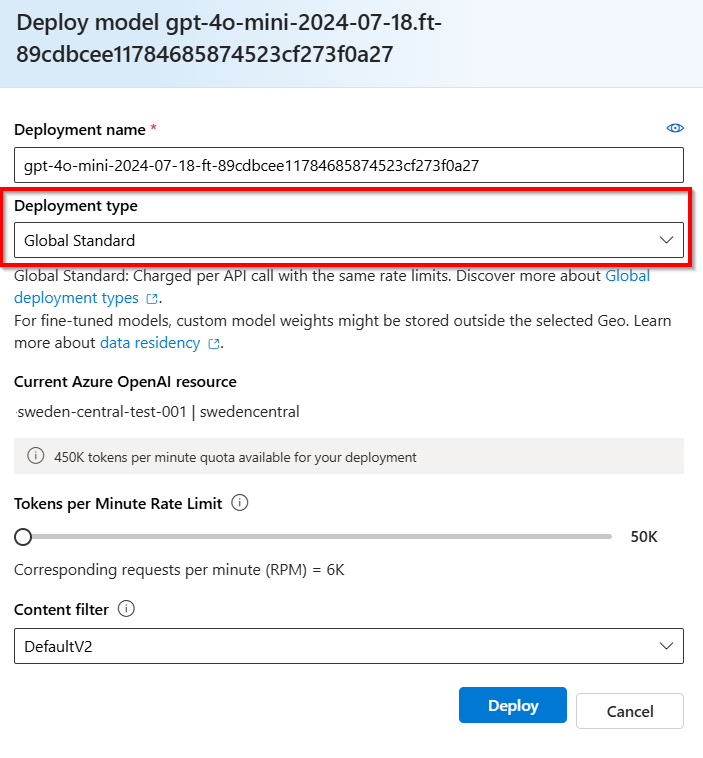
Azure OpenAI provides choices of deployment types for fine-tuned models on the hosting structure that fits different business and usage patterns: **Standard**, **Global Standard** (preview) and **Provisioned Throughput** (preview). Learn more about [deployment types for fine-tuned models](#deployment-types) and the [concepts of all deployment types](/models/deployment-types).
## Deploy your fine-tuned model
To deploy models, you need to be assigned the `Foundry Owner` role or any role with the `Microsoft.CognitiveServices/accounts/deployments/write` action.
The Foundry RBAC roles were recently renamed. **Foundry User**, **Foundry Owner**, **Foundry Account Owner**, and **Foundry Project Manager** were previously named Azure AI User, Azure AI Owner, Azure AI Account Owner, and Azure AI Project Manager. You might still see the previous names in some places while the rename rolls out. The role IDs and core permissions are unchanged by the rename.
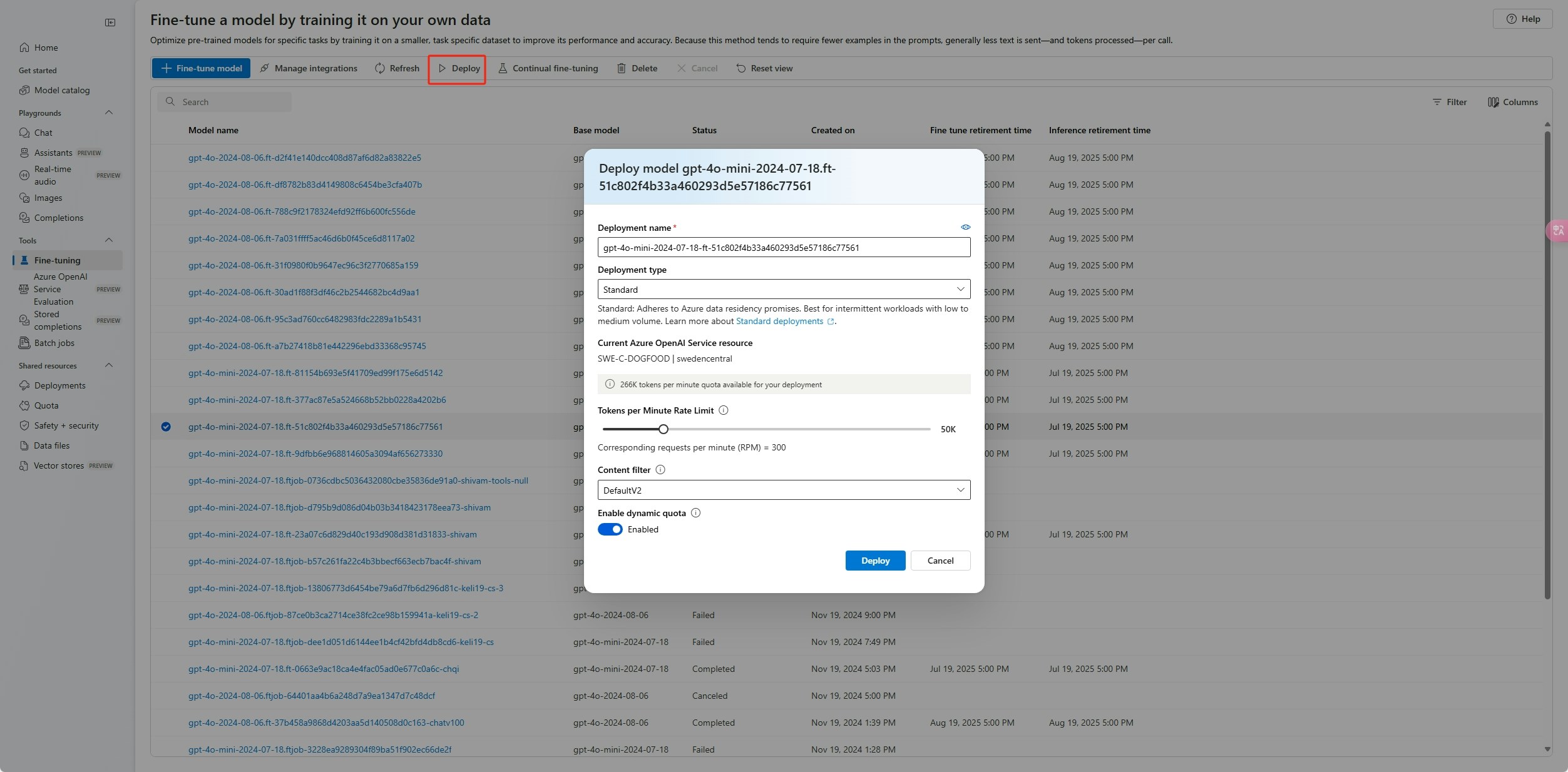
To deploy your custom model, select the custom model to deploy, and then select **Deploy**.
The **Deploy model** dialog box opens. In the dialog box, enter your **Deployment name** and then select **Create** to start the deployment of your custom model.
You can monitor the progress of your deployment on the **Deployments** pane in Foundry portal.
The portal doesn't support cross-region deployment. Use the Python SDK or REST API instead.
```python theme={null}
import json
import os
import requests
token = os.getenv("")
subscription = ""
resource_group = ""
resource_name = ""
model_deployment_name = "gpt-4.1-mini-ft" # custom deployment name that you will use to reference the model when making inference calls.
deploy_params = {'api-version': "2024-10-21"}
deploy_headers = {'Authorization': 'Bearer {}'.format(token), 'Content-Type': 'application/json'}
deploy_data = {
"sku": {"name": "standard", "capacity": 1},
"properties": {
"model": {
"format": "OpenAI",
"name": <"fine_tuned_model">, #retrieve this value from the previous call, it will look like gpt-4.1-mini-2025-04-14.ft-b044a9d3cf9c4228b5d393567f693b83
"version": "1"
}
}
}
deploy_data = json.dumps(deploy_data)
request_url = f'https://management.azure.com/subscriptions/{subscription}/resourceGroups/{resource_group}/providers/Microsoft.CognitiveServices/accounts/{resource_name}/deployments/{model_deployment_name}'
print('Creating a new deployment...')
r = requests.put(request_url, params=deploy_params, headers=deploy_headers, data=deploy_data)
print(r)
print(r.reason)
print(r.json())
```
| Variable | Definition |
| ----------------------- | -------------------------------------------------------------------------------------------------------------------------------------------------------------------------------------------------------------------------------------------------------------------------------------------------------------------------------------------------------------------------------------------------------------------------------------------------- |
| token | There are multiple ways to generate an authorization token. The easiest method for initial testing is to launch the Cloud Shell from the [Azure portal](https://portal.azure.com). Then run [`az account get-access-token`](https://learn.microsoft.com/cli/azure/account#az-account-get-access-token\(\)). You can use this token as your temporary authorization token for API testing. We recommend storing this in a new environment variable. |
| subscription | The subscription ID for the associated Azure OpenAI resource. |
| resource\_group | The resource group name for your Azure OpenAI resource. |
| resource\_name | The Azure OpenAI resource name. |
| model\_deployment\_name | The custom name for your new fine-tuned model deployment. This is the name that is referenced in your code when making chat completion calls. |
| fine\_tuned\_model | Retrieve this value from your fine-tuning job results in the previous step. It looks like `gpt-4.1-mini-2025-04-14.ft-b044a9d3cf9c4228b5d393567f693b83`. You need to add that value to the deploy\_data json. Alternatively, you can deploy a checkpoint by passing the checkpoint ID, which appears in the format `ftchkpt-e559c011ecc04fc68eaa339d8227d02d`. |
### Cross region deployment
Fine-tuning supports deploying a fine-tuned model to a different region than where the model was originally fine-tuned. You can also deploy to a different subscription/region.
The only limitations are that the new region must also support fine-tuning, and when deploying cross subscription, the account generating the authorization token for the deployment must have access to both the source and destination subscriptions.
The following example deploys a model that was fine-tuned in one subscription/region to another.
```python theme={null}
import json
import os
import requests
token= os.getenv("")
subscription = ""
resource_group = ""
resource_name = ""
source_subscription = ""
source_resource_group = ""
source_resource = ""
source = f'/subscriptions/{source_subscription}/resourceGroups/{source_resource_group}/providers/Microsoft.CognitiveServices/accounts/{source_resource}'
model_deployment_name = "gpt-4.1-mini-ft" # custom deployment name that you will use to reference the model when making inference calls.
deploy_params = {'api-version': "2024-10-21"}
deploy_headers = {'Authorization': 'Bearer {}'.format(token), 'Content-Type': 'application/json'}
deploy_data = {
"sku": {"name": "standard", "capacity": 1},
"properties": {
"model": {
"format": "OpenAI",
"name": <"FINE_TUNED_MODEL_NAME">, # This value will look like gpt-4.1-mini-2025-04-14.ft-0ab3f80e4f2242929258fff45b56a9ce
"version": "1",
"source": source
}
}
}
deploy_data = json.dumps(deploy_data)
request_url = f'https://management.azure.com/subscriptions/{subscription}/resourceGroups/{resource_group}/providers/Microsoft.CognitiveServices/accounts/{resource_name}/deployments/{model_deployment_name}'
print('Creating a new deployment...')
r = requests.put(request_url, params=deploy_params, headers=deploy_headers, data=deploy_data)
print(r)
print(r.reason)
print(r.json())
```
To deploy between the same subscription, but different regions you would just have subscription and resource groups be identical for both source and destination variables and only the source and destination resource names would need to be unique.
### Cross tenant deployment
The account used to generate access tokens with `az account get-access-token --tenant` should have Cognitive Services OpenAI Contributor permissions to both the source and destination Azure OpenAI resources. You will need to generate two different tokens, one for the source tenant and one for the destination tenant.
```python theme={null}
import requests
subscription = "DESTINATION-SUBSCRIPTION-ID"
resource_group = "DESTINATION-RESOURCE-GROUP"
resource_name = "DESTINATION-AZURE-OPENAI-RESOURCE-NAME"
model_deployment_name = "DESTINATION-MODEL-DEPLOYMENT-NAME"
fine_tuned_model = "gpt-4o-mini-2024-07-18.ft-f8838e7c6d4a4cbe882a002815758510" #source fine-tuned model id example id provided
source_subscription_id = "SOURCE-SUBSCRIPTION-ID"
source_resource_group = "SOURCE-RESOURCE-GROUP"
source_account = "SOURCE-AZURE-OPENAI-RESOURCE-NAME"
dest_token = "DESTINATION-ACCESS-TOKEN" # az account get-access-token --tenant DESTINATION-TENANT-ID
source_token = "SOURCE-ACCESS-TOKEN" # az account get-access-token --tenant SOURCE-TENANT-ID
headers = {
"Authorization": f"Bearer {dest_token}",
"x-ms-authorization-auxiliary": f"Bearer {source_token}",
"Content-Type": "application/json"
}
url = f"https://management.azure.com/subscriptions/{subscription}/resourceGroups/{resource_group}/providers/Microsoft.CognitiveServices/accounts/{resource_name}/deployments/{model_deployment_name}?api-version=2024-10-01"
payload = {
"sku": {
"name": "standard",
"capacity": 1
},
"properties": {
"model": {
"format": "OpenAI",
"name": fine_tuned_model,
"version": "1",
"sourceAccount": f"/subscriptions/{source_subscription_id}/resourceGroups/{source_resource_group}/providers/Microsoft.CognitiveServices/accounts/{source_account}"
}
}
}
response = requests.put(url, headers=headers, json=payload)
# Check response
print(f"Status Code: {response.status_code}")
print(f"Response: {response.json()}")
```
The following example shows how to use the REST API to create a model deployment for your customized model. The REST API generates a name for the deployment of your customized model.
```bash theme={null}
curl -X POST "https://management.azure.com/subscriptions//resourceGroups//providers/Microsoft.CognitiveServices/accounts//deployments/?api-version=2024-10-21" \
-H "Authorization: Bearer " \
-H "Content-Type: application/json" \
-d '{
"sku": {"name": "standard", "capacity": 1},
"properties": {
"model": {
"format": "OpenAI",
"name": "",
"version": "1"
}
}
}'
```
| Variable | Definition |
| ----------------------- | -------------------------------------------------------------------------------------------------------------------------------------------------------------------------------------------------------------------------------------------------------------------------------------------------------------------------------------------------------------------------------------------------------------------------------------------------- |
| token | There are multiple ways to generate an authorization token. The easiest method for initial testing is to launch the Cloud Shell from the [Azure portal](https://portal.azure.com). Then run [`az account get-access-token`](https://learn.microsoft.com/cli/azure/account#az-account-get-access-token\(\)). You can use this token as your temporary authorization token for API testing. We recommend storing this in a new environment variable. |
| subscription | The subscription ID for the associated Azure OpenAI resource. |
| resource\_group | The resource group name for your Azure OpenAI resource. |
| resource\_name | The Azure OpenAI resource name. |
| model\_deployment\_name | The custom name for your new fine-tuned model deployment. This is the name that is referenced in your code when making chat completion calls. |
| fine\_tuned\_model | Retrieve this value from your fine-tuning job results in the previous step. It looks like `gpt-4.1-mini-2025-04-14.ft-b044a9d3cf9c4228b5d393567f693b83`. You need to add that value to the deploy\_data json. Alternatively, you can deploy a checkpoint by passing the checkpoint ID, which appears in the format `ftchkpt-e559c011ecc04fc68eaa339d8227d02d`. |
### Cross region deployment
Fine-tuning supports deploying a fine-tuned model to a different region than where the model was originally fine-tuned. You can also deploy to a different subscription/region.
The only limitations are that the new region must also support fine-tuning and when deploying cross subscription the account generating the authorization token for the deployment must have access to both the source and destination subscriptions.
Below is an example of deploying a model that was fine-tuned in one subscription/region to another.
```bash theme={null}
curl -X PUT "https://management.azure.com/subscriptions//resourceGroups//providers/Microsoft.CognitiveServices/accounts//deployments/?api-version=2024-10-21" \
-H "Authorization: Bearer " \
-H "Content-Type: application/json" \
-d '{
"sku": {"name": "standard", "capacity": 1},
"properties": {
"model": {
"format": "OpenAI",
"name": "",
"version": "1",
"source": "/subscriptions/{sourceSubscriptionID}/resourceGroups/{sourceResourceGroupName}/providers/Microsoft.CognitiveServices/accounts/{sourceAccount}"
}
}
}'
```
To deploy between the same subscription, but different regions, you would just have subscription and resource groups be identical for both source and destination variables and only the source and destination resource names would need to be unique.
### Cross tenant deployment
The account used to generate access tokens with `az account get-access-token --tenant` should have Cognitive Services OpenAI Contributor permissions to both the source and destination Azure OpenAI resources. You will need to generate two different tokens, one for the source tenant and one for the destination tenant.
```bash theme={null}
curl -X PUT "https://management.azure.com/subscriptions//resourceGroups//providers/Microsoft.CognitiveServices/accounts//deployments/?api-version=2024-10-01" \
-H "Authorization: Bearer " \
-H "x-ms-authorization-auxiliary: Bearer " \
-H "Content-Type: application/json" \
-d '{
"sku": {"name": "standard", "capacity": 1},
"properties": {
"model": {
"format": "OpenAI",
"name": "",
"version": "1",
"sourceAccount": "/subscriptions/{sourceSubscriptionID}/resourceGroups/{sourceResourceGroupName}/providers/Microsoft.CognitiveServices/accounts/{sourceAccount}"
}
}
}'
```
The following example shows how to use the Azure CLI to deploy your customized model. With the Azure CLI, you must specify a name for the deployment of your customized model. For more information about how to use the Azure CLI to deploy customized models, see [`az cognitiveservices account deployment`](https://learn.microsoft.com/cli/azure/cognitiveservices/account/deployment).
To run this Azure CLI command in a console window, you must replace the following *\* with the corresponding values for your customized model:
| Placeholder | Value |
| --------------------------------- | --------------------------------------------------- |
| *\* | The name or ID of your Azure subscription. |
| *\* | The name of your Azure resource group. |
| *\* | The name of your Azure OpenAI resource. |
| *\* | The name you want to use for your model deployment. |
| *\* | The name of your customized model. |
```azurecli theme={null}
az cognitiveservices account deployment create
--resource-group
--name
--deployment-name
--model-name
--model-version "1"
--model-format OpenAI
--sku-capacity "1"
--sku-name "Standard"
```
After you deploy a customized model, if at any time the deployment remains inactive for more than 15 days, the deployment is deleted. The deployment of a customized model is *inactive* if the model was deployed more than 15 days ago and no chat completions or response API calls were made to it during a continuous 15-day period.
The deletion of an inactive deployment doesn't delete or affect the underlying customized model. The customized model can be redeployed at any time.
As described in [Azure OpenAI in Microsoft Foundry Models pricing](https://azure.microsoft.com/pricing/details/cognitive-services/openai-service/), each customized (fine-tuned) model that's deployed incurs an hourly hosting cost regardless of whether chat completions or response API calls are made to the model. To learn more about planning and managing costs with Azure OpenAI, see [Plan and manage costs for Azure OpenAI](/models/manage-costs#fine-tuned-models).
## Use your deployed fine-tuned model
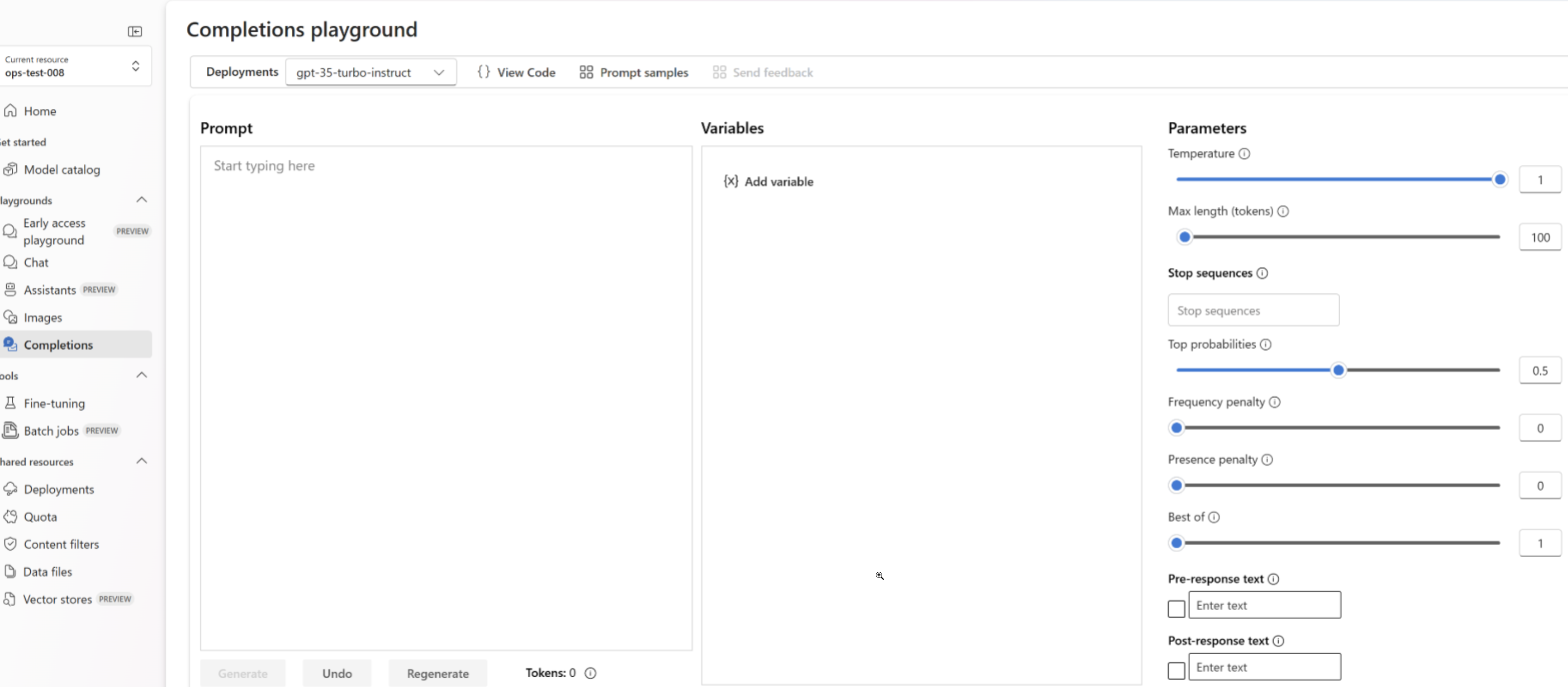
After your custom model deploys, you can use it like any other deployed model. You can use the **Playgrounds** in the [Foundry portal](https://ai.azure.com/?cid=learnDocs) to experiment with your new deployment. You can continue to use the same parameters with your custom model, such as `temperature` and `max_tokens`, as you can with other deployed models.
```python theme={null}
import os
from openai import AzureOpenAI
client = AzureOpenAI(
azure_endpoint = os.getenv("AZURE_OPENAI_ENDPOINT"),
api_key=os.getenv("AZURE_OPENAI_API_KEY"),
api_version="2024-02-01"
)
response = client.chat.completions.create(
model="gpt-4.1-mini-ft", # model = "Custom deployment name you chose for your fine-tuning model"
messages=[
{"role": "system", "content": "You are a helpful assistant."},
{"role": "user", "content": "Does Azure OpenAI support customer managed keys?"},
{"role": "assistant", "content": "Yes, customer managed keys are supported by Azure OpenAI."},
{"role": "user", "content": "Do other Azure services support this too?"}
]
)
print(response.choices[0].message.content)
```
```bash theme={null}
curl $AZURE_OPENAI_ENDPOINT/openai/deployments//chat/completions?api-version=2024-10-21 \
-H "Content-Type: application/json" \
-H "api-key: $AZURE_OPENAI_API_KEY" \
-d '{"messages":[{"role": "system", "content": "You are a helpful assistant."},{"role": "user", "content": "Does Azure OpenAI support customer managed keys?"},{"role": "assistant", "content": "Yes, customer managed keys are supported by Azure OpenAI."},{"role": "user", "content": "Do other Azure services support this too?"}]}'
```
Azure CLI is only for control plane operations such as resource creation and [model deployment](https://learn.microsoft.com/cli/azure/cognitiveservices/account/deployment). For inference operations, use the [REST API](https://learn.microsoft.com/rest/api/microsoft-foundry/), or the [language based SDKs](/models/supported-languages).
### Prompt caching
Azure OpenAI fine-tuning supports prompt caching with select models. Prompt caching allows you to reduce overall request latency and cost for longer prompts that have identical content at the beginning of the prompt. To learn more about prompt caching, see [getting started with prompt caching](/models/prompt-caching).
## Deployment Types
Azure OpenAI fine-tuning supports the following deployment types.
### Standard
[Standard deployments](/models/deployment-types) provide a pay-per-token billing model with data residency confined to the deployed region.
| Models | East US2 | North Central US | Sweden Central |
| ------------ | :------: | :--------------: | :------------: |
| o4-mini | ✅ | | ✅ |
| GPT-4.1 | | ✅ | ✅ |
| GPT-4.1-mini | | ✅ | ✅ |
| GPT-4.1-nano | | ✅ | ✅ |
| GPT-4o | ✅ | | ✅ |
| GPT-4o-mini | | ✅ | ✅ |
### Global Standard
[Global standard](/models/deployment-types) fine-tuned deployments offer [cost savings](https://azure.microsoft.com/pricing/details/cognitive-services/openai-service/), but custom model weights may temporarily be stored outside the geography of your Azure OpenAI resource.
Global standard deployments are available from all Azure OpenAI regions for the following models:
* o4-mini
* GPT-4.1
* GPT-4.1-mini
* GPT-4.1-nano
* GPT-4o
* GPT-4o-mini
### Developer Tier
[Developer](/models/deployment-types) fine-tuned deployments offer a similar experience as [Global Standard](#global-standard) without an hourly hosting fee, but do not offer an availability SLA. Developer deployments are designed for model candidate evaluation and not for production use.
Developer deployments are available from all Azure OpenAI regions for the following models:
| Models | Availability |
| ------------ | ------------ |
| o4-mini | All regions |
| GPT-4.1 | All regions |
| GPT-4.1-mini | All regions |
| GPT-4.1-nano | All regions |
### Provisioned Throughput
| Models | North Central US | Sweden Central |
| ----------- | :--------------: | :------------: |
| GPT-4.1 | | ✅ |
| GPT-4o | ✅ | ✅ |
| GPT-4o-mini | ✅ | ✅ |
[Provisioned throughput](/models/deployment-types) fine-tuned deployments offer [predictable performance](/models/provisioned-throughput) for latency-sensitive agents and applications. They use the same regional provisioned throughput (PTU) capacity as base models, so if you already have regional PTU quota you can deploy your fine-tuned model in support regions.
## Clean up your deployment
To delete a deployment, use the [Deployments - Delete REST API](https://learn.microsoft.com/rest/api/aiservices/accountmanagement/deployments/delete) and send an HTTP DELETE to the deployment resource. Like with creating deployments, you must include the following parameters:
* Azure subscription ID
* Azure resource group name
* Azure OpenAI resource name
* Name of the deployment to delete
Below is the REST API example to delete a deployment:
```bash theme={null}
curl -X DELETE "https://management.azure.com/subscriptions//resourceGroups//providers/Microsoft.CognitiveServices/accounts//deployments/?api-version=2024-10-21" \
-H "Authorization: Bearer "
```
You can also delete a deployment in Foundry portal, or use [Azure CLI](https://learn.microsoft.com/cli/azure/cognitiveservices/account/deployment).
## Next steps
* [Azure OpenAI deployment types](/models/deployment-types)
 You can monitor the progress of your deployment on the **Deployments** pane in Foundry portal.
The portal doesn't support cross-region deployment. Use the Python SDK or REST API instead.
You can monitor the progress of your deployment on the **Deployments** pane in Foundry portal.
The portal doesn't support cross-region deployment. Use the Python SDK or REST API instead.
 ### Developer Tier
[Developer](/models/deployment-types) fine-tuned deployments offer a similar experience as [Global Standard](#global-standard) without an hourly hosting fee, but do not offer an availability SLA. Developer deployments are designed for model candidate evaluation and not for production use.
Developer deployments are available from all Azure OpenAI regions for the following models:
| Models | Availability |
| ------------ | ------------ |
| o4-mini | All regions |
| GPT-4.1 | All regions |
| GPT-4.1-mini | All regions |
| GPT-4.1-nano | All regions |
### Provisioned Throughput
| Models | North Central US | Sweden Central |
| ----------- | :--------------: | :------------: |
| GPT-4.1 | | ✅ |
| GPT-4o | ✅ | ✅ |
| GPT-4o-mini | ✅ | ✅ |
[Provisioned throughput](/models/deployment-types) fine-tuned deployments offer [predictable performance](/models/provisioned-throughput) for latency-sensitive agents and applications. They use the same regional provisioned throughput (PTU) capacity as base models, so if you already have regional PTU quota you can deploy your fine-tuned model in support regions.
## Clean up your deployment
To delete a deployment, use the [Deployments - Delete REST API](https://learn.microsoft.com/rest/api/aiservices/accountmanagement/deployments/delete) and send an HTTP DELETE to the deployment resource. Like with creating deployments, you must include the following parameters:
* Azure subscription ID
* Azure resource group name
* Azure OpenAI resource name
* Name of the deployment to delete
Below is the REST API example to delete a deployment:
```bash theme={null}
curl -X DELETE "https://management.azure.com/subscriptions/
### Developer Tier
[Developer](/models/deployment-types) fine-tuned deployments offer a similar experience as [Global Standard](#global-standard) without an hourly hosting fee, but do not offer an availability SLA. Developer deployments are designed for model candidate evaluation and not for production use.
Developer deployments are available from all Azure OpenAI regions for the following models:
| Models | Availability |
| ------------ | ------------ |
| o4-mini | All regions |
| GPT-4.1 | All regions |
| GPT-4.1-mini | All regions |
| GPT-4.1-nano | All regions |
### Provisioned Throughput
| Models | North Central US | Sweden Central |
| ----------- | :--------------: | :------------: |
| GPT-4.1 | | ✅ |
| GPT-4o | ✅ | ✅ |
| GPT-4o-mini | ✅ | ✅ |
[Provisioned throughput](/models/deployment-types) fine-tuned deployments offer [predictable performance](/models/provisioned-throughput) for latency-sensitive agents and applications. They use the same regional provisioned throughput (PTU) capacity as base models, so if you already have regional PTU quota you can deploy your fine-tuned model in support regions.
## Clean up your deployment
To delete a deployment, use the [Deployments - Delete REST API](https://learn.microsoft.com/rest/api/aiservices/accountmanagement/deployments/delete) and send an HTTP DELETE to the deployment resource. Like with creating deployments, you must include the following parameters:
* Azure subscription ID
* Azure resource group name
* Azure OpenAI resource name
* Name of the deployment to delete
Below is the REST API example to delete a deployment:
```bash theme={null}
curl -X DELETE "https://management.azure.com/subscriptions/