> ## Documentation Index
> Fetch the complete documentation index at: https://hobbyist-e43fa225.mintlify.site/llms.txt
> Use this file to discover all available pages before exploring further.
# Understand deployment types in Microsoft Foundry Models in Azure Government
> Compare Microsoft Foundry deployment types including Standard, DataZone, and ProvisionedManaged.
When you deploy a model in Microsoft Foundry in Azure Government, you choose a deployment type that determines:
* **Where your data is processed** (data zone or single region)
* **How you pay** (pay-per-token or reserved capacity)
* **Performance characteristics** (latency variance, throughput limits)
The service offers two main categories: *standard* (pay-per-token) and *provisionedmanaged* (reserved capacity). Within each category, you can choose data zone or single regional processing based on your requirements.
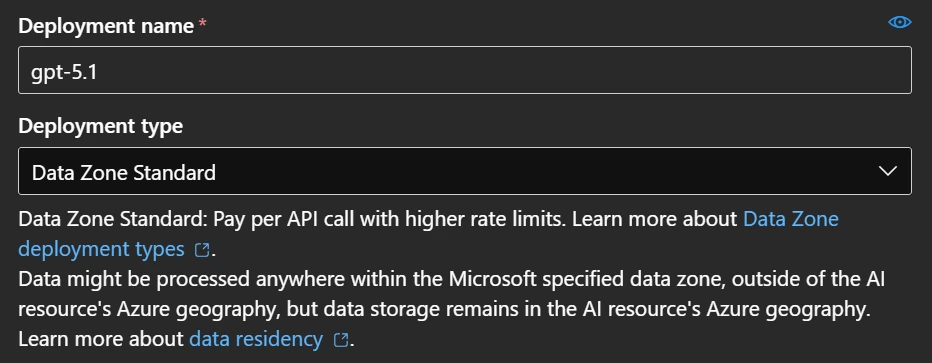 **Data residency for all deployment types**: Data stored at rest remains in the designated Azure region. However, inferencing data is processed as follows:
* **USGov DataZone** types: Processed only within the Azure Government cloud USGov data zone
* **Standard/Regional** types: Processed in the deployment region
## Deployment type comparison
| Deployment type | SKU code | Data processing | Billing | Best for |
| ----------------------------------------------- | ---------------------------- | ---------------- | ------------- | ---------------------------------------- |
| [Data Zone Standard](#data-zone-standard) | `DataZoneStandard` | Within data zone | Pay-per-token | USGov data zone compliance |
| [Data Zone Provisioned](#data-zone-provisioned) | `DataZoneProvisionedManaged` | Within data zone | Reserved PTU | USGov Data zone + predictable throughput |
| [Standard](#standard) | `Standard` | Single region | Pay-per-token | Regional compliance, low volume |
| [Regional Provisioned](#regional-provisioned) | `ProvisionedManaged` | Single region | Reserved PTU | Regional compliance + throughput |
Not all models support all deployment types. Check [Foundry Models sold by Azure](/models/models-sold-directly-by-azure-gov) for model availability by deployment type and region.
SLA guarantees vary by deployment type. Provisioned types provide guaranteed throughput and lower latency variance. Standard types offer best-effort service. For details, see the [Azure SLA for Azure OpenAI Service](https://www.microsoft.com/licensing/docs/view/Service-Level-Agreements-SLA-for-Online-Services).
For detailed pricing, see [Azure OpenAI Service pricing](https://azure.microsoft.com/pricing/details/cognitive-services/openai-service/).
## Choose the right deployment type
Use the following criteria to select a deployment type:
### By data residency requirement
* **USGov data zone**: Use DataZone Standard or DataZone Provisioned in an Azure Government region
* **Single region only**: Use Standard or Regional Provisioned
### By workload pattern
* **Variable, bursty traffic**: Use Standard or DataZone (pay-per-token)
* **Consistent high volume**: Use Provisioned types (reserved capacity)
### By latency requirement
* **Low latency variance required**: Use Provisioned types
* **Latency variance acceptable**: Use Standard types
### Data Zone deployments
For **DataZone** deployment types, prompts and responses are processed only within the specified data zone:
* **USGov**: Data processed within the two Azure Government regions (USGovArizona or USGovVirginia)
Learn more in the "Model region availability by deployment type" section of [Foundry Models sold by Azure](/models/models-sold-directly-by-azure-gov).
With Data Zone Standard deployment types, if the primary region experiences an interruption in service, all traffic initially routed to this region is affected. To learn more, see the [high availability and disaster recovery guide](https://learn.microsoft.com/en-us/azure/foundry-classic/how-to/high-availability-resiliency).
## Data Zone Standard
* SKU name in code: `DataZoneStandard`
Data Zone Standard deployments dynamically route traffic to datacenters within the Microsoft-defined data zone (USGov). This deployment type provides higher default quotas than geography-based deployment types while keeping data within the specified zone.
Customers with high consistent volume might experience greater latency variability. The threshold is set per model. To learn more about Azure OpenAI quotas in Azure Government, see the [Quotas and limits in Azure OpenAI](/models/quotas-limits-gov). For workloads that require low latency variance at large volume, consider provisioned deployment types.
## Data Zone Provisioned
* SKU name in code: `DataZoneProvisionedManaged`
Data Zone Provisioned deployments dynamically route traffic within the Microsoft-specified data zone (USGov) while providing reserved model processing capacity. This deployment type combines data zone compliance with high and predictable throughput.
## Standard
* SKU name in code: `Standard`
Standard deployments use pay-per-token billing. You pay only for what you consume. Models available in each region and throughput might be limited.
Standard deployments are suited for low-to-medium volume workloads with high burstiness. Customers with high consistent volume might experience greater latency variability.
## Regional Provisioned
* SKU name in code: `ProvisionedManaged`
Regional Provisioned deployments allow you to specify the amount of throughput you require in a deployment. The service then allocates the necessary model processing capacity and ensures it's ready for you. Throughput is defined in terms of provisioned throughput units (PTUs), which is a normalized way of representing the throughput for your deployment. Each model-version pair requires different amounts of PTUs to deploy, and provides different amounts of throughput per PTU. Minimum PTU requirements vary by model. For current minimums and available capacity, see [Provisioned throughput concepts](/models/provisioned-throughput).
## Troubleshooting deployment issues
Common issues when creating or using deployments:
| Issue | Cause | Resolution |
| -------------------------------- | ------------------------------------------------ | -------------------------------------------------------------------------------------------------------------- |
| Deployment type unavailable | Model doesn't support the selected type | Check [model availability by deployment type](/models/models-sold-directly-by-azure-gov) |
| Quota exceeded | Subscription limit reached for tokens per minute | Request quota increase at [Azure Government AOAI Quota](https://aka.ms/AOAIGovQuota) or use a different region |
| Region unavailable | Model not deployed in selected region | Select a region from the model's availability list |
| Provisioned capacity unavailable | No PTU capacity in region | Try a different region or use DataZone Provisioned for broader availability |
For Azure OpenAI quota limits by deployment type in Azure Government, see [Quotas and limits in Azure OpenAI](/models/quotas-limits-gov).
## Abuse Monitoring in Azure Government
Not all features of Abuse Monitoring are enabled for Azure OpenAI deployments in Azure Government. You are responsible for implementing reasonable technical and operational measures to detect and mitigate any use of the service in violation of the Product Terms. Automated Content Classification and Filtering remains enabled by default for Azure Government. If modified content filters are required, apply at [Azure Government Modified Filter Application](https://aka.ms/AOAIGovModifyContentFilter).
## Related content
* [Deploy Microsoft Foundry Models in the Foundry portal](/models/deploy-foundry-models)
* [Create and deploy an Azure OpenAI in Microsoft Foundry Models resource](https://learn.microsoft.com/en-us/azure/foundry-classic/openai/how-to/create-resource)
* [Foundry Models sold by Azure in Azure Government](/models/models-sold-directly-by-azure-gov)
* [Model region availability by deployment type in Azure Government](/models/models-sold-directly-by-azure-gov)
* [Azure OpenAI in Azure Government quotas and limits](/models/quotas-limits-gov)
* [Provisioned throughput concepts](/models/provisioned-throughput)
* [Azure OpenAI Service pricing](https://azure.microsoft.com/pricing/details/cognitive-services/openai-service/)
* [Data privacy and security for Foundry Models](https://learn.microsoft.com/en-us/azure/foundry-classic/how-to/concept-data-privacy)
* [High availability and disaster recovery](https://learn.microsoft.com/en-us/azure/foundry-classic/how-to/high-availability-resiliency)
**Data residency for all deployment types**: Data stored at rest remains in the designated Azure region. However, inferencing data is processed as follows:
* **USGov DataZone** types: Processed only within the Azure Government cloud USGov data zone
* **Standard/Regional** types: Processed in the deployment region
## Deployment type comparison
| Deployment type | SKU code | Data processing | Billing | Best for |
| ----------------------------------------------- | ---------------------------- | ---------------- | ------------- | ---------------------------------------- |
| [Data Zone Standard](#data-zone-standard) | `DataZoneStandard` | Within data zone | Pay-per-token | USGov data zone compliance |
| [Data Zone Provisioned](#data-zone-provisioned) | `DataZoneProvisionedManaged` | Within data zone | Reserved PTU | USGov Data zone + predictable throughput |
| [Standard](#standard) | `Standard` | Single region | Pay-per-token | Regional compliance, low volume |
| [Regional Provisioned](#regional-provisioned) | `ProvisionedManaged` | Single region | Reserved PTU | Regional compliance + throughput |
Not all models support all deployment types. Check [Foundry Models sold by Azure](/models/models-sold-directly-by-azure-gov) for model availability by deployment type and region.
SLA guarantees vary by deployment type. Provisioned types provide guaranteed throughput and lower latency variance. Standard types offer best-effort service. For details, see the [Azure SLA for Azure OpenAI Service](https://www.microsoft.com/licensing/docs/view/Service-Level-Agreements-SLA-for-Online-Services).
For detailed pricing, see [Azure OpenAI Service pricing](https://azure.microsoft.com/pricing/details/cognitive-services/openai-service/).
## Choose the right deployment type
Use the following criteria to select a deployment type:
### By data residency requirement
* **USGov data zone**: Use DataZone Standard or DataZone Provisioned in an Azure Government region
* **Single region only**: Use Standard or Regional Provisioned
### By workload pattern
* **Variable, bursty traffic**: Use Standard or DataZone (pay-per-token)
* **Consistent high volume**: Use Provisioned types (reserved capacity)
### By latency requirement
* **Low latency variance required**: Use Provisioned types
* **Latency variance acceptable**: Use Standard types
### Data Zone deployments
For **DataZone** deployment types, prompts and responses are processed only within the specified data zone:
* **USGov**: Data processed within the two Azure Government regions (USGovArizona or USGovVirginia)
Learn more in the "Model region availability by deployment type" section of [Foundry Models sold by Azure](/models/models-sold-directly-by-azure-gov).
With Data Zone Standard deployment types, if the primary region experiences an interruption in service, all traffic initially routed to this region is affected. To learn more, see the [high availability and disaster recovery guide](https://learn.microsoft.com/en-us/azure/foundry-classic/how-to/high-availability-resiliency).
## Data Zone Standard
* SKU name in code: `DataZoneStandard`
Data Zone Standard deployments dynamically route traffic to datacenters within the Microsoft-defined data zone (USGov). This deployment type provides higher default quotas than geography-based deployment types while keeping data within the specified zone.
Customers with high consistent volume might experience greater latency variability. The threshold is set per model. To learn more about Azure OpenAI quotas in Azure Government, see the [Quotas and limits in Azure OpenAI](/models/quotas-limits-gov). For workloads that require low latency variance at large volume, consider provisioned deployment types.
## Data Zone Provisioned
* SKU name in code: `DataZoneProvisionedManaged`
Data Zone Provisioned deployments dynamically route traffic within the Microsoft-specified data zone (USGov) while providing reserved model processing capacity. This deployment type combines data zone compliance with high and predictable throughput.
## Standard
* SKU name in code: `Standard`
Standard deployments use pay-per-token billing. You pay only for what you consume. Models available in each region and throughput might be limited.
Standard deployments are suited for low-to-medium volume workloads with high burstiness. Customers with high consistent volume might experience greater latency variability.
## Regional Provisioned
* SKU name in code: `ProvisionedManaged`
Regional Provisioned deployments allow you to specify the amount of throughput you require in a deployment. The service then allocates the necessary model processing capacity and ensures it's ready for you. Throughput is defined in terms of provisioned throughput units (PTUs), which is a normalized way of representing the throughput for your deployment. Each model-version pair requires different amounts of PTUs to deploy, and provides different amounts of throughput per PTU. Minimum PTU requirements vary by model. For current minimums and available capacity, see [Provisioned throughput concepts](/models/provisioned-throughput).
## Troubleshooting deployment issues
Common issues when creating or using deployments:
| Issue | Cause | Resolution |
| -------------------------------- | ------------------------------------------------ | -------------------------------------------------------------------------------------------------------------- |
| Deployment type unavailable | Model doesn't support the selected type | Check [model availability by deployment type](/models/models-sold-directly-by-azure-gov) |
| Quota exceeded | Subscription limit reached for tokens per minute | Request quota increase at [Azure Government AOAI Quota](https://aka.ms/AOAIGovQuota) or use a different region |
| Region unavailable | Model not deployed in selected region | Select a region from the model's availability list |
| Provisioned capacity unavailable | No PTU capacity in region | Try a different region or use DataZone Provisioned for broader availability |
For Azure OpenAI quota limits by deployment type in Azure Government, see [Quotas and limits in Azure OpenAI](/models/quotas-limits-gov).
## Abuse Monitoring in Azure Government
Not all features of Abuse Monitoring are enabled for Azure OpenAI deployments in Azure Government. You are responsible for implementing reasonable technical and operational measures to detect and mitigate any use of the service in violation of the Product Terms. Automated Content Classification and Filtering remains enabled by default for Azure Government. If modified content filters are required, apply at [Azure Government Modified Filter Application](https://aka.ms/AOAIGovModifyContentFilter).
## Related content
* [Deploy Microsoft Foundry Models in the Foundry portal](/models/deploy-foundry-models)
* [Create and deploy an Azure OpenAI in Microsoft Foundry Models resource](https://learn.microsoft.com/en-us/azure/foundry-classic/openai/how-to/create-resource)
* [Foundry Models sold by Azure in Azure Government](/models/models-sold-directly-by-azure-gov)
* [Model region availability by deployment type in Azure Government](/models/models-sold-directly-by-azure-gov)
* [Azure OpenAI in Azure Government quotas and limits](/models/quotas-limits-gov)
* [Provisioned throughput concepts](/models/provisioned-throughput)
* [Azure OpenAI Service pricing](https://azure.microsoft.com/pricing/details/cognitive-services/openai-service/)
* [Data privacy and security for Foundry Models](https://learn.microsoft.com/en-us/azure/foundry-classic/how-to/concept-data-privacy)
* [High availability and disaster recovery](https://learn.microsoft.com/en-us/azure/foundry-classic/how-to/high-availability-resiliency)