;
};
export const ZoneContent = ({group, value, options = [], values = [], defaultValue, children}) => {
const optionKey = options.map(option => `${option.id}:${option.title}`).join("|");
const [activePivot, setActivePivot] = useState(defaultValue || values[0]);
const slugify = value => value.toLowerCase().replace(/[^a-z0-9]+/g, "-").replace(/^-|-$/g, "");
const resolvePivot = () => {
if (typeof window === "undefined") return defaultValue || values[0];
const params = new URLSearchParams(window.location.search);
const requested = params.get("pivots");
if (requested) {
const requestedIds = requested.split(",").map(value => value.trim()).filter(Boolean);
const match = requestedIds.find(id => values.includes(id));
if (match) return match;
}
const hash = window.location.hash.replace(/^#/, "");
if (hash) {
const match = options.find(option => option.id === hash || slugify(option.title) === hash);
if (match) return match.id;
}
try {
const stored = window.localStorage.getItem(`foundry-zone-pivot:${group}`);
if (values.includes(stored)) return stored;
} catch {
return defaultValue || values[0];
}
return defaultValue || values[0];
};
useEffect(() => {
setActivePivot(resolvePivot());
}, [group, defaultValue, values.join("|"), optionKey]);
useEffect(() => {
const onPivotChange = event => {
if (event.detail?.group === group && values.includes(event.detail.value)) {
setActivePivot(event.detail.value);
}
};
window.addEventListener("foundry-zone-pivot-change", onPivotChange);
return () => window.removeEventListener("foundry-zone-pivot-change", onPivotChange);
}, [group, values.join("|")]);
if (activePivot !== value) return null;
return <>{children};
};
The Azure OpenAI Batch API efficiently handles large-scale and high-volume processing tasks. It processes asynchronous groups of requests with separate quota and offers a 24-hour target turnaround at [50% less cost than global standard](https://azure.microsoft.com/pricing/details/cognitive-services/openai-service/). With batch processing, you send a large number of requests in a single file instead of sending one request at a time. Global batch requests have a separate enqueued token quota, so your online workloads aren't disrupted.
Key use cases include:
* **Large-Scale Data Processing:** Quickly analyze extensive datasets in parallel.
* **Content Generation:** Create large volumes of text, such as product descriptions or articles.
* **Document Review and Summarization:** Automate the review and summarization of lengthy documents.
* **Customer Support Automation:** Handle numerous queries simultaneously for faster responses.
* **Data Extraction and Analysis:** Extract and analyze information from vast amounts of unstructured data.
* **Natural Language Processing (NLP) Tasks:** Perform tasks like sentiment analysis or translation on large datasets.
* **Marketing and Personalization:** Generate personalized content and recommendations at scale.
If your batch jobs are so large that you hit the enqueued token limit even after maxing out the quota for your deployment, certain regions now support a new feature that allows you to queue multiple batch jobs with exponential backoff.
Once your enqueued token quota is available, the next batch job can be created and kicked off automatically. To learn more, see [**automating retries of large batch jobs with exponential backoff**](#queueing-batch-jobs).
The service aims to process batch requests within 24 hours, but it doesn't expire jobs that take longer. You can [cancel](#cancel-batch) the job anytime. When you cancel the job, the service cancels any remaining work and returns any already completed work. You pay for any completed work.
Data stored at rest remains in the designated Azure geography, while data might be processed for inferencing in any Azure OpenAI location. [Learn more about data residency](https://azure.microsoft.com/explore/global-infrastructure/data-residency/).
## Batch support
### Global batch model availability
| **Region** | **gpt-5.4-mini**, **2026-03-17** | **gpt-5.4**, **2026-03-05** | **gpt-5.1**, **2025-11-13** | **gpt-5**, **2025-08-07** | **o3**, **2025-04-16** | **o4-mini**, **2025-04-16** | **gpt-4.1**, **2025-04-14** | **gpt-4.1-nano**, **2025-04-14** | **gpt-4.1-mini**, **2025-04-14** | **o3-mini**, **2025-01-31** | **gpt-4o**, **2024-05-13** | **gpt-4o**, **2024-08-06** | **gpt-4o**, **2024-11-20** | **gpt-4o-mini**, **2024-07-18** |
| :----------------- | :------------------------------: | :-------------------------: | :-------------------------: | :-----------------------: | :--------------------: | :-------------------------: | :-------------------------: | :------------------------------: | :------------------------------: | :-------------------------: | :------------------------: | :------------------------: | :------------------------: | :-----------------------------: |
| australiaeast | ✅ | ✅ | ✅ | ✅ | ✅ | ✅ | ✅ | ✅ | ✅ | ✅ | ✅ | ✅ | ✅ | ✅ |
| brazilsouth | ✅ | ✅ | ✅ | ✅ | ✅ | ✅ | ✅ | ✅ | ✅ | ✅ | ✅ | ✅ | ✅ | ✅ |
| canadaeast | ✅ | ✅ | ✅ | ✅ | ✅ | ✅ | ✅ | ✅ | ✅ | ✅ | ✅ | ✅ | ✅ | ✅ |
| centralus | ✅ | ✅ | ✅ | ✅ | ✅ | ✅ | ✅ | ✅ | ✅ | ✅ | ✅ | ✅ | ✅ | ✅ |
| eastus | ✅ | ✅ | ✅ | ✅ | ✅ | ✅ | ✅ | ✅ | ✅ | ✅ | ✅ | ✅ | ✅ | ✅ |
| eastus2 | ✅ | ✅ | ✅ | ✅ | ✅ | ✅ | ✅ | ✅ | ✅ | ✅ | ✅ | ✅ | ✅ | ✅ |
| francecentral | ✅ | ✅ | ✅ | ✅ | ✅ | ✅ | ✅ | ✅ | ✅ | ✅ | ✅ | ✅ | ✅ | ✅ |
| germanywestcentral | ✅ | ✅ | ✅ | ✅ | ✅ | ✅ | ✅ | ✅ | ✅ | ✅ | ✅ | ✅ | ✅ | ✅ |
| japaneast | ✅ | ✅ | ✅ | ✅ | ✅ | ✅ | ✅ | ✅ | ✅ | ✅ | ✅ | ✅ | ✅ | ✅ |
| koreacentral | ✅ | ✅ | ✅ | ✅ | ✅ | ✅ | ✅ | ✅ | ✅ | ✅ | ✅ | ✅ | ✅ | ✅ |
| northcentralus | ✅ | ✅ | ✅ | ✅ | ✅ | ✅ | ✅ | ✅ | ✅ | ✅ | ✅ | ✅ | ✅ | ✅ |
| norwayeast | ✅ | ✅ | ✅ | ✅ | ✅ | ✅ | ✅ | ✅ | ✅ | ✅ | ✅ | ✅ | ✅ | ✅ |
| polandcentral | ✅ | ✅ | ✅ | ✅ | ✅ | ✅ | ✅ | ✅ | ✅ | ✅ | ✅ | ✅ | ✅ | ✅ |
| southafricanorth | ✅ | ✅ | ✅ | ✅ | ✅ | ✅ | ✅ | ✅ | ✅ | ✅ | ✅ | ✅ | ✅ | ✅ |
| southcentralus | ✅ | ✅ | ✅ | ✅ | ✅ | ✅ | ✅ | ✅ | ✅ | ✅ | ✅ | ✅ | ✅ | ✅ |
| southindia | ✅ | ✅ | ✅ | ✅ | ✅ | ✅ | ✅ | ✅ | ✅ | ✅ | ✅ | ✅ | ✅ | ✅ |
| swedencentral | ✅ | ✅ | ✅ | ✅ | ✅ | ✅ | ✅ | ✅ | ✅ | ✅ | ✅ | ✅ | ✅ | ✅ |
| switzerlandnorth | ✅ | ✅ | ✅ | ✅ | ✅ | ✅ | ✅ | ✅ | ✅ | ✅ | ✅ | ✅ | ✅ | ✅ |
| uksouth | ✅ | ✅ | ✅ | ✅ | ✅ | ✅ | ✅ | ✅ | ✅ | ✅ | ✅ | ✅ | ✅ | ✅ |
| westeurope | ✅ | ✅ | ✅ | ✅ | ✅ | ✅ | ✅ | ✅ | ✅ | ✅ | ✅ | ✅ | ✅ | ✅ |
| westus | ✅ | ✅ | ✅ | ✅ | ✅ | ✅ | ✅ | ✅ | ✅ | ✅ | ✅ | ✅ | ✅ | ✅ |
| westus3 | ✅ | ✅ | ✅ | ✅ | ✅ | ✅ | ✅ | ✅ | ✅ | ✅ | ✅ | ✅ | ✅ | ✅ |
### Data zone batch model availability
| **Region** | **gpt-5.4-mini**, **2026-03-17** | **gpt-5.4**, **2026-03-05** | **gpt-5.1**, **2025-11-13** | **gpt-5**, **2025-08-07** | **o3**, **2025-04-16** | **o4-mini**, **2025-04-16** | **gpt-4.1**, **2025-04-14** | **gpt-4.1-nano**, **2025-04-14** | **gpt-4.1-mini**, **2025-04-14** | **o3-mini**, **2025-01-31** | **gpt-4o**, **2024-08-06** | **gpt-4o**, **2024-11-20** | **gpt-4o-mini**, **2024-07-18** |
| :----------------- | :------------------------------: | :-------------------------: | :-------------------------: | :-----------------------: | :--------------------: | :-------------------------: | :-------------------------: | :------------------------------: | :------------------------------: | :-------------------------: | :------------------------: | :------------------------: | :-----------------------------: |
| centralus | ✅ | ✅ | ✅ | ✅ | ✅ | ✅ | ✅ | ✅ | ✅ | ✅ | ✅ | ✅ | ✅ |
| eastus | ✅ | ✅ | ✅ | ✅ | ✅ | ✅ | ✅ | ✅ | ✅ | ✅ | ✅ | ✅ | ✅ |
| eastus2 | ✅ | ✅ | ✅ | ✅ | ✅ | ✅ | ✅ | ✅ | ✅ | ✅ | ✅ | ✅ | ✅ |
| francecentral | - | - | - | - | ✅ | ✅ | ✅ | ✅ | ✅ | - | ✅ | ✅ | ✅ |
| germanywestcentral | - | - | - | - | ✅ | ✅ | ✅ | ✅ | ✅ | - | ✅ | ✅ | ✅ |
| northcentralus | ✅ | ✅ | ✅ | ✅ | ✅ | ✅ | ✅ | ✅ | ✅ | ✅ | ✅ | ✅ | ✅ |
| polandcentral | - | - | - | - | ✅ | ✅ | ✅ | ✅ | ✅ | - | ✅ | ✅ | ✅ |
| southcentralus | ✅ | ✅ | ✅ | ✅ | ✅ | ✅ | ✅ | ✅ | ✅ | ✅ | ✅ | ✅ | ✅ |
| swedencentral | - | - | - | - | ✅ | ✅ | ✅ | ✅ | ✅ | - | ✅ | ✅ | ✅ |
| westeurope | - | - | - | - | ✅ | ✅ | ✅ | ✅ | ✅ | - | ✅ | ✅ | ✅ |
| westus | ✅ | ✅ | ✅ | ✅ | ✅ | ✅ | ✅ | ✅ | ✅ | ✅ | ✅ | ✅ | ✅ |
| westus3 | ✅ | ✅ | ✅ | ✅ | ✅ | ✅ | ✅ | ✅ | ✅ | ✅ | ✅ | ✅ | ✅ |
While Global Batch supports older API versions, some models require newer API versions. For example, `o3-mini` isn't supported with `2024-10-21` since it was released after this date. To access newer models with Global Batch, use the v1 API.
### Feature support
The following features aren't currently supported:
* Integration with the Assistants API.
* Integration with Azure OpenAI On Your Data feature.
### Batch deployment
In the [Microsoft Foundry portal](https://ai.azure.com/?cid=learnDocs), the batch deployment types appear as `Global-Batch` and `Data Zone Batch`. To learn more about Azure OpenAI deployment types, see the [deployment types guide](/models/deployment-types).
We recommend enabling **dynamic quota** for all global batch model deployments to help avoid job failures due to insufficient enqueued token quota. Using dynamic quota allows your deployment to opportunistically take advantage of more quota when extra capacity is available. When dynamic quota is set to off, your deployment will only be able to process requests up to the enqueued token limit that was defined when you created the deployment.
## Prerequisites
* An Azure subscription - [Create one for free](https://azure.microsoft.com/pricing/purchase-options/azure-account?cid=msft_learn).
* A resource with a model of the deployment type `GlobalBatch` or `DataZoneBatch` deployed.
## Preparing your batch file
Like [fine-tuning](../../how-to/fine-tuning), batch uses files in JSON lines (`.jsonl`) format. Below are some example files with different types of supported content:
### Input format
#### Responses API
```JSONL theme={null}
{"custom_id": "task-0", "method": "POST", "url": "/v1/responses", "body": {"model": "REPLACE-WITH-MODEL-DEPLOYMENT-NAME", "input": "When was Microsoft founded, and by whom?"}}
{"custom_id": "task-1", "method": "POST", "url": "/v1/responses", "body": {"model": "REPLACE-WITH-MODEL-DEPLOYMENT-NAME", "input": "When was XBOX merged into Microsoft?"}}
{"custom_id": "task-2", "method": "POST", "url": "/v1/responses", "body": {"model": "REPLACE-WITH-MODEL-DEPLOYMENT-NAME", "input": "What is Visual Basic?"}}
```
**Input with base64 encoded image:**
```JSONL theme={null}
{"custom_id": "task-3", "method": "POST", "url": "/v1/responses", "body": {"model": "REPLACE-WITH-MODEL-DEPLOYMENT-NAME", "input": [{"role": "system", "content": "You are a helpful assistant."},{"role": "user", "content": [{"type":"input_text","text":"Describe this picture:"},{"type":"input_image","image_url":"data:image/png;base64,iVBORw0KGgoAAAANSUhEUgAAABgAAAAYCAYAAADgdz34AAAABHNCSVQICAgIfAhkiAAAAAlwSFlzAAAApgAAAKYB3X3/OAAAABl0RVh0U29mdHdhcmUAd3d3Lmlua3NjYXBlLm9yZ5vuPBoAAANCSURBVEiJtZZPbBtFFMZ/M7ubXdtdb1xSFyeilBapySVU8h8OoFaooFSqiihIVIpQBKci6KEg9Q6H9kovIHoCIVQJJCKE1ENFjnAgcaSGC6rEnxBwA04Tx43t2FnvDAfjkNibxgHxnWb2e/u992bee7tCa00YFsffekFY+nUzFtjW0LrvjRXrCDIAaPLlW0nHL0SsZtVoaF98mLrx3pdhOqLtYPHChahZcYYO7KvPFxvRl5XPp1sN3adWiD1ZAqD6XYK1b/dvE5IWryTt2udLFedwc1+9kLp+vbbpoDh+6TklxBeAi9TL0taeWpdmZzQDry0AcO+jQ12RyohqqoYoo8RDwJrU+qXkjWtfi8Xxt58BdQuwQs9qC/afLwCw8tnQbqYAPsgxE1S6F3EAIXux2oQFKm0ihMsOF71dHYx+f3NND68ghCu1YIoePPQN1pGRABkJ6Bus96CutRZMydTl+TvuiRW1m3n0eDl0vRPcEysqdXn+jsQPsrHMquGeXEaY4Yk4wxWcY5V/9scqOMOVUFthatyTy8QyqwZ+kDURKoMWxNKr2EeqVKcTNOajqKoBgOE28U4tdQl5p5bwCw7BWquaZSzAPlwjlithJtp3pTImSqQRrb2Z8PHGigD4RZuNX6JYj6wj7O4TFLbCO/Mn/m8R+h6rYSUb3ekokRY6f/YukArN979jcW+V/S8g0eT/N3VN3kTqWbQ428m9/8k0P/1aIhF36PccEl6EhOcAUCrXKZXXWS3XKd2vc/TRBG9O5ELC17MmWubD2nKhUKZa26Ba2+D3P+4/MNCFwg59oWVeYhkzgN/JDR8deKBoD7Y+ljEjGZ0sosXVTvbc6RHirr2reNy1OXd6pJsQ+gqjk8VWFYmHrwBzW/n+uMPFiRwHB2I7ih8ciHFxIkd/3Omk5tCDV1t+2nNu5sxxpDFNx+huNhVT3/zMDz8usXC3ddaHBj1GHj/As08fwTS7Kt1HBTmyN29vdwAw+/wbwLVOJ3uAD1wi/dUH7Qei66PfyuRj4Ik9is+hglfbkbfR3cnZm7chlUWLdwmprtCohX4HUtlOcQjLYCu+fzGJH2QRKvP3UNz8bWk1qMxjGTOMThZ3kvgLI5AzFfo379UAAAAASUVORK5CYII=","detail":"auto"}]}],"max_output_tokens": 1000}}
```
**Input with image url:**
```JSONL theme={null}
{"custom_id": "task-3", "method": "POST", "url": "/v1/responses", "body": {"model": "REPLACE-WITH-MODEL-DEPLOYMENT-NAME", "input": [{"role": "system", "content": "You are a helpful assistant."},{"role": "user", "content": [{"type": "input_text", "text": "What’s in this image?"},{"type": "input_image","image_url": "https://raw.githubusercontent.com/MicrosoftDocs/azure-ai-docs/main/articles/ai-foundry/openai/media/how-to/generated-seattle.png", "detail": "low"}]}],"max_output_tokens": 1000}}
{"custom_id": "task-4", "method": "POST", "url": "/v1/responses", "body": {"model": "REPLACE-WITH-MODEL-DEPLOYMENT-NAME", "input": [{"role": "system", "content": "You are a helpful assistant."},{"role": "user", "content": [{"type": "input_text", "text": "What’s in this image?"},{"type": "input_image","image_url": "https://raw.githubusercontent.com/MicrosoftDocs/azure-ai-docs/main/articles/ai-foundry/openai/media/how-to/generated-seattle.png", "detail": "high"}]}],"max_output_tokens": 1000}}
{"custom_id": "task-5", "method": "POST", "url": "/v1/responses", "body": {"model": "REPLACE-WITH-MODEL-DEPLOYMENT-NAME", "input": [{"role": "system", "content": "You are a helpful assistant."},{"role": "user", "content": [{"type": "input_text", "text": "What’s in this image?"},{"type": "input_image","image_url": "https://raw.githubusercontent.com/MicrosoftDocs/azure-ai-docs/main/articles/ai-foundry/openai/media/how-to/generated-seattle.png", "detail": "auto"}]}],"max_output_tokens": 1000}}
```
```JSONL theme={null}
{"custom_id": "task-4", "method": "POST", "url": "/v1/responses", "body": {"model": "REPLACE-WITH-MODEL-DEPLOYMENT-NAME", "input": [{"role": "system", "content": "Extract the event information."}, {"role": "user", "content": "Alice and Bob are going to a science fair on Friday."}], "text": {"format": {"type": "json_schema", "name": "CalendarEventResponse", "schema": {"type": "object", "properties": {"name": {"type": "string"}, "date": {"type": "string"}, "participants": {"type": "array", "items": {"type": "string"}}}, "required": ["name", "date", "participants"], "additionalProperties": false}, "strict": true}}}}
```
#### Chat completions API
```JSONL theme={null}
{"custom_id": "task-0", "method": "POST", "url": "/v1/chat/completions", "body": {"model": "REPLACE-WITH-MODEL-DEPLOYMENT-NAME", "messages": [{"role": "system", "content": "You are an AI assistant that helps people find information."}, {"role": "user", "content": "When was Microsoft founded?"}]}}
{"custom_id": "task-1", "method": "POST", "url": "/v1/chat/completions", "body": {"model": "REPLACE-WITH-MODEL-DEPLOYMENT-NAME", "messages": [{"role": "system", "content": "You are an AI assistant that helps people find information."}, {"role": "user", "content": "When was the first XBOX released?"}]}}
{"custom_id": "task-2", "method": "POST", "url": "/v1/chat/completions", "body": {"model": "REPLACE-WITH-MODEL-DEPLOYMENT-NAME", "messages": [{"role": "system", "content": "You are an AI assistant that helps people find information."}, {"role": "user", "content": "What is Altair Basic?"}]}}
```
**Input with base64 encoded image:**
```JSONL theme={null}
{"custom_id": "request-1", "method": "POST", "url": "/v1/chat/completions", "body": {"model": "REPLACE-WITH-MODEL-DEPLOYMENT-NAME", "messages": [{"role": "system", "content": "You are a helpful assistant."},{"role": "user", "content": [{"type":"text","text":"Describe this picture:"},{"type":"image_url","image_url":{"url":"data:image/png;base64,iVBORw0KGgoAAAANSUhEUgAAABgAAAAYCAYAAADgdz34AAAABHNCSVQICAgIfAhkiAAAAAlwSFlzAAAApgAAAKYB3X3/OAAAABl0RVh0U29mdHdhcmUAd3d3Lmlua3NjYXBlLm9yZ5vuPBoAAANCSURBVEiJtZZPbBtFFMZ/M7ubXdtdb1xSFyeilBapySVU8h8OoFaooFSqiihIVIpQBKci6KEg9Q6H9kovIHoCIVQJJCKE1ENFjnAgcaSGC6rEnxBwA04Tx43t2FnvDAfjkNibxgHxnWb2e/u992bee7tCa00YFsffekFY+nUzFtjW0LrvjRXrCDIAaPLlW0nHL0SsZtVoaF98mLrx3pdhOqLtYPHChahZcYYO7KvPFxvRl5XPp1sN3adWiD1ZAqD6XYK1b/dvE5IWryTt2udLFedwc1+9kLp+vbbpoDh+6TklxBeAi9TL0taeWpdmZzQDry0AcO+jQ12RyohqqoYoo8RDwJrU+qXkjWtfi8Xxt58BdQuwQs9qC/afLwCw8tnQbqYAPsgxE1S6F3EAIXux2oQFKm0ihMsOF71dHYx+f3NND68ghCu1YIoePPQN1pGRABkJ6Bus96CutRZMydTl+TvuiRW1m3n0eDl0vRPcEysqdXn+jsQPsrHMquGeXEaY4Yk4wxWcY5V/9scqOMOVUFthatyTy8QyqwZ+kDURKoMWxNKr2EeqVKcTNOajqKoBgOE28U4tdQl5p5bwCw7BWquaZSzAPlwjlithJtp3pTImSqQRrb2Z8PHGigD4RZuNX6JYj6wj7O4TFLbCO/Mn/m8R+h6rYSUb3ekokRY6f/YukArN979jcW+V/S8g0eT/N3VN3kTqWbQ428m9/8k0P/1aIhF36PccEl6EhOcAUCrXKZXXWS3XKd2vc/TRBG9O5ELC17MmWubD2nKhUKZa26Ba2+D3P+4/MNCFwg59oWVeYhkzgN/JDR8deKBoD7Y+ljEjGZ0sosXVTvbc6RHirr2reNy1OXd6pJsQ+gqjk8VWFYmHrwBzW/n+uMPFiRwHB2I7ih8ciHFxIkd/3Omk5tCDV1t+2nNu5sxxpDFNx+huNhVT3/zMDz8usXC3ddaHBj1GHj/As08fwTS7Kt1HBTmyN29vdwAw+/wbwLVOJ3uAD1wi/dUH7Qei66PfyuRj4Ik9is+hglfbkbfR3cnZm7chlUWLdwmprtCohX4HUtlOcQjLYCu+fzGJH2QRKvP3UNz8bWk1qMxjGTOMThZ3kvgLI5AzFfo379UAAAAASUVORK5CYII="}}]}],"max_tokens": 1000}}
```
**Input with image url:**
```JSONL theme={null}
{"custom_id": "request-1", "method": "POST", "url": "/v1/chat/completions", "body": {"model": "REPLACE-WITH-MODEL-DEPLOYMENT-NAME", "messages": [{"role": "system", "content": "You are a helpful assistant."},{"role": "user", "content": [{"type": "text", "text": "What’s in this image?"},{"type": "image_url","image_url": {"url": "https://raw.githubusercontent.com/MicrosoftDocs/azure-ai-docs/main/articles/ai-foundry/openai/media/how-to/generated-seattle.png", "detail": "high"}}]}],"max_tokens": 1000}}
```
The `detail` parameter tells the model what level of detail to use when processing and understanding the image (`low`, `high`, or `auto` to let the model decide). If you skip the parameter, the model will use `auto`.
```JSONL theme={null}
{"custom_id": "task-0", "method": "POST", "url": "/v1/chat/completions", "body": {"model": "REPLACE-WITH-MODEL-DEPLOYMENT-NAME", "messages": [{"role": "system", "content": "Extract the event information."}, {"role": "user", "content": "Alice and Bob are going to a science fair on Friday."}], "response_format": {"type": "json_schema", "json_schema": {"name": "CalendarEventResponse", "strict": true, "schema": {"type": "object", "properties": {"name": {"type": "string"}, "date": {"type": "string"}, "participants": {"type": "array", "items": {"type": "string"}}}, "required": ["name", "date", "participants"], "additionalProperties": false}}}}}
```
The `custom_id` is required to allow you to identify which individual batch request corresponds to a given response. Responses won't be returned in identical order to the order defined in the `.jsonl` batch file.
`model` attribute should be set to match the name of the Global Batch deployment you wish to target for inference responses.
The `model` attribute must be set to match the name of the Global Batch deployment you wish to target for inference responses. The **same Global Batch model deployment name must be present on each line of the batch file.** If you want to target a different deployment you must do so in a separate batch file/job.
For the best performance we recommend submitting large files for batch processing, rather than a large number of small files with only a few lines in each file.
### Create input file
For this article, we'll create a file named `test.jsonl` and will copy the contents from standard input code block above to the file. You'll need to modify and add your global batch deployment name to each line of the file.
## Create batch job
Once your input file is prepared, you first need to upload the file to then be able to initiate a batch job. File upload can be done both programmatically or via the Microsoft Foundry portal. This example demonstrates uploading a file directly to your Azure OpenAI resource. Alternatively, you can [configure Azure Blob Storage for Azure OpenAI Batch](https://learn.microsoft.com/en-us/azure/foundry-classic/openai/how-to/batch-blob-storage).
1. Sign in to [Microsoft Foundry](https://ai.azure.com/?cid=learnDocs). Make sure the **New Foundry** toggle is on. These steps refer to **Foundry (new)**.
2. In the upper-right select **Build**
3. From the left-hand pane select **Models**
4. Select **Batch Jobs** > **create a batch job**
## Track batch job progress
Once your job is created, you can monitor the job's progress by selecting the Job ID for the most recently created job. By default you will be taken to the status page for your most recently created batch job.
You can track job status for your job in the right-hand pane:
## Retrieve batch job output file
Once your job has completed or reached a terminal state, it will generate an error file and an output file which can be downloaded for review by selecting the respective button with the downward arrow icon.
## Cancel batch
Cancels an in-progress batch. The batch will be in status `cancelling` for up to 10 minutes, before changing to `cancelled`, where it will have partial results (if any) available in the output file.
## Prerequisites
* An Azure subscription - [Create one for free](https://azure.microsoft.com/pricing/purchase-options/azure-account?cid=msft_learn).
* Python 3.8 or later version
* The following Python library: `openai`
* [Jupyter Notebooks](https://jupyter.org/)
* An Azure OpenAI resource with a model of the deployment type `Global-Batch` deployed. You can refer to the [resource creation and model deployment guide](https://learn.microsoft.com/en-us/azure/foundry-classic/openai/how-to/create-resource) for help with this process.
The steps in this article are intended to be run sequentially in [Jupyter Notebooks](https://jupyter.org/). For this reason we'll only instantiate the Azure OpenAI client once at the beginning of the examples. If you want to run a step out-of-order you'll often need to set up an Azure OpenAI client as part of that call.
Even if you already have the OpenAI Python library installed you might need to upgrade your installation to the latest version:
```cmd theme={null}
!pip install openai --upgrade
```
## Preparing your batch file
Like [fine-tuning](../../how-to/fine-tuning), global batch uses files in JSON lines (`.jsonl`) format. Below are some example files with different types of supported content:
### Input format
#### Responses API
```JSONL theme={null}
{"custom_id": "task-0", "method": "POST", "url": "/v1/responses", "body": {"model": "REPLACE-WITH-MODEL-DEPLOYMENT-NAME", "input": "When was Microsoft founded, and by whom?"}}
{"custom_id": "task-1", "method": "POST", "url": "/v1/responses", "body": {"model": "REPLACE-WITH-MODEL-DEPLOYMENT-NAME", "input": "When was XBOX merged into Microsoft?"}}
{"custom_id": "task-2", "method": "POST", "url": "/v1/responses", "body": {"model": "REPLACE-WITH-MODEL-DEPLOYMENT-NAME", "input": "What is Visual Basic?"}}
```
**Input with base64 encoded image:**
```JSONL theme={null}
{"custom_id": "task-3", "method": "POST", "url": "/v1/responses", "body": {"model": "REPLACE-WITH-MODEL-DEPLOYMENT-NAME", "input": [{"role": "system", "content": "You are a helpful assistant."},{"role": "user", "content": [{"type":"input_text","text":"Describe this picture:"},{"type":"input_image","image_url":"data:image/png;base64,iVBORw0KGgoAAAANSUhEUgAAABgAAAAYCAYAAADgdz34AAAABHNCSVQICAgIfAhkiAAAAAlwSFlzAAAApgAAAKYB3X3/OAAAABl0RVh0U29mdHdhcmUAd3d3Lmlua3NjYXBlLm9yZ5vuPBoAAANCSURBVEiJtZZPbBtFFMZ/M7ubXdtdb1xSFyeilBapySVU8h8OoFaooFSqiihIVIpQBKci6KEg9Q6H9kovIHoCIVQJJCKE1ENFjnAgcaSGC6rEnxBwA04Tx43t2FnvDAfjkNibxgHxnWb2e/u992bee7tCa00YFsffekFY+nUzFtjW0LrvjRXrCDIAaPLlW0nHL0SsZtVoaF98mLrx3pdhOqLtYPHChahZcYYO7KvPFxvRl5XPp1sN3adWiD1ZAqD6XYK1b/dvE5IWryTt2udLFedwc1+9kLp+vbbpoDh+6TklxBeAi9TL0taeWpdmZzQDry0AcO+jQ12RyohqqoYoo8RDwJrU+qXkjWtfi8Xxt58BdQuwQs9qC/afLwCw8tnQbqYAPsgxE1S6F3EAIXux2oQFKm0ihMsOF71dHYx+f3NND68ghCu1YIoePPQN1pGRABkJ6Bus96CutRZMydTl+TvuiRW1m3n0eDl0vRPcEysqdXn+jsQPsrHMquGeXEaY4Yk4wxWcY5V/9scqOMOVUFthatyTy8QyqwZ+kDURKoMWxNKr2EeqVKcTNOajqKoBgOE28U4tdQl5p5bwCw7BWquaZSzAPlwjlithJtp3pTImSqQRrb2Z8PHGigD4RZuNX6JYj6wj7O4TFLbCO/Mn/m8R+h6rYSUb3ekokRY6f/YukArN979jcW+V/S8g0eT/N3VN3kTqWbQ428m9/8k0P/1aIhF36PccEl6EhOcAUCrXKZXXWS3XKd2vc/TRBG9O5ELC17MmWubD2nKhUKZa26Ba2+D3P+4/MNCFwg59oWVeYhkzgN/JDR8deKBoD7Y+ljEjGZ0sosXVTvbc6RHirr2reNy1OXd6pJsQ+gqjk8VWFYmHrwBzW/n+uMPFiRwHB2I7ih8ciHFxIkd/3Omk5tCDV1t+2nNu5sxxpDFNx+huNhVT3/zMDz8usXC3ddaHBj1GHj/As08fwTS7Kt1HBTmyN29vdwAw+/wbwLVOJ3uAD1wi/dUH7Qei66PfyuRj4Ik9is+hglfbkbfR3cnZm7chlUWLdwmprtCohX4HUtlOcQjLYCu+fzGJH2QRKvP3UNz8bWk1qMxjGTOMThZ3kvgLI5AzFfo379UAAAAASUVORK5CYII=","detail":"auto"}]}],"max_output_tokens": 1000}}
```
**Input with image url:**
```JSONL theme={null}
{"custom_id": "task-3", "method": "POST", "url": "/v1/responses", "body": {"model": "REPLACE-WITH-MODEL-DEPLOYMENT-NAME", "input": [{"role": "system", "content": "You are a helpful assistant."},{"role": "user", "content": [{"type": "input_text", "text": "What’s in this image?"},{"type": "input_image","image_url": "https://raw.githubusercontent.com/MicrosoftDocs/azure-ai-docs/main/articles/ai-foundry/openai/media/how-to/generated-seattle.png", "detail": "low"}]}],"max_output_tokens": 1000}}
{"custom_id": "task-4", "method": "POST", "url": "/v1/responses", "body": {"model": "REPLACE-WITH-MODEL-DEPLOYMENT-NAME", "input": [{"role": "system", "content": "You are a helpful assistant."},{"role": "user", "content": [{"type": "input_text", "text": "What’s in this image?"},{"type": "input_image","image_url": "https://raw.githubusercontent.com/MicrosoftDocs/azure-ai-docs/main/articles/ai-foundry/openai/media/how-to/generated-seattle.png", "detail": "high"}]}],"max_output_tokens": 1000}}
{"custom_id": "task-5", "method": "POST", "url": "/v1/responses", "body": {"model": "REPLACE-WITH-MODEL-DEPLOYMENT-NAME", "input": [{"role": "system", "content": "You are a helpful assistant."},{"role": "user", "content": [{"type": "input_text", "text": "What’s in this image?"},{"type": "input_image","image_url": "https://raw.githubusercontent.com/MicrosoftDocs/azure-ai-docs/main/articles/ai-foundry/openai/media/how-to/generated-seattle.png", "detail": "auto"}]}],"max_output_tokens": 1000}}
```
```JSONL theme={null}
{"custom_id": "task-4", "method": "POST", "url": "/v1/responses", "body": {"model": "REPLACE-WITH-MODEL-DEPLOYMENT-NAME", "input": [{"role": "system", "content": "Extract the event information."}, {"role": "user", "content": "Alice and Bob are going to a science fair on Friday."}], "text": {"format": {"type": "json_schema", "name": "CalendarEventResponse", "schema": {"type": "object", "properties": {"name": {"type": "string"}, "date": {"type": "string"}, "participants": {"type": "array", "items": {"type": "string"}}}, "required": ["name", "date", "participants"], "additionalProperties": false}, "strict": true}}}}
```
#### Chat completions API
```JSONL theme={null}
{"custom_id": "task-0", "method": "POST", "url": "/v1/chat/completions", "body": {"model": "REPLACE-WITH-MODEL-DEPLOYMENT-NAME", "messages": [{"role": "system", "content": "You are an AI assistant that helps people find information."}, {"role": "user", "content": "When was Microsoft founded?"}]}}
{"custom_id": "task-1", "method": "POST", "url": "/v1/chat/completions", "body": {"model": "REPLACE-WITH-MODEL-DEPLOYMENT-NAME", "messages": [{"role": "system", "content": "You are an AI assistant that helps people find information."}, {"role": "user", "content": "When was the first XBOX released?"}]}}
{"custom_id": "task-2", "method": "POST", "url": "/v1/chat/completions", "body": {"model": "REPLACE-WITH-MODEL-DEPLOYMENT-NAME", "messages": [{"role": "system", "content": "You are an AI assistant that helps people find information."}, {"role": "user", "content": "What is Altair Basic?"}]}}
```
**Input with base64 encoded image:**
```JSONL theme={null}
{"custom_id": "request-1", "method": "POST", "url": "/v1/chat/completions", "body": {"model": "REPLACE-WITH-MODEL-DEPLOYMENT-NAME", "messages": [{"role": "system", "content": "You are a helpful assistant."},{"role": "user", "content": [{"type":"text","text":"Describe this picture:"},{"type":"image_url","image_url":{"url":"data:image/png;base64,iVBORw0KGgoAAAANSUhEUgAAABgAAAAYCAYAAADgdz34AAAABHNCSVQICAgIfAhkiAAAAAlwSFlzAAAApgAAAKYB3X3/OAAAABl0RVh0U29mdHdhcmUAd3d3Lmlua3NjYXBlLm9yZ5vuPBoAAANCSURBVEiJtZZPbBtFFMZ/M7ubXdtdb1xSFyeilBapySVU8h8OoFaooFSqiihIVIpQBKci6KEg9Q6H9kovIHoCIVQJJCKE1ENFjnAgcaSGC6rEnxBwA04Tx43t2FnvDAfjkNibxgHxnWb2e/u992bee7tCa00YFsffekFY+nUzFtjW0LrvjRXrCDIAaPLlW0nHL0SsZtVoaF98mLrx3pdhOqLtYPHChahZcYYO7KvPFxvRl5XPp1sN3adWiD1ZAqD6XYK1b/dvE5IWryTt2udLFedwc1+9kLp+vbbpoDh+6TklxBeAi9TL0taeWpdmZzQDry0AcO+jQ12RyohqqoYoo8RDwJrU+qXkjWtfi8Xxt58BdQuwQs9qC/afLwCw8tnQbqYAPsgxE1S6F3EAIXux2oQFKm0ihMsOF71dHYx+f3NND68ghCu1YIoePPQN1pGRABkJ6Bus96CutRZMydTl+TvuiRW1m3n0eDl0vRPcEysqdXn+jsQPsrHMquGeXEaY4Yk4wxWcY5V/9scqOMOVUFthatyTy8QyqwZ+kDURKoMWxNKr2EeqVKcTNOajqKoBgOE28U4tdQl5p5bwCw7BWquaZSzAPlwjlithJtp3pTImSqQRrb2Z8PHGigD4RZuNX6JYj6wj7O4TFLbCO/Mn/m8R+h6rYSUb3ekokRY6f/YukArN979jcW+V/S8g0eT/N3VN3kTqWbQ428m9/8k0P/1aIhF36PccEl6EhOcAUCrXKZXXWS3XKd2vc/TRBG9O5ELC17MmWubD2nKhUKZa26Ba2+D3P+4/MNCFwg59oWVeYhkzgN/JDR8deKBoD7Y+ljEjGZ0sosXVTvbc6RHirr2reNy1OXd6pJsQ+gqjk8VWFYmHrwBzW/n+uMPFiRwHB2I7ih8ciHFxIkd/3Omk5tCDV1t+2nNu5sxxpDFNx+huNhVT3/zMDz8usXC3ddaHBj1GHj/As08fwTS7Kt1HBTmyN29vdwAw+/wbwLVOJ3uAD1wi/dUH7Qei66PfyuRj4Ik9is+hglfbkbfR3cnZm7chlUWLdwmprtCohX4HUtlOcQjLYCu+fzGJH2QRKvP3UNz8bWk1qMxjGTOMThZ3kvgLI5AzFfo379UAAAAASUVORK5CYII="}}]}],"max_tokens": 1000}}
```
**Input with image url:**
```JSONL theme={null}
{"custom_id": "request-1", "method": "POST", "url": "/v1/chat/completions", "body": {"model": "REPLACE-WITH-MODEL-DEPLOYMENT-NAME", "messages": [{"role": "system", "content": "You are a helpful assistant."},{"role": "user", "content": [{"type": "text", "text": "What’s in this image?"},{"type": "image_url","image_url": {"url": "https://raw.githubusercontent.com/MicrosoftDocs/azure-ai-docs/main/articles/ai-foundry/openai/media/how-to/generated-seattle.png", "detail": "high"}}]}],"max_tokens": 1000}}
```
The `detail` parameter tells the model what level of detail to use when processing and understanding the image (`low`, `high`, or `auto` to let the model decide). If you skip the parameter, the model will use `auto`.
```JSONL theme={null}
{"custom_id": "task-0", "method": "POST", "url": "/v1/chat/completions", "body": {"model": "REPLACE-WITH-MODEL-DEPLOYMENT-NAME", "messages": [{"role": "system", "content": "Extract the event information."}, {"role": "user", "content": "Alice and Bob are going to a science fair on Friday."}], "response_format": {"type": "json_schema", "json_schema": {"name": "CalendarEventResponse", "strict": true, "schema": {"type": "object", "properties": {"name": {"type": "string"}, "date": {"type": "string"}, "participants": {"type": "array", "items": {"type": "string"}}}, "required": ["name", "date", "participants"], "additionalProperties": false}}}}}
```
The `custom_id` is required to allow you to identify which individual batch request corresponds to a given response. Responses won't be returned in identical order to the order defined in the `.jsonl` batch file.
`model` attribute should be set to match the name of the Global Batch deployment you wish to target for inference responses.
The `model` attribute must be set to match the name of the Global Batch deployment you wish to target for inference responses. The **same Global Batch model deployment name must be present on each line of the batch file.** If you want to target a different deployment you must do so in a separate batch file/job.
For the best performance we recommend submitting large files for batch processing, rather than a large number of small files with only a few lines in each file.
### Create input file
For this article we'll create a file named `test.jsonl` and will copy the contents from standard input code block above to the file. You'll need to modify and add your global batch deployment name to each line of the file. Save this file in the same directory that you're executing your Jupyter Notebook.
## Upload batch file
Once your input file is prepared, you first need to upload the file to then be able to initiate a batch job. File upload can be done both programmatically or via the Microsoft Foundry portal. This example demonstrates uploading a file directly to your Azure OpenAI resource. Alternatively, you can [configure Azure Blob Storage for Azure OpenAI Batch](https://learn.microsoft.com/en-us/azure/foundry-classic/openai/how-to/batch-blob-storage).
```python Python (Microsoft Entra ID) theme={null}
import os
from datetime import datetime
from openai import OpenAI
from azure.identity import DefaultAzureCredential, get_bearer_token_provider
token_provider = get_bearer_token_provider(
DefaultAzureCredential(), "https://ai.azure.com/.default"
)
client = OpenAI(
base_url = "https://YOUR-RESOURCE-NAME.openai.azure.com/openai/v1/",
api_key=token_provider,
)
# Upload a file with a purpose of "batch"
file = client.files.create(
file=open("test.jsonl", "rb"),
purpose="batch",
extra_body={"expires_after":{"seconds": 1209600, "anchor": "created_at"}} # Optional you can set to a number between 1209600-2592000. This is equivalent to 14-30 days
)
print(file.model_dump_json(indent=2))
print(f"File expiration: {datetime.fromtimestamp(file.expires_at) if file.expires_at is not None else 'Not set'}")
file_id = file.id
```
```python Python (API Key) theme={null}
import os
from datetime import datetime
from openai import OpenAI
client = OpenAI(
base_url = "https://YOUR-RESOURCE-NAME.openai.azure.com/openai/v1/",
api_key=os.getenv("AZURE_OPENAI_API_KEY"),
)
# Upload a file with a purpose of "batch"
file = client.files.create(
file=open("test.jsonl", "rb"),
purpose="batch",
extra_body={"expires_after":{"seconds": 1209600, "anchor": "created_at"}} # Optional you can set to a number between 1209600-2592000. This is equivalent to 14-30 days
)
print(file.model_dump_json(indent=2))
print(f"File expiration: {datetime.fromtimestamp(file.expires_at) if file.expires_at is not None else 'Not set'}")
file_id = file.id
```
By uncommenting and adding `extra_body={"expires_after":{"seconds": 1209600, "anchor": "created_at"}}` you're setting our upload file to expire in 14 days. There's a max limit of 500 input batch files per resource when no expiration is set. By setting a value for expiration the number of input batch files per resource is increased to 10,000 files per resource. To remove batch input file limits use [Batch with Azure Blob Storage](https://learn.microsoft.com/en-us/azure/foundry-classic/openai/how-to/batch-blob-storage).
**Output:**
```json theme={null}
{
"id": "file-655111ec9cfc44489d9af078f08116ef",
"bytes": 176064,
"created_at": 1743391067,
"filename": "test.jsonl",
"object": "file",
"purpose": "batch",
"status": "processed",
"expires_at": 1744600667,
"status_details": null
}
File expiration: 2025-04-13 23:17:47
```
## Create batch job
Once your file has uploaded successfully you can submit the file for batch processing.
```python theme={null}
# Submit a batch job with the file
batch_response = client.batches.create(
input_file_id=file_id,
endpoint="/chat/completions", # While passing this parameter is required, the system will read your input file to determine if the chat completions or responses API is needed.
completion_window="24h",
# extra_body={"output_expires_after":{"seconds": 1209600, "anchor": "created_at"}} # Optional you can set to a number between 1209600-2592000. This is equivalent to 14-30 days
)
# Save batch ID for later use
batch_id = batch_response.id
print(batch_response.model_dump_json(indent=2))
```
Currently the completion window must be set to `24h`. If you set any other value than `24h` your job will fail. Jobs taking longer than 24 hours will continue to execute until canceled.
**Output:**
```json theme={null}
{
"id": "batch_6caaf24d-54a5-46be-b1b7-518884fcbdde",
"completion_window": "24h",
"created_at": 1722476583,
"endpoint": null,
"input_file_id": "file-655111ec9cfc44489d9af078f08116ef",
"object": "batch",
"status": "validating",
"cancelled_at": null,
"cancelling_at": null,
"completed_at": null,
"error_file_id": null,
"errors": null,
"expired_at": null,
"expires_at": 1722562983,
"failed_at": null,
"finalizing_at": null,
"in_progress_at": null,
"metadata": null,
"output_file_id": null,
"request_counts": {
"completed": 0,
"failed": 0,
"total": 0
}
}
```
If your batch jobs are so large that you're hitting the enqueued token limit even after maxing out the quota for your deployment, certain regions now support a new [fail fast](#queueing-batch-jobs) feature that allows you to queue multiple batch jobs with exponential backoff so once one large batch job completes the next can be kicked off automatically. To learn more about what regions support this feature and how to adapt your code to take advantage of it, see [queuing batch jobs](#queueing-batch-jobs).
## Track batch job progress
Once you have created batch job successfully you can monitor its progress either in the Studio or programmatically. When checking batch job progress we recommend waiting at least 60 seconds in between each status call.
```Python theme={null}
import time
import datetime
status = "validating"
while status not in ("completed", "failed", "canceled"):
time.sleep(60)
batch_response = client.batches.retrieve(batch_id)
status = batch_response.status
print(f"{datetime.datetime.now()} Batch Id: {batch_id}, Status: {status}")
if batch_response.status == "failed":
for error in batch_response.errors.data:
print(f"Error code {error.code} Message {error.message}")
```
**Output:**
```output theme={null}
2024-07-31 21:48:32.556488 Batch Id: batch_6caaf24d-54a5-46be-b1b7-518884fcbdde, Status: validating
2024-07-31 21:49:39.221560 Batch Id: batch_6caaf24d-54a5-46be-b1b7-518884fcbdde, Status: in_progress
2024-07-31 21:50:53.383138 Batch Id: batch_6caaf24d-54a5-46be-b1b7-518884fcbdde, Status: in_progress
2024-07-31 21:52:07.274570 Batch Id: batch_6caaf24d-54a5-46be-b1b7-518884fcbdde, Status: in_progress
2024-07-31 21:53:21.149501 Batch Id: batch_6caaf24d-54a5-46be-b1b7-518884fcbdde, Status: finalizing
2024-07-31 21:54:34.572508 Batch Id: batch_6caaf24d-54a5-46be-b1b7-518884fcbdde, Status: finalizing
2024-07-31 21:55:35.304713 Batch Id: batch_6caaf24d-54a5-46be-b1b7-518884fcbdde, Status: finalizing
2024-07-31 21:56:36.531816 Batch Id: batch_6caaf24d-54a5-46be-b1b7-518884fcbdde, Status: finalizing
2024-07-31 21:57:37.414105 Batch Id: batch_6caaf24d-54a5-46be-b1b7-518884fcbdde, Status: completed
```
The following status values are possible:
| **Status** | **Description** |
| ------------- | ---------------------------------------------------------------------------------- |
| `validating` | The input file is being validated before the batch processing can begin. |
| `failed` | The input file has failed the validation process. |
| `in_progress` | The input file was successfully validated and the batch is currently running. |
| `finalizing` | The batch has completed and the results are being prepared. |
| `completed` | The batch has been completed and the results are ready. |
| `expired` | The batch wasn't able to be completed within the 24-hour time window. |
| `cancelling` | The batch is being `cancelled` (This may take up to 10 minutes to go into effect.) |
| `cancelled` | the batch was `cancelled`. |
To examine the job status details you can run:
```python theme={null}
print(batch_response.model_dump_json(indent=2))
```
**Output:**
```json theme={null}
{
"id": "batch_6caaf24d-54a5-46be-b1b7-518884fcbdde",
"completion_window": "24h",
"created_at": 1722476583,
"endpoint": null,
"input_file_id": "file-9f3a81d899b4442f98b640e4bc3535dd",
"object": "batch",
"status": "completed",
"cancelled_at": null,
"cancelling_at": null,
"completed_at": 1722477429,
"error_file_id": "file-c795ae52-3ba7-417d-86ec-07eebca57d0b",
"errors": null,
"expired_at": null,
"expires_at": 1722562983,
"failed_at": null,
"finalizing_at": 1722477177,
"in_progress_at": null,
"metadata": null,
"output_file_id": "file-3304e310-3b39-4e34-9f1c-e1c1504b2b2a",
"request_counts": {
"completed": 3,
"failed": 0,
"total": 3
}
}
```
Observe that there's both `error_file_id` and a separate `output_file_id`. Use the `error_file_id` to assist in debugging any issues that occur with your batch job.
## Retrieve batch job output file
```python theme={null}
import json
output_file_id = batch_response.output_file_id
if not output_file_id:
output_file_id = batch_response.error_file_id
if output_file_id:
file_response = client.files.content(output_file_id)
raw_responses = file_response.text.strip().split('\n')
for raw_response in raw_responses:
json_response = json.loads(raw_response)
formatted_json = json.dumps(json_response, indent=2)
print(formatted_json)
```
**Output:**
For brevity, we're only including a single chat completion response of output. If you follow the steps in this article you should have three responses similar to the one below:
### Chat completions
```json theme={null}
{
"custom_id": "task-0",
"response": {
"body": {
"choices": [
{
"content_filter_results": {
"hate": {
"filtered": false,
"severity": "safe"
},
"self_harm": {
"filtered": false,
"severity": "safe"
},
"sexual": {
"filtered": false,
"severity": "safe"
},
"violence": {
"filtered": false,
"severity": "safe"
}
},
"finish_reason": "stop",
"index": 0,
"logprobs": null,
"message": {
"content": "Microsoft was founded on April 4, 1975, by Bill Gates and Paul Allen in Albuquerque, New Mexico.",
"role": "assistant"
}
}
],
"created": 1722477079,
"id": "chatcmpl-9rFGJ9dh08Tw9WRKqaEHwrkqRa4DJ",
"model": "gpt-4o-2024-05-13",
"object": "chat.completion",
"prompt_filter_results": [
{
"prompt_index": 0,
"content_filter_results": {
"hate": {
"filtered": false,
"severity": "safe"
},
"jailbreak": {
"filtered": false,
"detected": false
},
"self_harm": {
"filtered": false,
"severity": "safe"
},
"sexual": {
"filtered": false,
"severity": "safe"
},
"violence": {
"filtered": false,
"severity": "safe"
}
}
}
],
"system_fingerprint": "fp_a9bfe9d51d",
"usage": {
"completion_tokens": 24,
"prompt_tokens": 27,
"total_tokens": 51
}
},
"request_id": "660b7424-b648-4b67-addc-862ba067d442",
"status_code": 200
},
"error": null
}
```
### Responses API
```json theme={null}
{
"custom_id": "task-0",
"response": {
"body": {
"id": "resp_0e5c78eb05ee70cf00690cc6d988e4819587556df17436a206",
"created_at": 1762445017.0,
"error": null,
"incomplete_details": null,
"instructions": null,
"metadata": {},
"model": "gpt-4.1-batch",
"object": "response",
"output": [
{
"id": "msg_0e5c78eb05ee70cf00690cc6da3c548195aae483031113df16",
"content": [
{
"annotations": [],
"text": "Microsoft was founded on **April 4, 1975** by **Bill Gates** and **Paul Allen**.",
"type": "output_text",
"logprobs": []
}
],
"role": "assistant",
"status": "completed",
"type": "message"
}
],
"parallel_tool_calls": true,
"temperature": 1.0,
"tool_choice": "auto",
"tools": [],
"top_p": 1.0,
"background": false,
"max_output_tokens": null,
"max_tool_calls": null,
"previous_response_id": null,
"prompt_cache_key": null,
"reasoning": {
"effort": null,
"summary": null
},
"safety_identifier": null,
"service_tier": "default",
"status": "completed",
"text": {
"format": {
"type": "text"
},
"verbosity": "medium"
},
"top_logprobs": 0,
"truncation": "disabled",
"usage": {
"input_tokens": 16,
"input_tokens_details": {
"cached_tokens": 0
},
"output_tokens": 25,
"output_tokens_details": {
"reasoning_tokens": 0
},
"total_tokens": 41
},
"user": null,
"content_filters": null,
"store": true
},
"request_id": "809b30c2-fa0b-4613-b5cc-c30f6b780c9a",
"status_code": 200
},
"error": null
}
```
### Additional batch commands
### Cancel batch
Cancels an in-progress batch. The batch will be in status `cancelling` for up to 10 minutes, before changing to `cancelled`, where it will have partial results (if any) available in the output file.
```python theme={null}
client.batches.cancel("batch_abc123") # set to your batch_id for the job you want to cancel
```
### List batch
List batch jobs for a particular Azure OpenAI resource.
```python theme={null}
client.batches.list()
```
List methods in the Python library are paginated.
To list all jobs:
```python theme={null}
all_jobs = []
# Automatically fetches more pages as needed.
for job in client.batches.list(
limit=20,
):
# Do something with job here
all_jobs.append(job)
print(all_jobs)
```
### List batch (Preview)
Use the REST API to list all batch jobs with additional sorting/filtering options.
In the examples below we're providing the `generate_time_filter` function to make constructing the filter easier. If you don't wish to use this function the format of the filter string would look like `created_at gt 1728860560 and status eq 'Completed'`.
```python Python (Microsoft Entra ID) theme={null}
import requests
import json
from datetime import datetime, timedelta
from azure.identity import DefaultAzureCredential
token_credential = DefaultAzureCredential()
token = token_credential.get_token('https://ai.azure.com/.default')
endpoint = "https://{YOUR_RESOURCE_NAME}.openai.azure.com/"
api_version = "2025-03-01-preview"
url = f"{endpoint}openai/batches"
order = "created_at asc"
time_filter = lambda: generate_time_filter("past 8 hours")
# Additional filter examples:
#time_filter = lambda: generate_time_filter("past 1 day")
#time_filter = lambda: generate_time_filter("past 3 days", status="Completed")
def generate_time_filter(time_range, status=None):
now = datetime.now()
if 'day' in time_range:
days = int(time_range.split()[1])
start_time = now - timedelta(days=days)
elif 'hour' in time_range:
hours = int(time_range.split()[1])
start_time = now - timedelta(hours=hours)
else:
raise ValueError("Invalid time range format. Use 'past X day(s)' or 'past X hour(s)'")
start_timestamp = int(start_time.timestamp())
filter_string = f"created_at gt {start_timestamp}"
if status:
filter_string += f" and status eq '{status}'"
return filter_string
filter = time_filter()
headers = {'Authorization': 'Bearer ' + token.token}
params = {
"api-version": api_version,
"$filter": filter,
"$orderby": order
}
response = requests.get(url, headers=headers, params=params)
json_data = response.json()
if response.status_code == 200:
print(json.dumps(json_data, indent=2))
else:
print(f"Request failed with status code: {response.status_code}")
print(response.text)
```
```python Python (API Key) theme={null}
import os
import requests
import json
from datetime import datetime, timedelta
api_key = os.getenv("AZURE_OPENAI_API_KEY"),
endpoint = os.getenv("AZURE_OPENAI_ENDPOINT")
api_version = "2025-03-01-preview"
url = f"{endpoint}openai/batches"
order = "created_at asc"
time_filter = lambda: generate_time_filter("past 8 hours")
# Additional filter examples:
#time_filter = lambda: generate_time_filter("past 1 day")
#time_filter = lambda: generate_time_filter("past 3 days", status="Completed")
def generate_time_filter(time_range, status=None):
now = datetime.now()
if 'day' in time_range:
days = int(time_range.split()[1])
start_time = now - timedelta(days=days)
elif 'hour' in time_range:
hours = int(time_range.split()[1])
start_time = now - timedelta(hours=hours)
else:
raise ValueError("Invalid time range format. Use 'past X day(s)' or 'past X hour(s)'")
start_timestamp = int(start_time.timestamp())
filter_string = f"created_at gt {start_timestamp}"
if status:
filter_string += f" and status eq '{status}'"
return filter_string
filter = time_filter()
headers = {
"api-key": api_key
}
params = {
"api-version": api_version,
"$filter": filter,
"$orderby": order
}
response = requests.get(url, headers=headers, params=params)
json_data = response.json()
if response.status_code == 200:
print(json.dumps(json_data, indent=2))
else:
print(f"Request failed with status code: {response.status_code}")
print(response.text)
```
**Output:**
```output theme={null}
{
"data": [
{
"cancelled_at": null,
"cancelling_at": null,
"completed_at": 1729011896,
"completion_window": "24h",
"created_at": 1729011128,
"error_file_id": "file-472c0626-4561-4327-9e4e-f41afbfb30e6",
"expired_at": null,
"expires_at": 1729097528,
"failed_at": null,
"finalizing_at": 1729011805,
"id": "batch_4ddc7b60-19a9-419b-8b93-b9a3274b33b5",
"in_progress_at": 1729011493,
"input_file_id": "file-f89384af0082485da43cb26b49dc25ce",
"errors": null,
"metadata": null,
"object": "batch",
"output_file_id": "file-62bebde8-e767-4cd3-a0a1-28b214dc8974",
"request_counts": {
"total": 3,
"completed": 2,
"failed": 1
},
"status": "completed",
"endpoint": "/chat/completions"
},
{
"cancelled_at": null,
"cancelling_at": null,
"completed_at": 1729016366,
"completion_window": "24h",
"created_at": 1729015829,
"error_file_id": "file-85ae1971-9957-4511-9eb4-4cc9f708b904",
"expired_at": null,
"expires_at": 1729102229,
"failed_at": null,
"finalizing_at": 1729016272,
"id": "batch_6287485f-50fc-4efa-bcc5-b86690037f43",
"in_progress_at": 1729016126,
"input_file_id": "file-686746fcb6bc47f495250191ffa8a28e",
"errors": null,
"metadata": null,
"object": "batch",
"output_file_id": "file-04399828-ae0b-4825-9b49-8976778918cb",
"request_counts": {
"total": 3,
"completed": 2,
"failed": 1
},
"status": "completed",
"endpoint": "/chat/completions"
}
],
"first_id": "batch_4ddc7b60-19a9-419b-8b93-b9a3274b33b5",
"has_more": false,
"last_id": "batch_6287485f-50fc-4efa-bcc5-b86690037f43"
}
```
## Queueing batch jobs
If your batch jobs are so large that you're hitting the enqueued token limit even after maxing out the quota for your deployment, certain regions now support a new fail fast feature that allows you to queue multiple batch jobs with exponential backoff. Once one large batch job completes and your enqueued token quota is once again available, the next batch job can be created and kicked off automatically.
**Old behavior:**
1. Large Batch job/s already running and using all available tokens for your deployment.
2. New batch job submitted.
3. New batch job goes into validation phase which can last up to a few minutes.
4. Token count for new job is checked against currently available quota.
5. New batch job fails with error reporting token limit exceeded.
**New behavior:**
1. Large Batch job/s already running and using all available tokens for your deployment
2. New batch job submitted
3. Approximate token count of new job immediately compared against currently available batch quota job fails fast allowing you to more easily handle retries programmatically.
### Region support
The following regions support the new fail fast behavior:
* australiaeast
* eastus
* germanywestcentral
* italynorth
* northcentralus
* polandcentral
* swedencentral
* switzerlandnorth
* eastus2
* westus
The code below demonstrates the basic mechanics of handling the fail fast behavior to allow automating retries and batch job queuing with exponential backoff.
Depending on the size of your batch jobs you may need to greatly increase the `max_retries` or alter this example further.
```python theme={null}
import time
from openai import BadRequestError
max_retries = 10
retries = 0
initial_delay = 5
delay = initial_delay
while True:
try:
batch_response = client.batches.create(
input_file_id=file_id,
endpoint="/chat/completions",
completion_window="24h",
)
# Save batch ID for later use
batch_id = batch_response.id
print(f"✅ Batch created successfully after {retries} retries")
print(batch_response.model_dump_json(indent=2))
break
except BadRequestError as e:
error_message = str(e)
# Check if it's a token limit error
if 'token_limit_exceeded' in error_message:
retries += 1
if retries >= max_retries:
print(f"❌ Maximum retries ({max_retries}) reached. Giving up.")
raise
print(f"⏳ Token limit exceeded. Waiting {delay} seconds before retry {retries}/{max_retries}...")
time.sleep(delay)
# Exponential backoff - increase delay for next attempt
delay *= 2
else:
# If it's a different error, raise it immediately
print(f"❌ Encountered non-token limit error: {error_message}")
raise
```
**Output:**
```console theme={null}
⏳ Token limit exceeded. Waiting 5 seconds before retry 1/10...
⏳ Token limit exceeded. Waiting 10 seconds before retry 2/10...
⏳ Token limit exceeded. Waiting 20 seconds before retry 3/10...
⏳ Token limit exceeded. Waiting 40 seconds before retry 4/10...
⏳ Token limit exceeded. Waiting 80 seconds before retry 5/10...
⏳ Token limit exceeded. Waiting 160 seconds before retry 6/10...
⏳ Token limit exceeded. Waiting 320 seconds before retry 7/10...
✅ Batch created successfully after 7 retries
{
"id": "batch_1e1e7b9f-d4b4-41fa-bd2e-8d2ec50fb8cc",
"completion_window": "24h",
"created_at": 1744402048,
"endpoint": "/chat/completions",
"input_file_id": "file-e2ba4ccaa4a348e0976c6fe3c018ea92",
"object": "batch",
"status": "validating",
"cancelled_at": null,
"cancelling_at": null,
"completed_at": null,
"error_file_id": "",
"errors": null,
"expired_at": null,
"expires_at": 1744488444,
"failed_at": null,
"finalizing_at": null,
"in_progress_at": null,
"metadata": null,
"output_file_id": "",
"request_counts": {
"completed": 0,
"failed": 0,
"total": 0
}
}
```
## Prerequisites
* An Azure subscription - [Create one for free](https://azure.microsoft.com/pricing/purchase-options/azure-account?cid=msft_learn).
* An Azure OpenAI resource with a model of the deployment type `Global-Batch` deployed. You can refer to the [resource creation and model deployment guide](https://learn.microsoft.com/en-us/azure/foundry-classic/openai/how-to/create-resource) for help with this process.
## Preparing your batch file
Like [fine-tuning](../../how-to/fine-tuning), global batch uses files in JSON lines (`.jsonl`) format. Below are some example files with different types of supported content:
### Input format
#### Responses API
```JSONL theme={null}
{"custom_id": "task-0", "method": "POST", "url": "/v1/responses", "body": {"model": "REPLACE-WITH-MODEL-DEPLOYMENT-NAME", "input": "When was Microsoft founded, and by whom?"}}
{"custom_id": "task-1", "method": "POST", "url": "/v1/responses", "body": {"model": "REPLACE-WITH-MODEL-DEPLOYMENT-NAME", "input": "When was XBOX merged into Microsoft?"}}
{"custom_id": "task-2", "method": "POST", "url": "/v1/responses", "body": {"model": "REPLACE-WITH-MODEL-DEPLOYMENT-NAME", "input": "What is Visual Basic?"}}
```
**Input with base64 encoded image:**
```JSONL theme={null}
{"custom_id": "task-3", "method": "POST", "url": "/v1/responses", "body": {"model": "REPLACE-WITH-MODEL-DEPLOYMENT-NAME", "input": [{"role": "system", "content": "You are a helpful assistant."},{"role": "user", "content": [{"type":"input_text","text":"Describe this picture:"},{"type":"input_image","image_url":"data:image/png;base64,iVBORw0KGgoAAAANSUhEUgAAABgAAAAYCAYAAADgdz34AAAABHNCSVQICAgIfAhkiAAAAAlwSFlzAAAApgAAAKYB3X3/OAAAABl0RVh0U29mdHdhcmUAd3d3Lmlua3NjYXBlLm9yZ5vuPBoAAANCSURBVEiJtZZPbBtFFMZ/M7ubXdtdb1xSFyeilBapySVU8h8OoFaooFSqiihIVIpQBKci6KEg9Q6H9kovIHoCIVQJJCKE1ENFjnAgcaSGC6rEnxBwA04Tx43t2FnvDAfjkNibxgHxnWb2e/u992bee7tCa00YFsffekFY+nUzFtjW0LrvjRXrCDIAaPLlW0nHL0SsZtVoaF98mLrx3pdhOqLtYPHChahZcYYO7KvPFxvRl5XPp1sN3adWiD1ZAqD6XYK1b/dvE5IWryTt2udLFedwc1+9kLp+vbbpoDh+6TklxBeAi9TL0taeWpdmZzQDry0AcO+jQ12RyohqqoYoo8RDwJrU+qXkjWtfi8Xxt58BdQuwQs9qC/afLwCw8tnQbqYAPsgxE1S6F3EAIXux2oQFKm0ihMsOF71dHYx+f3NND68ghCu1YIoePPQN1pGRABkJ6Bus96CutRZMydTl+TvuiRW1m3n0eDl0vRPcEysqdXn+jsQPsrHMquGeXEaY4Yk4wxWcY5V/9scqOMOVUFthatyTy8QyqwZ+kDURKoMWxNKr2EeqVKcTNOajqKoBgOE28U4tdQl5p5bwCw7BWquaZSzAPlwjlithJtp3pTImSqQRrb2Z8PHGigD4RZuNX6JYj6wj7O4TFLbCO/Mn/m8R+h6rYSUb3ekokRY6f/YukArN979jcW+V/S8g0eT/N3VN3kTqWbQ428m9/8k0P/1aIhF36PccEl6EhOcAUCrXKZXXWS3XKd2vc/TRBG9O5ELC17MmWubD2nKhUKZa26Ba2+D3P+4/MNCFwg59oWVeYhkzgN/JDR8deKBoD7Y+ljEjGZ0sosXVTvbc6RHirr2reNy1OXd6pJsQ+gqjk8VWFYmHrwBzW/n+uMPFiRwHB2I7ih8ciHFxIkd/3Omk5tCDV1t+2nNu5sxxpDFNx+huNhVT3/zMDz8usXC3ddaHBj1GHj/As08fwTS7Kt1HBTmyN29vdwAw+/wbwLVOJ3uAD1wi/dUH7Qei66PfyuRj4Ik9is+hglfbkbfR3cnZm7chlUWLdwmprtCohX4HUtlOcQjLYCu+fzGJH2QRKvP3UNz8bWk1qMxjGTOMThZ3kvgLI5AzFfo379UAAAAASUVORK5CYII=","detail":"auto"}]}],"max_output_tokens": 1000}}
```
**Input with image url:**
```JSONL theme={null}
{"custom_id": "task-3", "method": "POST", "url": "/v1/responses", "body": {"model": "REPLACE-WITH-MODEL-DEPLOYMENT-NAME", "input": [{"role": "system", "content": "You are a helpful assistant."},{"role": "user", "content": [{"type": "input_text", "text": "What’s in this image?"},{"type": "input_image","image_url": "https://raw.githubusercontent.com/MicrosoftDocs/azure-ai-docs/main/articles/ai-foundry/openai/media/how-to/generated-seattle.png", "detail": "low"}]}],"max_output_tokens": 1000}}
{"custom_id": "task-4", "method": "POST", "url": "/v1/responses", "body": {"model": "REPLACE-WITH-MODEL-DEPLOYMENT-NAME", "input": [{"role": "system", "content": "You are a helpful assistant."},{"role": "user", "content": [{"type": "input_text", "text": "What’s in this image?"},{"type": "input_image","image_url": "https://raw.githubusercontent.com/MicrosoftDocs/azure-ai-docs/main/articles/ai-foundry/openai/media/how-to/generated-seattle.png", "detail": "high"}]}],"max_output_tokens": 1000}}
{"custom_id": "task-5", "method": "POST", "url": "/v1/responses", "body": {"model": "REPLACE-WITH-MODEL-DEPLOYMENT-NAME", "input": [{"role": "system", "content": "You are a helpful assistant."},{"role": "user", "content": [{"type": "input_text", "text": "What’s in this image?"},{"type": "input_image","image_url": "https://raw.githubusercontent.com/MicrosoftDocs/azure-ai-docs/main/articles/ai-foundry/openai/media/how-to/generated-seattle.png", "detail": "auto"}]}],"max_output_tokens": 1000}}
```
```JSONL theme={null}
{"custom_id": "task-4", "method": "POST", "url": "/v1/responses", "body": {"model": "REPLACE-WITH-MODEL-DEPLOYMENT-NAME", "input": [{"role": "system", "content": "Extract the event information."}, {"role": "user", "content": "Alice and Bob are going to a science fair on Friday."}], "text": {"format": {"type": "json_schema", "name": "CalendarEventResponse", "schema": {"type": "object", "properties": {"name": {"type": "string"}, "date": {"type": "string"}, "participants": {"type": "array", "items": {"type": "string"}}}, "required": ["name", "date", "participants"], "additionalProperties": false}, "strict": true}}}}
```
#### Chat completions API
```JSONL theme={null}
{"custom_id": "task-0", "method": "POST", "url": "/v1/chat/completions", "body": {"model": "REPLACE-WITH-MODEL-DEPLOYMENT-NAME", "messages": [{"role": "system", "content": "You are an AI assistant that helps people find information."}, {"role": "user", "content": "When was Microsoft founded?"}]}}
{"custom_id": "task-1", "method": "POST", "url": "/v1/chat/completions", "body": {"model": "REPLACE-WITH-MODEL-DEPLOYMENT-NAME", "messages": [{"role": "system", "content": "You are an AI assistant that helps people find information."}, {"role": "user", "content": "When was the first XBOX released?"}]}}
{"custom_id": "task-2", "method": "POST", "url": "/v1/chat/completions", "body": {"model": "REPLACE-WITH-MODEL-DEPLOYMENT-NAME", "messages": [{"role": "system", "content": "You are an AI assistant that helps people find information."}, {"role": "user", "content": "What is Altair Basic?"}]}}
```
**Input with base64 encoded image:**
```JSONL theme={null}
{"custom_id": "request-1", "method": "POST", "url": "/v1/chat/completions", "body": {"model": "REPLACE-WITH-MODEL-DEPLOYMENT-NAME", "messages": [{"role": "system", "content": "You are a helpful assistant."},{"role": "user", "content": [{"type":"text","text":"Describe this picture:"},{"type":"image_url","image_url":{"url":"data:image/png;base64,iVBORw0KGgoAAAANSUhEUgAAABgAAAAYCAYAAADgdz34AAAABHNCSVQICAgIfAhkiAAAAAlwSFlzAAAApgAAAKYB3X3/OAAAABl0RVh0U29mdHdhcmUAd3d3Lmlua3NjYXBlLm9yZ5vuPBoAAANCSURBVEiJtZZPbBtFFMZ/M7ubXdtdb1xSFyeilBapySVU8h8OoFaooFSqiihIVIpQBKci6KEg9Q6H9kovIHoCIVQJJCKE1ENFjnAgcaSGC6rEnxBwA04Tx43t2FnvDAfjkNibxgHxnWb2e/u992bee7tCa00YFsffekFY+nUzFtjW0LrvjRXrCDIAaPLlW0nHL0SsZtVoaF98mLrx3pdhOqLtYPHChahZcYYO7KvPFxvRl5XPp1sN3adWiD1ZAqD6XYK1b/dvE5IWryTt2udLFedwc1+9kLp+vbbpoDh+6TklxBeAi9TL0taeWpdmZzQDry0AcO+jQ12RyohqqoYoo8RDwJrU+qXkjWtfi8Xxt58BdQuwQs9qC/afLwCw8tnQbqYAPsgxE1S6F3EAIXux2oQFKm0ihMsOF71dHYx+f3NND68ghCu1YIoePPQN1pGRABkJ6Bus96CutRZMydTl+TvuiRW1m3n0eDl0vRPcEysqdXn+jsQPsrHMquGeXEaY4Yk4wxWcY5V/9scqOMOVUFthatyTy8QyqwZ+kDURKoMWxNKr2EeqVKcTNOajqKoBgOE28U4tdQl5p5bwCw7BWquaZSzAPlwjlithJtp3pTImSqQRrb2Z8PHGigD4RZuNX6JYj6wj7O4TFLbCO/Mn/m8R+h6rYSUb3ekokRY6f/YukArN979jcW+V/S8g0eT/N3VN3kTqWbQ428m9/8k0P/1aIhF36PccEl6EhOcAUCrXKZXXWS3XKd2vc/TRBG9O5ELC17MmWubD2nKhUKZa26Ba2+D3P+4/MNCFwg59oWVeYhkzgN/JDR8deKBoD7Y+ljEjGZ0sosXVTvbc6RHirr2reNy1OXd6pJsQ+gqjk8VWFYmHrwBzW/n+uMPFiRwHB2I7ih8ciHFxIkd/3Omk5tCDV1t+2nNu5sxxpDFNx+huNhVT3/zMDz8usXC3ddaHBj1GHj/As08fwTS7Kt1HBTmyN29vdwAw+/wbwLVOJ3uAD1wi/dUH7Qei66PfyuRj4Ik9is+hglfbkbfR3cnZm7chlUWLdwmprtCohX4HUtlOcQjLYCu+fzGJH2QRKvP3UNz8bWk1qMxjGTOMThZ3kvgLI5AzFfo379UAAAAASUVORK5CYII="}}]}],"max_tokens": 1000}}
```
**Input with image url:**
```JSONL theme={null}
{"custom_id": "request-1", "method": "POST", "url": "/v1/chat/completions", "body": {"model": "REPLACE-WITH-MODEL-DEPLOYMENT-NAME", "messages": [{"role": "system", "content": "You are a helpful assistant."},{"role": "user", "content": [{"type": "text", "text": "What’s in this image?"},{"type": "image_url","image_url": {"url": "https://raw.githubusercontent.com/MicrosoftDocs/azure-ai-docs/main/articles/ai-foundry/openai/media/how-to/generated-seattle.png", "detail": "high"}}]}],"max_tokens": 1000}}
```
The `detail` parameter tells the model what level of detail to use when processing and understanding the image (`low`, `high`, or `auto` to let the model decide). If you skip the parameter, the model will use `auto`.
```JSONL theme={null}
{"custom_id": "task-0", "method": "POST", "url": "/v1/chat/completions", "body": {"model": "REPLACE-WITH-MODEL-DEPLOYMENT-NAME", "messages": [{"role": "system", "content": "Extract the event information."}, {"role": "user", "content": "Alice and Bob are going to a science fair on Friday."}], "response_format": {"type": "json_schema", "json_schema": {"name": "CalendarEventResponse", "strict": true, "schema": {"type": "object", "properties": {"name": {"type": "string"}, "date": {"type": "string"}, "participants": {"type": "array", "items": {"type": "string"}}}, "required": ["name", "date", "participants"], "additionalProperties": false}}}}}
```
The `custom_id` is required to allow you to identify which individual batch request corresponds to a given response. Responses won't be returned in identical order to the order defined in the `.jsonl` batch file.
`model` attribute should be set to match the name of the Global Batch deployment you wish to target for inference responses.
The `model` attribute must be set to match the name of the Global Batch deployment you wish to target for inference responses. The **same Global Batch model deployment name must be present on each line of the batch file.** If you want to target a different deployment you must do so in a separate batch file/job.
For the best performance we recommend submitting large files for batch processing, rather than a large number of small files with only a few lines in each file.
### Create input file
For this article we'll create a file named `test.jsonl` and will copy the contents from standard input code block above to the file. You'll need to modify and add your global batch deployment name to each line of the file.
## Upload batch file
Once your input file is prepared, you first need to upload the file to then be able to initiate a batch job. File upload can be done both programmatically or via the Microsoft Foundry portal. This example demonstrates uploading a file directly to your Azure OpenAI resource. Alternatively, you can [configure Azure Blob Storage for Azure OpenAI Batch](https://learn.microsoft.com/en-us/azure/foundry-classic/openai/how-to/batch-blob-storage).
```http theme={null}
curl -X POST https://YOUR_RESOURCE_NAME.openai.azure.com/openai/v1/files \
-H "Content-Type: multipart/form-data" \
-H "api-key: $AZURE_OPENAI_API_KEY" \
-F "purpose=batch" \
-F "file=@C:\\batch\\test.jsonl;type=application/json" \
-F "expires_after.seconds=1209600" \
-F "expires_after.anchor=created_at"
```
The above code assumes a particular file path for your test.jsonl file. Adjust this file path as necessary for your local system.
By adding the optional `"expires_after.seconds=1209600"` and `"expires_after.anchor=created_at"` parameters you're setting your upload file to expire in 14 days. There's a max limit of 500 batch input files per resource when no expiration is set. By setting a value for expiration the number of batch files per resource is increased to 10,000 files per resource. You can set to a number between 1209600-2592000. This is equivalent to 14-30 days. To remove batch input file limits use [Batch with Azure Blob Storage](https://learn.microsoft.com/en-us/azure/foundry-classic/openai/how-to/batch-blob-storage).
**Output:**
```json theme={null}
{
"status": "processed",
"bytes": 817,
"purpose": "batch",
"filename": "test.jsonl",
"expires_at": 1744607747,
"id": "file-7733bc35e32841e297a62a9ee50b3461",
"created_at": 1743398147,
"object": "file"
}
```
## Track file upload status
Depending on the size of your upload file it might take some time before it's fully uploaded and processed. To check on your file upload status run:
```http theme={null}
curl https://YOUR_RESOURCE_NAME.openai.azure.com/openai/v1/files/{file-id} \
-H "api-key: $AZURE_OPENAI_API_KEY"
```
**Output:**
```json theme={null}
{
"status": "processed",
"bytes": 686,
"purpose": "batch",
"filename": "test.jsonl",
"expires_at": 1744607747,
"id": "file-7733bc35e32841e297a62a9ee50b3461",
"created_at": 1721408291,
"object": "file"
}
```
## Create batch job
Once your file has uploaded successfully you can submit the file for batch processing.
```http theme={null}
curl -X POST https://YOUR_RESOURCE_NAME.openai.azure.com/openai/v1/batches \
-H "api-key: $AZURE_OPENAI_API_KEY" \
-H "Content-Type: application/json" \
-d '{
"input_file_id": "file-abc123",
"endpoint": "/chat/completions",
"completion_window": "24h",
"output_expires_after": {
"seconds": 1209600
},
"anchor": "created_at"
}'
```
Here you can optionally add `"output_expires_after":{"seconds": 1209600},` and `"anchor": "created_at"` so that your output files expire in 14 days.
Currently the completion window must be set to `24h`. If you set any other value than `24h` your job will fail. Jobs taking longer than 24 hours will continue to execute until canceled.
**Output:**
```json theme={null}
{
"cancelled_at": null,
"cancelling_at": null,
"completed_at": null,
"completion_window": "24h",
"created_at": "2024-07-19T17:13:57.2491382+00:00",
"error_file_id": null,
"expired_at": null,
"expires_at": "2024-07-20T17:13:57.1918498+00:00",
"failed_at": null,
"finalizing_at": null,
"id": "batch_fe3f047a-de39-4068-9008-346795bfc1db",
"in_progress_at": null,
"input_file_id": "file-21006e70789246658b86a1fc205899a4",
"errors": null,
"metadata": null,
"object": "batch",
"output_file_id": null,
"request_counts": {
"total": null,
"completed": null,
"failed": null
},
"status": "Validating"
}
```
## Track batch job progress
Once you have created batch job successfully you can monitor its progress either in the Studio or programmatically. When checking batch job progress we recommend waiting at least 60 seconds in between each status call.
```http theme={null}
curl https://YOUR_RESOURCE_NAME.openai.azure.com/openai/v1/batches/{batch_id} \
-H "api-key: $AZURE_OPENAI_API_KEY"
```
**Output:**
```json theme={null}
{
"cancelled_at": null,
"cancelling_at": null,
"completed_at": null,
"completion_window": "24h",
"created_at": "2024-07-19T17:33:29.1619286+00:00",
"error_file_id": null,
"expired_at": null,
"expires_at": "2024-07-20T17:33:29.1578141+00:00",
"failed_at": null,
"finalizing_at": null,
"id": "batch_e0a7ee28-82c4-46a2-a3a0-c13b3c4e390b",
"in_progress_at": null,
"input_file_id": "file-c55ec4e859d54738a313d767718a2ac5",
"errors": null,
"metadata": null,
"object": "batch",
"output_file_id": null,
"request_counts": {
"total": null,
"completed": null,
"failed": null
},
"status": "Validating"
}
```
The following status values are possible:
| **Status** | **Description** |
| ------------- | ---------------------------------------------------------------------------------- |
| `validating` | The input file is being validated before the batch processing can begin. |
| `failed` | The input file has failed the validation process. |
| `in_progress` | The input file was successfully validated and the batch is currently running. |
| `finalizing` | The batch has completed and the results are being prepared. |
| `completed` | The batch has been completed and the results are ready. |
| `expired` | The batch wasn't able to be completed within the 24-hour time window. |
| `cancelling` | The batch is being `cancelled` (This can take up to 10 minutes to go into effect.) |
| `cancelled` | the batch was `cancelled`. |
## Retrieve batch job output file
```http theme={null}
curl https://YOUR_RESOURCE_NAME.openai.azure.com/openai/v1/files/{output_file_id}/content \
-H "api-key: $AZURE_OPENAI_API_KEY" > batch_output.jsonl
```
### Additional batch commands
### Cancel batch
Cancels an in-progress batch. The batch will be in status `cancelling` for up to 10 minutes, before changing to `cancelled`, where it will have partial results (if any) available in the output file.
```http theme={null}
curl -X POST https://YOUR_RESOURCE_NAME.openai.azure.com/openai/v1/batches/{batch_id}/cancel \
-H "api-key: $AZURE_OPENAI_API_KEY"
```
### List batch
List existing batch jobs for a given Azure OpenAI resource.
```http theme={null}
curl https://YOUR_RESOURCE_NAME.openai.azure.com/openai/v1/batches \
-H "api-key: $AZURE_OPENAI_API_KEY"
```
The list API call is paginated. The response contains a boolean `has_more` to indicate when there are more results to iterate through.
### List batch (Preview)
Use the REST API to list all batch jobs with additional sorting/filtering options.
```http theme={null}
curl "YOUR_RESOURCE_NAME.openai.azure.com/batches?api-version=2025-04-01-preview&$filter=created_at%20gt%201728773533%20and%20created_at%20lt%201729032733%20and%20status%20eq%20'Completed'&$orderby=created_at%20asc" \
-H "api-key: $AZURE_OPENAI_API_KEY"
```
To avoid the error `URL rejected: Malformed input to a URL function` spaces are replaced with `%20`.
## Batch limits
| Limit name | Limit value |
| --------------------------------------------------------------------------------------------------------------------------------------------------- | ----------- |
| Maximum Batch input files - (no expiration) | 500 |
| Maximum Batch input files - (expiration set) | 10,000 |
| Maximum input file size | 200 MB |
| Maximum input file size - [Bring your own storage (BYOS)](https://learn.microsoft.com/en-us/azure/foundry-classic/openai/how-to/batch-blob-storage) | 1 GB |
| Maximum requests per file | 100,000 |
Batch file limits don't apply to output files (for example, `result.jsonl`, and `error.jsonl`). To remove batch input file limits, use [Batch with Azure Blob Storage](https://learn.microsoft.com/en-us/azure/foundry-classic/openai/how-to/batch-blob-storage).
## Batch quota
The table shows the batch quota limit. Quota values for global batch are represented in terms of enqueued tokens. When you submit a file for batch processing, the number of tokens in the file is counted. Until the batch job reaches a terminal state, those tokens count against your total enqueued token limit.
### Global batch
| Model | Enterprise and MCA-E | Default | Monthly credit card-based subscriptions | MSDN subscriptions | Azure for Students, free trials |
| -------------- | -------------------- | ------- | --------------------------------------- | ------------------ | ------------------------------- |
| `gpt-4.1` | 5B | 200M | 50M | 90K | N/A |
| `gpt-4.1 mini` | 15B | 1B | 50M | 90K | N/A |
| `gpt-4.1-nano` | 15B | 1B | 50M | 90K | N/A |
| `gpt-4o` | 5B | 200M | 50M | 90K | N/A |
| `gpt-4o-mini` | 15B | 1B | 50M | 90K | N/A |
| `gpt-4-turbo` | 300M | 80M | 40M | 90K | N/A |
| `gpt-4` | 150M | 30M | 5M | 100K | N/A |
| `o3-mini` | 15B | 1B | 50M | 90K | N/A |
| `o4-mini` | 15B | 1B | 50M | 90K | N/A |
| `gpt-5` | 5B | 200M | 50M | 90K | N/A |
| `gpt-5.1` | 5B | 200M | 50M | 90K | N/A |
| `gpt-5.2` | 5B | 200M | 50M | N/A | N/A |
| `gpt-5.4` | 5B | 200M | 50M | N/A | N/A |
| `gpt-5.4-mini` | 5B | 200M | 50M | N/A | N/A |
| `gpt-5.4-nano` | 5B | 200M | 50M | N/A | N/A |
| `gpt-5.5` | 5B | 200M | 50M | 90K | N/A |
B = billion | M = million | K = thousand
### Data zone batch
| Model | Enterprise and MCA-E | Default | Monthly credit card-based subscriptions | MSDN subscriptions | Azure for Students, free trials |
| -------------- | -------------------- | ------- | --------------------------------------- | ------------------ | ------------------------------- |
| `gpt-4.1` | 500M | 30M | 30M | 90K | N/A |
| `gpt-4.1-mini` | 1.5B | 100M | 50M | 90K | N/A |
| `gpt-4o` | 500M | 30M | 30M | 90K | N/A |
| `gpt-4o-mini` | 1.5B | 100M | 50M | 90K | N/A |
| `o3-mini` | 1.5B | 100M | 50M | 90K | N/A |
| `gpt-5` | 5B | 200M | 50M | 90K | N/A |
| `gpt-5.1` | 5B | 200M | 50M | 90K | N/A |
| `gpt-5.4` | 5B | 200M | 50M | N/A | N/A |
| `gpt-5.4-mini` | 5B | 200M | 50M | N/A | N/A |
| `gpt-5.5` | 5B | 200M | 50M | 90K | N/A |
## Batch object
| Property | Type | Definition |
| ------------------- | ------- | --------------------------------------------------------------------------------------------------------------------------------------------------------------------------------------------------------------------------------------------------------------------------------------------- |
| `id` | string | The identifier of the batch. |
| `object` | string | `batch` |
| `endpoint` | string | The API endpoint used by the batch. |
| `errors` | object | Error information for the batch, if any. |
| `input_file_id` | string | The ID of the input file for the batch. |
| `completion_window` | string | The time frame within which the batch should be processed. |
| `status` | string | The current status of the batch. Possible values: `validating`, `failed`, `in_progress`, `finalizing`, `completed`, `expired`, `cancelling`, `cancelled`. |
| `output_file_id` | string | The ID of the file containing the outputs of successfully executed requests. |
| `error_file_id` | string | The ID of the file containing the outputs of requests with errors. |
| `created_at` | integer | A timestamp when this batch was created (in Unix epoch seconds). |
| `in_progress_at` | integer | A timestamp when this batch started progressing (in Unix epoch seconds). |
| `expires_at` | integer | A timestamp when this batch will expire (in Unix epoch seconds). |
| `finalizing_at` | integer | A timestamp when this batch started finalizing (in Unix epoch seconds). |
| `completed_at` | integer | A timestamp when this batch completed (in Unix epoch seconds). |
| `failed_at` | integer | A timestamp when this batch failed (in Unix epoch seconds). |
| `expired_at` | integer | A timestamp when this batch expired (in Unix epoch seconds). |
| `cancelling_at` | integer | A timestamp when this batch started `cancelling` (in Unix epoch seconds). |
| `cancelled_at` | integer | A timestamp when this batch was `cancelled` (in Unix epoch seconds). |
| `request_counts` | object | Object structure:
`total` *integer* The total number of requests in the batch. `completed` *integer* The number of requests in the batch that are completed successfully. `failed` *integer* The number of requests in the batch that failed. |
| `metadata` | map | A set of key-value pairs that you can attach to the batch. This property can be useful for storing additional information about the batch in a structured format. |
## Frequently asked questions (FAQ)
### Can images be used with the batch API?
This capability is limited to certain multimodal models. You can provide images as input either through [an image URL or a base64 encoded representation of the image](#input-format).
### Can I use the batch API with fine-tuned models?
The batch API doesn't currently support fine-tuned models.
### Can I use the batch API for embeddings models?
The batch API doesn't currently support fine-tuned models.
### Does content filtering work with Global Batch deployment?
Yes. Similar to other deployment types, you can create content filters and associate them with the Global Batch deployment type.
### Can I request additional quota?
Yes, from the quota page in the [Foundry portal](https://ai.azure.com/?cid=learnDocs). Default quota allocation can be found in the [quota and limits article](/models/quotas-limits#batch-quota).
### What happens if the API doesn't complete my request within the 24 hour time frame?
We aim to process these requests within 24 hours; we don't expire the jobs that take longer. You can cancel the job anytime. When you cancel the job, any remaining work is canceled and any already completed work is returned. You'll be charged for any completed work.
### How many requests can I queue using batch?
There's no fixed limit on the number of requests you can batch, however, it will depend on your enqueued token quota. Your enqueued token quota includes the maximum number of input tokens you can enqueue at one time.
Once your batch request is completed, your batch rate limit is reset, as your input tokens are cleared. The limit depends on the number of global requests in the queue. If the Batch API queue processes your batches quickly, your batch rate limit is reset more quickly.
## Troubleshooting
A job is successful when `status` is `completed`. Successful jobs will still generate an `error_file_id`, but it will be associated with an empty file with zero bytes.
When a job failure occurs, you'll find details about the failure in the `errors` property:
```json theme={null}
{
"value": [
{
"id": "batch_80f5ad38-e05b-49bf-b2d6-a799db8466da",
"completion_window": "24h",
"created_at": 1725419394,
"endpoint": "/chat/completions",
"input_file_id": "file-c2d9a7881c8a466285e6f76f6321a681",
"object": "batch",
"status": "failed",
"cancelled_at": null,
"cancelling_at": null,
"completed_at": 1725419955,
"error_file_id": "file-3b0f9beb-11ce-4796-bc31-d54e675f28fb",
"errors": {
"object": "list",
"data": [
{
"code": "empty_file",
"message": "The input file is empty. Please ensure that the batch contains at least one request."
}
]
},
"expired_at": null,
"expires_at": 1725505794,
"failed_at": null,
"finalizing_at": 1725419710,
"in_progress_at": 1725419572,
"metadata": null,
"output_file_id": "file-ef12af98-dbbc-4d27-8309-2df57feed572",
"request_counts": {
"total": 10,
"completed": null,
"failed": null
}
}
]
}
```
### Error codes
| Error code | Definition |
| ---------------------- | ------------------------------------------------------------------------------------------------------------------------------------------------------------------------------------------------------------------------------------------------------------------------------------------------------------------------- |
| `invalid_json_line` | A line (or multiple) in your input file wasn't able to be parsed as valid json.
Please ensure no typos, proper opening and closing brackets, and quotes as per JSON standard, and resubmit the request. |
| `too_many_tasks` | The number of requests in the input file exceeds the maximum allowed value of 100,000.
Please ensure your total requests are under 100,000 and resubmit the job. |
| `url_mismatch` | Either a row in your input file has a URL that doesn’t match the rest of the rows, or the URL specified in the input file doesn’t match the expected endpoint URL.
Please ensure all request URLs are the same, and that they match the endpoint URL associated with your Azure OpenAI deployment. |
| `model_not_found` | The Azure OpenAI model deployment name that was specified in the `model` property of the input file wasn't found.
Please ensure this name points to a valid Azure OpenAI model deployment. |
| `duplicate_custom_id` | The custom ID for this request is a duplicate of the custom ID in another request. |
| `empty_file` | The input file is empty. Please ensure the batch contains at least one request. |
| `model_mismatch` | The Azure OpenAI model deployment name that was specified in the `model` property of this request in the input file doesn't match the rest of the file.
Please ensure that all requests in the batch point to the same Azure OpenAI in Foundry Models model deployment in the `model` property of the request. |
| `invalid_request` | The schema of the input line is invalid or the deployment SKU is invalid.
Please ensure the properties of the request in your input file match the expected input properties, and that the Azure OpenAI deployment SKU is `globalbatch` for batch API requests. |
| `input_modified` | Blob input has been modified after the batch job has been submitted. |
| `input_no_permissions` | It's not possible to access the input blob. Please check [permissions](https://learn.microsoft.com/azure/ai-foundry/openai/how-to/role-based-access-control) and network access between the Azure OpenAI account and Azure Storage account. |
### Known issues
* Resources deployed with Azure CLI won't work out-of-box with Azure OpenAI global batch. This is due to an issue where resources deployed using this method have endpoint subdomains that don't follow the `https://your-resource-name.openai.azure.com` pattern. A workaround for this issue is to deploy a new Azure OpenAI resource using one of the other common deployment methods which will properly handle the subdomain setup as part of the deployment process.
* UTF-8-BOM encoded `jsonl` files aren't supported. JSON lines files should be encoded using UTF-8. Use of Byte-Order-Mark (BOM) encoded files isn't officially supported by the JSON RFC spec, and Azure OpenAI will currently treat BOM encoded files as invalid. A UTF-8-BOM encoded file will currently return the generic error message: "Validation failed: A valid model deployment name couldn't be extracted from the input file. Please ensure that each row in the input file has a valid deployment name specified in the 'model' field, and that the deployment name is consistent across all rows."
* When using [your own storage for batch input data](https://learn.microsoft.com/en-us/azure/foundry-classic/openai/how-to/batch-blob-storage), once the batch job is submitted, if the input blob is modified the scoring job will be failed by the service.
## See also
* Learn more about Azure OpenAI [deployment types](/models/deployment-types)
* Learn more about Azure OpenAI [quotas and limits](/models/quotas-limits)
 2. In the upper-right select **Build**
3. From the left-hand pane select **Models**
4. Select **Batch Jobs** > **create a batch job**
2. In the upper-right select **Build**
3. From the left-hand pane select **Models**
4. Select **Batch Jobs** > **create a batch job**
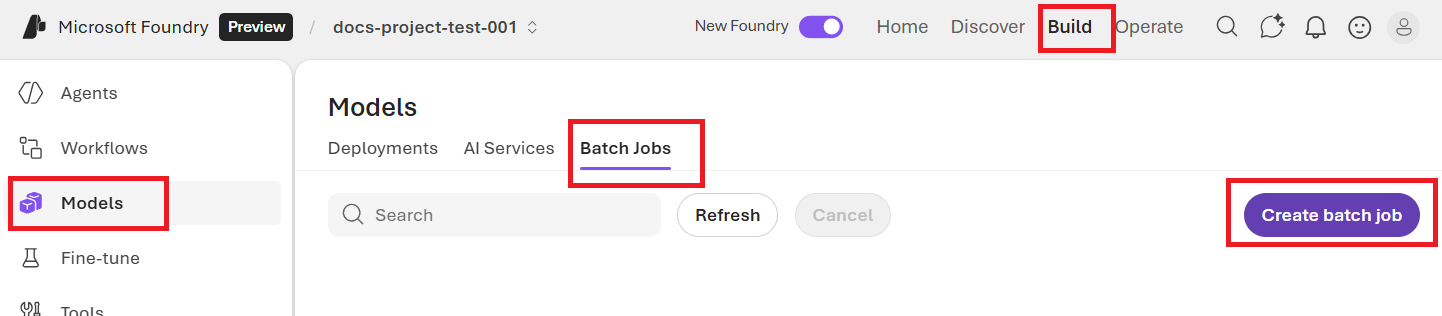 ## Track batch job progress
Once your job is created, you can monitor the job's progress by selecting the Job ID for the most recently created job. By default you will be taken to the status page for your most recently created batch job.
You can track job status for your job in the right-hand pane:
## Retrieve batch job output file
Once your job has completed or reached a terminal state, it will generate an error file and an output file which can be downloaded for review by selecting the respective button with the downward arrow icon.
## Cancel batch
Cancels an in-progress batch. The batch will be in status `cancelling` for up to 10 minutes, before changing to `cancelled`, where it will have partial results (if any) available in the output file.
## Track batch job progress
Once your job is created, you can monitor the job's progress by selecting the Job ID for the most recently created job. By default you will be taken to the status page for your most recently created batch job.
You can track job status for your job in the right-hand pane:
## Retrieve batch job output file
Once your job has completed or reached a terminal state, it will generate an error file and an output file which can be downloaded for review by selecting the respective button with the downward arrow icon.
## Cancel batch
Cancels an in-progress batch. The batch will be in status `cancelling` for up to 10 minutes, before changing to `cancelled`, where it will have partial results (if any) available in the output file.