> ## Documentation Index
> Fetch the complete documentation index at: https://hobbyist-e43fa225.mintlify.site/llms.txt
> Use this file to discover all available pages before exploring further.
# How to run an evaluation in Azure DevOps
> How to run evaluation in Azure DevOps, which enables offline evaluation of AI models within your CI/CD pipelines in Azure DevOps.
Items marked (preview) in this article are currently in public preview. This preview is provided without a service-level agreement, and we don't recommend it for production workloads. Certain features might not be supported or might have constrained capabilities. For more information, see [Supplemental Terms of Use for Microsoft Azure Previews](https://azure.microsoft.com/support/legal/preview-supplemental-terms/).
This [Azure DevOps extension](https://marketplace.visualstudio.com/items?itemName=ms-azure-exp-external.microsoft-extension-ai-agent-evaluation) enables offline evaluation of [Microsoft Foundry Agents](/agents/overview) within your CI/CD pipelines. It streamlines the offline evaluation process, so you can identify potential problems and make improvements before releasing an update to production.
To use this extension, provide a data set with test queries and a list of evaluators. This task invokes your agents with the queries, evaluates them, and generates a summary report.
## Features
* **Agent Evaluation**: Automate pre-production assessment of Microsoft Foundry agents in your CI/CD workflow.
* **Evaluators**: Use any evaluators from the Foundry evaluator catalog.
* **Statistical Analysis**: Evaluation results include confidence intervals and test for statistical significance to determine if changes are meaningful and not due to random variation.
## Evaluator categories
* [Agent evaluators](/evaluation/agent-evaluators): Process and system-level evaluators for agent workflows.
* [RAG evaluators](/evaluation/rag-evaluators): Evaluate end-to-end and retrieval processes in RAG systems.
* [Risk and safety evaluators](/evaluation/risk-safety-evaluators): Assess risks and safety concerns in responses.
* [General purpose evaluators](/evaluation/general-purpose-evaluators): Quality evaluation such as coherence and fluency.
* [OpenAI-based graders](/evaluation/azure-openai-graders): Use OpenAI graders including string check, text similarity, score/label model.
* [Custom evaluators](/evaluation/custom-evaluators): Define your own custom evaluators using Python code or LLM-as-a-judge patterns.
## Prerequisites
* A project. To learn more, see [Create a project](create-projects).
* A [Foundry agent](/agents/overview).
* The [AI Agent Evaluation extension](https://marketplace.visualstudio.com/items?itemName=ms-azure-exp-external.microsoft-extension-ai-agent-evaluation) installed in your Azure DevOps organization.
The recommended authentication method is Microsoft Entra ID via an Azure Resource Manager service connection. Create a [service connection](https://learn.microsoft.com/azure/devops/pipelines/library/connect-to-azure) in your Azure DevOps project, then reference it in your pipeline using the `AzureCLI@2` task before `AIAgentEvaluation@2`.
## Inputs
### Parameters
| Name | Required? | Description |
| ------------------------- | --------- | ----------------------------------------------------------------------------------------------------------------------------------------------------------------------------------------------------------- |
| azure-ai-project-endpoint | Yes | Endpoint of your Microsoft Foundry Project. To find this value, open your project in [Foundry portal](https://ai.azure.com) and copy the endpoint from the **Overview** page. |
| deployment-name | Yes | The name of an Azure AI model deployment to use for evaluation. Find existing deployments under **Models + endpoints** in the Foundry portal. |
| data-path | Yes | Path to the data file that contains the evaluators and input queries for evaluations. |
| agent-ids | Yes | ID of one or more agents to evaluate in format `agent-name:version` (for example, `my-agent:1` or `my-agent:1,my-agent:2`). Multiple agents are comma-separated and compared with statistical test results. |
| baseline-agent-id | No | ID of the baseline agent to compare against when evaluating multiple agents. If not provided, the first agent is used. |
To find your agent ID and version, open your project in [Foundry portal](https://ai.azure.com), go to **Agents**, select your agent, and copy the **Agent ID** from the details pane. The version is the deployment version number (for example, `my-agent:1`).
#### Data file
The input data file should be a JSON file with the following structure:
| Field | Type | Required? | Description |
| --------------------- | --------- | --------- | ------------------------------------------------------------------------------------------------------------------------------------------------------------------------------ |
| name | string | Yes | Name of the evaluation dataset. |
| evaluators | string\[] | Yes | List of evaluator names to use. Check out the list of available evaluators in your project's evaluator catalog in Foundry portal: **Build > Evaluations > Evaluator catalog**. |
| data | object\[] | Yes | Array of input objects with `query` and optional evaluator fields like `ground_truth`, `context`. Automapped to evaluators; use `data_mapping` to override. |
| openai\_graders | object | No | Configuration for OpenAI-based evaluators (label\_model, score\_model, string\_check, etc.). |
| evaluator\_parameters | object | No | Evaluator-specific initialization parameters (for example, thresholds, custom settings). |
| data\_mapping | object | No | Custom data field mappings (autogenerated from data if not provided). |
#### Basic sample data file
```json theme={null}
{
"name": "test-data",
"evaluators": [
"builtin.fluency",
"builtin.task_adherence",
"builtin.violence"
],
"data": [
{
"query": "Tell me about Tokyo disneyland"
},
{
"query": "How do I install Python?"
}
]
}
```
#### Additional sample data files
| Filename | Description |
| ------------------------------------------------------------------------------------------------------------------------------------- | ----------------------------------------------------------------------------------------------------------------------- |
| [dataset-tiny.json](https://github.com/microsoft/ai-agent-evals/blob/main/samples/data/dataset-tiny.json) | Dataset with small number of test queries and evaluators. |
| [dataset.json](https://github.com/microsoft/ai-agent-evals/blob/main/samples/data/dataset.json) | Dataset with all supported evaluator types and enough queries for confidence interval calculation and statistical test. |
| [dataset-builtin-evaluators.json](https://github.com/microsoft/ai-agent-evals/blob/main/samples/data/dataset-builtin-evaluators.json) | Built-in Foundry evaluators example (for example, coherence, fluency, relevance, groundedness, metrics). |
| [dataset-openai-graders.json](https://github.com/microsoft/ai-agent-evals/blob/main/samples/data/dataset-openai-graders.json) | OpenAI-based graders example (label models, score models, text similarity, string checks). |
| [dataset-custom-evaluators.json](https://github.com/microsoft/ai-agent-evals/blob/main/samples/data/dataset-custom-evaluators.json) | Custom evaluators example with evaluator parameters. |
| [dataset-data-mapping.json](https://github.com/microsoft/ai-agent-evals/blob/main/samples/data/dataset-data-mapping.json) | Data mapping example showing how to override automatic field mappings with custom data column names. |
## Sample pipeline
To use this extension, add the `AIAgentEvaluation@2` task to your Azure Pipeline. The following example shows a complete pipeline that authenticates by using an Azure Resource Manager service connection and evaluates an agent.
```yaml theme={null}
steps:
- task: AIAgentEvaluation@2
displayName: "Evaluate AI Agents"
inputs:
azure-ai-project-endpoint: "$(AzureAIProjectEndpoint)"
deployment-name: "$(DeploymentName)"
data-path: "$(System.DefaultWorkingDirectory)/path/to/your/dataset.json"
agent-ids: "$(AgentIds)"
```
## Evaluation results and outputs
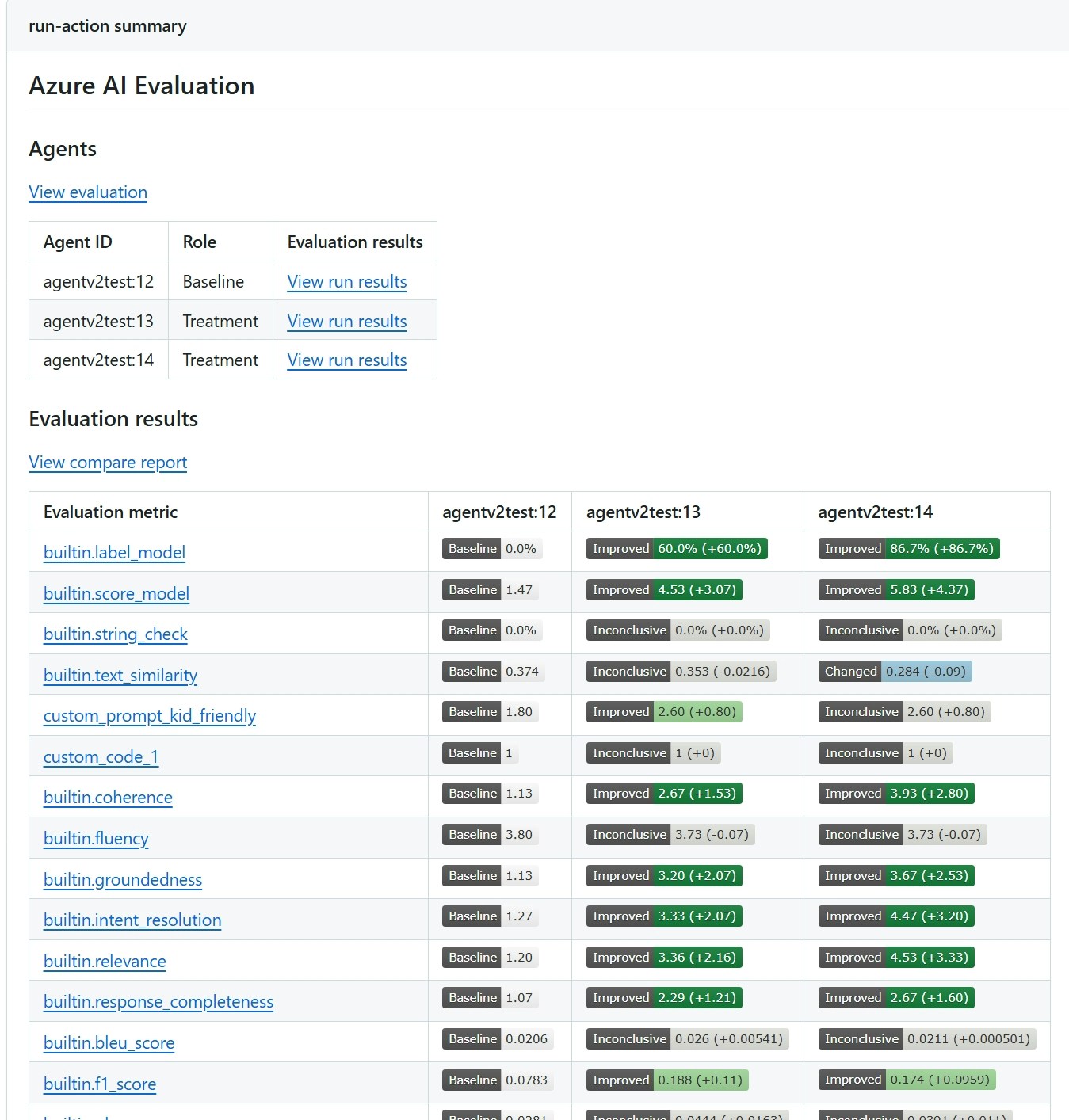
You see evaluation results in the Azure DevOps pipeline summary. The report shows evaluation scores for each metric, confidence intervals, and - when you evaluate multiple agents - a pairwise statistical comparison that indicates whether differences are meaningful or within random variation.
The following screenshot shows a sample report comparing two agents.
 ## Related content
* [Evaluation in GitHub Actions](/evaluation/evaluation-github-action)
* [How to evaluate generative AI models and applications with Foundry](/evaluation/evaluate-generative-ai-app)
* [How to view evaluation results in Foundry portal](/evaluation/evaluate-results)
## Related content
* [Evaluation in GitHub Actions](/evaluation/evaluation-github-action)
* [How to evaluate generative AI models and applications with Foundry](/evaluation/evaluate-generative-ai-app)
* [How to view evaluation results in Foundry portal](/evaluation/evaluate-results)